


Exos condition and value guide
A recertified Exos can reduce cost per terabyte, but factory recertified, renewed, refurbished, used and server pull are not interchangeable conditions. The correct decision starts with the exact model, who performed the work, the warranty source, the seller, the return window and the cost of an early replacement.
Factory recertified can be a rational value tier; an ambiguous marketplace drive is a different risk
Seagate says its factory-recertified products are sanitized, tested, supplied with required firmware and backed by a six-month warranty. Qualifying new Exos channel products commonly show five-year coverage, while seller-refurbished or used listings may rely only on the seller. Compare verified coverage and replacement risk, not the word “renewed” alone.
Interactive decision tool
New or recertified Exos value checker
Current exact-model offers
Verify model, interface, condition and warranty before purchase
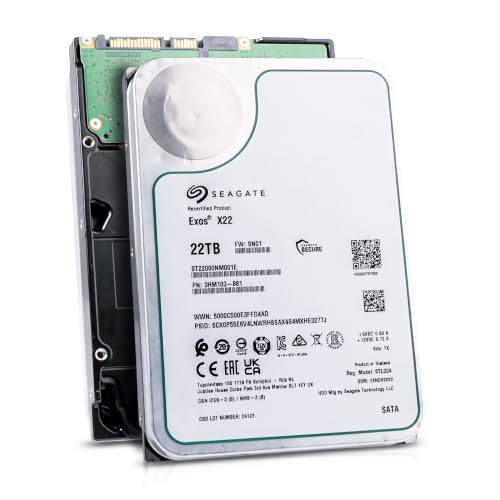
ST22000NM001E
Seagate (Recertified) Exos X22 22TB Internal Hard Drive - 3.5 Inch Hyperscale SATA 6Gb/s HDD, 7200 RPM, 2.5M MTBF, 512e…
$719.99
$32.73 per TB
Seagate factory-recertified warranty — verify serial
Buy on Amazon
ST16000NM001G
HDD for 16TB 3.5" SATA 6 Gb/s 256MB 7200RPM for Internal HDD for Enterprise Class HDD for ST16000NM001G
$721.48
$45.09 per TB
Warranty not verified
Buy on Amazon
ST28000NM003K
Enterprise 28TB SATA 6Gb/s Hard Drive - Seagate Exos M ST28000NM003K
$1,531.29
$54.69 per TB
Warranty not verified
Buy on Amazon
ST20000NM007D
Seagate Exos X20 ST20000NM007D 20TB 7.2K RPM SATA 6Gb/s 3.5in Hard Drive
Price Options
Warranty not verified
Buy on AmazonAmazon prices shown are retained for up to 24 hours. Latest price refresh: 2026-10-23 18:26:50 UTC. Price/availability may change; Amazon at purchase time controls.
Exact-model ownership reference
Keep model, interface, status and warranty route separate
Exos capacities overlap across generations and conditions. Use the complete model and serial number before applying firmware, warranty or reliability guidance.
| Exact model | Generation | Capacity | Interface | Status | Warranty route |
|---|---|---|---|---|---|
| ST16000NM002C | Seagate Factory Recertified | 16TB | Unknown | factory-recertified | Factory recertified: verify serial; official portfolio states six months |
| ST20000NM002C | Seagate Factory Recertified | 20TB | Unknown | factory-recertified | Factory recertified: verify serial; official portfolio states six months |
| ST22000NM000C | Seagate Factory Recertified | 22TB | Unknown | factory-recertified | Factory recertified: verify serial; official portfolio states six months |
| ST24000NM000C | Seagate Factory Recertified | 24TB | Unknown | factory-recertified | Factory recertified: verify serial; official portfolio states six months |
| ST26000NM000C | Seagate Factory Recertified | 26TB | Unknown | factory-recertified | Factory recertified: verify serial; official portfolio states six months |
| ST28000NM000C | Seagate Factory Recertified | 28TB | Unknown | factory-recertified | Factory recertified: verify serial; official portfolio states six months |
| ST16000NM001G | Exos X16 | 16TB | SATA | older | Verify by serial number, region and seller source |
| ST24000NM002H | Exos X24 | 24TB | SATA | current | Verify by serial number, region and seller source |
Separate four condition classes before comparing price
A new drive, a Seagate factory-recertified product, a seller-refurbished or marketplace-renewed product, and an ordinary used server pull can have different test processes and support routes. Keep each condition in its own group. Never call the cheapest result the better deal without adjusting for warranty and failure consequences. Build the comparison as a four-column procurement table rather than a single product list. Record who warrants the unit, whether the listing shows the complete drive label, how long you have to test it, and whether the seller promises replacement or refund. This prevents a six-month factory-recertified offer from being treated as identical to an undocumented server pull.
What Seagate factory recertified means
Seagate describes data sanitization, testing to factory performance standards, certification and required firmware. Its current recertified portfolio states six-month warranty coverage. Prime-drive documentation and warranties do not automatically apply to the recertified version. The factory process is useful evidence, but it is not permission to reuse every specification or warranty statement from the corresponding prime drive. Confirm the exact C-suffix product, received label and serial result. Store a screenshot of the product page and warranty result because marketplace wording and inventory can change after the purchase.
Seller refurbished is not factory recertified
A third party may erase, test, grade or merely relabel a drive. “Manufacturer refurbished” should be supported by the exact label, model and serial result. When the listing does not identify the process, classify the warranty as seller warranty or not verified. Ask the seller to state the recertification source in plain terms. A vague phrase such as “professionally renewed” does not identify the test procedure, data-sanitization standard, firmware handling or party responsible for support. When those details are absent, price the purchase as seller-controlled risk and keep the return window long enough for full-capacity testing.
Use the complete model and serial number
Exos capacities overlap across generations, interfaces and security variants. Record the full ST model, serial, interface and label as soon as the drive arrives. A capacity-only title cannot prove SATA or SAS, 512e or 4Kn, security class or factory-recertified status. The model number also controls interface and deployment compatibility. A cheap SAS drive is not a bargain for a SATA-only NAS, and a 4Kn configuration can be unsuitable for an older appliance even when capacity is correct. Verify the connector, logical sector size and security variant before the drive is added to a pool or array.
Price per terabyte is only the starting metric
Calculate delivered price per usable terabyte, then add return shipping, expected replacement reserve, downtime and rebuild exposure. A modest discount may not compensate for a much shorter warranty. A larger discount can fit a redundant archive tier with tested spares and independent backup. Use a total-risk calculation: delivered price, expected spare reserve, testing time, possible return freight and the operational cost of an early failure. For a multi-drive purchase, compare the cost of one extra tested spare with the saving created by the recertified batch. The result is more useful than a headline discount percentage alone.
Match risk to the storage role
Recertified drives can fit replicated media, secondary backup, test labs or cold spares when failure does not destroy the only copy. Use stricter standards for production databases, remote systems and business-critical arrays. The same drive can be acceptable in one role and unsuitable in another. A replicated media library with offline backup can tolerate more condition uncertainty than an unattended production server. Document the recovery objective, the maximum acceptable outage and whether the system can rebuild safely before choosing the lower-cost condition tier.
Review SMART without treating it as a guarantee
Check power-on hours, reallocated, pending and uncorrectable sectors, interface errors and temperature history. Healthy current readings cannot prove handling history. A missing report is not proof of failure, but it reduces the evidence available for a used purchase. Use SMART as one evidence source, not a certificate. Save the complete report before testing and compare it after the burn-in period. Watch for changes in media errors, pending sectors, uncorrectable sectors, command timeouts, interface CRC errors and temperature. A stable report strengthens the case; a rapidly changing attribute is a return signal.
Run an arrival test before trust
Confirm model, serial, capacity, interface and sector format. Review SMART, run a short diagnostic and perform an appropriate long read or write verification for an empty drive. Record results for the return or warranty baseline. Test one unit before opening or deploying an entire batch. Confirm that capacity, interface and sector format match the order, then run a short diagnostic and a full read verification. For an empty drive intended for production, an appropriate destructive write-and-read test can expose transport or early-life problems, but only after confirming no data must be preserved.
Inspect packaging and return terms
High-capacity HDDs are vulnerable to shock. Photograph packaging and labels before installation. Understand who pays return shipping, how long testing is allowed and whether the seller replaces the exact capacity or only refunds. Packaging is part of the evidence chain. Drives should be immobilized and protected from shock rather than shipped loose in a thin carton. Photograph external damage, internal packing, antistatic protection and the label before installation. If the drive fails acceptance testing, those records make the return conversation faster and reduce arguments about handling.
Plan spares and rebuild exposure
A recertified purchase is safer with a tested spare, adequate redundancy and a current backup. High-capacity rebuilds can take a long time and increase exposure to another error. Evaluate real data volume, controller bandwidth and temperature. Large arrays amplify replacement logistics. A drive may be inexpensive, but a rebuild can consume substantial controller bandwidth and keep the remaining disks busy for an extended period. Maintain at least one compatible spare, verify that the replacement is not smaller in sector count, and avoid introducing multiple untested drives into the same vdev or parity group simultaneously.
Know when new is better
Choose new when the price gap is small, the system is hard to reach, data is critical, the seller warranty is vague, or procurement requires an authorized regional channel. New authorized-channel stock is usually the safer choice when the system is remote, rebuild windows are costly, the purchase is for a client, or the seller cannot prove condition and warranty. It can also be better when the recertified discount is narrow after shipping and tax. The decision tool should therefore allow “buy new” as a positive outcome, not as a failure to find a bargain.
Use a disciplined checklist
Capture exact model, interface, sector format, condition, seller, warranty source, return window and delivered price. After delivery, validate the label, check warranty, inspect SMART and complete burn-in. Reject any unit whose identity or condition cannot be reconciled. Turn the checklist into an asset record. Store purchase source, model, serial, condition, warranty expiration, firmware revision, sector format, SMART baseline, test date and bay assignment. This record supports future warranty claims, prevents accidental model mixing and makes it easier to identify whether a later problem is isolated or common to a batch.
Seagate Exos authority cluster
Continue the exact-model decision
Frequently asked questions
Exos ownership and troubleshooting answers
How long is the Seagate factory-recertified warranty?
Seagate’s current factory-recertified pages state six months. Check the received serial because regional and seller terms can still affect the route.
Is Amazon Renewed the same as Seagate factory recertified?
No. A marketplace condition program does not prove that Seagate performed the recertification or supplies the warranty.
Are recertified Exos drives reliable?
Evaluate exact model, recertification source, warranty, packaging, SMART evidence, arrival testing and the consequences of failure.
Can I use recertified Exos drives in ZFS or RAID?
Yes when compatible, but redundancy, backup and staged batch testing are essential.
What discount makes recertified worthwhile?
There is no universal percentage. Compare warranty, return terms, replacement reserve, downtime and a new exact-model alternative.
Can a recertified drive show zero power-on hours?
A value may be reset or interpreted differently. Do not use one attribute as proof of condition.
What is a server pull?
A drive removed from an operating system or chassis. Treat it as used unless stronger evidence exists.
Should I mix new and recertified drives?
It can work when specifications match, but testing, spares and warranty administration become more complex.
Do C-suffix recertified models equal the original prime model?
Do not assume so. Keep the C-model identity separate and verify the official data sheet and label.
What CTA is used when Amazon shows a price?
The product card uses “Buy on Amazon.” When Amazon does not expose a featured numeric price, the card shows “Price Options” above the same “Buy on Amazon” button.
Official references
Cloudzat may earn a commission from qualifying purchases. Protect important data before diagnostics, and verify exact model, serial, interface, sector format, condition, seller and warranty source.