


Exos PWDIS and power troubleshooting
Some Exos SATA manuals define power-connector pin P3 as optional PWRDIS. When an older supply applies 3.3V to that pin, a supporting drive can remain disabled and appear dead even though the drive may be healthy. The exact model and power path decide whether this explanation fits.
Verify PWDIS before modifying anything, and solve it through a safe compatible power path
PWDIS is not the same as a failed drive, missing 12V, Power-Up-in-Standby or SAS incompatibility. Test a known-good supported path and preserve warranty. Cutting wires, scraping contacts or permanently altering the drive should not be the default solution.
Interactive decision tool
PWDIS probability checker
Current exact-model offers
Verify model, interface, condition and warranty before purchase
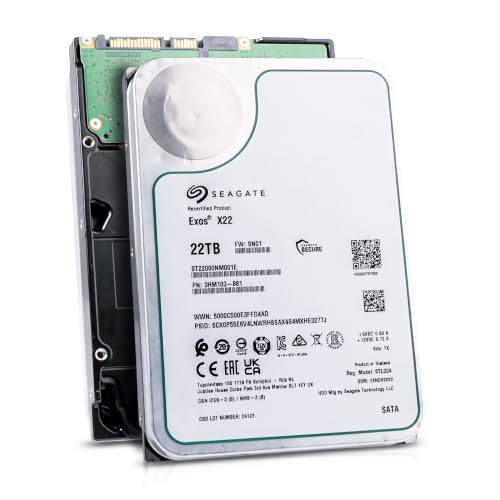
ST22000NM001E
Seagate (Recertified) Exos X22 22TB Internal Hard Drive - 3.5 Inch Hyperscale SATA 6Gb/s HDD, 7200 RPM, 2.5M MTBF, 512e…
$719.99
$32.73 per TB
Seagate factory-recertified warranty — verify serial
Buy on Amazon
ST16000NM001G
HDD for 16TB 3.5" SATA 6 Gb/s 256MB 7200RPM for Internal HDD for Enterprise Class HDD for ST16000NM001G
$721.48
$45.09 per TB
Warranty not verified
Buy on Amazon
ST28000NM003K
Enterprise 28TB SATA 6Gb/s Hard Drive - Seagate Exos M ST28000NM003K
$1,531.29
$54.69 per TB
Warranty not verified
Buy on Amazon
ST20000NM007D
Seagate Exos X20 ST20000NM007D 20TB 7.2K RPM SATA 6Gb/s 3.5in Hard Drive
Price Options
Warranty not verified
Buy on AmazonAmazon prices shown are retained for up to 24 hours. Latest price refresh: 2026-10-23 18:26:50 UTC. Price/availability may change; Amazon at purchase time controls.
Exact-model ownership reference
Keep model, interface, status and warranty route separate
Exos capacities overlap across generations and conditions. Use the complete model and serial number before applying firmware, warranty or reliability guidance.
| Exact model | Generation | Capacity | Interface | Status | Warranty route |
|---|---|---|---|---|---|
| ST12000NM002H | Exos X24 | 12TB | SATA | current | Verify by serial number, region and seller source |
| ST16000NM002H | Exos X24 | 16TB | SATA | current | Verify by serial number, region and seller source |
| ST20000NM002H | Exos X24 | 20TB | SATA | current | Verify by serial number, region and seller source |
| ST24000NM002H | Exos X24 | 24TB | SATA | current | Verify by serial number, region and seller source |
| ST24000NM001K | Exos M | 24TB | SATA | current | Verify by serial number, region and seller source |
| ST28000NM003K | Exos M | 28TB | SATA | current | Verify by serial number, region and seller source |
| ST30000NM004K | Exos M | 30TB | SATA | current | Verify by serial number, region and seller source |
| ST32000NM004K | Exos M | 32TB | SATA | current | Verify by serial number, region and seller source |
What P3 does on supported models
Current Exos M and X24 SATA manuals identify P3 as PWRDIS, an optional Enter/Exit Power Disable signal. Older SATA power conventions could supply 3.3V on the first pins. PWDIS is an optional SATA power-control feature documented for relevant enterprise models. When asserted, the drive can remain powered down even though the cable is connected. The exact model manual is the authority; do not assume every Exos generation or every drive that fails to spin uses the same power-pin behavior.
The classic symptom
The drive does not spin on one PSU cable yet works through another compatible dock or backplane. This is stronger evidence than the family name alone. Missing 12V or failure can look similar. The common pattern is simple: the SATA drive is silent on one modern PSU harness but spins normally on another supported power path or backplane. That A/B result makes PWDIS plausible. A drive that fails on every known-good path may instead have ordinary power, connector, PCB or mechanical problems.
It is on the power connector
Replacing the SATA data cable does not change a 3.3V P3 condition. Diagnose data and power paths separately. Pin 3 is on the 15-pin SATA power connector, not on the seven-pin SATA data connector. Replacing the data cable cannot remove 3.3V from the power path. Identify the power cable and backplane wiring before testing so troubleshooting does not become a series of unrelated cable swaps.
PWDIS and PUIS are separate
Power-Up-in-Standby waits for a command; PWDIS is a hardware power-control signal. A drive can support one, both or neither. Power Disable and Power-Up In Standby are different mechanisms. PWDIS is related to the state applied at the SATA power connector, while PUIS involves command-controlled spin-up behavior. A tool or controller may need to issue a spin-up command for PUIS, but that does not prove or correct a P3 Power Disable condition.
Confirm the exact manual
Search the official manual for the exact model generation and interface. Do not apply X24 or Exos M pin definitions to every Exos ever sold. Open the manual for the exact model and interface. Confirm that the unit is SATA rather than SAS and look for the power-connector pin definition. Marketplace titles and generic forum fixes are not enough because Exos capacities span many generations, security variants and connector configurations.
Use a compatible power path
A supported hot-swap backplane, enterprise chassis or correctly designed harness is the preferred test. Confirm behavior with the hardware vendor. The preferred solution is a standards-compatible power path: a supported backplane, correct PSU harness or purpose-built adapter from a reputable source. Verify that the solution preserves 5V, 12V, ground and connector quality. Test the drive outside the production array before trusting the new path.
Be cautious with Molex adapters
A four-pin peripheral connector lacks 3.3V and may bypass the condition, but poor adapters are a fire risk. Use reputable construction and adequate wire gauge. Legacy four-pin peripheral-to-SATA adapters can avoid a 3.3V feed, but adapter quality varies and poorly made molded connectors can overheat. Use only properly constructed components with suitable wire gauge, solid contacts and correct voltage routing. Inspect for heat, looseness or discoloration during initial testing.
Do not cut PSU wires casually
Cutting rails can affect other devices and void warranties. Modular PSU cables are not interchangeable across brands or models. Do not cut modular PSU wires or combine cables from different power-supply brands. Modular pinouts are not standardized at the PSU end and a wrong cable can destroy drives. A reversible, documented harness or backplane solution is safer than a modification that future technicians cannot recognize.
Avoid permanent drive modification
Removing contacts can compromise warranty. Temporary insulation methods can shift or contaminate the connector. Prefer supported hardware. Masking or removing a contact is an error-prone permanent workaround. It can damage the connector, contaminate adjacent contacts or make later diagnosis harder. Cloudzat guidance should prioritize compatible infrastructure and treat physical alteration as outside the normal recommended path.
Plan startup current
A PWDIS-compatible path still needs adequate 5V and 12V. Several drives starting at once can expose weak splitters and overloaded rails. A successful spin-up does not end the power review. High-capacity arrays can draw significant startup current when many motors begin together. Check PSU rail capacity, connector count, backplane ratings and staggered-spin support. Intermittent resets under load may be a broader power-distribution problem rather than PWDIS.
When PWDIS is not the cause
Failure on multiple known-good paths, burnt smell, damage or abnormal startup attempts can indicate hardware failure. SAS on SATA is a protocol problem, not PWDIS. When the drive spins on the current path, PWDIS is not the immediate explanation for missing data access. Continue with controller detection, SATA versus SAS identity, HBA support, sector format, partitioning and health. Keeping the diagnostic layers separate prevents a popular pin-3 fix from being applied to every “not detected” report.
Document the final configuration
Record model, serial, PSU, cable or backplane, controller and tested result. Label special harnesses for future migrations. Document the final wiring in the server record. Note the PSU model, cable or backplane used, affected drive models and the result of the controlled test. Label any non-obvious adapter. This protects future maintenance from reintroducing the original 3.3V path or misdiagnosing the same symptom after a hardware change.
Seagate Exos authority cluster
Continue the exact-model decision
Frequently asked questions
Exos ownership and troubleshooting answers
What is PWDIS?
An optional Power Disable signal on SATA power pin P3 for supported models.
Why does it spin in a dock but not a PC?
The PC cable may supply 3.3V on P3 while the dock does not. Verify ordinary power faults too.
Is PWDIS on the data cable?
No. It concerns the SATA power connector.
Does every Exos support it?
No universal assumption is safe. Check the exact manual.
Is it the same as PUIS?
No. PWDIS is a hardware pin signal; PUIS is command/configuration behavior.
Can an adapter make SAS work on SATA?
No. SAS still requires a SAS controller.
Should I tape pin 3?
A supported compatible power path is safer and better for warranty.
Can Molex-to-SATA solve it?
It may avoid 3.3V, but adapter quality and current capacity are critical.
Will firmware fix PWDIS?
No. PWDIS is a power-signal issue.
How do I test safely?
Use a known-good compatible backplane, dock or harness without modifying the drive.
Official references
Cloudzat may earn a commission from qualifying purchases. Protect important data before diagnostics, and verify exact model, serial, interface, sector format, condition, seller and warranty source.