


Exos sector-format guide
512e and 4Kn describe the logical sector size presented to the host, not the capacity or interface. Many current Exos X24 SATA models ship as 512e and support FastFormat conversion to 4Kn, but sector-format capability is model-specific. A buyer should confirm the exact drive model, current logical sector size, controller support and target operating system before changing anything.
Use 512e for widest compatibility; choose 4Kn only when the complete stack supports it
512e presents 512-byte logical sectors on 4K physical media and is normally the safest choice for mixed or consumer-oriented hardware. 4Kn exposes native 4096-byte logical sectors and can simplify alignment in modern storage stacks, but older operating systems, USB bridges, RAID controllers and NAS appliances may not support it. Changing sector size is a destructive operation and an interruption can render the device inoperable.
Interactive decision tool
512e or 4Kn compatibility checker
Current exact-model offers
Verify interface and model before purchase
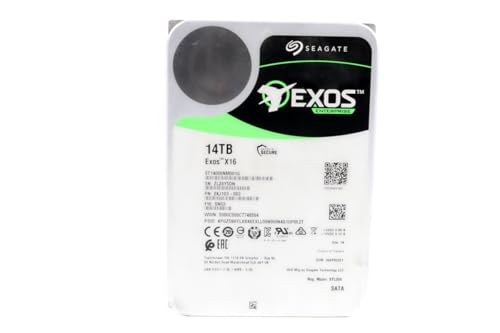
ST14000NM001G
Seagate (Renewed) Exos X16 14TB 7200 RPM SATA 6Gb/s 256MB Cache 3.5-Inch Internal Data Center HDD Enterprise Hard…
$409.99
$29.29/TB
Warranty not verified
Buy on Amazon
ST16000NM001G
Seagate 16TB HDD Exos X16 7200 RPM 512e/4Kn SATA 6Gb/s 256MB Cache 3.5-Inch Enterprise Hard Drive (ST16000NM001G) (Renewed)
$499.00
$31.19/TB
Warranty not verified
Buy on Amazon
ST16000NM002G
Seagate ST16000NM002G-R - Seagate 16TB 3.5" SAS 7.2K 12Gb/s Hard Drive (Renewed)
$548.55
$34.28/TB
Warranty not verified
Buy on Amazon
ST12000NM002H
Seagate Exos X24 12TB 3.5" 6 Gb/s SATA III Internal Hard Drive
$569.99
$47.50/TB
Warranty not verified
Buy on Amazon
ST18000NM004J
Seagate Enterprise ST18000NM004J Internal Hard Drive 3.5" 18TB SAS
$714.99
$39.72/TB
Warranty not verified
Buy on Amazon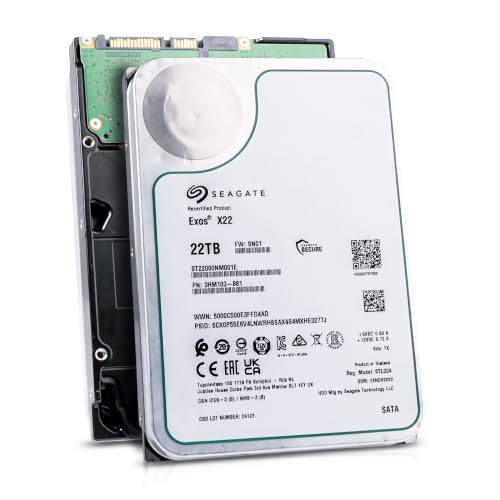
ST22000NM001E
Seagate (Recertified) Exos X22 22TB Internal Hard Drive - 3.5 Inch Hyperscale SATA 6Gb/s HDD, 7200 RPM, 2.5M…
$719.99
$32.73/TB
Seagate factory-recertified warranty — verify serial
Buy on Amazon
ST18000NM000J
18TB Hard Drive X18 ST18000NM000J 7200 RPM SATA 6Gb/s 256MB Cache 3.5-inch 18TB Enterprise Server Computer Hard Drive
$934.68
$51.93/TB
Warranty not verified
Buy on Amazon
ST30000NM004K
Seagate Exos M 30TB Enterprise Internal Hard Drive HDD - 3.5in 6GB/s SATA 7200RPM 2.5M MTBF (ST30000NM004K) (Renewed)
$1,200.00
$40.00/TB
Warranty not verified
Buy on Amazon
ST22000NM000E
SEAGATE - BUSINESS CRITICAL SAS 22TB 3.5IN 7200RPM 6GB/S 512E/4K
Price Options
Warranty not verified
Buy on Amazon
ST20000NM007D
Seagate Exos X20 ST20000NM007D 20TB 7.2K RPM SATA 6Gb/s 3.5in Hard Drive
Price Options
Warranty not verified
Buy on Amazon
ST28000NM003K
Seagate Exos M 28TB Enterprise Internal Hard Drive HDD - 3.5in 6GB/s SATA 7200RPM 2.5M MTBF (ST28000NM003K)
Price Options
Claimed 5-year warranty — verify by serial number
Buy on Amazon
ST16000NM007H
Seagate Technology ST16000NM007H 16TB Exos X24 HDD 3.5 SAS 7200 ISE Bare Hard Drive
Price Options
Warranty not verified
Buy on AmazonAmazon prices shown are retained for up to 24 hours. Latest price refresh: 2026-10-17 23:41:40 UTC. Price/availability may change; Amazon at purchase time controls.
Exact-model reference
Do not buy from the family name alone
Use the complete model number to confirm generation, interface, sector format and security class. Similar capacities can belong to different interfaces and security variants.
| Exact model | Generation | Capacity | Interface | Sector format | Security |
|---|---|---|---|---|---|
| ST12000NM002H | Exos X24 | 12TB | SATA | 512e / 4Kn FastFormat | ISE |
| ST12000NM001H | Exos X24 | 12TB | SATA | 512e / 4Kn FastFormat | SED |
| ST16000NM002H | Exos X24 | 16TB | SATA | 512e / 4Kn FastFormat | ISE |
| ST16000NM001H | Exos X24 | 16TB | SATA | 512e / 4Kn FastFormat | SED |
| ST20000NM002H | Exos X24 | 20TB | SATA | 512e / 4Kn FastFormat | ISE |
| ST20000NM001H | Exos X24 | 20TB | SATA | 512e / 4Kn FastFormat | SED |
| ST24000NM002H | Exos X24 | 24TB | SATA | 512e / 4Kn FastFormat | ISE |
| ST24000NM001H | Exos X24 | 24TB | SATA | 512e / 4Kn FastFormat | SED |
| ST12000NM007H | Exos X24 | 12TB | SAS | 512e / 4Kn model-dependent | ISE |
| ST12000NM005H | Exos X24 | 12TB | SAS | 512e / 4Kn model-dependent | SED |
| ST12000NM009H | Exos X24 | 12TB | SAS | 512e / 4Kn model-dependent | SED-FIPS |
| ST16000NM007H | Exos X24 | 16TB | SAS | 512e / 4Kn model-dependent | ISE |
What 512e means
A 512e drive uses 4096-byte physical sectors internally while emulating 512-byte logical sectors for the host. This preserves compatibility with software and controllers designed around the older 512-byte interface. Correctly aligned modern filesystems usually work efficiently on 512e. Misalignment can create read-modify-write penalties, but current operating systems generally align partitions appropriately. 512e should not be confused with 512n, where both logical and physical sectors are 512 bytes.
What 4Kn means
A 4Kn drive exposes 4096-byte logical sectors and uses 4096-byte physical sectors. The host, controller, boot firmware, storage software and any intermediate bridge must understand 4K logical sectors. 4Kn avoids the emulation layer and can be attractive in modern enterprise and ZFS environments, but it is less forgiving of older hardware. A drive may be mechanically healthy yet appear unsupported, show incorrect capacity or fail to initialize when a controller or bridge cannot present 4Kn correctly.
FastFormat is model-specific
Seagate Exos X24 SATA documentation lists FastFormat support for specified models and shows a default 512e shipping format with the ability to switch to 4Kn. That does not mean every Exos model supports conversion. Older generations may be sold as fixed 512e or fixed 4Kn exact models, and SAS variants can have different capabilities. Check the product manual or SeaChest supported-features output for the exact model rather than applying the X24 rule to the entire Exos family.
Sector conversion erases data
Seagate's SeaChest instructions require an explicit confirmation string stating that the operation will erase data and may render the drive inoperable. Treat conversion as a re-provisioning operation, not a harmless setting change. Back up all required data, verify the target drive by model and serial number, disconnect unrelated drives when practical, use stable power and allow the command to finish. Never convert a drive that is the only copy of important data.
An interrupted conversion can leave the drive unusable
The risk is not limited to file deletion. Seagate warns that interruption during sector-size formatting can render the device inoperable. Disable services that may issue out-of-band commands, avoid unreliable USB bridges and use SeaChest Bootable when appropriate. A SATA command can block for a long period while the operation completes, so an apparent system hang is not a reason to cut power. Follow the current Seagate procedure for the exact interface and tool version.
Operating-system and boot compatibility
Modern Linux and current server operating systems commonly support 4Kn data drives, but boot support depends on firmware, controller and operating-system details. Older Windows versions, cloning tools and recovery environments may assume 512-byte logical sectors. For a drive that must move between machines or work with vendor appliances, 512e offers wider compatibility. For a dedicated modern server whose complete stack is verified, 4Kn can be a valid choice.
ZFS and ashift
ZFS pool layout should be created with sector alignment suitable for 4K physical media. An ashift value representing 4K blocks is commonly used for both 512e and 4Kn modern HDDs. The critical rule is to decide before pool creation because changing the drive's logical sector size or the pool's fundamental alignment later is disruptive. Confirm current TrueNAS guidance for the installed release and avoid mixing unverified sector presentations behind controllers that mask the physical geometry.
Mixing 512e and 4Kn
Some operating systems can manage separate 512e and 4Kn drives, but an array, mirror or vendor NAS may impose stricter rules. Synology advises managing 4Kn drives separately, and hardware RAID controllers can require uniform sector sizes within a virtual disk. Even when the software accepts the combination, replacement and recovery become more complex. Standardizing the sector format within each pool or array reduces surprises and makes spare-drive planning easier.
USB adapters are a compatibility risk
A USB-to-SATA bridge can hide sector details, reject 4Kn or present a translated geometry. Seagate specifically advises against performing sector-size conversion through USB because not all adapters support 4K sector sizes and an interruption can damage usability. For diagnosis or conversion, connect the drive through a supported native SATA or SAS path. For ordinary external use, verify that the enclosure controller supports the drive capacity and logical sector size.
HBA, RAID controller and backplane checks
The drive is only one part of the sector-format path. The HBA firmware, RAID controller, expander, backplane and operating-system driver must pass the chosen logical block size correctly. Older controllers may have capacity limits or 4Kn restrictions even when the connector is compatible. Before buying a large batch, test one exact model with the intended controller firmware and storage software, then record the working configuration for future replacements.
How to inspect the current format
Use a trusted operating-system tool or SeaChest to read the logical and physical sector sizes. Identify the drive by model and serial number, not only by device path, because paths can change after reboot. The plugin's compatibility tool provides a decision recommendation but does not issue disk commands. A marketplace title that says “512e/4Kn” may describe family capability rather than the current shipping format, so verify the received unit before creating a pool.
512e versus 4Kn buying decision
Choose 512e when using a consumer NAS, mixed hardware, older controller, removable enclosure or uncertain recovery environment. Choose 4Kn when the drive, HBA, firmware, operating system, storage software and replacement plan are all verified for 4096-byte logical sectors. Do not convert merely for a theoretical performance gain. The safest format is the one that the complete system supports consistently and that can be replaced without an emergency conversion.
Exos authority cluster
Continue the exact-model decision
Frequently asked questions
Exos compatibility answers
Does 4Kn make an Exos drive faster?
Not automatically. It removes 512-byte logical emulation, but real performance depends on workload, alignment, controller and filesystem. Compatibility is usually the larger decision.
Do Exos X24 SATA drives ship as 512e?
The X24 SATA product manual lists 512e as the default shipping format for covered FastFormat models. Verify the exact received model and current configuration.
Can every Seagate Exos drive switch between 512e and 4Kn?
No. Conversion support is model-specific. Check the exact product manual or SeaChest supported-features output.
Will changing sector size erase my data?
Yes. Seagate's current SeaChest command requires confirmation that the process will erase data and may render the drive inoperable.
Can I convert sector size over USB?
Seagate does not recommend it. USB bridges may not support 4K logical sectors or the required command path reliably.
Can I mix 512e and 4Kn in one ZFS pool?
Some configurations may operate, but uniform sector presentation is easier to manage. Confirm TrueNAS and controller guidance before mixing.
Why does a 4Kn drive show zero or incorrect capacity?
The controller, bridge, firmware or operating system may not support 4096-byte logical sectors correctly. Test through a verified native interface.
Is 512e the same as 512n?
No. 512e uses 4K physical sectors with 512-byte logical emulation. 512n uses native 512-byte physical and logical sectors.
Should I convert a new drive before testing it?
First record the model, serial, warranty status and original format, then run non-destructive health checks. Convert only after confirming compatibility and backups.
What happens if sector conversion is interrupted?
Seagate warns that the device may become inoperable. Use stable power, the recommended tool and a direct supported connection.
Official references
Cloudzat may earn a commission from qualifying purchases. Compatibility recommendations are advisory; confirm the exact drive model, controller, backplane, sector format and appliance support list before purchase or data migration.