


Exos interface guide
The name “Seagate Exos” does not tell you which interface is on the drive. The same generation and capacity can have separate SATA and SAS model numbers, and marketplace variation pages can combine both. A SATA Exos can connect to a normal SATA port or a compatible SAS backplane. A SAS Exos requires a SAS-capable HBA, RAID controller or backplane; an ordinary motherboard SATA port and a passive cable do not provide SAS protocol support.
Choose by controller first, not by the advertised 6Gb/s or 12Gb/s number
For most home NAS, desktop and small-server systems, SATA is the simpler choice. SAS becomes valuable when the system already has a compatible SAS HBA or enterprise backplane and the buyer needs dual-port connectivity, multipath or an existing SAS infrastructure. The interface headline does not make a single hard drive twice as fast because the mechanical media remains the main sequential-performance limit.
Interactive decision tool
Exos SATA or SAS interface checker
Current exact-model offers
Verify interface and model before purchase
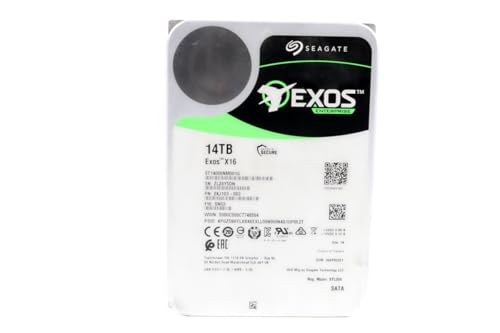
ST14000NM001G
Seagate (Renewed) Exos X16 14TB 7200 RPM SATA 6Gb/s 256MB Cache 3.5-Inch Internal Data Center HDD Enterprise Hard…
$409.99
$29.29/TB
Warranty not verified
Buy on Amazon
ST16000NM001G
Seagate 16TB HDD Exos X16 7200 RPM 512e/4Kn SATA 6Gb/s 256MB Cache 3.5-Inch Enterprise Hard Drive (ST16000NM001G) (Renewed)
$499.00
$31.19/TB
Warranty not verified
Buy on Amazon
ST16000NM002G
Seagate ST16000NM002G-R - Seagate 16TB 3.5" SAS 7.2K 12Gb/s Hard Drive (Renewed)
$548.55
$34.28/TB
Warranty not verified
Buy on Amazon
ST12000NM002H
Seagate Exos X24 12TB 3.5" 6 Gb/s SATA III Internal Hard Drive
$569.99
$47.50/TB
Warranty not verified
Buy on Amazon
ST18000NM004J
Seagate Enterprise ST18000NM004J Internal Hard Drive 3.5" 18TB SAS
$714.99
$39.72/TB
Warranty not verified
Buy on Amazon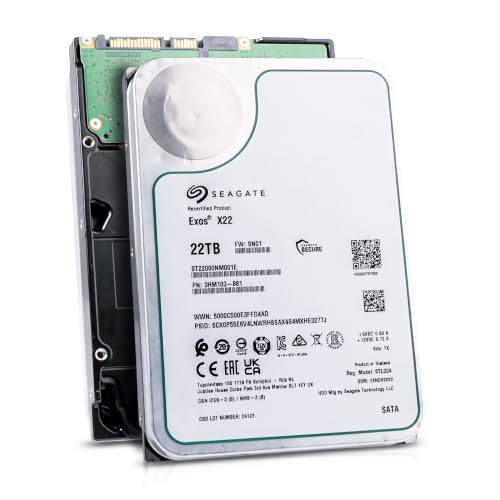
ST22000NM001E
Seagate (Recertified) Exos X22 22TB Internal Hard Drive - 3.5 Inch Hyperscale SATA 6Gb/s HDD, 7200 RPM, 2.5M…
$719.99
$32.73/TB
Seagate factory-recertified warranty — verify serial
Buy on Amazon
ST18000NM000J
18TB Hard Drive X18 ST18000NM000J 7200 RPM SATA 6Gb/s 256MB Cache 3.5-inch 18TB Enterprise Server Computer Hard Drive
$934.68
$51.93/TB
Warranty not verified
Buy on Amazon
ST30000NM004K
Seagate Exos M 30TB Enterprise Internal Hard Drive HDD - 3.5in 6GB/s SATA 7200RPM 2.5M MTBF (ST30000NM004K) (Renewed)
$1,200.00
$40.00/TB
Warranty not verified
Buy on Amazon
ST22000NM000E
SEAGATE - BUSINESS CRITICAL SAS 22TB 3.5IN 7200RPM 6GB/S 512E/4K
Price Options
Warranty not verified
Buy on Amazon
ST20000NM007D
Seagate Exos X20 ST20000NM007D 20TB 7.2K RPM SATA 6Gb/s 3.5in Hard Drive
Price Options
Warranty not verified
Buy on Amazon
ST28000NM003K
Seagate Exos M 28TB Enterprise Internal Hard Drive HDD - 3.5in 6GB/s SATA 7200RPM 2.5M MTBF (ST28000NM003K)
Price Options
Claimed 5-year warranty — verify by serial number
Buy on Amazon
ST16000NM007H
Seagate Technology ST16000NM007H 16TB Exos X24 HDD 3.5 SAS 7200 ISE Bare Hard Drive
Price Options
Warranty not verified
Buy on AmazonAmazon prices shown are retained for up to 24 hours. Latest price refresh: 2026-10-17 23:41:40 UTC. Price/availability may change; Amazon at purchase time controls.
Exact-model reference
Do not buy from the family name alone
Use the complete model number to confirm generation, interface, sector format and security class. Similar capacities can belong to different interfaces and security variants.
| Exact model | Generation | Capacity | Interface | Sector format | Security |
|---|---|---|---|---|---|
| ST24000NM002H | Exos X24 | 24TB | SATA | 512e / 4Kn FastFormat | ISE |
| ST24000NM007H | Exos X24 | 24TB | SAS | 512e / 4Kn model-dependent | ISE |
| ST16000NM001G | Exos X16 | 16TB | SATA | 512e | Standard |
| ST16000NM002G | Exos X16 | 16TB | SAS | 512e | Standard |
| ST18000NM000J | Exos X18 | 18TB | SATA | 512e | Standard |
| ST18000NM004J | Exos X18 | 18TB | SAS | 512e | Standard / verify security |
| ST22000NM001E | Exos X22 | 22TB | SATA | 512e | Standard |
| ST22000NM000E | Exos X22 | 22TB | SAS | 512e | Standard / verify security |
SATA and SAS are different protocols
SATA and SAS may appear similar in retailer descriptions, but they are not interchangeable host protocols. SATA is the common interface on desktop motherboards and many consumer NAS appliances. SAS is designed for enterprise storage controllers and commonly provides dual-port access, richer error reporting and multipath options. The safest buying method is to identify the exact Exos model number, then confirm the interface in Seagate documentation and the host-controller specification. Do not infer the interface from capacity, generation name or a product photograph alone.
A passive cable does not convert SATA into SAS
A breakout or adapter cable only routes signals supported by the controller. It cannot teach a SATA controller to speak SAS. A SAS drive connected to a motherboard SATA port will not become compatible because the plugs can be physically adapted. The system needs a SAS HBA, SAS RAID controller or SAS backplane with controller support. This is the most important warning on the page because low-cost SAS listings can look attractive until the buyer discovers that a controller, cable and suitable power path are also required.
SATA drives can often operate on SAS infrastructure
Many SAS HBAs and SAS backplanes can communicate with SATA drives through the SATA Tunneling Protocol. That direction of compatibility is common, but it still depends on the backplane, expander, cable topology and controller firmware. The reverse direction does not apply: a SAS drive cannot operate through a SATA-only controller. When a chassis has a SAS backplane, verify whether it accepts SATA devices, whether mixed SATA and SAS operation is supported, and whether the connector exposes the drive correctly to the operating system.
6Gb/s versus 12Gb/s is not a direct hard-drive speed comparison
SATA Exos models commonly advertise a 6Gb/s interface while SAS variants advertise 12Gb/s. Those figures describe link capability, not the sustained speed of the spinning media. A single 7,200 RPM Exos drive normally transfers data far below either interface ceiling. SAS can still provide operational benefits, including dual ports, queueing behavior and enterprise controller integration, but a 12Gb/s label should not be used as evidence that the same-capacity SAS disk will deliver twice the file-transfer speed of the SATA version.
Dual-port SAS and multipath
A major SAS advantage is dual-port connectivity. In compatible enterprise systems, each drive can be connected through two paths to one or two controllers. Multipath can preserve access when a cable, expander path or controller fails. This feature matters in high-availability storage and shared enclosures, but it adds little value when the drive is connected through a single inexpensive HBA in a home server. Buyers should pay for SAS when the surrounding system can use its capabilities rather than because the interface sounds more enterprise-grade.
HBA mode, RAID mode and drive visibility
TrueNAS and many software-defined storage systems work best when the operating system can see each physical drive, its serial number and health information. A SAS HBA running IT or passthrough mode is commonly preferred over a hardware RAID virtual disk. Some RAID controllers can hide SMART data, alter sector presentation or make recovery dependent on that controller. Before buying SAS Exos drives, confirm that the controller supports the drive capacity, sector format, desired operating mode and direct disk presentation.
Exact model pairs matter
Exos generations use different suffixes for interface and security variants. For example, verified X16 listings include ST16000NM001G as a SATA model and ST16000NM002G as a SAS model. Exos X24 includes separate SATA and SAS families, and security variants use additional exact numbers. Cloudzat stores each exact model as a separate record instead of assigning one specification to every drive sharing the same capacity. This prevents a SATA product card from inheriting a SAS connector or a standard drive from inheriting SED or FIPS claims.
NAS appliance compatibility
Most desktop-style Synology, QNAP, UGREEN and TerraMaster appliances use SATA drive bays. A SAS Exos drive will not work in a SATA-only appliance even if it is physically 3.5-inch. Enterprise NAS and rack systems may have SAS backplanes, but compatibility still needs to be checked by exact appliance and drive model. The buyer should confirm interface, maximum supported capacity, sector format, firmware status, drive-height clearance and the vendor compatibility policy before ordering several drives.
TrueNAS and custom servers
A custom TrueNAS server can use SATA Exos drives on motherboard ports or an HBA, and it can use SAS Exos drives through a compatible SAS HBA or backplane. TrueNAS documentation notes that SAS backplanes can often accept SATA drives, while SATA ports cannot accept SAS drives. For a small build, SATA usually minimizes cost and complexity. For a larger chassis with an existing SAS expander and HBA, SAS can fit the hardware architecture more naturally.
Power, cabling and backplanes
Interface selection changes more than the signal cable. Direct-attached SATA uses separate SATA data and power connectors. SAS drives are commonly installed in trays or backplanes using combined connectors and Mini-SAS or SlimSAS cabling upstream. A used enterprise chassis may have an expander backplane, a direct-attach backplane or a proprietary cable layout. Confirm the HBA connector type, cable direction, backplane generation, available power, airflow and spin-up capacity before treating a low drive price as the complete system cost.
Marketplace listing verification
Retailer variation pages can mix SATA and SAS products, model photographs and specifications. Verify the exact model in the selected variation, title, technical details and seller description. Reject a listing when the model is missing, the interface description conflicts with the exact model, or the page silently changes to another capacity or condition. Cloudzat's catalogue accepts exact model matches, separates conditions, rejects accessories and preserves buying-option links when a featured price is unavailable without inventing a price.
SATA versus SAS buying checklist
Choose SATA when the system has ordinary SATA ports, a consumer NAS, a straightforward home server or no need for multipath. Choose SAS when a compatible HBA or SAS backplane already exists and the design benefits from dual ports, multipath or enterprise enclosure integration. In both cases, verify exact model, sector format, security type, capacity support, controller firmware, warranty source and condition. The correct interface is the one the complete storage system can support and manage safely.
Exos authority cluster
Continue the exact-model decision
Frequently asked questions
Exos compatibility answers
Can I plug a SAS Exos drive into a SATA motherboard?
No. A SATA-only motherboard controller cannot communicate with a SAS drive. A compatible SAS HBA, RAID controller or SAS backplane is required.
Will a SAS-to-SATA cable make a SAS drive work?
No. A passive cable only changes routing or connector shape. It does not add SAS protocol support to a SATA controller.
Can a SATA Exos drive work on a SAS HBA?
Often yes, because many SAS controllers support SATA devices. Confirm the exact HBA, cable, expander and backplane documentation before purchase.
Is 12Gb/s SAS twice as fast as 6Gb/s SATA for one Exos HDD?
No. The interface ceiling is much higher than the sustained media speed of a single mechanical drive. SAS may add operational features, but not a guaranteed two-times file-transfer result.
Which interface is better for a home NAS?
SATA is usually the simpler and less expensive choice for consumer NAS appliances and small home servers. SAS is appropriate when the NAS or server already has SAS infrastructure.
How do I identify a SATA or SAS Exos model?
Use the complete model number from the label or listing and confirm it on Seagate's support page or product manual. Do not rely only on capacity or generation.
Does SAS provide better SMART data?
SAS uses different health and error-reporting mechanisms. Whether the operating system exposes the information depends on the controller, driver and software platform.
Can I mix SATA and SAS drives in one server?
Some SAS HBAs and backplanes support both, but mixing depends on the hardware topology and software design. Do not assume a SATA-only backplane can accept SAS.
Do I need hardware RAID for SAS Exos drives?
No. A SAS HBA in passthrough or IT mode can expose individual drives to software-defined storage. The preferred mode depends on the operating system and storage architecture.
Why are SAS Exos drives sometimes cheaper?
Used enterprise supply, lower consumer demand, condition and warranty differences can reduce price. Include the cost of the HBA, cables, trays and compatibility risk in the comparison.
Official references
Cloudzat may earn a commission from qualifying purchases. Compatibility recommendations are advisory; confirm the exact drive model, controller, backplane, sector format and appliance support list before purchase or data migration.