


Exos warranty and authenticity guide
The family name and a claimed five-year warranty are not enough. Exos coverage depends on the exact serial number, sales channel, region, condition and whether the drive was sold as a standalone channel product, OEM component, factory-recertified unit or seller-refurbished product.
Use Seagate’s serial result as the primary route, then reconcile it with the seller and invoice
The checker can report direct manufacturer coverage, seller responsibility, an OEM route, no coverage or unavailable information. Save the result with the invoice and exact model. Do not turn a retailer title into a warranty promise the serial lookup does not support.
Interactive decision tool
Exos warranty-route checker
Current exact-model offers
Verify model, interface, condition and warranty before purchase
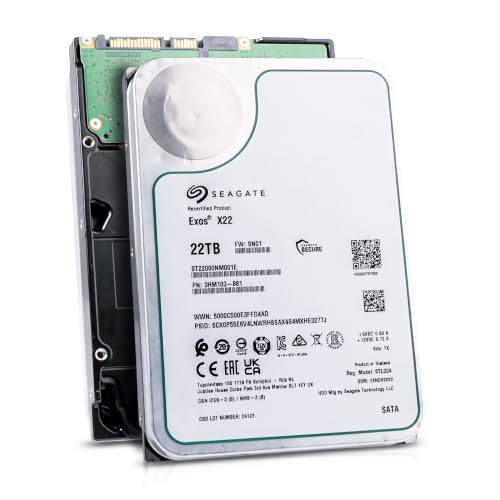
ST22000NM001E
Seagate (Recertified) Exos X22 22TB Internal Hard Drive - 3.5 Inch Hyperscale SATA 6Gb/s HDD, 7200 RPM, 2.5M MTBF, 512e…
$719.99
$32.73 per TB
Seagate factory-recertified warranty — verify serial
Buy on Amazon
ST16000NM001G
HDD for 16TB 3.5" SATA 6 Gb/s 256MB 7200RPM for Internal HDD for Enterprise Class HDD for ST16000NM001G
$721.48
$45.09 per TB
Warranty not verified
Buy on Amazon
ST28000NM003K
Enterprise 28TB SATA 6Gb/s Hard Drive - Seagate Exos M ST28000NM003K
$1,531.29
$54.69 per TB
Warranty not verified
Buy on Amazon
ST20000NM007D
Seagate Exos X20 ST20000NM007D 20TB 7.2K RPM SATA 6Gb/s 3.5in Hard Drive
Price Options
Warranty not verified
Buy on AmazonAmazon prices shown are retained for up to 24 hours. Latest price refresh: 2026-10-23 18:26:50 UTC. Price/availability may change; Amazon at purchase time controls.
Exact-model ownership reference
Keep model, interface, status and warranty route separate
Exos capacities overlap across generations and conditions. Use the complete model and serial number before applying firmware, warranty or reliability guidance.
| Exact model | Generation | Capacity | Interface | Status | Warranty route |
|---|---|---|---|---|---|
| ST16000NM001G | Exos X16 | 16TB | SATA | older | Verify by serial number, region and seller source |
| ST18000NM000J | Exos X18 | 18TB | SATA | older | Verify by serial number, region and seller source |
| ST20000NM007D | Exos X20 | 20TB | SATA | older | Verify by serial number, region and seller source |
| ST22000NM001E | Exos X22 | 22TB | SATA | older | Verify by serial number, region and seller source |
| ST24000NM002H | Exos X24 | 24TB | SATA | current | Verify by serial number, region and seller source |
| ST24000NM001K | Exos M | 24TB | SATA | current | Verify by serial number, region and seller source |
| ST28000NM003K | Exos M | 28TB | SATA | current | Verify by serial number, region and seller source |
| ST32000NM004K | Exos M | 32TB | SATA | current | Verify by serial number, region and seller source |
Find the correct serial number
Use the drive label, QR code, SeaTools or operating-system identification. Do not confuse the tray, enclosure or server serial with the drive serial. Photograph the label before installation in a dense chassis. When software cannot read the drive, use the serial printed on the drive itself. In a server or NAS, map the bay to the operating-system identifier before removal so the wrong disk is not disturbed. Photograph the entire label at a readable angle and keep the image with the invoice and storage-system asset record.
Run the official lookup
Enter the serial on Seagate’s warranty page and choose the correct country or region. Record the returned model, coverage result and any instruction to contact the seller, system manufacturer or support. Use the official country or regional warranty portal rather than a reseller’s generic specification page. Capture the date, exact model returned by the lookup, expiration or status, and any instruction shown. If the lookup disagrees with the listing, pause deployment and ask the seller to resolve the mismatch while the return period is still open.
Understand common results
An authorized channel drive may show direct coverage. An OEM drive can route to the system vendor. A cross-region product may require the original seller. A factory-recertified drive can have shorter manufacturer coverage. Treat each result as a routing instruction. Direct coverage, seller contact, OEM/system-manufacturer support, out-of-region handling and “information unavailable” require different next steps. Do not repeatedly submit a claim through the wrong route. Save the original message so support can see what the portal displayed at the time of purchase or failure.
Region and authorized channel matter
Claims may need to be exercised through an authorized distributor or reseller in the same jurisdiction. Record seller location and invoice details before buying a batch. Regional restrictions matter most with marketplace and cross-border inventory. Record the seller’s legal location, the invoice issuer and the country in which the serial is recognized. An apparently lower price can lose its advantage when the buyer must ship the drive internationally or rely on the original reseller for service.
OEM drives need the system-vendor route
A drive supplied inside a server, NAS or appliance can be genuine and still have no direct retail-channel warranty. Ask whether it is an OEM pull and obtain the support promise in writing. OEM status is not the same as counterfeit. A genuine Exos removed from a branded server may be supported by that system manufacturer rather than by Seagate’s channel warranty. Ask for the chassis or vendor support terms before buying, and avoid describing an OEM pull as a normal retail drive with a transferable five-year manufacturer warranty.
Factory recertified is a separate class
Seagate’s recertified portfolio states six months, not the prime-drive warranty shown on many family pages. Keep the C-model and label separate from the original new-drive model. Factory-recertified products should be checked as their own product class. Seagate currently describes a six-month warranty for its factory-recertified portfolio, while the received serial remains the controlling evidence. Keep C-suffix records separate from similarly sized prime models so the admin catalogue does not inherit the wrong warranty label.
Validate the label and QR code
Use Seagate’s validation page where the label provides the code. Compare the returned capacity and serial suffix. Identity validation supports authenticity, but warranty still requires the serial lookup. Label verification can help reconcile model, serial and capacity, but it does not replace the warranty result. Compare fonts, QR result, model suffix and capacity with the official page and the marketplace description. A mismatch between the physical drive and invoice should be reported immediately and the drive should not be deployed into an important array.
Prepare evidence before a claim
Save invoice, seller, purchase date, model, serial, firmware, diagnostics and photos. Describe the failure without unauthorized physical repair. Follow packaging instructions. A complete claim package reduces delay. Include the purchase document, serial, model, firmware, failure symptoms, diagnostic code, system logs and clear label photographs. Describe troubleshooting accurately and avoid claiming that a drive is “dead” when it is actually incompatible with the controller, sector format or power path.
SeaTools can support replacement
A SMART trip or failed short self-test is a strong replacement signal. Preserve any failure code. A passing test does not erase repeated I/O errors, disconnects or clicking. Run diagnostics only when the drive is stable enough and important data is protected. Preserve the SeaTools failure code and screenshots, but also include repeated controller resets, I/O errors or SMART events that may not appear during one short test. A single passing result should not erase a reproducible operational failure.
Warranty and data recovery are separate
Hardware replacement does not restore files unless the exact product has qualifying recovery coverage. Resolve recovery needs before shipping an irreplaceable drive. Warranty replacement and data recovery solve different problems. A replacement process normally exchanges hardware; it does not retrieve files from the failed unit. Decide whether professional recovery is needed before returning the drive, because submitting the original unit can end access to the only media containing the data.
Avoid warranty-voiding handling
Physical modification, altered labels, electrical overstress and improper packaging can affect a claim. Prefer a supported PWDIS power path over cutting connectors or altering the drive. Use supported handling throughout the claim. Do not open the drive, remove or alter labels, damage contacts or improvise electrical modifications. Package the unit according to the return instructions, record the tracking number and photograph the packed drive. These steps protect both the media and the evidence that the unit was shipped correctly.
Build a serial asset register
Track bay, model, serial, condition, seller, invoice, warranty expiration, firmware, sector format and test date. This prevents removing the wrong drive and speeds claims. For fleets, maintain an asset register that can be searched by bay, serial and warranty expiration. Add purchase channel, region, condition, firmware, logical sector size and last diagnostic date. Scheduled warranty reviews help identify drives that should be tested, reassigned or replaced before coverage and seller return windows expire.
Seagate Exos authority cluster
Continue the exact-model decision
Frequently asked questions
Exos ownership and troubleshooting answers
Where do I check Exos warranty?
Use Seagate’s official Warranty and Replacements page with the exact serial and correct region.
Why does a new Exos show no Seagate warranty?
It may be OEM, cross-region, grey-market, recertified, seller-refurbished or incorrectly listed. Contact the seller.
Do all new Exos drives have five years?
Many channel models list five years, but serial and sales route determine actual eligibility.
Does factory recertified have five years?
Seagate’s current factory-recertified portfolio states six months.
Can I check warranty if the drive does not work?
Yes. Read the serial printed on the label.
What does OEM warranty mean?
Support may be handled through the system manufacturer rather than directly by Seagate.
Does warranty include lost data?
Generally no. Hardware warranty and data recovery are separate.
Should I run SeaTools before a claim?
It can provide evidence, but protect accessible data first and do not stress a clicking drive.
Can label damage affect warranty?
Tampering or missing identity information can affect eligibility. Preserve the original label.
What CTA appears with a clear price?
“Buy on Amazon.” Listings without a featured numeric price show “Price Options” and keep the “Buy on Amazon” button.
Official references
Cloudzat may earn a commission from qualifying purchases. Protect important data before diagnostics, and verify exact model, serial, interface, sector format, condition, seller and warranty source.