


Exos NAS suitability guide
Seagate Exos drives can work well in many NAS systems, but “enterprise HDD” is not a universal compatibility guarantee. The main checks are exact model, SATA or SAS interface, sector format, maximum supported capacity, vendor drive policy, bay cooling, startup power, acoustic tolerance and warranty source. Consumer NAS appliances usually need SATA models, while custom and enterprise systems may support SAS through an appropriate backplane.
Exos is a strong NAS option when the appliance supports the exact drive and the chassis can manage enterprise acoustics and heat
Buy by exact model rather than family name. Verify the NAS compatibility list or support policy, keep 4Kn drives separate where required, confirm the maximum bay capacity and use adequate airflow. For a living-room NAS where noise matters more than workload rating, a purpose-built NAS drive may be the more comfortable choice even when Exos offers a lower price per terabyte.
Interactive decision tool
Exos NAS compatibility checker
Current exact-model offers
Verify interface and model before purchase
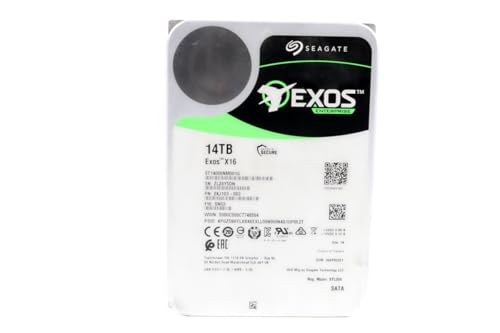
ST14000NM001G
Seagate (Renewed) Exos X16 14TB 7200 RPM SATA 6Gb/s 256MB Cache 3.5-Inch Internal Data Center HDD Enterprise Hard…
$409.99
$29.29/TB
Warranty not verified
Buy on Amazon
ST16000NM001G
Seagate 16TB HDD Exos X16 7200 RPM 512e/4Kn SATA 6Gb/s 256MB Cache 3.5-Inch Enterprise Hard Drive (ST16000NM001G) (Renewed)
$499.00
$31.19/TB
Warranty not verified
Buy on Amazon
ST12000NM002H
Seagate Exos X24 12TB 3.5" 6 Gb/s SATA III Internal Hard Drive
$569.99
$47.50/TB
Warranty not verified
Buy on Amazon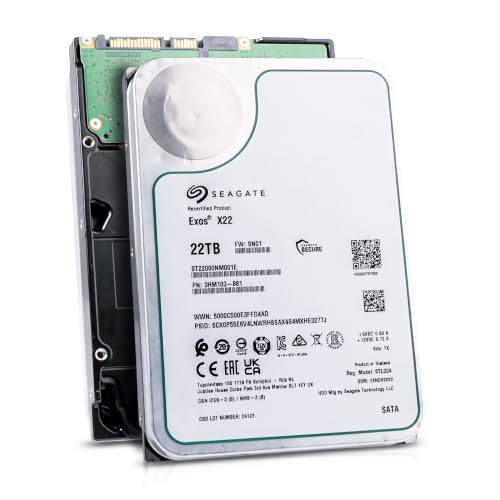
ST22000NM001E
Seagate (Recertified) Exos X22 22TB Internal Hard Drive - 3.5 Inch Hyperscale SATA 6Gb/s HDD, 7200 RPM, 2.5M…
$719.99
$32.73/TB
Seagate factory-recertified warranty — verify serial
Buy on Amazon
ST18000NM000J
18TB Hard Drive X18 ST18000NM000J 7200 RPM SATA 6Gb/s 256MB Cache 3.5-inch 18TB Enterprise Server Computer Hard Drive
$934.68
$51.93/TB
Warranty not verified
Buy on Amazon
ST30000NM004K
Seagate Exos M 30TB Enterprise Internal Hard Drive HDD - 3.5in 6GB/s SATA 7200RPM 2.5M MTBF (ST30000NM004K) (Renewed)
$1,200.00
$40.00/TB
Warranty not verified
Buy on Amazon
ST20000NM007D
Seagate Exos X20 ST20000NM007D 20TB 7.2K RPM SATA 6Gb/s 3.5in Hard Drive
Price Options
Warranty not verified
Buy on Amazon
ST28000NM003K
Seagate Exos M 28TB Enterprise Internal Hard Drive HDD - 3.5in 6GB/s SATA 7200RPM 2.5M MTBF (ST28000NM003K)
Price Options
Claimed 5-year warranty — verify by serial number
Buy on Amazon
ST20000NM002H
Seagate 20TB Exos Enterprise Hard Drive | SATA (ST20000NM002H)
Price Options
Claimed 5-year warranty — verify by serial number
Buy on AmazonAmazon prices shown are retained for up to 24 hours. Latest price refresh: 2026-10-17 23:41:40 UTC. Price/availability may change; Amazon at purchase time controls.
Exact-model reference
Do not buy from the family name alone
Use the complete model number to confirm generation, interface, sector format and security class. Similar capacities can belong to different interfaces and security variants.
| Exact model | Generation | Capacity | Interface | Sector format | Security |
|---|---|---|---|---|---|
| ST16000NM002H | Exos X24 | 16TB | SATA | 512e / 4Kn FastFormat | ISE |
| ST20000NM002H | Exos X24 | 20TB | SATA | 512e / 4Kn FastFormat | ISE |
| ST24000NM002H | Exos X24 | 24TB | SATA | 512e / 4Kn FastFormat | ISE |
| ST24000NM001K | Exos M | 24TB | SATA | 512e | Standard / verify exact listing |
| ST28000NM003K | Exos M | 28TB | SATA | 512e | Standard / verify exact listing |
| ST30000NM004K | Exos M | 30TB | SATA | 512e | Standard / verify exact listing |
| ST32000NM004K | Exos M | 32TB | SATA | 512e | Standard / verify exact listing |
| ST16000NM001G | Exos X16 | 16TB | SATA | 512e | Standard |
| ST18000NM000J | Exos X18 | 18TB | SATA | 512e | Standard |
| ST22000NM001E | Exos X22 | 22TB | SATA | 512e | Standard |
Electrical compatibility is only the first check
A 3.5-inch SATA Exos model can physically and electrically fit many desktop-style NAS bays, but successful deployment also depends on firmware recognition, maximum capacity, sector format and vendor policy. A SAS Exos will not operate in a SATA-only NAS. Before purchase, record the NAS model, DSM or operating-system version, bay type, exact Exos model and current firmware. A product that spins and appears in the interface can still be unsupported by the vendor for alerts, firmware management or technical support.
Use the exact NAS compatibility list
Compatibility databases are tied to a specific NAS model and can change. A drive listed for one Synology or QNAP does not automatically become approved for every appliance from that brand. Some vendors test a drive family only at certain capacities or firmware revisions. Search the exact NAS model and exact Seagate model number. When a drive is absent, distinguish “not tested” from explicitly incompatible and understand what support limitations the vendor applies.
SATA is the normal choice for consumer NAS bays
Most tower NAS appliances expose SATA connectors. Select a SATA Exos exact model and reject marketplace listings that silently switch to SAS. A low-priced SAS enterprise pull may require a custom server, compatible HBA and different cabling. For rack or enterprise NAS hardware, inspect the backplane and controller documentation rather than assuming every bay is SAS because the chassis looks enterprise-grade.
512e and 4Kn planning
512e usually provides the broadest appliance compatibility. Synology's compatibility guidance notes that 4Kn drives should be managed separately, and other vendors can impose their own rules. Do not convert a populated drive to another sector format. If FastFormat is supported, conversion erases data and should occur only before deployment with the exact model, controller and target format verified. Keep spare drives in the same logical sector format as the active array.
Acoustics in a home environment
Exos drives are designed for data-center-style workloads and can produce audible seek activity, idle background maintenance and vibration. The X24 manual publishes higher sound-power figures during performance seeking than at idle. A solid metal NAS chassis can amplify those sounds through trays and furniture. Use secure mounting, intact vibration isolators and a location where enterprise seek noise is acceptable. Do not promise that one Exos generation is silent without exact-model measurements in the intended enclosure.
Cooling and temperature monitoring
High-capacity helium drives still require consistent airflow. Populate bays according to the NAS cooling design, keep intakes clean and monitor drive-reported temperatures during parity checks, scrubs and rebuilds. Densely packed systems can develop hot spots that are not visible from room temperature. Seagate publishes operating limits, but running near a maximum is not the same as maintaining the conditions assumed for long-term reliability. Aim for stable, moderate temperatures and investigate fan or airflow changes promptly.
Startup current and power supply headroom
Several drives can spin up at once and create a larger 12V demand than steady-state power figures suggest. The Exos X24 manual lists substantial peak startup current for covered models. Consumer NAS appliances are designed around supported bay counts, but DIY systems need a power supply, cables and backplane that can handle simultaneous startup. Avoid overloaded SATA power splitters and connectors with poor contact. Staggered spin-up support depends on the drive, controller and system implementation.
Vibration and bay count
Enterprise drives are built with rotational-vibration tolerance, but the chassis still matters. Loose trays, mixed mounting hardware and poor structural support can increase vibration and noise. In larger arrays, maintain consistent fastening, airflow and cable clearance. Do not infer that an enterprise label makes any improvised enclosure safe. A NAS designed for its advertised bay count provides a more predictable mechanical environment than an open desktop case with several drives stacked closely together.
RAID is not a backup
Exos workload and error-recovery features do not protect against accidental deletion, ransomware, fire, theft, controller failure or multiple-drive loss beyond the array's redundancy. Use snapshots where supported and keep at least one independent backup, preferably with an off-site or offline copy. Large Exos capacities make rebuilds lengthy, so capacity planning should consider fault tolerance and restoration time rather than maximizing raw terabytes per dollar.
New, OEM and recertified drives
NAS buyers often encounter new retail, OEM, factory-recertified, seller-refurbished and used Exos products. The exact model may be identical while warranty coverage is not. Verify serial-number eligibility, seller return terms and whether the warranty is from Seagate or only the seller. Used enterprise pulls can have high power-on hours. Price savings should fund a replacement reserve and stronger backup rather than be treated as equivalent to a qualifying new drive.
Choose capacity as an array decision
A larger drive can reduce bay count and power per usable terabyte, but it also increases rebuild exposure and replacement cost. Confirm the NAS maximum single-drive capacity, parity or mirror layout, filesystem limits and future expansion method. In Unraid, parity must be at least as large as the largest data drive. In ZFS, vdev expansion rules and spare strategy affect the decision. Buy enough headroom without locking the system into an unsupported capacity tier.
NAS buying checklist
Confirm the exact Exos model, SATA or SAS interface, 512e or 4Kn format, security variant, NAS compatibility status, firmware, maximum capacity, tray fit, airflow and power. Decide whether the acoustic profile suits the room. Verify condition and warranty source. Plan redundancy, backup, monitoring and a matching spare. Only then compare price per terabyte. This sequence prevents a cheap listing from becoming an expensive compatibility problem.
Exos authority cluster
Continue the exact-model decision
Frequently asked questions
Exos compatibility answers
Can I use a Seagate Exos drive in a NAS?
Yes, when the NAS supports the exact model, interface, capacity and sector format. Consumer NAS appliances normally require SATA.
Is Exos better than IronWolf Pro for NAS?
It depends on exact models, price, acoustics, vendor compatibility and included services. Exos can offer strong enterprise specifications, while IronWolf Pro is positioned directly for NAS use.
Are Exos drives too loud for home NAS use?
They can be more noticeable than consumer NAS drives, especially during seeks and background activity. Chassis mounting and room placement strongly affect perceived noise.
Can a SAS Exos work in Synology or QNAP?
Only in models with a compatible SAS backplane and controller. Most desktop NAS appliances are SATA-only.
Should I use 512e or 4Kn in a NAS?
Use the format supported by the exact appliance and array. 512e usually provides wider compatibility; 4Kn should be verified and managed according to vendor guidance.
Do Exos drives need extra cooling?
They need the airflow specified for the NAS bay design. Monitor temperature under sustained workload and keep fans and intakes clean.
Can I mix Exos generations in one array?
Often technically possible, but align interface, sector format, capacity rules and expected performance. Uniform models simplify spares and troubleshooting.
Does Exos warranty cover NAS use?
Warranty eligibility depends on the exact serial number, purchase source, region and condition. Verify with Seagate and the seller.
Is RAID enough protection for Exos drives?
No. RAID provides availability after certain drive failures but does not replace independent backups.
Are recertified Exos drives suitable for NAS?
They can be used with appropriate testing, warranty verification, replacement reserve and backups, but they are not equivalent to qualifying new drives.
Official references
Cloudzat may earn a commission from qualifying purchases. Compatibility recommendations are advisory; confirm the exact drive model, controller, backplane, sector format and appliance support list before purchase or data migration.