


Exos acoustics and failure triage
Exos drives can produce noticeable seek, calibration and power-management sounds, especially in quiet home environments. Repeated hard clicking, failed detection, I/O errors or worsening noise can also indicate a serious problem. The safest response depends on whether data is accessible and whether the sound is paired with instability.
Protect the data first; identify the sound second
A normal enterprise seek pattern should not cause files to become unreadable or the drive to disappear. When clicking accompanies errors, resets or inaccessible data, stop nonessential testing and decide between cloning, warranty replacement and professional recovery.
Interactive decision tool
Exos clicking and noise risk checker
Current exact-model offers
Verify model, interface, condition and warranty before purchase
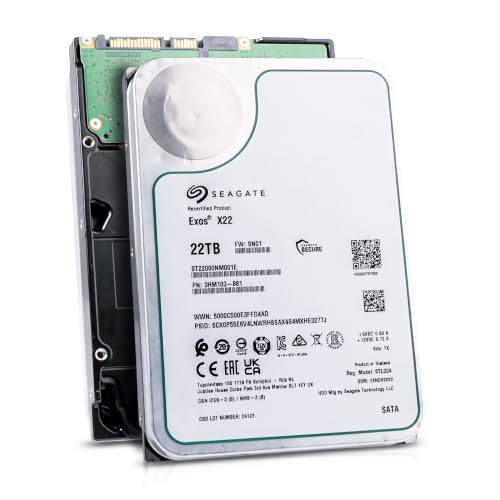
ST22000NM001E
Seagate (Recertified) Exos X22 22TB Internal Hard Drive - 3.5 Inch Hyperscale SATA 6Gb/s HDD, 7200 RPM, 2.5M MTBF, 512e…
$719.99
$32.73 per TB
Seagate factory-recertified warranty — verify serial
Buy on Amazon
ST16000NM001G
HDD for 16TB 3.5" SATA 6 Gb/s 256MB 7200RPM for Internal HDD for Enterprise Class HDD for ST16000NM001G
$721.48
$45.09 per TB
Warranty not verified
Buy on Amazon
ST28000NM003K
Enterprise 28TB SATA 6Gb/s Hard Drive - Seagate Exos M ST28000NM003K
$1,531.29
$54.69 per TB
Warranty not verified
Buy on Amazon
ST20000NM007D
Seagate Exos X20 ST20000NM007D 20TB 7.2K RPM SATA 6Gb/s 3.5in Hard Drive
Price Options
Warranty not verified
Buy on AmazonAmazon prices shown are retained for up to 24 hours. Latest price refresh: 2026-10-23 18:26:50 UTC. Price/availability may change; Amazon at purchase time controls.
Exact-model ownership reference
Keep model, interface, status and warranty route separate
Exos capacities overlap across generations and conditions. Use the complete model and serial number before applying firmware, warranty or reliability guidance.
| Exact model | Generation | Capacity | Interface | Status | Warranty route |
|---|---|---|---|---|---|
| ST16000NM001G | Exos X16 | 16TB | SATA | older | Verify by serial number, region and seller source |
| ST18000NM000J | Exos X18 | 18TB | SATA | older | Verify by serial number, region and seller source |
| ST20000NM007D | Exos X20 | 20TB | SATA | older | Verify by serial number, region and seller source |
| ST22000NM001E | Exos X22 | 22TB | SATA | older | Verify by serial number, region and seller source |
| ST24000NM002H | Exos X24 | 24TB | SATA | current | Verify by serial number, region and seller source |
| ST24000NM001K | Exos M | 24TB | SATA | current | Verify by serial number, region and seller source |
| ST28000NM003K | Exos M | 28TB | SATA | current | Verify by serial number, region and seller source |
| ST32000NM004K | Exos M | 32TB | SATA | current | Verify by serial number, region and seller source |
Enterprise drives are not silent
Exos is optimized for dense storage and enterprise duty rather than a quiet desktop. Seek activity and vibration can be more audible than consumer NAS or desktop drives. Enterprise HDDs can produce sharper seek and calibration sounds than quiet consumer drives, especially in open desks or lightly damped NAS enclosures. Establish a baseline when the drive is healthy. A sound that is repeatable during ordinary seeks is different from a new hard click followed by resets, timeouts or loss of detection.
Describe sound and timing
Record whether it occurs at startup, random I/O, idle, scrub or continuously. Distinguish light chatter, single recalibration, rhythmic hard knock, chirp and repeated spin-up. Describe the pattern rather than writing only “clicking.” Note whether it occurs at spin-up, during seeks, every few seconds at idle, under a scrub, or just before the device disappears. Record an audio sample from a safe distance and correlate the timestamp with controller, kernel and SMART logs.
Check detection stability
A noisy drive that stays visible and transfers normally follows a lower-risk path than one that disappears, freezes the controller or resets. Detection stability is one of the strongest separators. A noisy drive that remains consistently detected, passes appropriate tests and shows no errors may be demonstrating normal enterprise acoustics or chassis resonance. Clicking combined with repeated link loss, spin retries or changing capacity is a higher-priority failure signal.
Back up before stress tests
Copy irreplaceable data before long diagnostics, benchmarks or bad-block scans. Do not wait for a perfect diagnosis. Protect data before running long diagnostics. Copy irreplaceable files while the drive is readable, or create a controlled clone when appropriate. Do not begin with an extended surface scan on a drive that is already disconnecting. The goal is to preserve recoverability before proving the hardware is defective.
Separate sound from chassis resonance
Loose trays, panels and synchronized drives can amplify normal vibration. Secure the drive according to the chassis design. Chassis resonance can make a healthy seek sound much worse. Check tray screws, rails, vibration isolators, neighboring fans and panels. Compare the same drive in another supported bay only when data risk is low. Do not hold or move a spinning bare drive in an unsafe way to test vibration.
Power-management sounds can be periodic
Enterprise power features may cause periodic activity. Do not disable settings from an online command without exact-model confirmation. Periodic sounds can be related to background media management, head parking, power management or controller activity. Correlate the interval with workload and system events. A regular sound without errors still deserves observation, but it should not automatically be described as head crash or mechanical failure.
Review SMART and logs
Look for reallocated, pending and uncorrectable sectors, timeouts, link resets and temperature history. SMART supports the decision but cannot overrule severe symptoms. Review SMART trends and controller logs together. Media errors, pending or uncorrectable sectors, command timeouts and resets are more meaningful when they coincide with the sound. Interface CRC errors can also point to cabling rather than media. Save the baseline and compare after any cable, power or bay change.
Use SeaTools when stable enough
A short diagnostic can help and a SMART trip or failed self-test supports replacement. Avoid lengthy tests on an unstable data drive. Use SeaTools or platform diagnostics only when the drive remains stable and data is protected. Start with a short test and preserve any failure code. A passing test is one piece of evidence, not permission to ignore repeated clicks, resets or application-level I/O errors that are reproducible under real workload.
Clicking plus no detection is high risk
Repeated clicking without readiness can indicate head, media, motor or internal control failure. Repeated power cycling can worsen damage. Hard repetitive clicking with no detection, spin-up retries or sudden disappearance should be treated as a recovery risk. Reduce power cycles and avoid opening the drive. When the files are unique or valuable, consult a professional recovery service before further DIY testing changes the failure state.
Array rebuilds need immediate review
Identify the clicking serial, check logs and avoid removing the wrong disk. Ensure backup before forcing a rebuild. In an array, identify the exact member before removal and check redundancy health. A clicking disk during rebuild or resilver can put the pool at greater risk. Pause nonessential workloads, verify backup and replacement compatibility, and avoid pulling the wrong drive based only on which bay sounds loudest.
Warranty and recovery differ
A replacement provides hardware, not files. Resolve data recovery before shipping the drive. Warranty replacement and data recovery should be decided in the correct order. Warranty may replace the hardware but generally does not return the files. Preserve serial, logs, diagnostic result and invoice, then decide whether the original media must go to a recovery provider before it is surrendered for replacement.
Choose a compatible replacement
Match interface, sector format, capacity and controller support. Compare warranty source and condition explicitly. Choose a replacement by exact interface, sector format, capacity and chassis compatibility. A SAS replacement needs the same controller path; a parity or RAID member must not be smaller than the required sector count. Use the catalogue to compare current new offers, but keep the failed drive isolated until the recovery decision is complete.
Seagate Exos authority cluster
Continue the exact-model decision
Frequently asked questions
Exos ownership and troubleshooting answers
Are Exos drives normally loud?
They can have noticeable seek noise and vibration. Normal sound should not come with errors or resets.
Is one click at startup normal?
It may be, but repeated rhythmic clicking or failure to become ready requires review.
Should I run a long test?
Not before protecting accessible data.
Can a loose tray amplify noise?
Yes. Secure the chassis while still checking health and logs.
Does SMART detect every mechanical problem?
No. Treat symptoms and logs together.
Can firmware stop clicking?
Do not assume so. Mechanical failure is not repaired by firmware.
What does clicking plus disconnecting mean?
It is high risk. Back up or clone if stable, and consider professional recovery.
Will warranty recover data?
No. Hardware warranty and data recovery are separate.
Can power management cause periodic sound?
Yes, but changes should be model-specific and made after ruling out errors.
What replacement should I buy?
Match exact interface, sector format, capacity and platform support.
Official references
Cloudzat may earn a commission from qualifying purchases. Protect important data before diagnostics, and verify exact model, serial, interface, sector format, condition, seller and warranty source.