


Exos firmware safety guide
Exos firmware is not a generic download chosen by capacity or family name. Seagate support asks for a serial number to locate applicable firmware. The exact model, hardware revision, interface, OEM status and current firmware determine whether an update belongs on a drive.
Update only when the exact serial is eligible and the operational reason is clear
Do not flash firmware found for a similar-capacity Exos, an OEM system or another interface. Protect data, confirm controller pass-through, use stable power and follow release instructions. Firmware cannot repair mechanical damage, bad media or an incompatible SAS controller.
Interactive decision tool
Exos firmware readiness checker
Current exact-model offers
Verify model, interface, condition and warranty before purchase
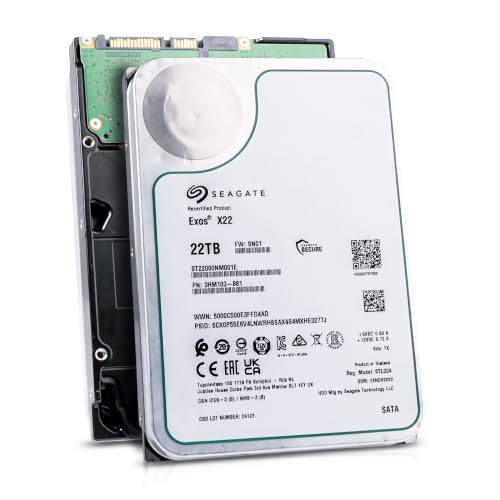
ST22000NM001E
Seagate (Recertified) Exos X22 22TB Internal Hard Drive - 3.5 Inch Hyperscale SATA 6Gb/s HDD, 7200 RPM, 2.5M MTBF, 512e…
$719.99
$32.73 per TB
Seagate factory-recertified warranty — verify serial
Buy on Amazon
ST16000NM001G
HDD for 16TB 3.5" SATA 6 Gb/s 256MB 7200RPM for Internal HDD for Enterprise Class HDD for ST16000NM001G
$721.48
$45.09 per TB
Warranty not verified
Buy on Amazon
ST28000NM003K
Enterprise 28TB SATA 6Gb/s Hard Drive - Seagate Exos M ST28000NM003K
$1,531.29
$54.69 per TB
Warranty not verified
Buy on Amazon
ST20000NM007D
Seagate Exos X20 ST20000NM007D 20TB 7.2K RPM SATA 6Gb/s 3.5in Hard Drive
Price Options
Warranty not verified
Buy on AmazonAmazon prices shown are retained for up to 24 hours. Latest price refresh: 2026-10-23 18:26:50 UTC. Price/availability may change; Amazon at purchase time controls.
Exact-model ownership reference
Keep model, interface, status and warranty route separate
Exos capacities overlap across generations and conditions. Use the complete model and serial number before applying firmware, warranty or reliability guidance.
| Exact model | Generation | Capacity | Interface | Status | Warranty route |
|---|---|---|---|---|---|
| ST16000NM001G | Exos X16 | 16TB | SATA | older | Verify by serial number, region and seller source |
| ST16000NM002G | Exos X16 | 16TB | SAS | older | Verify by serial number, region and seller source |
| ST18000NM000J | Exos X18 | 18TB | SATA | older | Verify by serial number, region and seller source |
| ST18000NM004J | Exos X18 | 18TB | SAS | older | Verify by serial number, region and seller source |
| ST20000NM007D | Exos X20 | 20TB | SATA | older | Verify by serial number, region and seller source |
| ST22000NM001E | Exos X22 | 22TB | SATA | older | Verify by serial number, region and seller source |
| ST24000NM002H | Exos X24 | 24TB | SATA | current | Verify by serial number, region and seller source |
| ST24000NM007H | Exos X24 | 24TB | SAS | current | Verify by serial number, region and seller source |
Record identity and current revision
Capture the full ST model, serial and firmware from the label, SeaTools, operating system or HBA. Preserve screenshots. Record the complete ST model, serial, interface and current firmware before searching. Capture the HBA or controller path as well, because management software can display a logical volume instead of the physical device. A screenshot and text export make it possible to verify that the correct drive is selected during maintenance.
Use serial-specific lookup
Use Seagate’s firmware search instead of an unofficial mirror or a package for a neighboring model. Use Seagate’s serial-number search or the system vendor’s qualified update channel. Do not download an image simply because the capacity and family name match. When no firmware is offered for the serial, treat that as a stop signal and ask Seagate or the OEM rather than forcing a neighboring package.
Read scope and prerequisites
Check supported models, current revisions, upgrade path, tool, power-cycle requirements and whether the package is OEM-specific. Read the release notes and instructions completely. Confirm supported model and part-number ranges, source revision, destination revision, update utility, operating system, controller limitations and required power cycle. Some packages are intended for specific OEM platforms even when the printed base model looks familiar.
Back up before maintenance
Confirm independent backup, array health and spare availability. Do not update redundant members simultaneously unless supported. Back up important data and verify the backup before maintenance. In an array, confirm redundancy health and avoid updating multiple members simultaneously unless the platform procedure explicitly supports it. Have a compatible spare and recovery plan available before taking a production pool into a maintenance state.
Use a command-capable path
USB bridges and RAID abstraction can block firmware commands. Follow Seagate and controller guidance. Firmware commands may be blocked by USB bridges, RAID abstraction, multipath layers or appliance firmware. Use the path required by the release instructions and ensure the utility identifies the exact physical device. Do not bypass a controller’s qualification rules on a production server without vendor approval.
Maintain stable power
Avoid firmware work during PSU troubleshooting or unstable utility power. Prevent sleep and unexpected reboot. Maintain stable power and prevent sleep, reboot or cable movement during the update. Do not perform firmware work while diagnosing a PSU, PWDIS condition or intermittent backplane. Schedule the operation when the system can remain offline long enough to verify every drive afterward.
Do not mix SATA and SAS
They can share capacity and generation while using different firmware and command paths. SATA and SAS variants can share generation and capacity but use different command sets and firmware. Confirm the interface from the exact model and controller report. Never apply an image selected for a SATA sibling to a SAS unit, or vice versa, based on a family-level name.
OEM firmware may be vendor-controlled
A server or appliance can require qualified firmware and vendor orchestration. Check the system manufacturer first. An OEM server, storage appliance or hyperscale drive may require vendor-controlled firmware and sequencing. Check the system manufacturer’s support matrix and release bundle first. A direct Seagate image can be inappropriate when the appliance expects a qualified revision tied to its enclosure, HBA or management software.
Firmware is not mechanical repair
Clicking, failed SMART, bad sectors and disconnects require data protection and replacement decisions. Firmware cannot repair mechanical damage, unstable heads, bad media or a controller incompatibility. Clicking, repeated disappearance, SMART failure or rapidly increasing bad sectors should trigger data protection and replacement assessment. Do not use flashing as a last attempt on an unstable drive with important data.
Verify afterward
Confirm revision, model, serial, sector format, capacity and controller visibility. Review logs and run a short test. After the update, verify the displayed revision, exact model, serial, capacity, logical sector size and controller visibility. Review system logs for resets or errors and run a short health test. For arrays, confirm every member returned correctly before resuming normal workload or updating another drive.
Preserve a change record
Record date, old and new revision, source, tool, host, controller and outcome. Preserve a maintenance record with the package source, checksum when supplied, old and new revision, tool version, host, controller, date and operator. This record prevents repeated updates, helps troubleshoot future behavior and supports vendor conversations when multiple drives share the same revision.
Know when not to update
Do not update to solve PWDIS, SAS-on-SATA incompatibility, unsupported 4Kn or because another user has a different revision. Do not update merely because another owner reports a newer code. Stop when identity is uncertain, the serial is ineligible, backup is incomplete, power is unstable or the only available path is unsupported. A stable drive with no applicable release can be safer left unchanged than exposed to an unverified procedure.
Seagate Exos authority cluster
Continue the exact-model decision
Frequently asked questions
Exos ownership and troubleshooting answers
Where do I download Exos firmware?
Use Seagate’s official support page and enter the exact serial.
Can I use firmware from the same capacity?
No. Match exact model, interface, revision and serial eligibility.
Will firmware fix clicking?
Usually not. Protect data and assess failure or recovery.
Can I update through USB?
A bridge may block commands. Use a supported path.
Can I update inside RAID?
Only according to controller and platform guidance.
Do SATA and SAS use the same firmware?
Do not assume so.
What if no update appears?
Do not force another image. Contact Seagate or the OEM.
Should I back up first?
Yes. Verify backup and array health.
Can firmware change sector format?
Firmware and destructive sector conversion are separate operations.
How do I verify success?
Confirm revision, identity, capacity, format and health afterward.
Official references
Cloudzat may earn a commission from qualifying purchases. Protect important data before diagnostics, and verify exact model, serial, interface, sector format, condition, seller and warranty source.