


Exos reliability and evidence guide
“Are Exos drives reliable?” is too broad for a defensible yes-or-no answer. Exos includes many generations, capacities, SATA and SAS variants, security classes, specialist SMR products, factory-recertified units and used server pulls. Reliability evidence must stay tied to exact model, age, sample size and environment.
Exos is engineered as an enterprise family, but an individual purchase still depends on exact model and condition
Current channel models publish enterprise workload, MTBF and warranty specifications, yet those ratings do not predict that one drive will last a specific number of years. Use fleet reports carefully, verify warranty and condition, test arrivals and design the system to tolerate failure.
Interactive decision tool
Exos reliability evidence scorer
Current exact-model offers
Verify model, interface, condition and warranty before purchase
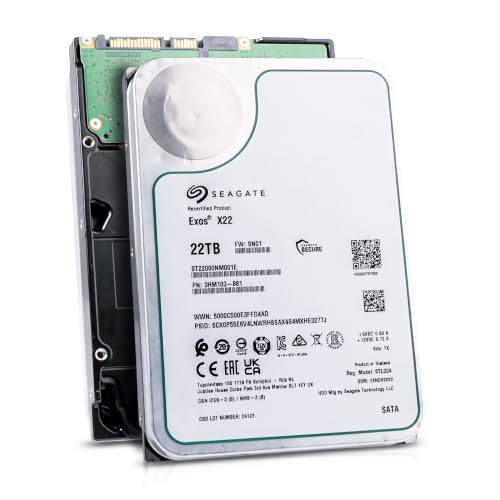
ST22000NM001E
Seagate (Recertified) Exos X22 22TB Internal Hard Drive - 3.5 Inch Hyperscale SATA 6Gb/s HDD, 7200 RPM, 2.5M MTBF, 512e…
$699.00
$31.77 per TB
Seagate factory-recertified warranty — verify serial
Buy on Amazon
ST28000NM003K
Enterprise 28TB SATA 6Gb/s Hard Drive - Seagate Exos M ST28000NM003K
$1,343.24
$47.97 per TB
Warranty not verified
Buy on Amazon
ST20000NM007D
Seagate Exos X20 ST20000NM007D 20TB 7.2K RPM SATA 6Gb/s 3.5in Hard Drive
Price Options
Warranty not verified
Buy on Amazon
ST16000NM001G
HDD for 16TB 3.5" SATA 6 Gb/s 256MB 7200RPM for Internal HDD for Enterprise Class HDD for ST16000NM001G
Price Options
Warranty not verified
Buy on AmazonAmazon prices shown are retained for up to 24 hours. Latest price refresh: 2026-11-05 18:26:18 UTC. Price/availability may change; Amazon at purchase time controls.
Exact-model ownership reference
Keep model, interface, status and warranty route separate
Exos capacities overlap across generations and conditions. Use the complete model and serial number before applying firmware, warranty or reliability guidance.
| Exact model | Generation | Capacity | Interface | Status | Warranty route |
|---|---|---|---|---|---|
| ST14000NM001G | Exos X16 | 14TB | SATA | older | Verify by serial number, region and seller source |
| ST16000NM001G | Exos X16 | 16TB | SATA | older | Verify by serial number, region and seller source |
| ST18000NM000J | Exos X18 | 18TB | SATA | older | Verify by serial number, region and seller source |
| ST18000NM003D | Exos X20 | 18TB | SATA | older | Verify by serial number, region and seller source |
| ST20000NM007D | Exos X20 | 20TB | SATA | older | Verify by serial number, region and seller source |
| ST20000NM004E | Exos X22 | 20TB | SATA | older | Verify by serial number, region and seller source |
| ST22000NM001E | Exos X22 | 22TB | SATA | older | Verify by serial number, region and seller source |
| ST24000NM002H | Exos X24 | 24TB | SATA | current | Verify by serial number, region and seller source |
| ST24000NM001K | Exos M | 24TB | SATA | current | Verify by serial number, region and seller source |
| ST32000NM004K | Exos M | 32TB | SATA | current | Verify by serial number, region and seller source |
Define reliability for the workload
A media server, object store, backup shelf and VM array stress drives differently. Define acceptable failure risk, service interruption, rebuild time and data-loss exposure. Define the required outcome before judging a drive family. A home media archive, backup target, virtualization pool and transactional database have different latency, duty-cycle and outage expectations. Record acceptable rebuild time, recovery point, recovery time and service interruption so reliability is measured against the actual system role.
Stay at exact-model level
Do not convert a brand-wide rate into a conclusion about ST16000NM001G, ST18000NM000J or ST24000NM002H. Keep ST32000NM004K and ST32000NM003K separate. Keep evidence tied to the full model number. A result for ST16000NM001G does not automatically describe ST16000NM000J, ST24000NM002H or an Exos M model. Capacity, generation, interface, firmware and age differ. Preserve ST32000NM004K and ST32000NM003K as separate records until their configurations are confirmed.
Interpret MTBF correctly
MTBF is a population engineering statistic under specified conditions, not an individual lifespan countdown. MTBF and workload ratings are population-level engineering specifications under defined conditions. They are useful for comparing product classes and planning fleets, but they do not predict that one individual drive will operate for a calculated number of years. Warranty length is also a support term, not a failure-free guarantee.
Use fleet reports with discipline
Compare drive count, drive-days, age, workload and confidence. A small sample can show an extreme rate by chance. Fleet reports are most useful when they provide exact model, drive count, drive-days, age distribution and operating environment. Small samples can produce unstable annualized rates, and a young fleet is not directly comparable with an older one. Avoid converting a brand-wide average into a buying verdict for every Exos model.
Condition can dominate reputation
New authorized-channel, factory-recertified, seller-refurbished and old server-pull drives are different purchases. Condition can outweigh family reputation. New authorized-channel, factory-recertified, seller-refurbished and used server-pull drives have different evidence and warranty. Compare packaging, power-on history, SMART baseline and return rights. A low-cost used unit should not inherit the confidence level of a new channel drive.
Cooling, vibration and power matter
Airflow, secure trays, stable power and startup-current planning are reliability inputs. Environment is part of reliability engineering. Provide stable power, sufficient startup-current headroom, direct airflow, secure trays and vibration control. Monitor the hottest bay and controller error logs. A well-designed storage system reduces avoidable faults that would otherwise be attributed incorrectly to the drive brand.
SMART is warning, not guarantee
Monitor media errors, timeouts, link errors and temperature. A clean snapshot cannot overrule repeated resets or clicking. SMART can warn about media degradation, interface faults, command timeouts and temperature, but it cannot promise future health. Use trends and controller logs rather than one green status. Repeated resets, application I/O errors or new clicking can justify replacement even when a short self-test passes.
Arrival testing reduces risk
Validate model, serial, interface, format, capacity and warranty. Inspect packaging and run staged tests. Arrival testing catches shipping damage, wrong models and early failures before the unit contains valuable data. Verify serial warranty, interface, sector format, capacity and firmware, then run staged diagnostics under controlled cooling. Introduce large batches gradually so one suspect shipment does not enter the same array at once.
Redundancy and backup differ
RAID and parity improve availability for certain failures but do not protect against deletion, ransomware, fire or excessive multiple failures. Redundancy improves availability for defined failures, while backup protects against a wider set of events. RAID, parity and ZFS do not replace independent copies against deletion, ransomware, fire or multiple-device loss. Design both layers and test restoration rather than treating the word “enterprise” as data protection.
Plan replacements before failure
Keep compatible spares or a documented replacement list with capacity, interface and sector-format requirements. Plan replacements before a failure alert. Keep a compatible spare or documented shortlist that matches interface, sector size, capacity and chassis. Verify that replacement sector count is sufficient for the array. A current price catalogue is most valuable when it is prepared before an urgent degraded-pool purchase.
Warranty is evidence, not durability
A five-year route improves support but does not prevent failure or recover data. Recertified and seller coverage differ. Warranty is useful evidence of support route and expected product class, but it does not recover files or prevent downtime. Verify the serial, region and seller before deployment. Factory-recertified six-month coverage, seller promises and new-channel coverage must remain separate in both product cards and fleet records.
Balanced buying verdict
Exos can be strong for dense always-on storage when model, interface, format, cooling, acoustics and warranty fit. Avoid listings that hide exact identity or support. The balanced conclusion is conditional: Exos can be a strong choice for dense, always-on storage when the exact model, controller, sector format, acoustics, power, cooling and warranty fit. Reject listings that hide identity, mix SATA and SAS, or blur condition. Reliability comes from both the drive and the system designed around it.
Seagate Exos authority cluster
Continue the exact-model decision
Frequently asked questions
Exos ownership and troubleshooting answers
Are Exos drives reliable?
They are enterprise drives, but reliability must be evaluated by exact model, age, condition, workload and environment.
Does 2.5M-hour MTBF mean 285 years?
No. It is a population metric, not an individual lifespan promise.
Are fleet reports useful?
Yes when exact model, sample size, age and environment are considered.
Are recertified drives less reliable?
Condition adds uncertainty, but source, warranty, packaging and testing determine risk.
What SMART values matter?
Media errors, pending and uncorrectable sectors, interface errors, timeouts and temperature history are common inputs.
Does RAID make reliability unimportant?
No. Rebuilds expose the system and RAID does not replace backup.
Which generation is most reliable?
There is no universal winner without comparable exact-model evidence.
Can heat reduce reliability?
Poor cooling and sustained high temperature create avoidable risk.
Should I use Exos in a home NAS?
It can fit when interface, sector format, noise, power and cooling are supported.
What is strongest buying evidence?
Exact model, verified serial warranty, reputable seller, good packaging, clear condition and successful arrival tests.
Official references
- Seagate Exos support and serial-specific firmware lookup
- Seagate Exos X24 product support and manuals
- Seagate Exos X18 support and manuals
- Seagate Exos M support and firmware lookup
- Seagate warranty validation and replacement claims
- Seagate factory-recertified drives and six-month warranty
- Seagate SeaTools Bootable diagnostic manual
Cloudzat may earn a commission from qualifying purchases. Protect important data before diagnostics, and verify exact model, serial, interface, sector format, condition, seller and warranty source.