


United Kingdom
RX 9060 XT 16GB Prices UK: Which Graphics Card Should You Buy?
Our pick: ASUS Dual RX 9060 XT White 16 GB. Choose the lower-priced suitable RX 9060 XT with 16 GB for a gaming PC that prioritises value and texture-memory room. It is our default over a substantially more expensive RTX 5060 Ti 16 GB for gaming alone.
Choose an exact model
ASUS Dual RX 9060 XT White 16 GB
Our value pick for a gaming-first PC: 16 GB without the competing NVIDIA premium.
See the offer ↓XFX Swift RX 9060 XT White 16 GB
Alternative if the first choice is unavailable or does not fit your case. It is not an automatic performance upgrade.
See the offer ↓Alternative : XFX Mercury AMD Radeon RX 9060 XT OC Gaming Edition with 16GB GDDR6 HDMI 2xDP, AMD RDNA 4 RX 90….
Amazon offers in United Kingdom
9 qualified local offers · GBP · Confirm delivery and checkout total.

Alternative offer
ASUS Dual Radeon RX 9060 XT 16GB GDDR6 White Edition (PCIe 5.0, 16gB GDDR6, HDMI 2.1b, DisplayPort 2.1a, 2.5-slot design, Axial-tech fan design, 0dB technology, and more)
RX 9060 XT
£529.99Price observed 02.11.2026 07:17 UTCBuy on Amazon ↗
Alternative offer
XFX Swift AMD Radeon RX 9060 XT OC White Gaming Edition with 16GB GDDR6 HDMI 2xDP, AMD RDNA™ 4 (RX-96TSW16WQ)
RX 9060 XT
£586.00Price observed 02.11.2026 07:17 UTCBuy on Amazon ↗
Alternative offer
XFX Mercury AMD Radeon RX 9060 XT OC Gaming Edition with 16GB GDDR6 HDMI 2xDP, AMD RDNA 4 RX 9060XT RX-96TMERCBA
RX 9060 XT
£594.57Price observed 02.11.2026 07:17 UTCBuy on Amazon ↗
Alternative offer
ASUS Dual Radeon RX 9060 XT 16GB GDDR6 Graphics Card (PCIe 5.0, HDMI 2.1b, DisplayPort 2.1a, 2.5-slot design, Axial-tech fan design, 0dB technology, and more)
RX 9060 XT
£599.99Price observed 02.11.2026 07:17 UTCBuy on Amazon ↗
Alternative offer
XFX Swift AMD Radeon RX 9060 XT OC Triple Fan 16GB Gaming Graphics Card (RX-96TS316BA)
RX 9060 XT
£610.00Price observed 02.11.2026 07:17 UTCBuy on Amazon ↗
Alternative offer
ASRock Rx9060 Xt Challenger 16Gb Oc Pcie5 16Gb Ddr6 Hdmi 2 Dp 3290Mhz Clock Led
RX9060 XT
£658.26Price observed 02.11.2026 07:17 UTCBuy on Amazon ↗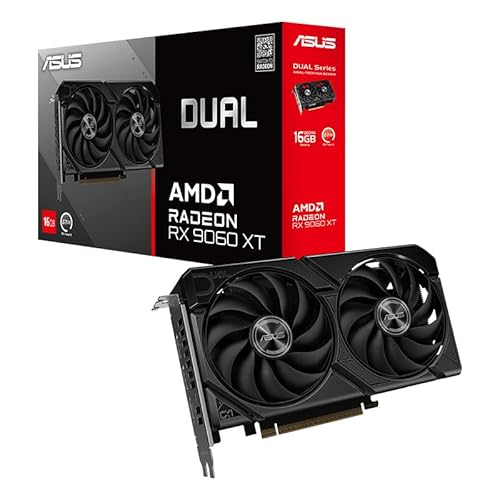
Alternative offer
ASUS AMD Dual Radeon RX 9060 XT 16GB GDDR6 Video Card DUAL-RX9060XT-16G
RX 9060 XT
£730.51Price observed 02.11.2026 07:17 UTCBuy on Amazon ↗
Alternative offer
Powercolor Radeon RX 9060 XT HellHound OC 16GB GDDR6 Graphics Card
RX 9060 XT
£775.04Price observed 02.11.2026 07:17 UTCBuy on Amazon ↗As an Amazon Associate, Cloudzat earns from qualifying purchases. Dated observations can change; confirm the exact variant, seller and total before buying.
Buying guide
Buy this card
Our pick: ASUS Dual RX 9060 XT White 16 GB. Our value pick for a gaming-first PC: 16 GB without the competing NVIDIA premium.
The alternative is XFX Swift RX 9060 XT White 16 GB. Alternative if the first choice is unavailable or does not fit your case. It is not an automatic performance upgrade.
Both offers are in the RX 9060 XT family. The second card is a fallback, not a reason to spend more automatically. A higher price needs to buy a useful difference in size, cooling or display outputs. If both fit and provide the connections you need, choose the first model at the lower price.
| Choice | Exact card | Who should buy it |
|---|---|---|
| Our pick | ASUS Dual RX 9060 XT White 16 GB | Our value pick for a gaming-first PC: 16 GB without the competing NVIDIA premium. |
| Alternative | XFX Swift RX 9060 XT White 16 GB | Alternative if the first choice is unavailable or does not fit your case. It is not an automatic performance upgrade. |
Our value choice for a sensible gaming upgrade
The RX 9060 XT 16 GB is the card we would start with for a gaming-focused buyer who wants a useful memory capacity without immediately paying for a high-end GPU. It suits a balanced 1080p build and appropriate 1440p use, with settings matched to the game. Our choice is the less expensive suitable partner version.
This recommendation is about the 16 GB model. The 8 GB version is a different purchase and should not be treated as equivalent just because the GPU family name matches. A small saving on a low-memory variant is not our default for a new general-purpose gaming upgrade when a suitable 16 GB card is affordable.
16 GB gives room for textures, not unlimited speed
Graphics memory stores the textures and working data needed by the GPU. Having 16 GB gives more room than an 8 GB model, which is useful as games become more demanding or when using larger texture packs. The capacity is separate from the PC's ordinary RAM and cannot be doubled by adding system memory.
The GPU still has its own processing limits. A 16 GB 9060 XT is not automatically equal in frame rate to a 16 GB 9070 XT. If your target is demanding high-refresh 1440p or heavier 4K gaming, buy a stronger GPU tier rather than the most expensive version of this one. For a modest screen and budget, this lower tier may be all you need.
When we would pay for NVIDIA instead
Choose an RTX alternative when you have a specific requirement, such as a CUDA-based application or an important feature supported by the software you use. Compatibility comes before a lower graphics-card price when the card is also a work tool. A Radeon gaming recommendation is not a promise that it substitutes for NVIDIA in every professional application.
For gaming without that requirement, the RX 9060 XT 16 GB is our value preference when the competing 5060 Ti 16 GB costs clearly more. Both give the same memory capacity. Keep the difference for the rest of the PC rather than paying for a brand preference that has no practical role in your games.
Choose the board maker for price and fit
An XFX Swift, ASUS Dual, Sapphire Pulse or other suitable 16 GB partner card remains the same GPU class. Its size, cooler and connections can differ. Our starting choice is the lower-priced model that fits the case and offers the display outputs you need. A white edition need not cost more just because the build theme is white.
Do not assume that a larger cooler or factory-overclock label creates a different performance tier. If two cards cost about the same, the more convenient fit or documented cooling behaviour can decide it. If one is much more expensive, our choice is the cheaper suitable card. The premium needs a practical benefit rather than another version of the same 16 GB badge.
What to allow for in the rest of the PC
Keep a suitable existing case and power supply rather than automatically buying a whole new computer. The important limits are room for the card, its required power connections and the power supply's recommended capacity. An expensive graphics upgrade that also forces a new case and power supply can cost much more than the card's price suggests.
Choose a quality power supply with the right connectors for the exact card. The wattage printed on a box is not the card's constant consumption, and a larger number alone does not establish quality. If a power supply must be replaced, add that expense before choosing between the cheaper and stronger GPU. Do not reuse a modular power cable from an unrelated power-supply model.
A card that fits is better than an unnecessary case replacement
For a normal roomy desktop, a standard partner card is often the simplest purchase. For a small case, choose the appropriate shorter or thinner model directly. Card length can be restricted by a front radiator or drive cage, while thickness can cover another slot. Leave room for the power cable as well as the printed card dimensions.
A two-fan card is not automatically worse than a three-fan version. Cooler performance and noise depend on the complete design and the case's airflow. If you want to pay for quieter operation, use evidence for the exact model rather than assuming that the longest card or the most fans will be quietest. Otherwise, choose the cheaper suitable standard card.
Connect the screen to the new graphics card
Plug the monitor into the graphics card's display output rather than leaving it connected to the motherboard. Choose a suitable HDMI or DisplayPort cable for the screen's intended resolution and refresh rate. A graphics card cannot make an old cable or a limited monitor input support every advertised display mode.
For a competitive game on a high-refresh monitor, responsive ordinary rendering matters more than a spectacular generated-frame number. For a slower single-player game, supported upscaling can be a useful compromise. Pick settings that give a clear, comfortable picture and good control response; an expensive purchase does not make every maximum setting worthwhile.
When to keep your current PC
Keep the rest of a healthy desktop if the graphics card is the missing part. A GPU upgrade can be enough when games struggle mainly with graphics settings. If a PC has very little RAM, an old limiting processor or a failing drive, putting the entire budget into graphics may leave those problems in place.
For a working gaming PC that already meets your target, our recommendation is to keep it. For a new build, leave money for the monitor, sufficient RAM and SSD space instead of choosing a premium graphics-card edition and cutting useful capacity elsewhere. The goal is a computer that feels good to use, rather than the most elaborate version of one component.
Compare the complete purchase cost
Check the checkout amounts. Unknown tax and delivery charges are not added automatically.
Frequently asked questions
Do I need the most expensive version of this GPU?
No. Our default is the cheaper suitable standard model. Pay extra for a necessary size, connection or proven noise advantage, not simply a different badge.
Can more ordinary RAM increase graphics memory?
No. System RAM and the memory on the graphics card are separate. Buy the GPU capacity your games or applications need.
Will a new card guarantee maximum settings in every game?
No. Choose a sensible GPU tier for the screen and use appropriate game settings. Ray tracing and high-resolution textures can be especially demanding.
Should I replace the whole PC?
Keep a healthy, suitable desktop when a GPU upgrade solves the need. Include a required power supply or case change in the cost before buying.
Related buying guides
- Gaming PC Prices UK: Should You Buy a Prebuilt PC or Build Your Own?
- CPU Prices UK: Which AMD Ryzen or Intel Processor Should You Buy?
- RX 9060 XT 16GB vs RTX 5060 Ti 16GB: Which Should You Buy in the UK?
- RX 9070 vs RTX 5070: Which Graphics Card Should You Buy in the UK?
- RTX 5060 Prices UK: Which 8GB Graphics Card Should You Buy?
- RTX 5060 Ti 16GB Prices UK: Which Graphics Card Should You Buy?
- RTX 5070 Prices UK: Which Graphics Card Should You Buy?
- Kingston FURY Renegade G5 Prices UK: Which Capacity Should You Buy?
- Lexar NM790 Prices UK: Which Capacity Should You Buy?
- Samsung 9100 PRO Prices UK: Which Capacity Should You Buy?
- Samsung 990 PRO Prices UK: Which Capacity Should You Buy?
- Samsung 990 PRO vs 9100 PRO: Which SSD Should You Buy in UK?
- WD_BLACK SN8100 Prices UK: Which Capacity Should You Buy?
- WD_BLACK SN850X Prices UK: Which Capacity Should You Buy?
- WD_BLACK SN850X vs SN8100: Which SSD Should You Buy in UK?
- B650 vs B850 Motherboards UK: Which Features Are Worth Paying For?
- Best CPU for RTX 5070 UK: Which Processor and Platform Should You Buy?
- AM5 Upgrade Bundles UK: Compare CPU, Motherboard and RAM Costs
- Ryzen 9800X3D vs 9700X UK: Which CPU Is Worth the Extra Cost?
- 32GB vs 64GB RAM UK: Which Memory Kit Should You Buy?
- Best AM5 RAM UK: Which DDR5 EXPO Memory Kit Should You Buy?
- DDR5 RAM Prices UK: Which 32GB or 64GB Kit Should You Buy?
- RTX 5060 Ti Gaming PCs UK: Which Configuration Should You Buy?
- RTX 5070 Gaming PCs UK: Which Configuration Should You Buy?
- RTX 5070 Ti Gaming PCs UK: Which Configuration Should You Buy?
- RX 9060 XT Gaming PCs UK: Which Configuration Should You Buy?
- PC for Sim Racing UK: Which System Fits Your Simulator and Screens?
- External SSD for Mac UK: Choose by Port, Capacity and Cost
- SSD for iPhone ProRes UK: Choose Drives and Recording Kits
- Portable SSDs UK: Compare Models, Ports and Complete Costs
- PS5 SSDs UK: Choose Compatible Drives, Heatsinks and Capacity
- Steam Deck SSD Upgrades UK: Choose Drives and Compare Costs
- Best SSD for Photoshop Scratch Disk: UK Buying Guide
- Best SSD for Sample Libraries: UK Capacity and Prices
- Best CAD Laptops UK: RAM, Graphics and Buying Guide
- PC for Fusion 360 UK: Workstation Specs and Prices Guide
- PC for Revit UK: Workstation Specs, RAM and Prices Guide
- PC for SOLIDWORKS UK: Workstation Specs and Prices Guide
- Best GPU for Blender in the UK: VRAM and Upgrade Cost
- Best PC for Blender in the UK: RAM, GPU and Prices
- Best PC for Unreal Engine in the UK: Builds, RAM and GPU
- Best PC for After Effects in the UK: RAM, GPU and Cache
- Best PC for Lightroom Classic in the UK: RAM and Prices
- Best Laptop for Photo Editing in the UK: Screen and RAM
- Best PC for Premiere Pro in the UK: Codecs, RAM and GPU
- Best PC for DaVinci Resolve in the UK: GPU, RAM and Cost
- Rx 9060 Xt 16gb Price
- Gpu Prices