


the UK
PC for Fusion 360 UK: Workstation Specs and Prices Guide
For regular Autodesk Fusion design and CAM, start with 32 GB RAM, a modern Core Ultra 7 or Ryzen 7-class processor, a 1 TB SSD and suitable dedicated graphics. Choose 64 GB for larger assemblies or heavy multitasking. The exact configurations below are useful starting points; a professional graphics-card name alone does not establish Autodesk certification.
Choose the right option
Lenovo ThinkStation P3 Tiny Gen 2 · 32 GB RAM · 1 TB SSD
32 GB installed RAM, RTX A1000 and Windows 11 Pro. For ordinary modelling at the memory tier shown. Exact certification remains unverified.
Compare exact offers ↓Lenovo ThinkStation P3 Tiny Gen 2 · 64 GB RAM · 1 TB SSD
64 GB installed RAM, RTX A1000 and Windows 11 Pro. For the larger-memory workload tier. Exact certification remains unverified.
Compare exact offers ↓Amazon offers in the UK
Confirm the selected capacity, seller and delivered total.

Lenovo ThinkStation P3 Tiny Gen 2 · 32 GB RAM · 1 TB SSD
Lenovo ThinkStation P3 Tiny Gen 2 w/Ultra 7, NVIDIA RTX A1000, 3YR Warranty | Workstation with Intel Core Ultra 7 265 vPro Processor, NVIDIA RTX A1000 8GB GDDR6 Graphics, 32GB RAM, 1TB SSD, Win 11 Pro
Core Ultra 7 265 · RTX A1000 · Windows 11 Pro. Certification not verified.
£2,779.86Price observed 02.11.2026 19:53 UTCBuy on Amazon ↗Lenovo ThinkStation P3 Tiny Gen 2 · 64 GB RAM · 1 TB SSD
Lenovo ThinkStation P3 Tiny Gen 2 Workstation with Intel Core Ultra 7 265 vPro Processor, NVIDIA RTX A1000 8GB GDDR6, 64GB DDR5-5600MT Memory, 1TB SSD, DisplayPort, RJ-45, WiFi 7, and Windows 11 Pro
Core Ultra 7 265 · RTX A1000 · Windows 11 Pro. Certification not verified.
£3,418.57Price observed 02.11.2026 20:15 UTCBuy on Amazon ↗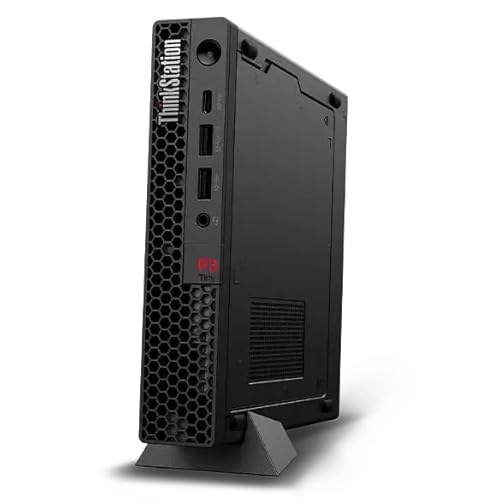
Lenovo ThinkStation P3 Tiny Gen 2 · 64 GB RAM · 1 TB SSD
Lenovo 2026 ThinkStation P3 Tiny Gen 2 with Ultra 9, NVIDIA RTX A1000 8GB | Workstation - Intel Ultra 9 285 24-Core, 64GB RAM, 1TB Gen5 NVMe SSD, Integrated Ethernet, Wi-Fi 7, Windows 11 Pro
Core Ultra 9 285 · RTX A1000 · Windows 11 Pro. Certification not verified.
£3,615.63Price observed 02.11.2026 20:15 UTCBuy on Amazon ↗
Lenovo ThinkStation P3 Tower Gen 2 · 64 GB RAM · 1 TB SSD
Lenovo ThinkStation P3 Tower with Ultra 9 285, 64GB DDR5, NVIDIA RTX 2000 | Ada Generation 16GB GDDR6, 1TB SSD, Gen 2 Workstation, Intel Core vPro Processor, Wi-Fi 7, Win11 Pro, 1 YR Warranty
Core Ultra 9 285 · RTX 2000 Ada · Windows 11 Pro. Certification not verified.
£4,485.54Price observed 02.11.2026 20:15 UTCBuy on Amazon ↗As an Amazon Associate, Cloudzat earns from qualifying purchases. Prices are dated observations and can change. Check the exact variant and delivery to your address before ordering.
Buying guide
Which exact option fits your work?
Lenovo ThinkStation P3 Tiny Gen 2 · 32 GB RAM · 1 TB SSD: Core Ultra 7 265, RTX A1000, Windows 11 Pro. This is the installed configuration, not the maximum that the family can support. 32 GB installed RAM, RTX A1000 and Windows 11 Pro. For ordinary modelling at the memory tier shown. Exact certification remains unverified.
Lenovo ThinkStation P3 Tiny Gen 2 · 64 GB RAM · 1 TB SSD: Core Ultra 7 265, RTX A1000, Windows 11 Pro. This is the installed configuration, not the maximum that the family can support. 64 GB installed RAM, RTX A1000 and Windows 11 Pro. For the larger-memory workload tier. Exact certification remains unverified.
The memory difference is 32 GB. Choose the larger capacity for the larger-project tier described in this guide. If ordinary work fits in the smaller capacity, the price premium needs another useful benefit. More RAM is capacity, not a measured speed ranking.
The two selected P3 Tiny Gen 2 configurations use the same Core Ultra 7 265 and RTX A1000, with the same nominal 1 TB SSD. The main listed capacity difference is 32 GB versus 64 GB RAM. That makes the premium easier to judge: pay for the extra working room when needed, or compare a supported memory upgrade rather than expecting a different graphics class.
| Exact option | Specification | Best reason to choose |
|---|---|---|
| Lenovo ThinkStation P3 Tiny Gen 2 · 32 GB RAM · 1 TB SSD | Core Ultra 7 265 · RTX A1000 · Windows 11 Pro. Certification not verified. | 32 GB installed RAM, RTX A1000 and Windows 11 Pro. For ordinary modelling at the memory tier shown. Exact certification remains unverified. |
| Lenovo ThinkStation P3 Tiny Gen 2 · 64 GB RAM · 1 TB SSD | Core Ultra 7 265 · RTX A1000 · Windows 11 Pro. Certification not verified. | 64 GB installed RAM, RTX A1000 and Windows 11 Pro. For the larger-memory workload tier. Exact certification remains unverified. |
When paying more makes sense
For ordinary parts and assemblies, start with 32 GB RAM and keep money for a comfortable monitor. Choose 64 GB for larger assemblies or working in several demanding programs together. The graphics choice also matters: a compact workstation name alone does not establish that its exact graphics card is approved for your software.
The configuration worth buying for everyday Fusion
A balanced new workstation should make sketching, modelling and navigating assemblies comfortable without spending the whole budget on a flagship graphics card. Our practical starting point is 32 GB RAM and a 1 TB SSD, paired with a current capable processor. Autodesk's current buying advice allows a lighter 16 GB system for smaller work, while larger or more complex designs justify 32 GB or more and dedicated graphics with 8 GB or more memory.
For a student learning individual parts, an existing supported 16 GB computer may be enough to begin. For a new computer intended to last through larger projects, 32 GB is the more comfortable purchase. Move to 64 GB when assemblies, CAM work and other applications genuinely need more working room. Extra RAM prevents a capacity shortage; it does not automatically make a simple sketch rebuild faster.
Spend on the processor before an oversized gaming GPU
Fusion includes different kinds of work. Interactive modelling, rebuilding a design and generating manufacturing toolpaths do not all use the computer in the same way. A responsive modern processor is a sensible priority, while extra cores are most useful when the particular operation can use them. Do not choose a slow older processor solely because its advertisement lists a large core count.
A larger GPU is not a universal cure for slow design calculations. Graphics matter for displaying the model and for features that use GPU acceleration, but more graphics memory does not speed up every parametric operation. For ordinary mechanical design, a balanced CPU, enough RAM and appropriate graphics are usually a more useful buying combination than a premium GPU paired with limited memory.
32 GB versus 64 GB: a practical decision
Choose 32 GB for ordinary parts, moderate assemblies and a browser or office applications alongside Fusion. Choose 64 GB when you work with larger assemblies, keep several demanding applications open or repeatedly exhaust memory with your existing projects. These are buying tiers, not promises tied to a fixed part count. A few complex imported bodies can be harder to manage than many simple repeated parts.
If the two offers use the same processor and graphics but differ only in RAM, the extra money buys working capacity rather than a new performance class. Compare the price of the 64 GB configuration with a supported RAM upgrade to the 32 GB model. In a compact machine, confirm the actual installed modules and replacement cost: a machine described as supporting 64 GB may still arrive with only 32 GB.
Dedicated graphics and certified hardware
For larger Fusion designs, Autodesk currently recommends dedicated graphics with at least 8 GB of graphics memory. Consumer cards meeting the requirements are generally compatible, while professional or mission-critical use can justify certified hardware. Compatible and certified are different claims. A gaming card may be a practical hobbyist choice without becoming a certified professional configuration.
If support policy requires certification, match the application release, system or graphics hardware, operating system and driver to Autodesk's record. The offers here are not labelled certified unless that exact match is established. This matters most when downtime and vendor support have a clear business cost. For casual design, paying a large workstation premium only for the badge may be unnecessary.
Tiny workstation or tower
A compact workstation is attractive for a small desk, a quiet office layout or a computer mounted behind a display. It can be a good fit for modelling with a fixed modest graphics configuration. Its size also limits future card choices, power and storage expansion. Buy the installed configuration you need now rather than assuming a tiny chassis can later become a high-power rendering tower.
A tower is the more flexible choice if you expect additional internal drives, a larger GPU or a broader upgrade path. That flexibility has value only if you will use it. When the workload fits the compact system and the price is better, there is no need to pay for an empty large case. Compare the complete processor, RAM and graphics configuration rather than treating chassis size as a speed ranking.
Storage, internet and the working desk
A 1 TB SSD is a useful starting point for Windows, Fusion, cached data and active projects. Choose more storage when other design applications, local libraries or exported files need it. The installation size alone is not a sensible target for the whole workstation. Keep free room for temporary data and updates instead of buying a tiny system drive that is crowded from the start.
Some Fusion services depend on connectivity or remote processing. A faster local SSD or GPU cannot fix every delay caused by a network connection or a remote service. For a permanent desk, a suitable wired connection can be more predictable than a weak wireless signal. Also include a comfortable display and pointing device in the budget: screen space and precise input affect everyday modelling even when they do not change a benchmark score.
When the more expensive option is worth it
Pay more for 64 GB when your active work needs it, for a tower when expansion is likely, or for a verified professional configuration when your support requirements demand it. Do not pay a large premium merely for a higher model number if the useful RAM, storage and graphics remain the same. The local comparison below states the actual installed configuration so those differences are visible.
If you mainly make small parts and the current computer remains responsive, there may be no immediate reason to replace it. If a new purchase is needed, the balanced 32 GB tier is the starting point; 64 GB is the larger-workload option. Keep the optional selector as a convenience, not a prerequisite. It filters numeric requirements and cannot certify a system or promise the time required to generate a toolpath.
Optional: refine capacity or compare your requirements
The guide above gives a starting choice without this tool. Use it only to refine your own capacity or configuration requirements. Its result is an estimate, not a performance test or certification.
SOLIDWORKS always triggers the certification check and excludes an unknown or Home edition. Prices are stored observations; add missing costs below.
Compare the complete purchase cost
Check the checkout amounts. Unknown tax and delivery charges are not added automatically.
Frequently asked questions
Is 16 GB enough for Fusion?
It can be enough for learning and smaller designs on a supported computer. For a new regular-use workstation, 32 GB is our more comfortable starting point. Larger assemblies and heavy multitasking can justify 64 GB.
Do I need a professional graphics card?
Not for every hobbyist workflow. Suitable consumer graphics are generally compatible, but professional support requirements may call for certified hardware. Certification must match the relevant hardware and driver record.
Will 64 GB make every operation faster?
No. It provides more working capacity. It helps when memory is the restriction, but does not automatically accelerate a small design that already fits comfortably in 32 GB.
Related buying guides
- PC for Revit UK: Workstation Specs, RAM and Prices Guide
- PC for SOLIDWORKS UK: Workstation Specs and Prices Guide
- Best CAD Laptops UK: RAM, Graphics and Buying Guide
- Best SSD for Photoshop Scratch Disk: UK Buying Guide
- Best SSD for Sample Libraries: UK Capacity and Prices
- Kingston FURY Renegade G5 Prices UK: Which Capacity Should You Buy?
- Best Workstation Gpu
- High End Pc Builder