


Cloudzat Thunderbolt & NVMe Enclosure Intelligence
The best enclosure is not simply the one with the largest bandwidth number. Your computer port, SSD generation, sustained workload, cooling and cable can each become the bottleneck. This builder turns those constraints into a practical enclosure class and current product matches.
Build your enclosure setup
Results remain hidden until you click the button.
Start with the host port
A Thunderbolt 5 enclosure cannot deliver Thunderbolt 5 performance from a Thunderbolt 4 or ordinary USB-C port. Identify the host connection before paying for a faster enclosure.
Match the enclosure to the workload
Backups and document storage need less sustained throughput than video editing, large local AI model libraries or scratch-disk work. Continuous transfers also make enclosure cooling more important.
The SSD can be the bottleneck
A PCIe 3.0 SSD will not benefit fully from an 80Gbps enclosure, while a fast PCIe 5.0 SSD may throttle inside a small passively cooled case.
Cable capability matters
Use a cable rated for the required interface and bandwidth. A charge-only or lower-speed USB-C cable can make a correctly chosen enclosure perform like a much slower device.
Current enclosure catalogue
Verified current offers with Amazon images and prices. Use the calculator above for workload-specific matching.
| Product | Interface | Slots | Cooling | Condition | Price | |
|---|---|---|---|---|---|---|
 nusynThunderbolt 5 Docking Station for Mac & Windows, 180W PD | 80/120Gbps data transfer, NVMe SSD slot, 3 Thunderbolt 5 ports, up to dual 6K@60Hz for Mac or dual 8K@120Hz for Windows |
Thunderbolt 5 120Gbps class |
2 | Passive | New | $269.00 | View on Amazon |
 HYPERHyperDrive Next Thunderbolt 5 Dock with SSD Enclosure — 120Gbps Computer Docking Station with Triple 4K Display, Thunderbolt Share, M.2 PCIe Gen4 Slot, AI Module Support, USB-A, 2.5G Ethernet |
Thunderbolt 5 120Gbps class |
1 | Passive | New | $319.99 | View on Amazon |
 RazerRazer Thunderbolt 5 Dock Chroma, 11 Ports + M.2 SSD Slot, White | 120Gbps Transfer Speeds, 3x 4K Displays at 144 Hz on Thunderbolt 5/4 Laptops, 140W PD Charging, Active Cooling, TB Share |
Thunderbolt 5 120Gbps class |
2 | Active fan | New | $349.99 | View on Amazon |
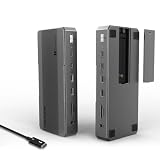 WAVLINKWAVLINK Intel-Certified Thunderbolt 5 Dock, 12-in-1 with M.2 NVMe Slot Up to 120Gbps, 140W PD, Triple 4K/Dual 8K Displays, 10Gbps USB, 2.5G RJ45 Ethernet, for Thunderbolt 5/4 Mac & Windows Laptops |
Thunderbolt 5 120Gbps class |
1 | Passive | New | $349.99 | View on Amazon |
 WAVLINKWAVLINK Thunderbolt 5 Dock, 13-in-1 TB5 Docking Station with NVMe M.2 | 120Gbps Transfer, 64Gbps M.2 SSD Transfer, 140W PD IN, 2.5G Ethernet, 4x 10Gbps USB-A, SD 4.0, Compatible with TB5/4 Laptops |
Thunderbolt 5 120Gbps class |
1 | Passive | New | $349.99 | View on Amazon |
 RazerRazer Thunderbolt 5 Dock Chroma, 11 Ports + M.2 SSD Slot, Black | 120Gbps Transfer Speeds, 3x 4K Displays at 144 Hz on Thunderbolt 5/4 Laptops, 140W PD Charging, Active Cooling, TB Share |
Thunderbolt 5 120Gbps class |
2 | Active fan | New | $379.99 | View on Amazon |
 IVANKYiVANKY FusionDock Max 2 Upgraded 23-in-1 Intel Certified Thunderbolt 5 Dock |
Thunderbolt 5 120Gbps class |
1 | Active fan | New | $399.99 | View on Amazon |
 MAIWO80Gbps M.2 NVMe SSD Enclosure with Cooling Fan Up to 7039MB/s All-Metal Body Tool Free, Support Thunderbolt5/4/3/USB4 Port, Support M.2 PCIe NVMe M Key 2280 SSD, 8TB Capacity |
Thunderbolt 5 80Gbps class |
1 Tool-free |
Active fan | New | $94.99 | View on Amazon |
Frequently asked questions
Can I use a Thunderbolt enclosure on USB-C?
Only when the enclosure explicitly supports that USB mode. Some Thunderbolt-only enclosures will not work on a regular USB-C port.
Do I need active cooling?
It is most useful for long writes, video editing, large model transfers and high-performance PCIe 4.0 or 5.0 SSDs.
Is Thunderbolt 5 always faster than USB4?
The host, enclosure controller, SSD and workload must all support the higher speed. Many real workloads remain limited by the SSD or thermals.