


Cloudzat Thunderbolt & NVMe Enclosure Intelligence
Thunderbolt 5 and USB4 can both support fast external storage, but the better choice depends on the host computer, required sustained speed, device compatibility and price. This tool recommends an interface only after those constraints are entered.
Compare Thunderbolt 5 and USB4
The result uses your host, workload and budget rather than interface names alone.
The host decides the upper limit
Buying an 80Gbps enclosure for a 40Gbps computer does not unlock the higher link rate. Start with the ports your computer actually provides.
Certification and implementation differ
Two products with similar bandwidth claims can vary in compatibility, cable quality, controller behavior and required features.
Storage workloads are not display workloads
Some connection modes advertise higher aggregate or display-oriented bandwidth. External SSD results still depend on storage traffic and the enclosure controller.
Value depends on upgrade horizon
A higher-cost enclosure may be worthwhile when it will move between a current computer and a future faster host. Otherwise, a mature 40Gbps model may offer better value.
Current enclosure catalogue
Verified current offers with Amazon images and prices. Use the calculator above for workload-specific matching.
| Product | Interface | Slots | Cooling | Condition | Price | |
|---|---|---|---|---|---|---|
 nusynThunderbolt 5 Docking Station for Mac & Windows, 180W PD | 80/120Gbps data transfer, NVMe SSD slot, 3 Thunderbolt 5 ports, up to dual 6K@60Hz for Mac or dual 8K@120Hz for Windows |
Thunderbolt 5 120Gbps class |
2 | Passive | New | $269.00 | View on Amazon |
 HYPERHyperDrive Next Thunderbolt 5 Dock with SSD Enclosure — 120Gbps Computer Docking Station with Triple 4K Display, Thunderbolt Share, M.2 PCIe Gen4 Slot, AI Module Support, USB-A, 2.5G Ethernet |
Thunderbolt 5 120Gbps class |
1 | Passive | New | $319.99 | View on Amazon |
 RazerRazer Thunderbolt 5 Dock Chroma, 11 Ports + M.2 SSD Slot, White | 120Gbps Transfer Speeds, 3x 4K Displays at 144 Hz on Thunderbolt 5/4 Laptops, 140W PD Charging, Active Cooling, TB Share |
Thunderbolt 5 120Gbps class |
2 | Active fan | New | $349.99 | View on Amazon |
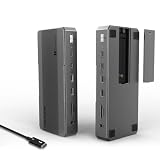 WAVLINKWAVLINK Intel-Certified Thunderbolt 5 Dock, 12-in-1 with M.2 NVMe Slot Up to 120Gbps, 140W PD, Triple 4K/Dual 8K Displays, 10Gbps USB, 2.5G RJ45 Ethernet, for Thunderbolt 5/4 Mac & Windows Laptops |
Thunderbolt 5 120Gbps class |
1 | Passive | New | $349.99 | View on Amazon |
 WAVLINKWAVLINK Thunderbolt 5 Dock, 13-in-1 TB5 Docking Station with NVMe M.2 | 120Gbps Transfer, 64Gbps M.2 SSD Transfer, 140W PD IN, 2.5G Ethernet, 4x 10Gbps USB-A, SD 4.0, Compatible with TB5/4 Laptops |
Thunderbolt 5 120Gbps class |
1 | Passive | New | $349.99 | View on Amazon |
 RazerRazer Thunderbolt 5 Dock Chroma, 11 Ports + M.2 SSD Slot, Black | 120Gbps Transfer Speeds, 3x 4K Displays at 144 Hz on Thunderbolt 5/4 Laptops, 140W PD Charging, Active Cooling, TB Share |
Thunderbolt 5 120Gbps class |
2 | Active fan | New | $379.99 | View on Amazon |
 IVANKYiVANKY FusionDock Max 2 Upgraded 23-in-1 Intel Certified Thunderbolt 5 Dock |
Thunderbolt 5 120Gbps class |
1 | Active fan | New | $399.99 | View on Amazon |
 MAIWO80Gbps M.2 NVMe SSD Enclosure with Cooling Fan Up to 7039MB/s All-Metal Body Tool Free, Support Thunderbolt5/4/3/USB4 Port, Support M.2 PCIe NVMe M Key 2280 SSD, 8TB Capacity |
Thunderbolt 5 80Gbps class |
1 Tool-free |
Active fan | New | $94.99 | View on Amazon |
Frequently asked questions
Which is better for a standard M4 Mac mini?
Choose an enclosure that matches the actual ports on that model. Paying for a higher interface does not change the host limit.
Which is better for an M4 Pro Mac mini?
A Thunderbolt 5 or compatible 80Gbps product can be considered when sustained speed and the SSD justify it.
Is USB4 more compatible with Windows PCs?
Compatibility varies by the PC implementation and enclosure. Check the supported modes on both sides.