


Cloudzat Thunderbolt & NVMe Enclosure Intelligence
Headline interface bandwidth is measured in bits per second, while file sizes are usually measured in bytes. Protocol overhead, SSD speed, thermal throttling and small-file behavior reduce real throughput. This calculator provides a practical planning estimate.
Estimate real throughput and transfer time
The calculator accounts for interface efficiency, SSD generation and workload pattern.
Link bandwidth is not file speed
A 40Gbps connection does not transfer files at 5GB/s in normal use. Encoding, protocol and controller overhead reduce the usable rate.
Small files are slower
Thousands of small files add filesystem and metadata overhead. Large sequential media files usually come closer to the enclosure ceiling.
Sustained writes expose throttling
Long transfers heat the SSD and controller. Cooling and the drive cache affect whether the initial speed can be maintained.
Use ranges rather than guarantees
The result is a planning range. Real systems vary by computer, operating system, filesystem, cable, firmware and SSD.
Current enclosure catalogue
Verified current offers with Amazon images and prices. Use the calculator above for workload-specific matching.
| Product | Interface | Slots | Cooling | Condition | Price | |
|---|---|---|---|---|---|---|
 nusynThunderbolt 5 Docking Station for Mac & Windows, 180W PD | 80/120Gbps data transfer, NVMe SSD slot, 3 Thunderbolt 5 ports, up to dual 6K@60Hz for Mac or dual 8K@120Hz for Windows |
Thunderbolt 5 120Gbps class |
2 | Passive | New | $269.00 | View on Amazon |
 HYPERHyperDrive Next Thunderbolt 5 Dock with SSD Enclosure — 120Gbps Computer Docking Station with Triple 4K Display, Thunderbolt Share, M.2 PCIe Gen4 Slot, AI Module Support, USB-A, 2.5G Ethernet |
Thunderbolt 5 120Gbps class |
1 | Passive | New | $319.99 | View on Amazon |
 RazerRazer Thunderbolt 5 Dock Chroma, 11 Ports + M.2 SSD Slot, White | 120Gbps Transfer Speeds, 3x 4K Displays at 144 Hz on Thunderbolt 5/4 Laptops, 140W PD Charging, Active Cooling, TB Share |
Thunderbolt 5 120Gbps class |
2 | Active fan | New | $349.99 | View on Amazon |
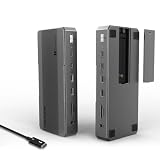 WAVLINKWAVLINK Intel-Certified Thunderbolt 5 Dock, 12-in-1 with M.2 NVMe Slot Up to 120Gbps, 140W PD, Triple 4K/Dual 8K Displays, 10Gbps USB, 2.5G RJ45 Ethernet, for Thunderbolt 5/4 Mac & Windows Laptops |
Thunderbolt 5 120Gbps class |
1 | Passive | New | $349.99 | View on Amazon |
 WAVLINKWAVLINK Thunderbolt 5 Dock, 13-in-1 TB5 Docking Station with NVMe M.2 | 120Gbps Transfer, 64Gbps M.2 SSD Transfer, 140W PD IN, 2.5G Ethernet, 4x 10Gbps USB-A, SD 4.0, Compatible with TB5/4 Laptops |
Thunderbolt 5 120Gbps class |
1 | Passive | New | $349.99 | View on Amazon |
 RazerRazer Thunderbolt 5 Dock Chroma, 11 Ports + M.2 SSD Slot, Black | 120Gbps Transfer Speeds, 3x 4K Displays at 144 Hz on Thunderbolt 5/4 Laptops, 140W PD Charging, Active Cooling, TB Share |
Thunderbolt 5 120Gbps class |
2 | Active fan | New | $379.99 | View on Amazon |
 IVANKYiVANKY FusionDock Max 2 Upgraded 23-in-1 Intel Certified Thunderbolt 5 Dock |
Thunderbolt 5 120Gbps class |
1 | Active fan | New | $399.99 | View on Amazon |
 MAIWO80Gbps M.2 NVMe SSD Enclosure with Cooling Fan Up to 7039MB/s All-Metal Body Tool Free, Support Thunderbolt5/4/3/USB4 Port, Support M.2 PCIe NVMe M Key 2280 SSD, 8TB Capacity |
Thunderbolt 5 80Gbps class |
1 Tool-free |
Active fan | New | $94.99 | View on Amazon |
Frequently asked questions
Why divide by eight?
Network and interface speeds are usually quoted in bits, while file sizes are quoted in bytes. Eight bits make one byte before overhead.
Why is my real speed much lower?
The host port, cable, enclosure controller, SSD, thermal state, filesystem and file pattern can each reduce throughput.
Does a faster enclosure improve small-file copies?
It can help, but latency and filesystem overhead may dominate more than sequential bandwidth.