


Cloudzat Thunderbolt & NVMe Enclosure Intelligence
Building an external SSD lets you choose the drive, enclosure and cooling separately. It can deliver better serviceability or value, but only when the parts are compatible and the complete cost compares well with a ready-made portable SSD.
Calculate a complete external SSD build
Combines current internal NVMe SSD and enclosure offers already stored on Cloudzat.
Choose capacity before peak speed
A drive that is too small becomes expensive to replace. Estimate current use, model libraries, media projects and future growth before selecting the enclosure tier.
Interface and SSD should be balanced
A premium SSD inside a 10Gbps case wastes drive capability. An 80Gbps enclosure around a slow or small drive may also be poor value.
Check NAND and sustained writes
Some SSDs slow significantly after their fast cache is exhausted. Long video exports and large AI model transfers can expose that behavior.
Keep a backup
An external SSD is not a backup merely because it is external. Important data still needs another independent copy.
Current enclosure catalogue
Verified current offers with Amazon images and prices. Use the calculator above for workload-specific matching.
| Product | Interface | Slots | Cooling | Condition | Price | |
|---|---|---|---|---|---|---|
 nusynThunderbolt 5 Docking Station for Mac & Windows, 180W PD | 80/120Gbps data transfer, NVMe SSD slot, 3 Thunderbolt 5 ports, up to dual 6K@60Hz for Mac or dual 8K@120Hz for Windows |
Thunderbolt 5 120Gbps class |
2 | Passive | New | $269.00 | View on Amazon |
 HYPERHyperDrive Next Thunderbolt 5 Dock with SSD Enclosure — 120Gbps Computer Docking Station with Triple 4K Display, Thunderbolt Share, M.2 PCIe Gen4 Slot, AI Module Support, USB-A, 2.5G Ethernet |
Thunderbolt 5 120Gbps class |
1 | Passive | New | $319.99 | View on Amazon |
 RazerRazer Thunderbolt 5 Dock Chroma, 11 Ports + M.2 SSD Slot, White | 120Gbps Transfer Speeds, 3x 4K Displays at 144 Hz on Thunderbolt 5/4 Laptops, 140W PD Charging, Active Cooling, TB Share |
Thunderbolt 5 120Gbps class |
2 | Active fan | New | $349.99 | View on Amazon |
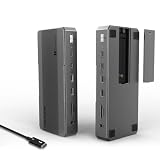 WAVLINKWAVLINK Intel-Certified Thunderbolt 5 Dock, 12-in-1 with M.2 NVMe Slot Up to 120Gbps, 140W PD, Triple 4K/Dual 8K Displays, 10Gbps USB, 2.5G RJ45 Ethernet, for Thunderbolt 5/4 Mac & Windows Laptops |
Thunderbolt 5 120Gbps class |
1 | Passive | New | $349.99 | View on Amazon |
 WAVLINKWAVLINK Thunderbolt 5 Dock, 13-in-1 TB5 Docking Station with NVMe M.2 | 120Gbps Transfer, 64Gbps M.2 SSD Transfer, 140W PD IN, 2.5G Ethernet, 4x 10Gbps USB-A, SD 4.0, Compatible with TB5/4 Laptops |
Thunderbolt 5 120Gbps class |
1 | Passive | New | $349.99 | View on Amazon |
 RazerRazer Thunderbolt 5 Dock Chroma, 11 Ports + M.2 SSD Slot, Black | 120Gbps Transfer Speeds, 3x 4K Displays at 144 Hz on Thunderbolt 5/4 Laptops, 140W PD Charging, Active Cooling, TB Share |
Thunderbolt 5 120Gbps class |
2 | Active fan | New | $379.99 | View on Amazon |
 IVANKYiVANKY FusionDock Max 2 Upgraded 23-in-1 Intel Certified Thunderbolt 5 Dock |
Thunderbolt 5 120Gbps class |
1 | Active fan | New | $399.99 | View on Amazon |
 MAIWO80Gbps M.2 NVMe SSD Enclosure with Cooling Fan Up to 7039MB/s All-Metal Body Tool Free, Support Thunderbolt5/4/3/USB4 Port, Support M.2 PCIe NVMe M Key 2280 SSD, 8TB Capacity |
Thunderbolt 5 80Gbps class |
1 Tool-free |
Active fan | New | $94.99 | View on Amazon |
Frequently asked questions
Is building an external SSD cheaper?
Sometimes. It depends on current internal SSD and enclosure prices, required cable and the price of comparable finished portable drives.
Can I reuse an old NVMe SSD?
Yes, when the drive is healthy and compatible with the enclosure. Check form factor, protocol and thermal condition.
Do all M.2 drives use NVMe?
No. Some M.2 drives use SATA, and many NVMe enclosures do not support M.2 SATA drives.