


Cloudzat Thunderbolt & NVMe Enclosure Intelligence
The right Mac mini enclosure depends on the exact model and how the drive will be used. A simple backup drive, an always-connected AI model library and a video-editing scratch disk have different speed and cooling needs.
Choose an enclosure for your Mac mini
Select the exact Mac class and workload before showing recommendations.
Match the Mac mini generation
Different Mac mini configurations expose different high-speed ports. Select the actual machine rather than assuming every Apple Silicon Mac mini has the same connection.
AI libraries favor capacity and reliability
Local models can consume substantial storage. A stable enclosure, sufficient cooling and a short certified cable can matter more than a brief benchmark peak.
Video editing favors sustained speed
Large media files and scratch workloads benefit from higher sequential throughput and thermal stability.
Keep boot and backup roles separate
A drive used as an active model library or scratch disk should not be the only backup of important files.
Current enclosure catalogue
Verified current offers with Amazon images and prices. Use the calculator above for workload-specific matching.
| Product | Interface | Slots | Cooling | Condition | Price | |
|---|---|---|---|---|---|---|
 nusynThunderbolt 5 Docking Station for Mac & Windows, 180W PD | 80/120Gbps data transfer, NVMe SSD slot, 3 Thunderbolt 5 ports, up to dual 6K@60Hz for Mac or dual 8K@120Hz for Windows |
Thunderbolt 5 120Gbps class |
2 | Passive | New | $269.00 | View on Amazon |
 HYPERHyperDrive Next Thunderbolt 5 Dock with SSD Enclosure — 120Gbps Computer Docking Station with Triple 4K Display, Thunderbolt Share, M.2 PCIe Gen4 Slot, AI Module Support, USB-A, 2.5G Ethernet |
Thunderbolt 5 120Gbps class |
1 | Passive | New | $319.99 | View on Amazon |
 RazerRazer Thunderbolt 5 Dock Chroma, 11 Ports + M.2 SSD Slot, White | 120Gbps Transfer Speeds, 3x 4K Displays at 144 Hz on Thunderbolt 5/4 Laptops, 140W PD Charging, Active Cooling, TB Share |
Thunderbolt 5 120Gbps class |
2 | Active fan | New | $349.99 | View on Amazon |
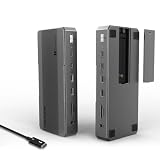 WAVLINKWAVLINK Intel-Certified Thunderbolt 5 Dock, 12-in-1 with M.2 NVMe Slot Up to 120Gbps, 140W PD, Triple 4K/Dual 8K Displays, 10Gbps USB, 2.5G RJ45 Ethernet, for Thunderbolt 5/4 Mac & Windows Laptops |
Thunderbolt 5 120Gbps class |
1 | Passive | New | $349.99 | View on Amazon |
 WAVLINKWAVLINK Thunderbolt 5 Dock, 13-in-1 TB5 Docking Station with NVMe M.2 | 120Gbps Transfer, 64Gbps M.2 SSD Transfer, 140W PD IN, 2.5G Ethernet, 4x 10Gbps USB-A, SD 4.0, Compatible with TB5/4 Laptops |
Thunderbolt 5 120Gbps class |
1 | Passive | New | $349.99 | View on Amazon |
 RazerRazer Thunderbolt 5 Dock Chroma, 11 Ports + M.2 SSD Slot, Black | 120Gbps Transfer Speeds, 3x 4K Displays at 144 Hz on Thunderbolt 5/4 Laptops, 140W PD Charging, Active Cooling, TB Share |
Thunderbolt 5 120Gbps class |
2 | Active fan | New | $379.99 | View on Amazon |
 IVANKYiVANKY FusionDock Max 2 Upgraded 23-in-1 Intel Certified Thunderbolt 5 Dock |
Thunderbolt 5 120Gbps class |
1 | Active fan | New | $399.99 | View on Amazon |
 MAIWO80Gbps M.2 NVMe SSD Enclosure with Cooling Fan Up to 7039MB/s All-Metal Body Tool Free, Support Thunderbolt5/4/3/USB4 Port, Support M.2 PCIe NVMe M Key 2280 SSD, 8TB Capacity |
Thunderbolt 5 80Gbps class |
1 Tool-free |
Active fan | New | $94.99 | View on Amazon |
Frequently asked questions
Can I leave an NVMe enclosure connected all the time?
Yes, when the enclosure is designed for continuous use and temperatures remain reasonable. Enable sensible sleep behavior and maintain backups.
Is Thunderbolt 5 useful for every Mac mini?
No. It is most useful when the Mac mini supports it and the SSD and workload can use the extra bandwidth.
Should I use APFS?
APFS is generally appropriate for Mac-only use. Mixed Mac and Windows use may require a different format with different trade-offs.