


Exos Synology guide
Synology compatibility is specific to the NAS model, drive model, capacity and sometimes firmware. Some Exos models appear on Synology's compatibility list for selected systems, but that does not approve every Exos generation or capacity for every DiskStation or RackStation. Most desktop Synology units use SATA bays, while certain enterprise systems can support SAS.
Never publish a universal “Exos works with Synology” verdict
Use Synology's current compatibility list for the exact NAS and exact drive model. Confirm that the selected marketplace variation is SATA unless the appliance explicitly supports SAS, check maximum capacity and firmware, and manage 4Kn drives separately as Synology directs. A drive absent from the list may operate, but support can be limited for issues caused by that drive or its firmware.
Interactive decision tool
Synology Exos compatibility route
Current exact-model offers
Verify interface and model before purchase
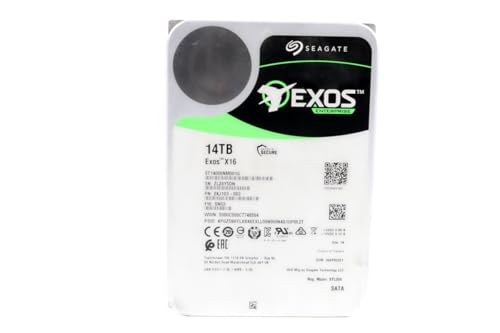
ST14000NM001G
Seagate (Renewed) Exos X16 14TB 7200 RPM SATA 6Gb/s 256MB Cache 3.5-Inch Internal Data Center HDD Enterprise Hard…
$409.99
$29.29/TB
Warranty not verified
Buy on Amazon
ST16000NM001G
Seagate 16TB HDD Exos X16 7200 RPM 512e/4Kn SATA 6Gb/s 256MB Cache 3.5-Inch Enterprise Hard Drive (ST16000NM001G) (Renewed)
$499.00
$31.19/TB
Warranty not verified
Buy on Amazon
ST12000NM002H
Seagate Exos X24 12TB 3.5" 6 Gb/s SATA III Internal Hard Drive
$569.99
$47.50/TB
Warranty not verified
Buy on Amazon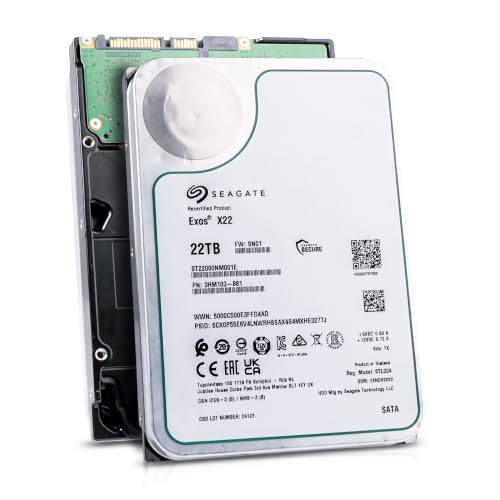
ST22000NM001E
Seagate (Recertified) Exos X22 22TB Internal Hard Drive - 3.5 Inch Hyperscale SATA 6Gb/s HDD, 7200 RPM, 2.5M…
$719.99
$32.73/TB
Seagate factory-recertified warranty — verify serial
Buy on Amazon
ST18000NM000J
18TB Hard Drive X18 ST18000NM000J 7200 RPM SATA 6Gb/s 256MB Cache 3.5-inch 18TB Enterprise Server Computer Hard Drive
$934.68
$51.93/TB
Warranty not verified
Buy on Amazon
ST30000NM004K
Seagate Exos M 30TB Enterprise Internal Hard Drive HDD - 3.5in 6GB/s SATA 7200RPM 2.5M MTBF (ST30000NM004K) (Renewed)
$1,200.00
$40.00/TB
Warranty not verified
Buy on Amazon
ST20000NM007D
Seagate Exos X20 ST20000NM007D 20TB 7.2K RPM SATA 6Gb/s 3.5in Hard Drive
Price Options
Warranty not verified
Buy on Amazon
ST28000NM003K
Seagate Exos M 28TB Enterprise Internal Hard Drive HDD - 3.5in 6GB/s SATA 7200RPM 2.5M MTBF (ST28000NM003K)
Price Options
Claimed 5-year warranty — verify by serial number
Buy on Amazon
ST20000NM002H
Seagate 20TB Exos Enterprise Hard Drive | SATA (ST20000NM002H)
Price Options
Claimed 5-year warranty — verify by serial number
Buy on AmazonAmazon prices shown are retained for up to 24 hours. Latest price refresh: 2026-10-17 23:41:40 UTC. Price/availability may change; Amazon at purchase time controls.
Exact-model reference
Do not buy from the family name alone
Use the complete model number to confirm generation, interface, sector format and security class. Similar capacities can belong to different interfaces and security variants.
| Exact model | Generation | Capacity | Interface | Sector format | Security |
|---|---|---|---|---|---|
| ST16000NM002H | Exos X24 | 16TB | SATA | 512e / 4Kn FastFormat | ISE |
| ST20000NM002H | Exos X24 | 20TB | SATA | 512e / 4Kn FastFormat | ISE |
| ST24000NM002H | Exos X24 | 24TB | SATA | 512e / 4Kn FastFormat | ISE |
| ST24000NM001K | Exos M | 24TB | SATA | 512e | Standard / verify exact listing |
| ST28000NM003K | Exos M | 28TB | SATA | 512e | Standard / verify exact listing |
| ST30000NM004K | Exos M | 30TB | SATA | 512e | Standard / verify exact listing |
| ST32000NM004K | Exos M | 32TB | SATA | 512e | Standard / verify exact listing |
| ST16000NM001G | Exos X16 | 16TB | SATA | 512e | Standard |
| ST18000NM000J | Exos X18 | 18TB | SATA | 512e | Standard |
| ST22000NM001E | Exos X22 | 22TB | SATA | 512e | Standard |
Compatibility is tied to the Synology model
A drive verified for one DiskStation is not automatically verified for another. Synology's compatibility tool starts with the storage-system model and then lists tested drives, firmware and notes. Hardware generations differ in controller, bay design, capacity support and DSM policy. Enter the complete NAS model, not only the number of bays, and repeat the check whenever DSM, drive firmware or the intended capacity changes.
Exact Exos model and firmware
The same Exos generation can contain SATA, SAS, 512e, 4Kn, ISE, SED and FIPS exact models. Synology entries identify a precise model and may include a firmware revision or product suffix. Match the received label rather than the retailer family name. If the listing hides the model or combines multiple variations, it is not suitable for a compatibility-critical multi-drive purchase.
SATA versus SAS in Synology
Most DiskStation and many RackStation models use SATA internal bays. A SAS Exos drive will not operate in a SATA-only unit. Some enterprise Synology systems use SAS backplanes and list SAS Exos models, but that support is system-specific. Check the interface field in the compatibility list and the NAS hardware specification. Do not assume a rack form factor means SAS.
Synology's 4Kn guidance
Synology's compatibility pages state that 4Kn hard drives should always be used and managed separately. This matters when replacing drives, expanding arrays or mixing exact models. A 512e and a 4Kn model can share capacity while presenting different logical sectors. Do not convert an in-use drive to solve a compatibility warning. FastFormat erases data and should be performed only before deployment on supported exact models.
What an unlisted drive means
An unlisted drive may be untested rather than electrically incompatible, but Synology states that support can be limited for issues caused by the drive or firmware. The practical risk depends on the NAS series, DSM behavior, intended workload and the owner's willingness to troubleshoot without full vendor support. For business-critical systems, choose a listed exact model or a Synology-supported drive policy. For a home lab, document the decision and maintain stronger backups.
Capacity and volume limits
The NAS must support the individual drive capacity and the planned volume or storage-pool size. Older units may recognize a drive yet have limits elsewhere in the storage stack. Check the current Synology specification, DSM release and filesystem choice. Large Exos models can also increase rebuild duration. A capacity that fits physically is not automatically a sensible upgrade for the processor, memory and fault-tolerance level of an older NAS.
Noise and vibration in DiskStation enclosures
Exos enterprise seek activity can be audible through lightweight trays and desks. Secure every tray, use the supplied mounting hardware and keep the NAS on a stable surface. Do not block the rear fans or intake path. If the NAS is placed near a bed, office microphone or living-room seating, compare the acoustic tradeoff with NAS-focused drives before buying an entire set.
Thermal behavior and fan profiles
Monitor drive temperatures during data scrubbing, RAID repair and large transfers. High-capacity drives can maintain elevated activity for hours, and quiet fan profiles may not provide enough airflow in a warm room. Use supported fan settings, clean dust and avoid enclosing the NAS in a cabinet without ventilation. If one bay runs consistently hotter, inspect airflow and tray seating rather than assuming all drives share identical conditions.
Health monitoring and firmware management
DSM can report health information and issue storage warnings, but feature depth may vary with drive support status and interface. Keep notifications enabled and record exact model, serial and firmware. Synology may not provide firmware updates for third-party drives. Use Seagate's serial-based support route and do not flash firmware intended for another exact model, OEM customer or security variant.
New, renewed and used Exos in Synology
Condition is separate from compatibility. A listed model can still be a poor purchase when it is a heavily used server pull, carries only a short seller warranty or has an unclear sector format. Verify power-on hours and health where possible, test before building the array and preserve the return window. A recertified price advantage should be compared with the cost of downtime, replacement stock and backup.
RAID repair and matching replacements
A replacement must meet capacity rules and should match interface and logical sector format. Keeping one verified spare can reduce emergency purchasing, especially for older exact models that disappear from retail. Do not insert a SAS replacement into a SATA NAS or a 4Kn drive into a pool whose vendor policy requires separation. Record the working exact model and firmware after installation.
Synology compatibility checklist
Select the exact Synology model in the current compatibility list. Search the complete Exos model, capacity and firmware. Confirm SATA or SAS, 512e or 4Kn, maximum capacity, DSM version and support notes. Review noise, cooling and rebuild duration. Verify condition and warranty source. Test the received label against the order before installing multiple drives and keep an independent backup regardless of RAID level.
Exos authority cluster
Continue the exact-model decision
Frequently asked questions
Exos compatibility answers
Do Seagate Exos drives work in Synology NAS units?
Some exact Exos models are listed for selected Synology systems. Compatibility must be checked by exact NAS, drive model, capacity and firmware.
Can I use any Exos capacity in a DiskStation?
No. Maximum supported capacity and tested models vary by Synology hardware and DSM policy.
Can a SAS Exos work in a standard DiskStation?
Most DiskStation models are SATA-only. SAS requires a Synology system with a compatible SAS backplane and explicit support.
What happens if the Exos drive is not on Synology's list?
It may operate, but Synology can limit support for issues caused by the drive or its firmware. Evaluate the risk and backup requirements.
Can I mix 512e and 4Kn Exos drives in Synology?
Synology advises using and managing 4Kn drives separately. Follow the exact model's compatibility notes.
Does DSM update Seagate Exos firmware?
Do not assume it does. Firmware support varies. Use official Seagate and Synology instructions for the exact model.
Why is my Exos drive recognized but marked unverified?
The exact model or firmware may not be in the compatibility database for that NAS. Recognition is not the same as full vendor validation.
Are Exos drives louder in Synology enclosures?
Enterprise seek noise can be noticeable and enclosure mounting can amplify it. Placement and tray fit matter.
Should I use recertified Exos drives in Synology?
Only after checking exact compatibility, health, sector format, warranty and return rights, with a strong backup and replacement plan.
How often should I recheck compatibility?
Check before purchase and again after major DSM, NAS or drive-firmware changes because compatibility lists can be updated.
Official references
Cloudzat may earn a commission from qualifying purchases. Compatibility recommendations are advisory; confirm the exact drive model, controller, backplane, sector format and appliance support list before purchase or data migration.