


Exos TrueNAS guide
Seagate Exos CMR drives can be strong TrueNAS data disks when the exact model, controller and sector format are understood. SATA models work on supported motherboard ports or HBAs. SAS models require a SAS HBA or compatible backplane. The controller should expose individual disks, serial numbers and health information rather than hiding them behind a hardware RAID virtual disk.
For most small TrueNAS builds, use SATA 512e Exos models on a reliable HBA or motherboard ports; use SAS only when the server already has SAS infrastructure
Standardize the logical sector format within the pool, use CMR rather than host-managed Exos Xz SMR, keep the HBA in a direct-disk mode, and plan vdev redundancy, scrubs, SMART monitoring, cooling and backup before buying capacity. A low-price enterprise pull is not a substitute for a tested controller path and replacement plan.
Interactive decision tool
TrueNAS Exos readiness checker
Current exact-model offers
Verify interface and model before purchase
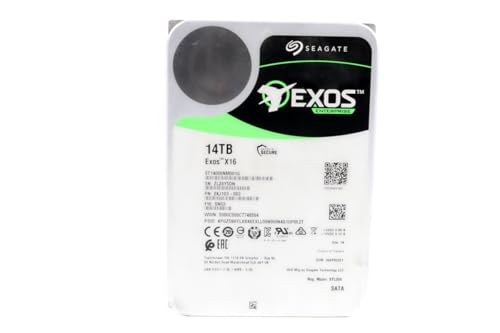
ST14000NM001G
Seagate (Renewed) Exos X16 14TB 7200 RPM SATA 6Gb/s 256MB Cache 3.5-Inch Internal Data Center HDD Enterprise Hard…
$409.99
$29.29/TB
Warranty not verified
Buy on Amazon
ST16000NM001G
Seagate 16TB HDD Exos X16 7200 RPM 512e/4Kn SATA 6Gb/s 256MB Cache 3.5-Inch Enterprise Hard Drive (ST16000NM001G) (Renewed)
$499.00
$31.19/TB
Warranty not verified
Buy on Amazon
ST16000NM002G
Seagate ST16000NM002G-R - Seagate 16TB 3.5" SAS 7.2K 12Gb/s Hard Drive (Renewed)
$548.55
$34.28/TB
Warranty not verified
Buy on Amazon
ST12000NM002H
Seagate Exos X24 12TB 3.5" 6 Gb/s SATA III Internal Hard Drive
$569.99
$47.50/TB
Warranty not verified
Buy on Amazon
ST18000NM004J
Seagate Enterprise ST18000NM004J Internal Hard Drive 3.5" 18TB SAS
$714.99
$39.72/TB
Warranty not verified
Buy on Amazon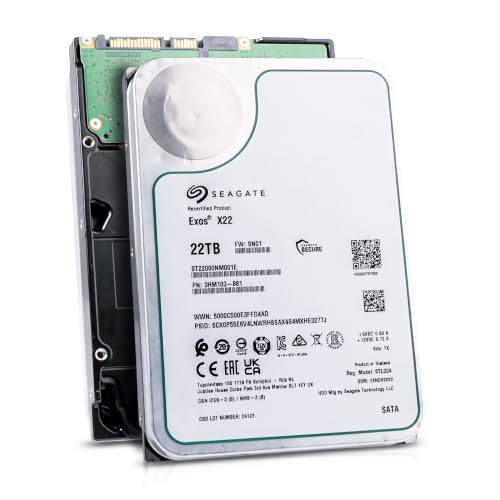
ST22000NM001E
Seagate (Recertified) Exos X22 22TB Internal Hard Drive - 3.5 Inch Hyperscale SATA 6Gb/s HDD, 7200 RPM, 2.5M…
$719.99
$32.73/TB
Seagate factory-recertified warranty — verify serial
Buy on Amazon
ST18000NM000J
18TB Hard Drive X18 ST18000NM000J 7200 RPM SATA 6Gb/s 256MB Cache 3.5-inch 18TB Enterprise Server Computer Hard Drive
$934.68
$51.93/TB
Warranty not verified
Buy on Amazon
ST30000NM004K
Seagate Exos M 30TB Enterprise Internal Hard Drive HDD - 3.5in 6GB/s SATA 7200RPM 2.5M MTBF (ST30000NM004K) (Renewed)
$1,200.00
$40.00/TB
Warranty not verified
Buy on Amazon
ST22000NM000E
SEAGATE - BUSINESS CRITICAL SAS 22TB 3.5IN 7200RPM 6GB/S 512E/4K
Price Options
Warranty not verified
Buy on Amazon
ST20000NM007D
Seagate Exos X20 ST20000NM007D 20TB 7.2K RPM SATA 6Gb/s 3.5in Hard Drive
Price Options
Warranty not verified
Buy on Amazon
ST28000NM003K
Seagate Exos M 28TB Enterprise Internal Hard Drive HDD - 3.5in 6GB/s SATA 7200RPM 2.5M MTBF (ST28000NM003K)
Price Options
Claimed 5-year warranty — verify by serial number
Buy on Amazon
ST16000NM007H
Seagate Technology ST16000NM007H 16TB Exos X24 HDD 3.5 SAS 7200 ISE Bare Hard Drive
Price Options
Warranty not verified
Buy on AmazonAmazon prices shown are retained for up to 24 hours. Latest price refresh: 2026-10-17 23:41:40 UTC. Price/availability may change; Amazon at purchase time controls.
Exact-model reference
Do not buy from the family name alone
Use the complete model number to confirm generation, interface, sector format and security class. Similar capacities can belong to different interfaces and security variants.
| Exact model | Generation | Capacity | Interface | Sector format | Security |
|---|---|---|---|---|---|
| ST16000NM002H | Exos X24 | 16TB | SATA | 512e / 4Kn FastFormat | ISE |
| ST20000NM002H | Exos X24 | 20TB | SATA | 512e / 4Kn FastFormat | ISE |
| ST24000NM002H | Exos X24 | 24TB | SATA | 512e / 4Kn FastFormat | ISE |
| ST24000NM001K | Exos M | 24TB | SATA | 512e | Standard / verify exact listing |
| ST28000NM003K | Exos M | 28TB | SATA | 512e | Standard / verify exact listing |
| ST30000NM004K | Exos M | 30TB | SATA | 512e | Standard / verify exact listing |
| ST32000NM004K | Exos M | 32TB | SATA | 512e | Standard / verify exact listing |
| ST16000NM001G | Exos X16 | 16TB | SATA | 512e | Standard |
| ST18000NM000J | Exos X18 | 18TB | SATA | 512e | Standard |
| ST22000NM001E | Exos X22 | 22TB | SATA | 512e | Standard |
Exos CMR versus specialized Exos Xz SMR
The ordinary high-capacity Exos X and Exos M models in this plugin are classified separately from Exos Xz host-managed SMR products. TrueNAS documentation states that host-managed SMR is not supported because ZFS cannot manage the required zone semantics. Do not allow an Xz model into a normal CMR purchasing table merely because the capacity and Exos brand match. Verify the exact model and recording technology before pool creation.
SATA or SAS for TrueNAS
SATA Exos drives are appropriate for many small and medium TrueNAS systems. SAS drives can be a good fit in servers with a compatible SAS HBA, expander or backplane and can support dual-port enterprise architectures. TrueNAS notes that SAS infrastructure can often accept SATA drives, while a SATA port cannot accept SAS. Choose the interface that matches the installed controller and cabling rather than buying SAS first and solving the host path later.
Use an HBA that exposes individual disks
ZFS needs reliable visibility into each physical disk. A preferred storage controller exposes serial numbers, SMART or health data and direct error behavior without creating hardware RAID virtual disks. Broadcom or LSI HBAs in IT or passthrough mode are common choices. Hardware RAID can mask device identity, cache writes in ways ZFS cannot control or make recovery dependent on the original controller. Verify firmware, capacity support and sector-size handling.
512e, 4Kn and ashift
Both 512e and 4Kn Exos drives use 4K physical media in many current models, but they present different logical block sizes. TrueNAS pool creation should use an alignment appropriate for 4K sectors. Standardize the logical sector format across a vdev where practical, and decide before writing data. FastFormat conversion erases the drive and can fail if interrupted. Do not convert a member of an active pool.
Avoid unsupported T10-DIF configurations
Current TrueNAS hardware guidance states that T10-DIF drives are not officially supported. Some enterprise SAS listings can include formats or protection-information settings intended for other storage systems. A drive that appears as 520-byte sectors or another unusual block format may need destructive reformatting and may still be unsuitable. Buy exact models with a documented 512e or 4Kn presentation rather than assuming every SAS Exos pull is ready for TrueNAS.
Vdev design and capacity
Drive capacity does not determine redundancy. Mirrors provide flexible replacement and performance characteristics, while RAIDZ layouts trade capacity efficiency, fault tolerance and rebuild behavior. Large-capacity Exos drives can take a long time to resilver, especially when pools are busy or nearly full. Choose vdev width, parity level and spare strategy based on acceptable fault exposure and restoration time, not only the lowest raw price per terabyte.
SMART, serial numbers and controller pass-through
TrueNAS monitoring is most useful when the operating system can read each disk's serial number, temperature and health information. Confirm that the HBA, expander and enclosure pass those identifiers consistently. USB bridges can report duplicate or unstable serials and are discouraged for primary storage. SAS health data uses different command paths from SATA, so test the exact controller and drive combination before committing a large pool.
SED and ZFS encryption
TrueNAS supports native ZFS encryption and also documents management of self-encrypting drives. These are different security layers. An SED can provide onboard encryption and rapid cryptographic erase, while ZFS encryption provides dataset-level control and portability within the software stack. Decide how keys are backed up, how the system unlocks after reboot and how failed drives are replaced. Do not buy SED-FIPS merely because it is available if the platform will not manage it.
Cooling and vibration
TrueNAS often runs scrubs, resilvers and replication workloads for many hours. Monitor drive temperatures under those sustained conditions, not only at idle. Dense rack chassis and home-built towers need clear front-to-back airflow, working fans and secure drive mounting. Exos drives tolerate enterprise environments, but published reliability assumptions still depend on operating conditions. A drive near its maximum temperature is not evidence of a well-designed storage server.
Power and spin-up planning
High-capacity disks can draw significant current during startup. A multi-drive TrueNAS server needs adequate 12V capacity, quality connectors and a backplane designed for the bay count. Avoid excessive SATA power splitters. Staggered spin-up may help when the HBA, backplane and drive support it, but it must be configured deliberately. Include fans, HBA and CPU load in UPS sizing rather than calculating from idle drive watts alone.
New versus recertified in ZFS pools
Recertified and used Exos drives can reduce acquisition cost, but ZFS does not remove the need for warranty and replacement planning. Test every drive before pool admission, verify sector format, save SMART baselines and confirm seller return terms. Keep enough redundancy to tolerate the expected failure scenario and maintain an independent backup. A pool built entirely from same-age used pulls can create correlated replacement risk.
TrueNAS deployment checklist
Identify the exact model and reject host-managed SMR. Confirm SATA or SAS controller support, direct-disk HBA mode, logical sector size, capacity support and health-data visibility. Choose vdev topology, ashift, encryption, spare strategy, cooling and UPS capacity. Test one drive through the actual backplane. Record model, serial, firmware, sector format and warranty source before pool creation. Then install monitoring, scrubs and a separate backup.
Exos authority cluster
Continue the exact-model decision
Frequently asked questions
Exos compatibility answers
Are Seagate Exos drives compatible with TrueNAS?
Many CMR Exos SATA and SAS models can work well when the exact interface, sector format and controller path are supported.
Can TrueNAS use SAS Exos drives?
Yes, through a compatible SAS HBA or backplane. A motherboard SATA port cannot operate a SAS drive.
Should I use hardware RAID with TrueNAS?
TrueNAS generally benefits from direct access to individual disks. Use an HBA or controller mode that exposes the physical drives unless a specific supported architecture requires otherwise.
Can TrueNAS use 4Kn Exos drives?
Modern systems can, but confirm the HBA, firmware and TrueNAS release. Standardize sector format and create the pool with appropriate alignment.
Can I mix 512e and 4Kn in one vdev?
Avoid it unless the complete configuration has been tested and documented. Uniform logical sectors simplify replacement and recovery.
Are Exos Xz drives suitable for TrueNAS?
No for ordinary ZFS use. TrueNAS documentation says host-managed SMR is not supported.
Does TrueNAS support Exos SED models?
TrueNAS has SED management documentation, but compatibility depends on protocol, controller and configuration. ZFS native encryption is a separate option.
Can I connect Exos drives over USB to TrueNAS?
USB storage is not recommended for primary TrueNAS pools because bridges can hide serials and create reliability issues.
How much cooling do Exos drives need?
Use the drive and chassis specifications, monitor temperatures during scrubs and resilvers, and maintain stable front-to-back airflow.
Should I use recertified Exos drives in TrueNAS?
Only with testing, verified sector format, suitable redundancy, a replacement reserve, clear warranty terms and independent backups.
Official references
Cloudzat may earn a commission from qualifying purchases. Compatibility recommendations are advisory; confirm the exact drive model, controller, backplane, sector format and appliance support list before purchase or data migration.