


Exos home-server guide
Seagate Exos Home Server Guide: Compatibility, Noise, Power and Setup
Seagate Exos drives can provide excellent capacity for backup servers, media libraries, ZFS systems and home labs, but they bring enterprise assumptions into a residential environment. The key decision is not whether the drive is electrically a hard drive. It is whether the complete server can support its interface, logical sector size, startup power, cooling, vibration and acoustic behavior.
Use Exos at home when capacity value and enterprise workload capability matter more than silent operation
SATA is the simplest path for most towers and consumer motherboards. SAS requires a compatible HBA or backplane. Use 512e unless the entire stack is verified for 4Kn, plan power for simultaneous spin-up, provide direct airflow and keep the server away from quiet living spaces if seek noise is objectionable. Buy by exact model and warranty source.
Interactive decision tool
Home-server Exos suitability checker
Exact-model reference
Do not buy from the family name alone
Use the complete model number to confirm generation, interface, sector format and security class. Similar capacities can belong to different interfaces and security variants.
| Exact model | Generation | Capacity | Interface | Sector format | Security |
|---|---|---|---|---|---|
| ST16000NM002H | Exos X24 | 16TB | SATA | 512e / 4Kn FastFormat | ISE |
| ST20000NM002H | Exos X24 | 20TB | SATA | 512e / 4Kn FastFormat | ISE |
| ST24000NM002H | Exos X24 | 24TB | SATA | 512e / 4Kn FastFormat | ISE |
| ST24000NM001K | Exos M | 24TB | SATA | 512e | Standard / verify exact listing |
| ST28000NM003K | Exos M | 28TB | SATA | 512e | Standard / verify exact listing |
| ST30000NM004K | Exos M | 30TB | SATA | 512e | Standard / verify exact listing |
| ST32000NM004K | Exos M | 32TB | SATA | 512e | Standard / verify exact listing |
| ST16000NM001G | Exos X16 | 16TB | SATA | 512e | Standard |
| ST18000NM000J | Exos X18 | 18TB | SATA | 512e | Standard |
| ST22000NM001E | Exos X22 | 22TB | SATA | 512e | Standard |
Exos can be used outside a data center
A current SATA Exos drive uses an industry-standard host interface and can operate in many desktop-style servers. The enterprise label does not require a proprietary operating system. Compatibility still depends on exact model, controller, sector format and capacity. Home users should evaluate acoustics, power and cooling more carefully because the chassis and room are often less controlled than a rack environment.
SATA is the easiest home-server choice
A SATA Exos model can connect to a supported motherboard SATA port or HBA using ordinary SATA data and power paths. This minimizes extra hardware and usually provides straightforward health monitoring. Confirm that the motherboard firmware and operating system support the full capacity. Very old controllers can have limits even when they use the correct connector.
When SAS makes sense at home
SAS can be cost-effective when buying used enterprise drives or reusing a server chassis, but it requires a compatible HBA, cable and backplane. It is most sensible when the hardware already exists or when the build needs many ports and enterprise enclosure features. Include controller power, airflow, PCIe lanes and cabling in the total cost. A passive adapter cannot replace the HBA.
512e versus 4Kn
512e provides the broadest compatibility with desktop firmware, recovery tools and consumer enclosures. 4Kn can work in modern Linux, ZFS and server environments but must be supported end to end. FastFormat conversion is destructive and should happen only before deployment. Keep a written record of each drive's logical sector size so replacements do not depend on guessing during a failure.
Chassis airflow
High-capacity HDDs need airflow across the drive bodies and electronics. A tower with front intake fans and unobstructed trays is preferable to tightly stacking drives in a general desktop cage. Monitor temperatures during parity checks, scrubs, backups and media scans. Replace failed fans promptly and clean filters. Enterprise tolerance does not eliminate the reliability consequences of sustained heat.
Acoustics and room placement
Exos drives can emit noticeable seeks, clicks associated with normal head movement and background maintenance sounds. Multiple drives can transmit vibration into a desk or wooden cabinet. Use secure mounting and place the server in a ventilated utility area when possible. Do not hide it in a sealed cupboard merely to reduce noise. If silent operation is the main priority, compare NAS-focused HDDs or fewer larger drives.
Power supply and spin-up current
Steady idle watts understate the startup demand of several hard drives. Size the 12V rail, connectors and UPS for simultaneous spin-up plus the HBA, CPU and fans. Avoid low-quality splitters and overloaded modular cables. A server that resets only when all drives start may have a power-path problem rather than defective disks. Staggered spin-up requires coordinated drive and controller support.
Workload fit
Exos is designed for continuous enterprise workloads and can suit backup repositories, Plex or Jellyfin media, file servers, ZFS pools, virtual-machine bulk storage and AI dataset archives. Mechanical latency still makes SSDs better for operating systems, application databases, metadata and active virtual machines. A balanced home server often uses Exos for capacity and mirrored SSDs or NVMe for latency-sensitive services.
NAS operating system choice
TrueNAS, Unraid, Linux mdraid, Windows Storage Spaces and other platforms have different controller and replacement assumptions. TrueNAS favors direct disk access for ZFS. Unraid uses parity-size rules and identifies drives by serial number. Vendor NAS systems depend on compatibility lists. Select the software architecture before buying drives so the HBA mode, sector format and expansion method are intentional.
Security variants at home
SED and FIPS models are not automatically better for a home server. They can add rapid cryptographic erase or managed locking when the host supports it, but they introduce credential and recovery obligations. Software encryption may be easier to back up and migrate. Buy an SED only with a plan for ownership, unlocking, PSID inventory and recovery after motherboard or controller replacement.
New versus recertified economics
Exos often appears inexpensive because the listing is OEM, recertified, seller-refurbished or used. Compare price per terabyte alongside warranty source, power-on hours, return period and the cost of keeping a spare. Test drives before trusting them and do not build the only copy of family data on a batch of unverified enterprise pulls. Savings should improve redundancy and backup, not replace them.
Home-server deployment checklist
Choose workload and operating system. Confirm exact model, interface, sector format, security variant, capacity support and controller mode. Plan drive bays, airflow, noise location, startup power and UPS capacity. Verify condition and warranty by serial number. Test one drive through the final cable and backplane, record its baseline, then build redundancy, monitoring and an independent backup. Compare price only after the compatibility design is complete.
Current exact-model offers
Verify interface and model before purchase
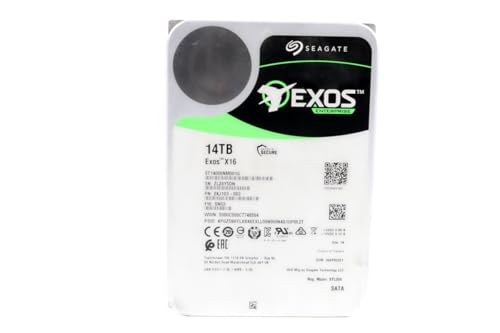
ST14000NM001G
Seagate (Renewed) Exos X16 14TB 7200 RPM SATA 6Gb/s 256MB Cache 3.5-Inch Internal Data Center HDD Enterprise Hard…
$399.99
$28.57/TB
Warranty not verified
Buy on Amazon
ST16000NM001G
Seagate 16TB HDD Exos X16 7200 RPM 512e/4Kn SATA 6Gb/s 256MB Cache 3.5-Inch Enterprise Hard Drive (ST16000NM001G) (Renewed)
$479.99
$30.00/TB
Warranty not verified
Buy on Amazon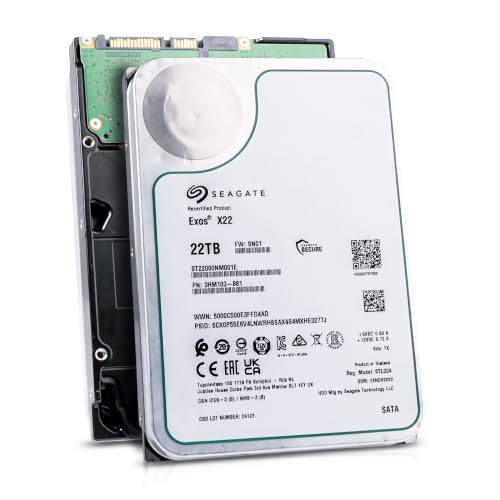
ST22000NM001E
Seagate (Recertified) Exos X22 22TB Internal Hard Drive - 3.5 Inch Hyperscale SATA 6Gb/s HDD, 7200 RPM, 2.5M…
$649.99
$29.55/TB
Seagate factory-recertified warranty — verify serial
Buy on Amazon
ST18000NM000J
Seagate Enterprise 3.5" 18000 GB 7200 RPM 18 TB 3.5" 7200 RPM SATA ST18000NM00J
$714.98
$39.72/TB
Warranty not verified
Buy on Amazon
ST20000NM002H
Seagate 20TB Exos Enterprise Hard Drive | SATA (ST20000NM002H)
$799.99
$40.00/TB
Claimed 5-year warranty — verify by serial number
Buy on Amazon
ST20000NM007D
Seagate Exos X20 ST20000NM007D 20TB 7.2K RPM SATA 6Gb/s 3.5in Hard Drive
$849.00
$42.45/TB
Warranty not verified
Buy on Amazon
ST28000NM003K
ST28000NM003K
$1,119.99
$40.00/TB
Claimed 5-year warranty — verify by serial number
Buy on Amazon
ST24000NM002H
Seagate Exos X24 24TB Enterprise Internal Hard Drive HDD - 6GB/s SATA 7200RPM 2.5M MTBF (ST24000NM002H)
Price Options
Claimed 5-year warranty — verify by serial number
Buy on Amazon
ST12000NM002H
Seagate Exos X24 12TB 3.5" 6 Gb/s SATA III Internal Hard Drive
Price Options
Warranty not verified
Buy on Amazon
ST30000NM004K
ST30000NM004K
Price Options
Claimed 5-year warranty — verify by serial number
Buy on AmazonAmazon prices shown are retained for up to 24 hours. Latest price refresh: 2026-08-26 00:38:10 UTC. Price/availability may change; Amazon at purchase time controls.
Exos authority cluster
Continue the exact-model decision
Frequently asked questions
Exos compatibility answers
Can I use Seagate Exos in a normal desktop PC?
A SATA Exos can work when the motherboard, power supply, operating system and chassis support the capacity and 3.5-inch drive. SAS requires an HBA.
Are Exos drives too loud for home use?
They can be noticeable during seeks and background activity. Perceived noise depends on exact model, mounting, enclosure and room placement.
Do Exos drives need a server power supply?
Not specifically, but the supply and cabling must handle startup current for the number of drives installed.
Should I choose SATA or SAS for a home server?
Choose SATA for simplicity unless compatible SAS infrastructure already exists or provides a specific benefit.
Can I use Exos for Plex or Jellyfin?
Yes, as bulk media storage. Use SSD or NVMe for application data and metadata when responsiveness matters.
Can Exos be a boot drive?
It can, but an SSD is normally much better for boot and application latency. Use Exos mainly for capacity.
Should I use 4Kn at home?
Only when the controller, operating system, recovery tools and future replacements are verified. 512e is safer for broad compatibility.
Are used Exos drives good value?
They can be, but condition, power-on hours, warranty and correlated age risk must be considered. Maintain redundancy and backups.
Do I need an HBA for SATA Exos drives?
Not when enough supported motherboard SATA ports are available. An HBA is useful for additional ports or a backplane.
Does enterprise reliability remove the need for backups?
No. Every drive can fail, and redundancy does not protect against deletion, ransomware or disaster. Keep independent backups.
Official references
Cloudzat may earn a commission from qualifying purchases. Compatibility recommendations are advisory; confirm the exact drive model, controller, backplane, sector format and appliance support list before purchase or data migration.