


Cloudzat OCuLink & eGPU Intelligence
An external GPU setup works only when the computer exposes a suitable PCIe path, the operating system supports the graphics stack, the dock can power the card and the workload can tolerate connection overhead. This checker turns those dependencies into a clear setup verdict and shopping checklist.
Check an external GPU setup
No result is shown until you click the button.
Identify the real connection
A USB-C-shaped port may be USB, USB4, Thunderbolt or a proprietary connection. The connector shape does not confirm eGPU support. OCuLink provides a direct PCIe link, while Thunderbolt and USB4 rely on host controller support.
Operating-system support matters
Windows usually provides the broadest eGPU path. Linux support depends on the GPU driver and desktop stack. Apple Silicon Macs do not support conventional external desktop GPUs, even when they have Thunderbolt ports.
Power and physical fit are separate checks
A dock can expose PCIe correctly yet remain unusable if the power supply, connectors, card length, slot width or cooling are inadequate.
Treat the result as a purchase checklist
Computer firmware, BIOS routing and vendor implementation can differ between models. Verify the exact computer manual before purchasing a dock or opening a mini PC to reach an M.2 adapter.
Current eGPU accessory catalogue
Current docks, adapters, cables and power supplies with Amazon images and prices.
| Product | Type | Interface | Power | Condition | Price | |
|---|---|---|---|---|---|---|
 PlugablePlugable Thunderbolt 5 AI eGPU Enclosure & Dock: 80Gbps, TAA Compliant |
Egpu Dock | Thunderbolt 5 80Gbps class |
850W | New | Price Options | Buy on Amazon |
 GOLDSOUNGOLDSOUN External eGPU Dock Compatible with Thunderbolt 3/4 USB4,85W PD |
Egpu Dock | Thunderbolt 4 40Gbps class |
Separate/unknown | New | Price Options | Buy on Amazon |
 OwlTreeOwlTree Graphics Card eGPU Dock for Thunderbolt 3/4 USB 4, with 60cm Cable |
Egpu Dock | Thunderbolt 4 40Gbps class |
Separate/unknown | New | Price Options | Buy on Amazon |
 NIMONIMO External Dedicated Graphics Card for Laptops & Mini PCs & Desktop, AMD RX 7600MXT, Thunderbolt 5 & OCuLink eGPU Docking Station, 8GB GDDR6, DP 2.0 / HDMI 2.1, 240W Built-in PSU |
Oculink Cable | OCuLink x4 80Gbps class |
Separate/unknown Included |
New | Price Options | Buy on Amazon |
 RGEEKOCuLink eGPU Dock |
Oculink Cable | OCuLink x4 64Gbps class |
Separate/unknown | New | Price Options | Buy on Amazon |
 OwlTreePCIe 4.0 x4 64Gbps Compatible eGPU DOCK, with OCuLink SFF-8612 8311 to PCIe x16 and SFF-8611 Male Cable, Enclosure supports Standard ATX Power and External Graphics Cards GPU for Laptop Mini PC |
Integrated Egpu RTX 4090 |
OCuLink x4 64Gbps class |
Separate/unknown Included |
New | Price Options | Buy on Amazon |
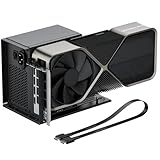 OwlTreeOwlTree PCIe 4.0 x4 64Gbps eGPU External Graphics Cards Dock, with OCuLink SFF-8612 8311 to PCIe x16 and SFF-8611 Male Cable 50cm, Supports GPU Laptop MIni PC Standard ATX Power Supply |
Integrated Egpu RTX 4090 |
OCuLink x4 64Gbps class |
Separate/unknown Included |
New | Price Options | Buy on Amazon |
 RGEEKOCuLink eGPU Dock, SFF-8612 to PCIe x16 Adapter with 50cm OCuLink Cable |
Integrated Egpu RTX 4090 |
OCuLink x4 64Gbps class |
Separate/unknown Included |
New | Price Options | Buy on Amazon |
Amazon prices and images are refreshed on a 24-hour cycle when available. A matching listing without a current featured numeric price is shown as Price Options; check Amazon for the current offer.
Frequently asked questions
Does every Thunderbolt laptop support an eGPU?
No. The port, firmware, operating system and driver stack must support external PCIe graphics. Verify the exact model.
Can USB4 support an eGPU?
Some USB4 implementations expose PCIe tunneling and can work with compatible docks, while others do not. USB4 branding alone is not sufficient.
Can an Apple Silicon Mac use an NVIDIA eGPU?
No conventional external desktop GPU path is supported on Apple Silicon macOS. Use the built-in Apple GPU or a separate networked workstation.