


Cloudzat OCuLink & eGPU Intelligence
External GPU performance is not reduced by one universal percentage. The loss changes with the link, GPU strength, CPU, resolution, internal or external display use and whether the workload repeatedly transfers data. This calculator provides a planning range rather than a benchmark promise.
Estimate external GPU performance loss
The output is a range, not a guaranteed benchmark.
Faster GPUs can expose the link limit
A high-end card can be restricted more noticeably by an external connection than a midrange card because it generates and consumes data faster.
An external monitor usually helps gaming
Sending rendered frames back through the same connection to a laptop display can add traffic. Connecting the monitor directly to the eGPU often reduces that penalty.
Resolution changes the bottleneck
At higher resolutions, the GPU itself does more work per frame and the relative connection penalty can shrink. At lower resolutions, the CPU and link can become more visible.
AI behavior differs from games
When a complete model fits in GPU memory, token generation may depend more on GPU memory bandwidth than the external link. CPU offloading, model loading and multi-GPU traffic remain connection-sensitive.
Current eGPU accessory catalogue
Current docks, adapters, cables and power supplies with Amazon images and prices.
| Product | Type | Interface | Power | Condition | Price | |
|---|---|---|---|---|---|---|
 PlugablePlugable Thunderbolt 5 AI eGPU Enclosure & Dock: 80Gbps, TAA Compliant |
Egpu Dock | Thunderbolt 5 80Gbps class |
850W | New | Price Options | Buy on Amazon |
 GOLDSOUNGOLDSOUN External eGPU Dock Compatible with Thunderbolt 3/4 USB4,85W PD |
Egpu Dock | Thunderbolt 4 40Gbps class |
Separate/unknown | New | Price Options | Buy on Amazon |
 OwlTreeOwlTree Graphics Card eGPU Dock for Thunderbolt 3/4 USB 4, with 60cm Cable |
Egpu Dock | Thunderbolt 4 40Gbps class |
Separate/unknown | New | Price Options | Buy on Amazon |
 NIMONIMO External Dedicated Graphics Card for Laptops & Mini PCs & Desktop, AMD RX 7600MXT, Thunderbolt 5 & OCuLink eGPU Docking Station, 8GB GDDR6, DP 2.0 / HDMI 2.1, 240W Built-in PSU |
Oculink Cable | OCuLink x4 80Gbps class |
Separate/unknown Included |
New | Price Options | Buy on Amazon |
 RGEEKOCuLink eGPU Dock |
Oculink Cable | OCuLink x4 64Gbps class |
Separate/unknown | New | Price Options | Buy on Amazon |
 OwlTreePCIe 4.0 x4 64Gbps Compatible eGPU DOCK, with OCuLink SFF-8612 8311 to PCIe x16 and SFF-8611 Male Cable, Enclosure supports Standard ATX Power and External Graphics Cards GPU for Laptop Mini PC |
Integrated Egpu RTX 4090 |
OCuLink x4 64Gbps class |
Separate/unknown Included |
New | Price Options | Buy on Amazon |
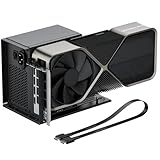 OwlTreeOwlTree PCIe 4.0 x4 64Gbps eGPU External Graphics Cards Dock, with OCuLink SFF-8612 8311 to PCIe x16 and SFF-8611 Male Cable 50cm, Supports GPU Laptop MIni PC Standard ATX Power Supply |
Integrated Egpu RTX 4090 |
OCuLink x4 64Gbps class |
Separate/unknown Included |
New | Price Options | Buy on Amazon |
 RGEEKOCuLink eGPU Dock, SFF-8612 to PCIe x16 Adapter with 50cm OCuLink Cable |
Integrated Egpu RTX 4090 |
OCuLink x4 64Gbps class |
Separate/unknown Included |
New | Price Options | Buy on Amazon |
Amazon prices and images are refreshed on a 24-hour cycle when available. A matching listing without a current featured numeric price is shown as Price Options; check Amazon for the current offer.
Frequently asked questions
Is the result a guaranteed benchmark?
No. It is a planning range based on common bottleneck patterns. Exact performance requires testing the specific computer, dock, GPU and application.
Why does the internal display increase the loss?
Frames may need to travel back through the eGPU link to the laptop display, consuming bandwidth and adding latency.
Is OCuLink loss always small?
No. PCIe generation, lane count, CPU limits and workload can still reduce performance.