


Cloudzat OCuLink & eGPU Intelligence
OCuLink and Thunderbolt 5 solve the external GPU problem in different ways. OCuLink favors a direct PCIe path and lower overhead. Thunderbolt favors hot plugging, standardized cabling and broader peripheral functions. The better option depends on the computer and how often the setup moves.
Compare OCuLink and Thunderbolt 5
The result weighs performance, portability, host support and total cost.
Connection convenience has real value
Thunderbolt can carry displays, data and peripheral traffic through a familiar USB-C connector. OCuLink usually requires a dedicated port, shutdown discipline and a separate power arrangement.
Direct PCIe helps bandwidth-sensitive work
Gaming at lower resolutions and workloads that repeatedly transfer data can be more sensitive to link overhead. Once a local AI model is loaded into VRAM, sustained inference may be less link-sensitive than initial loading or CPU offload.
The host decides the available options
A computer with only Thunderbolt cannot use an OCuLink dock without an internal adapter path. A mini PC with native OCuLink may make Thunderbolt unnecessary for a fixed desk setup.
Compare total platform cost
Include the dock, cable, power supply, GPU and any lost M.2 slot. A cheaper dock can become more expensive after the supporting parts are added.
Current eGPU accessory catalogue
Current docks, adapters, cables and power supplies with Amazon images and prices.
| Product | Type | Interface | Power | Condition | Price | |
|---|---|---|---|---|---|---|
 PlugablePlugable Thunderbolt 5 AI eGPU Enclosure & Dock: 80Gbps, TAA Compliant |
Egpu Dock | Thunderbolt 5 80Gbps class |
850W | New | Price Options | Buy on Amazon |
 GOLDSOUNGOLDSOUN External eGPU Dock Compatible with Thunderbolt 3/4 USB4,85W PD |
Egpu Dock | Thunderbolt 4 40Gbps class |
Separate/unknown | New | Price Options | Buy on Amazon |
 OwlTreeOwlTree Graphics Card eGPU Dock for Thunderbolt 3/4 USB 4, with 60cm Cable |
Egpu Dock | Thunderbolt 4 40Gbps class |
Separate/unknown | New | Price Options | Buy on Amazon |
 NIMONIMO External Dedicated Graphics Card for Laptops & Mini PCs & Desktop, AMD RX 7600MXT, Thunderbolt 5 & OCuLink eGPU Docking Station, 8GB GDDR6, DP 2.0 / HDMI 2.1, 240W Built-in PSU |
Oculink Cable | OCuLink x4 80Gbps class |
Separate/unknown Included |
New | Price Options | Buy on Amazon |
 RGEEKOCuLink eGPU Dock |
Oculink Cable | OCuLink x4 64Gbps class |
Separate/unknown | New | Price Options | Buy on Amazon |
 OwlTreePCIe 4.0 x4 64Gbps Compatible eGPU DOCK, with OCuLink SFF-8612 8311 to PCIe x16 and SFF-8611 Male Cable, Enclosure supports Standard ATX Power and External Graphics Cards GPU for Laptop Mini PC |
Integrated Egpu RTX 4090 |
OCuLink x4 64Gbps class |
Separate/unknown Included |
New | Price Options | Buy on Amazon |
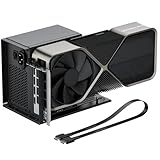 OwlTreeOwlTree PCIe 4.0 x4 64Gbps eGPU External Graphics Cards Dock, with OCuLink SFF-8612 8311 to PCIe x16 and SFF-8611 Male Cable 50cm, Supports GPU Laptop MIni PC Standard ATX Power Supply |
Integrated Egpu RTX 4090 |
OCuLink x4 64Gbps class |
Separate/unknown Included |
New | Price Options | Buy on Amazon |
 RGEEKOCuLink eGPU Dock, SFF-8612 to PCIe x16 Adapter with 50cm OCuLink Cable |
Integrated Egpu RTX 4090 |
OCuLink x4 64Gbps class |
Separate/unknown Included |
New | Price Options | Buy on Amazon |
Amazon prices and images are refreshed on a 24-hour cycle when available. A matching listing without a current featured numeric price is shown as Price Options; check Amazon for the current offer.
Frequently asked questions
Which is better for a fixed mini-PC desk setup?
Native OCuLink is often attractive when maximum GPU performance and a permanent connection matter more than hot plugging.
Which is better for a laptop?
Thunderbolt is usually easier when the laptop explicitly supports eGPU use, because the connection is external and more portable.
Does Thunderbolt 5 remove all eGPU performance loss?
No. It improves available bandwidth, but protocol overhead, CPU limits, display routing and application behavior remain.