


Canada · www.amazon.ca · CAD
Core 3 N355 Mini PCs Canada: Prices and Buying Guide
Explore Core 3 N355 mini PCs in Canada. Compare verified CAD prices, RAM, SSD and networking, then check software, delivery and the exact configuration.
The quick answer
Our pick: MINIX NUC355 (16 GB RAM, 512 GB SSD).
Our N355 Mini PC picks
The pick below has the processor, RAM and SSD shown. Check those options and the total on Amazon before ordering.

MINIX NUC355
N355 · 16 GB RAM · 512 GB SSD
Installed RAM and SSD are included. Check the exact model’s ports and software support.
MINIX NUC355 Mini PC, Intel Core 3 N355, 16GB DDR5, 512GB PCIe SSD, Triple 4K Display, WiFi 6, BT5.2, 2.5G LAN, Windows 11 Pro, USB-C/HDMI, for Business, Office, Education & Digital Signage
Compare the CPU, installed RAM, SSD and seller. Each card shows when its price was checked. Some PCs do not include an operating system, so confirm the contents and delivered total before ordering.
N355 · mini PC offers
1 complete systemsMINIX NUC355 Mini PC, Intel Core 3 N355, 16GB DDR5, 512GB PCIe SSD, Triple 4K Display, WiFi 6, BT5.2, 2.5G LAN, Windows 11 Pro, USB-C/HDMI, for Business, Office, Education & Digital Signage
N355 · 16 GB RAM · 512 GB SSD
CA$695.90 CAD
Buy on AmazonPrice verified · New
Price may have changed. Check Amazon before ordering.
Offer details
Amazon listing · ASIN B0FDQSD213No systems match these filters. Try a higher budget or less memory.
As an Amazon Associate, Cloudzat earns from qualifying purchases. Affiliate links do not change the listed selection rules. Kits and other processors are kept separate from complete exact-CPU systems.
How to choose a Core 3 N355 mini PC
| Specification | Intel Core 3 N355 |
|---|---|
| Cores / threads | 8 / 8 |
| Maximum turbo frequency | Up to 3.90 GHz |
| Intel processor power rating | 15 W processor base power · 9 W minimum assured power |
| Integrated graphics | Intel Graphics · 32 execution units |
| Intel listed maximum memory | 16 GB · one memory channel |
Source: Intel specifications linked above, checked 30 October 2026. Processor ratings are not wall-power measurements or system benchmarks. Installed memory, ports and expansion depend on the exact computer.
Start with the official Core 3 N355 identity
Intel names this processor Core 3 N355. That is different from the older Core i3-N305 naming, even though retailers may use inconsistent abbreviations. Search results and product families can mix several processor options, so confirm the selected variant rather than relying on a photograph or the broad model-family name. A comparison phrase mentioning N355 does not prove that the advertised computer contains one.
An N355 purchase should begin with the complete machine and its intended workload. Office desktops, multi-port appliances and other compact systems can share a processor while differing in memory layout, storage access, ports and support. A newer CPU label cannot compensate for an interface the job requires or an enclosure that is difficult to maintain. Write down those requirements before evaluating a price premium.
Comparing a Canadian delivered price
Use the Canadian-dollar prices shown here when shopping for a Canadian address. A US-dollar offer converted into CAD is not a Canadian delivered price. Confirm the selected seller, dispatch location, delivery charge and final checkout total for your province and postal code. Taxes and any import charges shown at checkout can change the comparison. A product family may contain several sellers and configurations, so record the exact CPU, memory, SSD and operating-system bundle rather than relying on the family name or enclosure photograph.
For a cross-border shipment, check the return address and the process for obtaining support before paying. A nominal saving can become less useful if returning the system requires an expensive international shipment. Confirm the supplied mains lead, the adapter input rating and any accessories needed for your display. Keep the order confirmation and model details. When the mini PC arrives, verify the installed components and activation status, then test the features that motivated the purchase before transferring important files or retiring your previous machine.
Eight cores are useful only when the workload fits
The processor specification lists eight cores and eight threads. That provides a different starting point from a four-core N150, but it is not a promise that every task doubles in speed. Some applications depend more on one busy thread, storage latency or available memory. Several concurrent services also need resources beyond the CPU, particularly when they run backups, indexing or updates at the same time.
Compare evidence from the complete system where possible. Cooling, firmware settings and the installed configuration affect what a small computer can sustain. Avoid translating a maximum turbo figure into a measured application advantage. For demanding gaming, heavy creative production or substantial local AI, evaluate a more capable platform instead of assuming that every eight-core processor belongs to the same performance class.
N355 versus i3-N305 is a system comparison
Both of these processors have eight cores and eight threads. The N355 should not be presented as a core-count upgrade over an N305. Their published maximum frequencies and graphics specifications differ, but those facts alone do not settle the value of two finished products. Compare RAM, SSD, ports, cooling, seller terms and the complete price before choosing the newer model.
An N305 computer already performing its job well may not need replacement. A new N355 system becomes more interesting when it solves a specific limitation, such as unsuitable networking, poor service access or insufficient included storage. Even then, verify the feature on the exact model. Paying for a newer badge while keeping the same practical limitation is unlikely to improve the installation in the way you intended.
Installed RAM and vendor capacity claims
For a machine running several applications or services, size memory before making the processor choice final. Include the host operating system, simultaneous workloads and recovery headroom. Check the RAM actually supplied, whether it is replaceable and the upgrade cost. A larger supported maximum printed in a product image does not establish what comes installed in the selected offer.
Intel lists a 16 GB maximum for N355, with one memory channel. Some vendors advertise larger system configurations; those require confirmation from the system vendor for the exact machine and revision. Do not assume a larger official memory ceiling merely because N355 is newer than N305 or N150. If your job needs substantial memory beyond the documented platform specification, compare other platforms before committing to this one.
Home services, containers and virtual machines
An N355 machine can be considered for modest home services when the entire configuration fits. A few containers, several desktop virtual machines and a camera-recording installation are different purchasing problems. List the services that must run together, their storage needs and the periods when scheduled work will overlap. Memory, drive behaviour and network support can determine suitability before all cores are occupied.
Check the chosen software’s current requirements and the machine’s firmware options. Processor virtualisation support does not guarantee that every device can be used as you intend. Keep backups away from the host, allow space for logs and recovery images, and record how to restore essential services. If you want a dedicated Home Assistant machine, follow the project’s official x86-64 guidance rather than assuming the factory operating system is ready for that role.
Multi-port appliances need network evidence
If the intended job is routing or a firewall, inspect the network-controller models and their support in your operating system. Confirm port count and speed, but also consider the features that will run on the appliance. VPNs, inspection and several busy links can create a different workload from simple forwarding. The CPU name does not prove a throughput figure for the complete network configuration.
Check whether the offer includes RAM, an SSD and a suitable power adapter. Barebones appliances can look inexpensive beside complete desktops while needing additional purchases before use. Compare the complete delivered cost and support route. For a system that will provide household connectivity, retain a fallback connection and a recovery copy of the configuration while testing the new hardware.
Storage and external connections
Compare installed SSD capacity with the data the computer will hold. A compact service host needs room for updates and logs as well as applications, while recordings and media can change the storage budget substantially. Confirm the physical drive format, interface and accessible spare connectors. An M.2 slot is not by itself evidence of NVMe support or a convenient second-drive upgrade.
Check each external connector’s actual function. USB-C does not automatically provide USB4, display output or power input. Multiple display sockets do not establish the resolutions and refresh rates that the finished system can use together. Read the manufacturer’s model-level specification and include any needed adapters or cables in the budget, particularly when replacing an existing computer with a known monitor arrangement.
Graphics, media and local AI expectations
Use integrated graphics specifications as feature information, not a substitute for testing your applications. A media server’s needs depend on direct playback versus conversion, codecs, subtitles, clients and software settings. Check the current Plex or Jellyfin documentation for the operating system, graphics driver and acceleration path you intend to use. No fixed stream count follows simply from the N355 model name.
Local AI and demanding games require a separate assessment. Memory capacity, graphics capability, model size and software support matter alongside the CPU. Do not treat a seller’s AI PC or gaming label as evidence that the machine fits a demanding task. If those workloads are the main reason for buying, compare suitable alternatives before spending money on upgrades that still leave the platform’s main constraint in place.
Cooling, placement and ownership cost
Check the enclosure and cooling arrangement for the actual workload. A fanless case removes fan noise but does not guarantee low temperatures or stable performance during sustained processing. A small ventilated desktop can be a better choice when its fan is quiet under normal use. Placement, room temperature and firmware settings all affect the result, so evidence from another enclosure is an imperfect guide.
Use measured whole-system watts for electricity planning. Intel’s processor base-power value is not a reading at the wall. The calculator starts with editable examples and uses your operating hours and tariff. Include external drives or accessories separately. When comparing two offers, add the complete purchase price and realistic running cost rather than assuming that a nominal processor rating predicts the annual bill.
Decide whether the premium buys something useful
Choose an N355 system because its complete configuration meets your needs at a defensible total price. If an N150 can perform the light job with the required ports and memory, a higher CPU tier may not earn its premium. If an N305 offers the same practical features at a lower cost, compare that option carefully. Availability and seller support also matter when a service must be restored quickly after a failure.
Keep the exact model and selected configuration in your order record. On arrival, verify CPU, memory and SSD, test essential ports and retain recovery information before changing software. Try the real workload while return options remain available. Move important services only after those checks, and keep independent backups. The useful result is a system that performs the intended job, rather than simply the newest label in the shortlist.
Electricity and service continuity in Canada
For an always-on server, enter your own electricity unit rate in Canadian dollars per kWh. The editable calculator value is an illustration, not a provincial average or a current tariff quote. If your rate changes by time or season, use a representative weighted input or calculate the periods separately. Fixed charges that remain unchanged with the purchase should not be treated as incremental mini PC consumption. Measure the complete computer with the storage and adapters it normally uses; Intel’s processor power rating is not that measurement.
Consider support and recovery alongside the hardware price. Check that firmware, driver and recovery downloads identify the exact model, and keep a separate copy of important service settings and files. Where an interruption would cause problems, plan an orderly shutdown and test the intended restart behaviour. A UPS can help with a short interruption but is a separate purchase and power load. Confirm local delivery and return conditions for your address, particularly if a listing uses a third-party seller or ships from outside Canada.
Estimate annual electricity cost
Enter measured whole-system watts and your local tariff. The starting values are examples, not N355 measurements or national tariff estimates.
kWh/year = watts × hours/day × 365 ÷ 1000. Cost = kWh × tariff. Excludes standby changes and other equipment.
Current alternative mini PC deals on Amazon
These use other processors. Compare the complete configuration, ports and delivered cost with the systems above.

ACEMAGIC Mini PC K1 Ryzen Embedded R2544 8GB DDR4 RAM 256GB Mini PC Win11 Pro(Beats 3550H/4300U/3500U/N150, Mini Computer 4K Dual Display/HDMI/WiFi/BT/LAN -Home/Office Mini Desktop PC
RYZEN · 8 GB RAM
CA$299.99 CAD
Buy on AmazonPrice verified · New
Price may have changed. Check Amazon before ordering.
Offer details
ACEMAGIC Mini PC K1 Ryzen Embedded R2544 8GB DDR4 RAM 256GB Mini PC Win11 Pro(Beats 3550H/4300U/3500U/N150, Mini Computer 4K Dual Display/HDMI/WiFi/BT/LAN -Home/Office Mini Desktop PC
Amazon listing · ASIN B0DNHVFK1T
Fanless Mini PC N150, 4X 2.5G LAN, Firewall Appliance & Home Server
N150 · Installed configuration not confirmed
CA$344.99 CAD
Buy on AmazonPrice verified · New
Price may have changed. Check Amazon before ordering.
Offer details
Fanless Mini PC N150, 4X 2.5G LAN, Firewall Appliance & Home Server
Amazon listing · ASIN B0HKVM2YGL
Beelink Mini S13 Mini PC, Intel Twin Lake-N150 (4C/4T, up to 3.6GHz), 16GB DDR4 RAM 500GB M.2 SSD, Mini Computer Support 4K@60Hz Dual Screen Display/WiFi6/BT5.2/USB3.2/Win11 Home
N150 · 16 GB RAM · 500 GB SSD
CA$418.93 CAD
Buy on AmazonPrice verified · New
Price may have changed. Check Amazon before ordering.
Offer details
Beelink Mini S13 Mini PC, Intel Twin Lake-N150 (4C/4T, up to 3.6GHz), 16GB DDR4 RAM 500GB M.2 SSD, Mini Computer Support 4K@60Hz Dual Screen Display/WiFi6/BT5.2/USB3.2/Win11 Home
Amazon listing · ASIN B0DP4LGQWY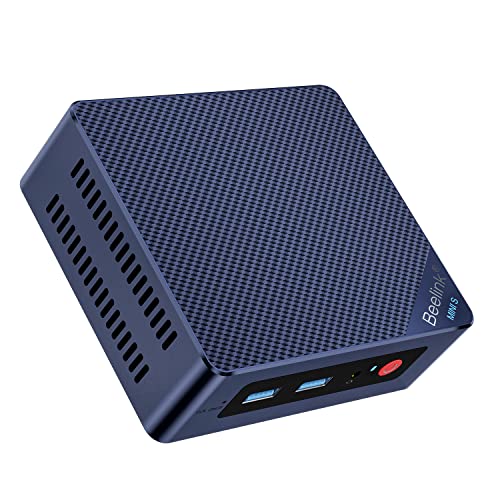
Beelink Mini S12 Pro Mini PC - 12th Gen Intel N100 (Up to 3.4GHz), 16GB DDR4, 500GB SSD, 4K Dual Display, WiFi 6, BT 5.2, 1000Mbps LAN - Low Power Mini Desktop Computer
N100 · 16 GB RAM · 500 GB SSD
CA$421.04 CAD
Buy on AmazonPrice verified · New
Price may have changed. Check Amazon before ordering.
Offer details
Beelink Mini S12 Pro Mini PC - 12th Gen Intel N100 (Up to 3.4GHz), 16GB DDR4, 500GB SSD, 4K Dual Display, WiFi 6, BT 5.2, 1000Mbps LAN - Low Power Mini Desktop Computer
Amazon listing · ASIN B0BW8JSQCHCore 3 N355 buying questions
Is the official name Core i3-N355?
Intel’s official name is Core 3 N355. Core i3-N305 is the older processor’s name. Verify the exact selected variant because retailer descriptions may use inconsistent abbreviations.
Does N355 have more cores than N305?
No. Both have eight cores and eight threads. Compare the complete systems and relevant specifications rather than describing N355 as a core-count upgrade.
Will an N355 system run large local AI models well?
Suitability depends on memory, graphics capability, model size and software support. Do not infer demanding local-AI performance from a seller’s AI PC label. Compare a more capable platform when that is the primary workload.
Is a fanless N355 always the better choice?
Fanless cooling removes fan noise but does not guarantee lower temperatures or sustained performance. Compare the exact enclosure, placement and workload, including measurements where available.
How should I compare local prices?
Use CAD offers from Amazon Canada and confirm the selected configuration, delivery, checkout taxes and return destination. Overseas converted prices are not local offers. Each card shows when its price was checked.
Sources and buying method
Intel provides the processor specifications. The cards show the RAM, SSD and dated Amazon price for each PC. We have not tested every machine ourselves.
Intel Core 3 N355 · Home Assistant x86-64