


Canada · www.amazon.ca · CAD
i3-N305 vs Core 3 N355: Which Mini PC Should You Buy in Canada?
Compare i3-N305 vs Core 3 N355 mini PCs in Canada. Check eight-core specs, RAM, SSD, CAD prices, cooling and total ownership costs before paying a premium.
The quick answer
Both processors have eight cores and eight threads. Choose the complete system with the configuration, ports, cooling and support you need at the better total cost. A newer N355 badge alone is not a reason to replace a working N305.
Compare the CPU, installed RAM, SSD and seller. Each card shows when its price was checked. Some PCs do not include an operating system, so confirm the contents and delivered total before ordering.
N305 · mini PC offers
2 complete systems
NUC 12 GO Mini PC | Intel Core i3-N305 Processor, Supports Triple 4K Display, 7 USB Ports & 2.5G LAN, Compact Design for Office/Home Entertainment (8GB RAM+256GB SSD)
N305 · 8 GB RAM · 256 GB SSD
CA$860.99 CAD
Buy on AmazonPrice verified · New
Price may have changed. Check Amazon before ordering.
Offer details
NUC 12 GO Mini PC | Intel Core i3-N305 Processor, Supports Triple 4K Display, 7 USB Ports & 2.5G LAN, Compact Design for Office/Home Entertainment (8GB RAM+256GB SSD)
Amazon listing · ASIN B0G657S9N2NUC 12 GO Mini PC | Intel Core i3-N305 Processor, Supports Triple 4K Display, 7 USB Ports & 2.5G LAN, Compact Design for Office/Home Entertainment (16GB RAM+512GB SSD)
N305 · 16 GB RAM · 512 GB SSD
CA$1,032.99 CAD
Buy on AmazonPrice verified · New
Price may have changed. Check Amazon before ordering.
Offer details
NUC 12 GO Mini PC | Intel Core i3-N305 Processor, Supports Triple 4K Display, 7 USB Ports & 2.5G LAN, Compact Design for Office/Home Entertainment (16GB RAM+512GB SSD)
Amazon listing · ASIN B0G64TL4V5No systems match these filters. Try a higher budget or less memory.
N305 · barebones kits
N305: These are incomplete configurations. Include the required RAM, SSD and software when comparing total cost with a complete computer.
NUC 12 GO Mini PC | Intel Core i3-N305 Processor, Supports Triple 4K Display, 7 USB Ports & 2.5G LAN, Compact Design for Office/Home Entertainment (Barebone)
N305 · Barebones kit: check included parts
CA$621.99 CAD
Buy on AmazonPrice verified · New
Price may have changed. Check Amazon before ordering.
Offer details
NUC 12 GO Mini PC | Intel Core i3-N305 Processor, Supports Triple 4K Display, 7 USB Ports & 2.5G LAN, Compact Design for Office/Home Entertainment (Barebone)
Amazon listing · ASIN B0G64V5WM1
Lenovobaiying NUC 12 GO Mini PC with Intel Core i3-N305 Processor, Supports Triple 4K Display, 2.5G LAN, Compact Design for Office/Home Entertainment (Barebone)
N305 · Barebones kit: check included parts
CA$707.00 CAD
Buy on AmazonPrice verified · New
Price may have changed. Check Amazon before ordering.
Offer details
Lenovobaiying NUC 12 GO Mini PC with Intel Core i3-N305 Processor, Supports Triple 4K Display, 2.5G LAN, Compact Design for Office/Home Entertainment (Barebone)
Amazon listing · ASIN B0H24Y1KWNN355 · mini PC offers
1 complete systems
MINIX NUC355 Mini PC, Intel Core 3 N355, 16GB DDR5, 512GB PCIe SSD, Triple 4K Display, WiFi 6, BT5.2, 2.5G LAN, Windows 11 Pro, USB-C/HDMI, for Business, Office, Education & Digital Signage
N355 · 16 GB RAM · 512 GB SSD
CA$695.90 CAD
Buy on AmazonPrice verified · New
Price may have changed. Check Amazon before ordering.
Offer details
MINIX NUC355 Mini PC, Intel Core 3 N355, 16GB DDR5, 512GB PCIe SSD, Triple 4K Display, WiFi 6, BT5.2, 2.5G LAN, Windows 11 Pro, USB-C/HDMI, for Business, Office, Education & Digital Signage
Amazon listing · ASIN B0FDQSD213No systems match these filters. Try a higher budget or less memory.
As an Amazon Associate, Cloudzat earns from qualifying purchases. Affiliate links do not change the listed selection rules. Kits and other processors are kept separate from complete exact-CPU systems.
i3-N305 vs Core 3 N355: what changes for the buyer
| Specification | Intel Core i3-N305 | Intel Core 3 N355 |
|---|---|---|
| Cores / threads | 8 / 8 | 8 / 8 |
| Maximum turbo frequency | Up to 3.80 GHz | Up to 3.90 GHz |
| Intel processor power rating | 15 W TDP · 9 W configurable TDP-down | 15 W processor base power · 9 W minimum assured power |
| Integrated graphics | Intel UHD Graphics · 32 execution units | Intel Graphics · 32 execution units |
| Intel listed maximum memory | 16 GB · one memory channel | 16 GB · one memory channel |
Source: Intel specifications linked above, checked 30 October 2026. Processor ratings are not wall-power measurements or system benchmarks. Installed memory, ports and expansion depend on the exact computer.
This is an eight-core versus eight-core decision
Core i3-N305 and Core 3 N355 both have eight cores and eight threads. Do not treat N355 as a core-count upgrade over N305. For a buyer comparing complete mini PCs, the useful differences include installed memory, SSD, ports, cooling, software contents, seller support and price. Begin with the job you need the machine to perform and the requirements you cannot change easily after purchase.
An N355 model can be attractive when its complete package earns the premium. A suitably configured N305 can remain a sensible option when it costs less and already meets the workload. For an existing owner, replacing a working eight-core computer needs a specific reason. The newer name alone does not establish that the change will improve your applications, service capacity or ownership experience enough to justify the cost.
Comparing a Canadian delivered price
Use the Canadian-dollar prices shown here when shopping for a Canadian address. A US-dollar offer converted into CAD is not a Canadian delivered price. Confirm the selected seller, dispatch location, delivery charge and final checkout total for your province and postal code. Taxes and any import charges shown at checkout can change the comparison. A product family may contain several sellers and configurations, so record the exact CPU, memory, SSD and operating-system bundle rather than relying on the family name or enclosure photograph.
For a cross-border shipment, check the return address and the process for obtaining support before paying. A nominal saving can become less useful if returning the system requires an expensive international shipment. Confirm the supplied mains lead, the adapter input rating and any accessories needed for your display. Keep the order confirmation and model details. When the mini PC arrives, verify the installed components and activation status, then test the features that motivated the purchase before transferring important files or retiring your previous machine.
Names and published specifications
Intel’s official names are Core i3-N305 and Core 3 N355. Retailer descriptions may use inconsistent abbreviations, so confirm the exact selected processor. The specification table identifies the official models and their published turbo, graphics and power information. These are processor facts, not a benchmark result showing a fixed percentage advantage in every small computer using the newer chip.
The maximum clock and graphics specifications differ, but neither value demonstrates the behaviour of a complete enclosure during long-running work. Cooling, firmware settings and the installed configuration also matter. When performance determines the purchase, seek evidence that identifies the tested system and workload. Avoid making a replacement decision from a processor-number comparison or a seller’s unqualified speed claim alone.
Compare equivalent complete configurations
Match the installed RAM and SSD before comparing the displayed prices. A complete desktop, an industrial appliance and a barebones kit are different purchases even when they use one of these CPUs. Include memory, storage, an appropriate power adapter, software and required accessories in the total. A lower starting price can disappear once the machine is equipped for the job.
Check the selected variant and seller again at checkout. Product-family pages can change the processor, installed components or operating-system bundle when an option changes. Keep the written specification with your order record. Do not assume that the enclosure photograph, familiar model name or largest capacity mentioned in the description identifies the configuration included in the price you are comparing.
Memory does not automatically increase with the newer CPU
Size memory around the applications or services that must run at the same time. Allow space for the host operating system, background work and recovery needs. Several busy containers or virtual machines can be constrained by memory before all CPU cores are occupied. Check installed capacity, whether modules are replaceable and what a later change would cost.
Intel lists a 16 GB maximum and one memory channel for both processors. Larger configurations advertised by a system vendor require confirmation for the exact machine and revision. The newer N355 name does not establish a larger official memory ceiling. If your planned workload depends on substantially more memory, evaluate other platforms rather than assuming that changing between these two CPUs resolves the constraint.
Home services and virtual-machine planning
For a service host, separate the number of installed applications from the amount of work they actually do. A few busy tasks can matter more than many mostly idle services. Consider what happens when indexing, backups or updates overlap with normal use. With the same core count in both processors, complete-system behaviour and the rest of the configuration deserve close attention.
For virtualisation, check the current platform requirements, firmware options and device support. CPU virtualisation features do not guarantee that every network or storage component can be used as you intend. Keep backups away from the host and document recovery steps. If an existing N305 system runs the service mix comfortably, measure its actual limitations before assuming that an N355 replacement will provide a meaningful improvement.
Networking can matter more than a CPU refresh
Compare network-controller models, port count and operating-system support for a firewall or multi-network appliance. The CPU name does not determine the Ethernet hardware implemented by the manufacturer. Features such as VPNs, inspection and several active links can change the workload. A published processor specification does not establish a guaranteed encrypted-throughput or routing result for the finished device.
An N355 appliance may justify consideration because of its board layout or useful interfaces, while an N305 model may already have the connections you need. Confirm those features directly rather than assigning the benefit to the processor refresh. Include any required network accessories and retain a fallback connection when replacing essential equipment. Recovery and support arrangements matter when the appliance is responsible for household connectivity.
Storage, service access and firmware support
Check SSD capacity, interface and maintenance access on the exact machine. A service host needs room for updates, logs and recovery images as well as applications and data. A second connector may be useful, but restrictions, shared space or missing hardware can change the upgrade plan. An M.2 label alone does not prove NVMe support or an unrestricted expansion path.
Review the manufacturer’s update and recovery information. Older stock is not automatically unsuitable, and a newer CPU does not automatically bring better firmware maintenance or seller support. The practical questions are whether the exact model has the documentation, updates and service route you need. Retain the original recovery information before changing the operating system or migrating important services.
Office work, graphics and media servers
For office use, assess the applications you run together, monitor connections, SSD space and noise. A newer processor may be less important than a better configured and better supported desktop. For media-server use, separate direct playback from conversion. Codec, subtitles, client compatibility, graphics drivers and application settings determine the actual path and can matter more than a small published frequency difference.
Check the current Plex or Jellyfin acceleration requirements for your operating system and intended features. Do not infer a fixed simultaneous-stream count from either CPU’s graphics specification. Test representative files and your actual display or network setup during the return period. If demanding games, creative production or substantial local AI are the main objective, compare more suitable platforms rather than assuming these two eight-core labels describe the same class as larger processors.
Cooling and running-cost comparison
Compare the exact enclosures and their cooling arrangements for sustained work. Fanless systems can avoid fan noise while depending strongly on placement, ambient temperature and power settings. A quiet ventilated desktop can be the better fit for some installations. Measurements from one enclosure should not be treated as universal results for every N305 or N355 computer.
Their nominal processor ratings do not establish identical whole-system power or a guaranteed electricity saving for the newer machine. Use measured average wall power, the same operating hours and your own tariff in the calculator. The initial watt values are illustrative inputs. Add the complete purchase price and required components, then consider support, maintenance and recovery costs alongside the resulting numerical scenario.
Buy the better system and avoid an unnecessary replacement
For a new purchase, choose the N355 model when its complete configuration, ports, cooling or support justify its total cost. Choose a well-specified N305 when it meets the same job at a more attractive delivered price. Avoid assuming either outcome from the CPU name alone, especially when availability or a specialist enclosure explains much of the price difference.
For an existing N305 owner, retain the machine when it performs reliably and has the required capacity. Replace it when the new system solves a clear limitation that is worth the complete migration cost. On arrival, verify the selected CPU, installed memory and SSD, test important ports and keep recovery information. Migrate services gradually, retain independent backups and confirm the practical benefit with your own workload before retiring the working system.
Electricity and service continuity in Canada
For an always-on server, enter your own electricity unit rate in Canadian dollars per kWh. The editable calculator value is an illustration, not a provincial average or a current tariff quote. If your rate changes by time or season, use a representative weighted input or calculate the periods separately. Fixed charges that remain unchanged with the purchase should not be treated as incremental mini PC consumption. Measure the complete computer with the storage and adapters it normally uses; Intel’s processor power rating is not that measurement.
Consider support and recovery alongside the hardware price. Check that firmware, driver and recovery downloads identify the exact model, and keep a separate copy of important service settings and files. Where an interruption would cause problems, plan an orderly shutdown and test the intended restart behaviour. A UPS can help with a short interruption but is a separate purchase and power load. Confirm local delivery and return conditions for your address, particularly if a listing uses a third-party seller or ships from outside Canada.
Compare complete ownership cost
Enter comparable complete-system prices and your own electricity tariff. The starting 10 W and 15 W values are illustrative inputs, not processor measurements or country averages.
Estimated ownership cost = complete price + watts × hours/day × 365 ÷ 1000 × tariff × years. Excludes repairs, resale, peripherals and tariff changes.
Current alternative mini PC deals on Amazon
These use other processors. Compare the complete configuration, ports and delivered cost with the systems above.

ACEMAGIC Mini PC K1 Ryzen Embedded R2544 8GB DDR4 RAM 256GB Mini PC Win11 Pro(Beats 3550H/4300U/3500U/N150, Mini Computer 4K Dual Display/HDMI/WiFi/BT/LAN -Home/Office Mini Desktop PC
RYZEN · 8 GB RAM
CA$299.99 CAD
Buy on AmazonPrice verified · New
Price may have changed. Check Amazon before ordering.
Offer details
ACEMAGIC Mini PC K1 Ryzen Embedded R2544 8GB DDR4 RAM 256GB Mini PC Win11 Pro(Beats 3550H/4300U/3500U/N150, Mini Computer 4K Dual Display/HDMI/WiFi/BT/LAN -Home/Office Mini Desktop PC
Amazon listing · ASIN B0DNHVFK1T
Fanless Mini PC N150, 4X 2.5G LAN, Firewall Appliance & Home Server
N150 · Installed configuration not confirmed
CA$344.99 CAD
Buy on AmazonPrice verified · New
Price may have changed. Check Amazon before ordering.
Offer details
Fanless Mini PC N150, 4X 2.5G LAN, Firewall Appliance & Home Server
Amazon listing · ASIN B0HKVM2YGL
Beelink Mini S13 Mini PC, Intel Twin Lake-N150 (4C/4T, up to 3.6GHz), 16GB DDR4 RAM 500GB M.2 SSD, Mini Computer Support 4K@60Hz Dual Screen Display/WiFi6/BT5.2/USB3.2/Win11 Home
N150 · 16 GB RAM · 500 GB SSD
CA$418.93 CAD
Buy on AmazonPrice verified · New
Price may have changed. Check Amazon before ordering.
Offer details
Beelink Mini S13 Mini PC, Intel Twin Lake-N150 (4C/4T, up to 3.6GHz), 16GB DDR4 RAM 500GB M.2 SSD, Mini Computer Support 4K@60Hz Dual Screen Display/WiFi6/BT5.2/USB3.2/Win11 Home
Amazon listing · ASIN B0DP4LGQWY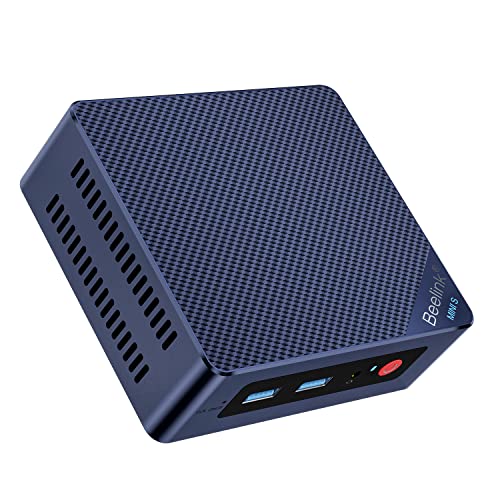
Beelink Mini S12 Pro Mini PC - 12th Gen Intel N100 (Up to 3.4GHz), 16GB DDR4, 500GB SSD, 4K Dual Display, WiFi 6, BT 5.2, 1000Mbps LAN - Low Power Mini Desktop Computer
N100 · 16 GB RAM · 500 GB SSD
CA$421.04 CAD
Buy on AmazonPrice verified · New
Price may have changed. Check Amazon before ordering.
Offer details
Beelink Mini S12 Pro Mini PC - 12th Gen Intel N100 (Up to 3.4GHz), 16GB DDR4, 500GB SSD, 4K Dual Display, WiFi 6, BT 5.2, 1000Mbps LAN - Low Power Mini Desktop Computer
Amazon listing · ASIN B0BW8JSQCHComparison questions answered
Does N355 have more cores than i3-N305?
No. Both have eight cores and eight threads. N355 is not a core-count upgrade over N305. Compare the complete configuration, cooling, support and price before deciding that a replacement is worthwhile.
Is Core i3-N355 the correct official processor name?
Intel uses Core 3 N355. The older processor is Core i3-N305. Retailer abbreviations can differ, so verify the exact selected processor and the written specification of the complete machine.
Should I replace a reliable N305 mini PC with N355?
Replace it when the new system solves a clear limitation worth the complete purchase and migration cost. A working N305 that meets the workload does not need replacement solely because the newer processor exists.
Do the calculator’s initial watts come from measurements?
No. They are editable examples. Enter measured whole-system averages where available, prices for comparable complete systems, the same operating schedule and your own tariff.
How should I compare local prices?
Use CAD offers from Amazon Canada and confirm the selected configuration, delivery, checkout taxes and return destination. Overseas converted prices are not local offers. Each card shows when its price was checked.
Sources and buying method
Intel provides the processor specifications. The cards show the RAM, SSD and dated Amazon price for each PC. We have not tested every machine ourselves.
Intel Core i3-N305 · Intel Core 3 N355 · Home Assistant x86-64