


Canada · CAD
Mini PCs for Ollama Canada
Choose the GMKtec EVO-X2 with 128GB for a compact Ollama machine built around larger local models. Choose the MINISFORUM MS-S1 MAX with 128GB for a networked lab. For smaller models and everyday development, start with an AI X1 Pro-370 with 32GB or 64GB. Select the operating system and supported GPU backend before ordering.
Which model to choose
GMKtec EVO-X2, 128GB
Best starting point when fitting larger models is the priority. Buy the 128GB version because its memory is not a later SO-DIMM upgrade.

128 GB RAM · 1000 GB SSD
CA$5,221.82Price checked 01.11.2026 10:28 UTCBuy on Amazon ↗Specifications and model details ↗MINISFORUM MS-S1 MAX, 128GB
Best for a shared local-model host that also benefits from dual 10GbE and expansion. Keep 128GB when replacing another high-memory recommendation.
See model and buying options ↗MINISFORUM AI X1 Pro-370, 32GB or 64GB
Best for smaller models and a general development desktop. Replaceable memory gives more flexibility; choose capacity around the models you actually use.

32 GB RAM · 1000 GB SSD
CA$1,719.99Price checked 01.11.2026 10:59 UTCBuy on Amazon ↗Specifications and model details ↗Amazon prices and configurations
Ryzen AI Max+ 395
GMKtec EVO-X2 Gaming Mini PC Ryzen AI Max+ 395 5.1GHz 128GB LPDDR5X 1TB SSD | Desktop Mini Computer with Radeon 8060S, 50 TOPS NPU, WiFi 7, BT 5.4, 2…
128 GB RAM · 1000 GB SSD
CA$5,221.82Price checked 01.11.2026 10:28 UTCBuy on Amazon ↗Ryzen AI 9 HX 370
MINISFORUM AI X1 Pro-370 AMD Ryzen AI 9 HX370 Mini PC up to 5.1GHz 12C/24T, AMD Radeon 890M Mini Desktop Computer, 32GB DDR5 1TB PCIe 4.0 SSD, 8K Qua…
32 GB RAM · 1000 GB SSD
CA$1,719.99Price checked 01.11.2026 10:59 UTCBuy on Amazon ↗
AMD Ryzen
MINISFORUM 795S7 Mini PC AMD Ryzen 9 7945HX (16C/32T) 32GB RAM 1TB SSD Mini Tower Computer, 2X DDR5 Slots, 2X PCIe4.0 SSD, HDMI|DP|USB-C Outputs, 2.5…
32 GB RAM · 1000 GB SSD
CA$2,820.42Price checked 01.11.2026 06:27 UTCBuy on Amazon ↗
Ryzen AI Max+ 395
GMKtec EVO-X2 AI Mini PC AMD Ryzen Al Max+ 395 Up to 5.1GHz, 16C/32T | Mini Gaming Computers 64GB LPDDR5X 8000MHz (8GB*8) 1TB PCIe 4.0 SSD, Quad Scre…
64 GB RAM · 1000 GB SSD
CA$3,180.45Price checked 01.11.2026 09:22 UTCBuy on Amazon ↗
Core Ultra
ROG NUC 2025 Mini PC with Intel Core Ultra 7 Processor, NVIDIA GeForce RTX 5060, 32GB DDR5, 1TB SSD, 4K Ready, WiFi 7, Thunderbolt 5, RGB Lighting Ef…
32 GB RAM · 1000 GB SSD
CA$3,316.61Price checked 01.11.2026 06:27 UTCBuy on Amazon ↗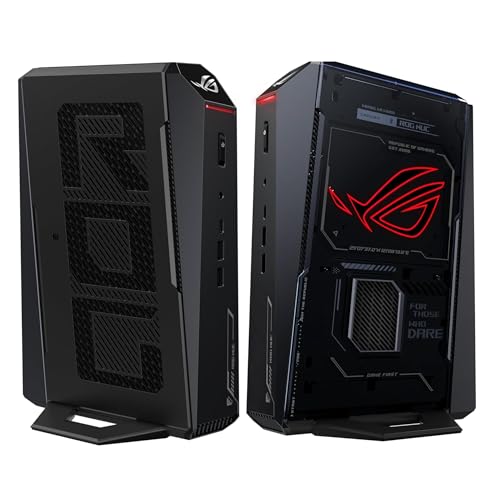
Core Ultra H
ROG NUC 2025 Gaming Mini PC Intel Core Ultra 7 255H RTX 5060 | 32GB DDR5, 1TB SSD, Thunderbolt 4, Triple-Fan Cooling, ARGB Lighting, Windows 11 Pro
32 GB RAM · 1000 GB SSD
CA$3,326.85Price checked 01.11.2026 07:56 UTCBuy on Amazon ↗Ryzen AI Max+ 395
GMKtec EVO-X2 AI Mini PC AMD Ryzen AI Max+ 395, 64GB LPDDR5X 2TB SSD | Gaming Desktop Computers Quad Screen 8K Display, WiFi 7 & USB4, SD Card Reader…
64 GB RAM · 2000 GB SSD
CA$3,289.00Price checked 01.11.2026 10:08 UTCBuy on Amazon ↗
Core Ultra
ROG NUC 2025 Gaming Mini PC with Intel Core Ultra 7, GeForce RTX 5060, 32GB DDR5 RAM, 2TB SSD, Triple-Fan Cooling
32 GB RAM · 2000 GB SSD
CA$3,419.60Price checked 01.11.2026 06:27 UTCBuy on Amazon ↗Buying guide
Which Ollama computer should you buy?
For a first small-model desktop, the AI X1 Pro-370 is the sensible place to begin. It avoids paying for a large fixed memory pool before you need one and can also handle ordinary development work. Choose the EVO-X2 with 128GB when a smaller machine cannot hold the model and context you want. Its main attraction here is capacity in a compact computer, not a promise that every model will run faster than on a dedicated GPU.
The MS-S1 MAX is the alternative for a lab with shared datasets, fast network storage or additional expansion requirements. If those connections will remain unused, the simpler EVO-X2 is easier to justify. A tower with NVIDIA graphics is a separate, useful option when accelerator throughput or a CUDA-based environment matters more than having a small enclosure.
Check the Ollama backend for your operating system
Ollama’s AMD support differs between Linux and Windows. Its current GPU documentation lists supported ROCm hardware and a Vulkan path for additional GPUs. Check the exact processor, operating system and driver combination instead of treating all Radeon products as interchangeable. On an integrated-GPU system, inspect the application’s reported memory and active backend after installation.
If your objective is a simple private assistant, begin with a smaller model that leaves comfortable headroom. CPU execution can be useful for testing, but it is not a substitute for a working acceleration path when you expect quick interaction. A large NPU TOPS figure is not an Ollama tokens-per-second measurement.
Choose memory from the conversation you want
A short prompt to a small model and a long conversation with document context are different memory budgets. Allow room for the cache and surrounding services as well as weights. If you want several people to use the server, test concurrent requests before assuming that a successful single-user run scales unchanged.
For a development desk, 32GB is a starting tier rather than a universal recommendation. Compare 64GB for more local services or larger models. Choose 128GB when fitting a particular model is the reason for buying the machine. Quantization can reduce memory use, but examine its effect on your actual answers instead of selecting only the smallest download.
Run Ollama as a dependable local service
Keep the model service on a private network unless you deliberately configure a protected remote access method. Check who can reach its endpoint and keep application updates separate from the habit of exposing a port to the internet. For a home assistant or document tool, record which model and settings the application expects so an update is easy to reverse.
Use a fast local SSD for models you run often and back up your own prompts, application data and documents. A second PC can access an Ollama server over the network, but that does not merge the memory of the client and server. When choosing an alternative machine, preserve the capacity and supported backend that made the original recommendation suitable.
Budget memory for the whole application
Choose a model size and a useful context window before choosing a computer. A model file is only one part of memory use: the runtime, attention cache, operating system, browser and other applications need room too. Four-bit quantization reduces weight storage, but it does not make every part of inference four-bit. A machine that loads a model with almost no free memory may become frustrating during a long conversation. For a first local AI desktop, 32GB suits smaller experiments, 64GB provides more working room, and 128GB is worth comparing when model capacity drives the purchase.
Shared memory and dedicated video memory behave differently. An integrated GPU uses part of the same physical RAM as the CPU. A discrete GPU has its own VRAM, and moving work between that memory and host RAM can reduce throughput. Do not add the two capacities together and treat the result as one equally fast pool. Choose a supported backend first, then enough memory for the workload and a reasonable reserve.
Build a useful local AI workspace
A 1TB SSD is a workable starting point for a few smaller models. Choose 2TB when you expect several large downloads, separate environments and your own documents. Keep projects and irreplaceable data backed up separately. An additional internal drive helps organize work but does not protect against the failure or loss of the whole computer. A fast network is useful when datasets live on a NAS; it does not automatically combine several PCs into one larger accelerator.
Plan for long sessions rather than a brief demonstration. Leave the intake and exhaust clear, use a stable power supply, and try a balanced power profile if the machine shares your desk with a microphone. Measure whole-system power if electricity cost matters. The adapter rating and processor power limit are not constant wall consumption. Buy an expandable system when you expect to change RAM or storage, and a fixed-memory system only after choosing the memory tier you intend to keep.
Test the workflow while returns are straightforward
Install the current supported application and graphics driver, then begin with a small model. Confirm which processing backend is active instead of assuming that an AI badge means your software uses the NPU. Load your intended model, run a realistic prompt, and watch memory use and response time through a longer exchange. For a shared service, test simultaneous requests as well as a single user. A successful download or a screenshot of a loaded model is not enough to judge a working setup.
Keep the application version, model format, quantization and power mode with any performance notes. Those details explain why two reports about the same processor can differ. For an alternative purchase, preserve the requirements that matter: usable memory, supported accelerator and necessary ports. A lower-memory replacement is not equivalent when capacity is the reason for buying. If your essential tools require CUDA or a replaceable graphics card, allow space and budget for an NVIDIA desktop instead.
Buying and support in Canada
Use Canadian-dollar prices when comparing these systems. Include delivery and the applicable provincial or territorial taxes in your total, and check whether the seller ships from Canada or imports the machine. A cross-border offer can have a different return process, delivery schedule or additional charges. Do not compare an American promotional price with a Canadian delivered price as though the currency and purchase conditions were identical.
Confirm the included adapter, power lead and operating-system edition, then keep the invoice and serial number. For work or study, choose a support route you can use if the computer fails during a busy week. An alternative should preserve the required memory, graphics and connections, even when the brand changes. Add any missing display, keyboard, webcam or backup drive to the budget before deciding whether the compact system is good value.
Questions buyers ask
Is 32GB enough for Ollama?
It is a practical starting tier for smaller local models and development. Model size, quantization, context and other running services determine whether 64GB or 128GB is the better purchase.
Which compact model should I choose for larger models?
Start with an EVO-X2 with 128GB. Choose an MS-S1 MAX with the same memory when dual 10GbE or expansion is useful.
Can I choose any AMD Mini PC for Ollama GPU acceleration?
No. Check Ollama’s current GPU documentation for the exact hardware, operating system and driver path. Confirm the active backend after installation.
Specifications and software guidance
Ollama GPU support ↗GMKtec EVO-X2 ↗MINISFORUM MS-S1 MAX ↗MINISFORUM AI X1 Pro-370 ↗Related Mini PC guides
Mini PCs for LM Studio CanadaMini PCs for Stable Diffusion and ComfyUI CanadaBest Mini PCs for OpenClaw Local Models CanadaCompare Mini PC pricesAs an Amazon Associate, Cloudzat earns from qualifying purchases. Prices and availability can change.