


QNAP TR-004 Price, Specs, RAID Modes and Alternatives
Compare current Amazon US QNAP TR-004 offers and understand the four-bay enclosure before buying. The page covers hardware and software-control modes, capacity, direct computer use and QNAP NAS expansion.
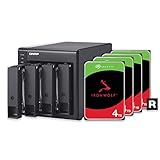
The QNAP TR-004 is a four-bay USB 3.2 Gen 1 Type-C enclosure that can work as direct-attached storage or as supported QNAP NAS expansion. Its main strengths are clear RAID mode controls and broad SATA drive support. Its 5Gbps link and model-specific expansion rules should be understood before purchase.
QNAP TR-004 reference specifications
- Bays
- 4
- Drive support
- Four 3.5-inch SATA bays; 2.5-inch SATA drives require suitable mounting.
- Host interface
- USB 3.2 Gen 1 Type-C, 5Gbps
- RAID and modes
- Individual, JBOD, RAID 0, RAID 1/10, RAID 5 and software-control mode
- Cooling
- Active cooling with lockable drive trays
- Management
- QNAP External RAID Manager on supported computers
QNAP recommends a direct USB connection rather than placing a hub or dock between the host and enclosure.


No offers match these filters
Reset a filter or choose another bay count, interface, RAID mode or brand.
QNAP TR-004 at a glance
The TR-004 has four SATA drive bays and a USB 3.2 Gen 1 Type-C host connection. QNAP positions it as both a direct-attached storage device for a computer and an expansion enclosure for compatible QNAP NAS systems. It is not a standalone NAS because it has no independent network operating system or Ethernet service.
The enclosure is commonly sold diskless. Current Amazon sellers may also offer bundles, so confirm the selected capacity, drive warranty and seller before comparing prices.
Supported RAID and disk modes
QNAP documents Individual, JBOD, RAID 0, RAID 1/10, RAID 5 and Software Control modes. Physical DIP switches select the controller mode. The QNAP External RAID Manager utility can configure and monitor supported layouts on a computer. When connected to a compatible QNAP NAS, Storage and Snapshots can manage supported functions.
Individual mode presents each disk separately, but QNAP notes that hot swap is not supported in that mode. RAID behavior and recovery depend on the selected controller mode, so keep the switch configuration documented.
USB 3.2 Gen 1 performance ceiling
The host link is 5Gbps. This is suitable for backup, media libraries, parity-protected HDD storage and general desktop use, but it can limit a fast RAID 0 or SATA SSD array. QNAP recommends a direct connection to the host and advises against placing a USB hub or docking station between the system and the TR-004.
Use the supplied or a qualified short cable. If the enclosure disconnects, verify the host port, cable, power and operating-system logs before changing the array.
Capacity planning and Windows limits
Four matching drives can be arranged for capacity, protection or independent use. RAID 5 provides roughly three drives worth of capacity before formatting, while RAID 10 provides roughly two. QNAP also warns that non-server Windows editions have a 63TB limit for a single volume in this context. Very large builds need operating-system planning.
Check the current drive-compatibility list and firmware. Large disks lengthen rebuild and verification times, so a UPS and separate backup become more important as capacity increases.
Using TR-004 with a QNAP NAS
The enclosure can expand selected QNAP NAS devices through USB, but it does not behave exactly like an internal NAS expansion shelf. Feature support depends on the NAS model, QTS or QuTS hero version and selected storage mode. Consult QNAP compatibility information before buying it solely for NAS expansion.
A TR-004 used with one NAS should not be assumed to move freely to another device with all data and configuration intact. Keep an independent backup and document the setup.
Using TR-004 with Windows, Mac or Linux
QNAP supports direct computer use and provides External RAID Manager for supported Windows and macOS systems. Linux can recognize existing partitions in several configurations, but QNAP notes limitations around creating new arrays. File-system choice remains separate from the RAID layer.
Format the volume for the main host and test sleep, wake and safe removal. If the enclosure will move between systems, plan the file system and management utility first.
Drive selection and maintenance
Use matching SATA drives for RAID. NAS-class CMR HDDs are a sensible option for continuous multi-drive use. SATA SSDs can improve latency and throughput, but the 5Gbps host link limits aggregate speed. Label each tray and keep the drive order recorded before service.
When a drive fails, confirm the correct bay through the LEDs or management utility. Insert a replacement at least as large as the failed member and allow the rebuild to finish without unnecessary power cycles.
TR-004 alternatives
Choose a 10Gbps TerraMaster or other DAS when independent disk throughput is more important than hardware RAID. Choose a Thunderbolt enclosure such as OWC ThunderBay 4 for higher-performance creative work. Choose a five-bay UGREEN RAID enclosure when capacity per chassis and a fifth SATA bay are priorities. Choose a NAS when the storage must operate independently over the network.
The TR-004 remains attractive for users who value QNAP integration, physical mode controls and a four-bay RAID design more than peak interface speed.
Recovery, migration and support records
Keep a photograph of the TR-004 DIP switches, a list of drive serial numbers by bay and the External RAID Manager version. If the enclosure stops working, this record reduces the risk of selecting the wrong mode on a replacement unit. Do not reset the controller or move switches simply because the volume is not mounting. First verify power, USB connection and host recognition.
For a capacity upgrade, QNAP support rules and the chosen mode determine whether drives can be replaced progressively or whether the array must be recreated. Plan for a complete verified backup before changing disks. A second storage destination is also useful during firmware or operating-system updates, because availability during an upgrade is not the same as recoverability after a failure.
Quick decision guide
Best reason to buy
Four-bay controller-managed RAID with QNAP computer and NAS integration.
Main limitation
The 5Gbps host link can limit fast SSD or striped arrays.
Best RAID balance
RAID 5 provides about three drives worth of capacity and one-drive tolerance.
Choose another product
Use Thunderbolt for higher creative-workflow speed or NAS for independent network access.
How Cloudzat builds this comparison
Cloudzat limits this page to Amazon products identified as QNAP TR-004. Static specifications are based on QNAP documentation, while price, condition and availability come from current eligible Amazon offers.
Technical content reviewed August 1, 2026. Manufacturer specifications and marketplace variants can change.
Frequently asked questions
Is QNAP TR-004 a NAS?
No. It is a USB expansion and DAS enclosure. A connected computer or compatible QNAP NAS provides the host services.
What RAID levels does TR-004 support?
QNAP lists Individual, JBOD, RAID 0, RAID 1/10, RAID 5 and Software Control modes.
Is TR-004 10Gbps?
No. The official specification uses USB 3.2 Gen 1 at 5Gbps.
Can TR-004 work with Mac?
Yes, with supported macOS versions and the appropriate file system and utility.
Can I hot-swap drives?
Support depends on the mode. QNAP states that hot swap is not supported in Individual mode.
Does TR-004 include drives?
The common configuration is diskless, but some sellers may offer populated bundles. Check the exact Amazon variant.