


Immich application storage guide
The database is small compared with a large photo library, but its storage path has an outsized effect on how predictable the server feels. The practical buying goal is not to dedicate an enormous SSD to PostgreSQL. It is to give the database and application layer a stable local device with enough headroom for the rest of the Immich stack, maintenance and any additional services sharing the host.
Live Amazon prices
Current SSD options for the Immich database
Compare the exact model, capacity, condition and seller before ordering. Choose for workload fit first, then price.
Internal SSDs
9 options


TEAMGROUP T253X7002T0C101 2TB


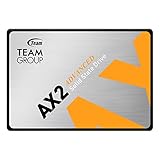
TEAMGROUP T253A3002T0C101 2TB

Choose the right setup
Match the database SSD to the whole application workload
Treat the database SSD as application infrastructure. Reliability, local placement, compatibility and free-space headroom matter more than buying the fastest benchmark result.
Before you buy
Separate the jobs
Keep database/application storage, original-media storage and backups as separate decisions.
Leave room to grow
Plan for library growth, generated media and free-space reserve instead of sizing only for today.
Match the hardware
Confirm interface, form factor, bays and network speed before choosing a listing.
Protect the library
Redundancy can improve availability, but keep an independent backup copy.
Choose the right database SSD size
Enter your library size and growth plans to estimate the storage capacity that gives you useful headroom.
Buying guide
Immich database SSD buying guide
Why the database deserves its own storage decision
Photo originals dominate total capacity, yet the database coordinates metadata, jobs and application state. That makes it a poor candidate for an improvised network share simply because the media already lives there. A dedicated local SSD separates application responsiveness from bulk-media throughput and lets you diagnose storage issues more cleanly. The device can also host containers or generated data, but those extra roles need to be included in its capacity budget.
Local placement reduces moving parts
A local internal SSD keeps the database path independent of NAS availability, SMB/NFS behavior, switch outages and network latency. This does not eliminate the need for database backups, but it narrows the number of components involved in every transaction. If the media pool is remote, a local database SSD also allows Immich to remain architecturally clear: compute and application state on the server, originals on the protected storage system.
500GB, 1TB or 2TB
The database itself does not justify buying by terabytes, so the correct capacity comes from everything sharing the device. A dedicated Immich application SSD can start comfortably in the 500GB class. A 1TB model gives more room for generated media, logs, updates and several containers. Two terabytes is easier to justify when the SSD doubles as a broader application datastore or when video-heavy generated files are intentionally kept on it.
NVMe is convenient, not mandatory
NVMe offers excellent latency and is easy to fit into modern mini PCs and server boards, but Immich does not require a premium flagship NVMe model just to hold database files. SATA SSDs can deliver responsive local application storage in systems with available 2.5-inch bays. Choose the interface that the host supports cleanly, leaves an upgrade path and does not force the bulk media layer onto expensive flash.
Endurance should match write activity
Database writes are only one source of SSD wear. Imports, logs, containers, temporary files, cache and other services can all share the same device. A heavily consolidated server therefore has a different endurance profile from a dedicated home appliance. When the workload is busy, compare exact-model TBW and warranty information from the manufacturer. A marketplace title that omits endurance is not evidence of a specific rating.
Free space is operational headroom
Running an application SSD nearly full can complicate updates, temporary jobs and maintenance. Buy enough capacity that the normal operating state leaves meaningful free space rather than treating every advertised gigabyte as permanently allocatable. This is why the planner recommends a capacity class with room around the database instead of attempting to estimate the database file size to the nearest gigabyte.
Separate database backup from SSD redundancy
A mirrored application device can improve uptime, but it is not a substitute for a restorable database backup. The failure modes are different: a logical mistake can be mirrored perfectly to both devices. Design a backup process that preserves the database state you need to rebuild Immich, and test that process before a real drive failure turns the documentation into an emergency checklist.
Do not confuse generated media with originals
Thumbnails and transcodes can be recreated; original user media cannot simply be regenerated from application metadata. When both live on the same SSD, keep that distinction clear in backup and capacity planning. You may decide to back up the entire application volume for convenience while prioritizing originals and database state differently. Storage design should follow recovery importance, not only directory location.
Shared virtualization hosts need extra margin
If Proxmox, Docker or another host runs multiple applications from the same SSD, Immich competes with every other service for capacity and I/O. A drive that looks oversized for one database can be appropriately sized for a shared datastore. In that scenario, endurance, power-loss behavior, host filesystem design and backup tooling become system-level decisions. Do not size the disk from Immich alone while ignoring the rest of the machine.
Thermals and M.2 slot placement
Compact systems may place an M.2 slot beneath a cover or close to hot components. Database traffic itself may not saturate a modern SSD, but imports and other workloads can produce longer writes. Use the host’s intended thermal pad or heatsink if provided, maintain airflow and monitor the actual drive temperature after installation. A cooler, stable Gen4 drive can be a better server choice than a hotter flagship running in a constrained chassis.
When a second SSD is useful
A second internal SSD can separate the operating system/application layer from generated media or other services. This is not required for every household, but it can simplify growth and failure replacement. One device can remain modest and highly reliable for the database, while another larger SSD handles thumbnails, transcodes or shared container storage. The benefit is operational clarity, not merely higher benchmark throughput.
Database SSD buying checklist
Before purchase, confirm exact interface, physical size, host slot support, capacity, condition, seller and warranty. If the model will serve a high-write shared host, verify endurance and thermal behavior from manufacturer documentation. Decide how the database will be backed up and where restored data will live. Then compare live price. This ordering prevents a low Amazon price from becoming the reason you choose an otherwise unsuitable application drive.
Questions people ask
Immich Database SSD questions
How large should an Immich database SSD be?
Size the application SSD for the whole role, not just PostgreSQL. A 500GB class device is a comfortable dedicated starting point; 1TB or more can make sense when other services or generated files share it.
Does the Immich database need NVMe?
No. NVMe is convenient and fast, but a suitable local SATA SSD can also be effective. Host compatibility and reliable local placement matter more than chasing peak sequential speed.
Can the Immich database be on a NAS share?
Current Immich guidance favors local database storage rather than a network share. Keep the database on stable local storage and use the NAS for media if that matches your architecture.
Should the operating system and database share an SSD?
They can in a small server. Leave adequate free space and ensure backups cover the application state. Separate devices become more useful as the host runs more services or generated data grows.
Is 2TB overkill for the database?
For the database alone, yes in most home deployments. It can still be justified if the SSD also stores thumbnails, transcodes, containers, VMs or other application data.
Does SSD DRAM matter for the Immich database?
It can influence some workloads, but it is not a single universal requirement. Evaluate the exact SSD’s sustained behavior, endurance, interface, price and host workload together.
Should I mirror the database SSD?
Mirroring can improve availability but does not replace a database backup. Whether it is worth the extra device depends on downtime tolerance and the broader server design.
What happens if the database SSD fails?
Recovery depends on the backups and deployment records you prepared before the failure. Keep a tested database backup plan and protect original media separately.
Can I use a used enterprise SSD?
Potentially, but condition, remaining endurance, interface and seller warranty need careful verification. Used enterprise SSDs should be treated as a separate risk decision rather than assumed healthy because of the model name.
What is the most important database SSD feature?
Reliable local compatibility and sufficient headroom come first. After that, compare endurance, warranty, thermals and price for the exact model and the write activity of the whole host.