


Immich storage buying guide
An Immich server does not need the same storage device for every job. Originals can live on a protected hard-drive pool while the database, application data, thumbnails and generated media benefit from responsive local SSD storage. The right SSD is therefore the one that fits its assigned role, not simply the model with the highest benchmark number.
Live Amazon prices
Best current SSD options for Immich
Compare the exact model, capacity, condition and seller before ordering. Choose for workload fit first, then price.
Internal SSDs
9 options
TEAMGROUP T253TY004T0C101 4TB

TEAMGROUP T253X7004T0C101 4TB
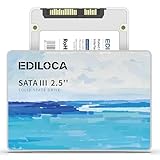


SP Silicon Power SP004TBSS3A55S25AY 4TB
Choose the right setup
Choose the SSD role before choosing the model
Choose the SSD role first. A small application drive, a larger generated-media drive and an all-in-one SSD have different capacity and endurance priorities, so comparing them as if they were interchangeable leads to poor value.
Before you buy
Separate the jobs
Keep database/application storage, original-media storage and backups as separate decisions.
Leave room to grow
Plan for library growth, generated media and free-space reserve instead of sizing only for today.
Match the hardware
Confirm interface, form factor, bays and network speed before choosing a listing.
Protect the library
Redundancy can improve availability, but keep an independent backup copy.
Choose an SSD for its Immich job
Enter your library size and growth plans to estimate the storage capacity that gives you useful headroom.
Buying guide
How to choose an SSD for Immich
Start with the SSD job, not the benchmark
Immich storage is easier to design when the SSD has a clearly defined job. Database activity rewards low latency and consistent random I/O, while thumbnails and transcoded files primarily need dependable capacity and quick access. An SSD chosen for a mixed host may also carry containers, logs and temporary files. Define that scope first, then compare capacity, endurance and price. A headline sequential read number is rarely enough to decide whether a drive is a good Immich purchase.
Keep the database on local solid-state storage
Database responsiveness affects browsing, metadata work and background jobs even when the original photos live elsewhere. Treat the database location as application storage rather than bulk media storage. A local internal SSD avoids making database access depend on network latency or a remote share. This separation also makes troubleshooting clearer: slow media reads, database stalls and network problems do not all collapse into the same storage path.
NVMe versus SATA for Immich
NVMe is the natural first choice when the server has an available M.2 slot because it offers low latency, compact installation and ample performance for database and generated-media work. SATA SSDs still make sense in systems with spare 2.5-inch bays, limited M.2 slots or a need for inexpensive secondary solid-state capacity. For Immich, interface choice should follow the host layout and storage role rather than a benchmark contest.
How much SSD capacity to buy
Capacity planning should include more than the current database footprint. Leave room for thumbnails, transcoded video, application updates, temporary work, logs and growth if those items share the same SSD. A 500GB class drive is a practical application starting point, while 1TB or 2TB becomes easier to justify when generated media, other containers or heavy video workloads share the device. Unused headroom also reduces emergency migrations later.
Endurance matters more for busy hosts
A family server with occasional imports is different from a machine that constantly receives videos, regenerates assets or hosts several write-heavy services. When write activity is high, compare the exact model’s published endurance and warranty rather than assuming every SSD in a product family behaves the same. If a listing does not state endurance, check the exact model’s manufacturer specification before using TBW as a buying factor.
TLC, QLC and missing NAND details
NAND type can influence sustained writes, endurance and pricing, but marketplace listings are often incomplete. TLC can be attractive for sustained application workloads, while QLC can still be sensible when cost and read-heavy capacity matter more. If a listing omits NAND type, verify the exact model with the manufacturer before using TLC or QLC as a deciding factor.
DRAM, HMB and application behavior
Some NVMe drives use onboard DRAM, others rely on Host Memory Buffer, and some product pages describe neither clearly. Immich does not turn this single feature into a universal pass-or-fail rule. The better approach is to consider the entire workload: database writes, other containers, available system memory, endurance and price. If a drive is intended for a busy shared datastore, stronger sustained behavior may matter more than it would for a lightly used home server.
Do not use the media pool as a database shortcut
A large NAS or HDD array may have excellent sequential throughput while still being the wrong place for latency-sensitive application data. Keeping the database and application layer on local SSD storage lets the hard-drive pool focus on what it does well: holding originals, large videos and protected capacity. This also allows each layer to be upgraded independently when the photo library grows faster than the server software footprint.
Plan failure and replacement before installation
An SSD is not a backup merely because it has no moving parts. Keep configuration and database backup procedures separate from the health of the live drive. Before deploying, confirm how you will restore the Immich database, preserve originals and replace the application SSD if it fails. Buying a common capacity and interface can make replacement easier than choosing an unusual device that is difficult to source later.
Watch thermals in compact servers
M.2 drives in small systems can share limited airflow with the CPU, memory and network controller. Sustained imports, thumbnail generation and other background work may heat the SSD more than light browsing does. Use the host manufacturer’s cooling provisions, avoid decorative heatsinks that prevent a cover from closing, and check actual temperatures after deployment. Thermal stability is more useful than chasing a short benchmark peak.
Price per TB is useful but not sufficient
Price per TB helps compare 1TB, 2TB and 4TB SSDs, but application storage has a minimum-quality problem that bulk media does not. A cheaper drive can be poor value if the exact model has weak endurance, uncertain warranty, unsuitable form factor or an ambiguous marketplace listing. Use price per TB after compatibility and role fit are established, not as the first filter.
A practical two-tier storage design
A strong Immich layout often separates fast application storage from economical protected media storage. Put the database and generated application data on a reliable local SSD, then store originals on a properly sized HDD or NAS pool with independent backups. That arrangement makes capacity growth predictable and keeps expensive flash from being consumed by media that gains little from NVMe-level performance. The live cards above focus on internal SSDs for that fast tier.
Questions people ask
Best SSD for Immich questions
Does Immich need an NVMe SSD?
No. Immich can run with other suitable storage, but NVMe is a convenient choice for local database and application storage when the host provides an M.2 slot. SATA SSD can also be appropriate.
Is 500GB enough for an Immich SSD?
It can be a practical starting class for a dedicated application/database SSD. If thumbnails, transcodes, other containers or large temporary workloads share the drive, 1TB or more can provide easier headroom.
Should my original photos be stored on SSD?
They can be, but large libraries often get better cost efficiency from protected hard-drive or NAS storage. The SSD is usually most valuable for the application, database and generated working data.
Can I use a SATA SSD for Immich?
Yes. A SATA SSD can be a sensible application or generated-media device when the server lacks a free M.2 slot or when SATA capacity is more economical.
Is TLC required for Immich?
No universal NAND type is required. TLC can be attractive for sustained writes and endurance, while other NAND types may fit lighter workloads. Verify the exact model rather than relying on family names.
How important is SSD TBW for Immich?
It matters more as write volume rises. Large imports, video-heavy libraries, frequent regeneration and other services sharing the SSD increase the reason to compare documented endurance.
Should the database and thumbnails share one SSD?
They can. A shared SSD simplifies a small build, but size it for both roles and leave free-space headroom. Larger deployments may separate roles for easier scaling and troubleshooting.
Does a faster Gen5 SSD make Immich much faster?
Not automatically. User experience depends on the entire system and workload. Capacity, latency, endurance, thermals and host compatibility can be more important than maximum sequential throughput.
Can I use an external USB SSD for the database?
For the database, a stable internal SSD is the safer starting point because it avoids adding USB bridge, cable and enclosure variables to an important application workload.
What should I verify before buying an Immich SSD?
Verify the exact model, capacity, interface, form factor, condition, seller, warranty terms, endurance data when relevant, and that the server actually has a compatible slot or bay.