


Quick buying answer
Choose the DXP8800 Plus when eight bays and long-term expansion are worth the larger chassis. If six bays cover your forecast, the DXP6800 Pro keeps similar high-speed connectivity in a smaller system.
Large creator libraries, multi-user 10GbE storage and buyers planning significant capacity growth.
Choose a six-bay system when footprint and initial drive cost matter more than maximum expansion.
Budget for eight drives only if your RAID plan actually needs them; also confirm the Amazon bundle contents before comparing prices.
What matters for a UK buyer
The DXP8800 Plus is UGREEN's eight-bay performance NAS for buyers who want more drive slots without moving to rackmount hardware. It combines a Core i5-1235U, dual 10GbE, two Thunderbolt 4 ports and two M.2 slots.
Its real advantage is flexibility. Eight bays let you build larger RAID groups, keep more capacity in reserve, or use smaller drives while still reaching high usable capacity. That matters for video libraries, backups and growing production data.
Advertising / affiliate links. As an Amazon Associate, we earn from qualifying purchases. Prices shown here are from Amazon; other UK retailers may have different prices or stock.
Current prices for matching storage systems
Some displayed prices were checked earlier and may have changed. See each product card for the last-checked time and confirm the current offer on Amazon.
These figures use the matching products currently shown on this page. Delivery may cost extra, and each card shows when Amazon was last checked.
Current UGREEN NASync DXP8800 Plus Deals on Amazon
2 of 2 products
Amazon | prices in GBP
UGREEN NASync DXP8800 Plus 8-Bay Desktop NAS, 2 * 10GbE, 2 * M.2 NVMe Slots
10GbE NAS | UGREEN NASync DXP8800 Plus | 8 bays | Dual 10GbE | Thunderbolt 4 | Intel Core i5-1235U | 2 M.2 slots | New | In stock
Previously verified price; check the current offer.
Last checked: Oct 28, 2026 11:40 pm GMT+0000
Seller when checked: UGREEN GROUP LIMITED UK | Shipping may be additional

UGREEN NASync DXP8800 Plus 8-Bay Desktop NAS (Diskless)
10GbE NAS | UGREEN NASync DXP8800 Plus | 8 bays | Dual 10GbE | Thunderbolt 4 | Intel Core i5-1235U | 2 M.2 slots | Diskless listing | New | In stock
Previously verified price; check the current offer.
Last checked: Oct 28, 2026 11:41 pm GMT+0000
Seller when checked: Daisy Mall | Shipping may be additional
Try clearing the filters or compare the other options below. Availability can change quickly.
Prices and availability can change. The Amazon price at the time of purchase is the final reference. Confirm configuration, seller, condition, shipping and delivery before ordering.
Certain content on this site comes from Amazon. That content is provided as-is and may be changed or removed at any time.
Other options worth considering
These options may suit the same workload, budget or performance goal. Compare the configuration and software requirements that matter to you.
UGREEN NASync DXP6800 Pro

UGREEN NASync DXP6800 Pro 6-Bay Desktop NAS, 2 * 10GbE, 8K HDMI, 2 * TBT4 | Intel i5 1235u 10-Core CPU, 8GB DDR5 RAM, 2 * NVMe Slots, Multi-Device Connectivity, Office Network Nas Storage (Diskless)
10GbE NAS | UGREEN NASync DXP6800 Pro | 6 bays | Dual 10GbE | Thunderbolt 4 | Intel Core i5-1235U | 8 GB RAM | 2 M.2 slots | Diskless listing | New | In stock
Previously verified price; check the current offer.
Last checked: Oct 28, 2026 11:39 pm GMT+0000
UGREEN iDX6011 AI NAS
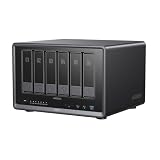
UGREEN NASync iDX6011 6-Bay AI NAS, 32GB LPDDR5X RAM | Intel Core Ultra 5 125H 208TB Capacity, Dual 10GbE, Dual Thunderbolt 4, Dual M.2 NVMe, 8K HDMI (Diskless)
AI NAS | UGREEN iDX6011 | 6 bays | Dual 10GbE | Thunderbolt 4 | Intel Core Ultra 5 125H | 32 GB RAM | 2 M.2 slots | Diskless listing | UGOS Pro | New | In stock
Previously verified price; check the current offer.
Last checked: Oct 28, 2026 11:44 pm GMT+0000
UGREEN NASync iDX6011 6-Bay AI NAS, 64GB LPDDR5X, Intel Core Ultra 5 125H | 208TB Capacity, Dual 10GbE, Dual Thunderbolt 4, Dual M.2 NVMe, 8K HDMI, Private Cloud Network Attached Storage (Diskless)
AI NAS | UGREEN iDX6011 | 6 bays | Dual 10GbE | Thunderbolt 4 | Intel Core Ultra 5 125H | 64 GB RAM | 2 M.2 slots | Diskless listing | UGOS Pro | New | Low stock
Previously verified price; check the current offer.
Last checked: Oct 28, 2026 11:44 pm GMT+0000
10GbE NAS UK

UGREEN NAS UPS 120W DC Battery Backup 12000mAh Battery Power Supply | Compatible NAS DXP2800/DXP2800GT DXP4800 Pro/DXP4800GT/DXP4800 Plus/DXP480T Plus/DH2300/DH4300 Plus
10GbE NAS | UGREEN NASync DXP4800 GT | 4 bays | Dual 10GbE | AMD Ryzen Embedded R2514 | 2 M.2 slots | New | In stock
Previously verified price; check the current offer.
Last checked: Oct 28, 2026 11:34 pm GMT+0000

UGREEN NASync DXP2800 GT 2-Bay NAS Storage, 10GbE LAN 4K HDMI Cloud Backup | AMD Ryzen Embedded R2514 CPU, 8GB RAM, 4K HDMI, Surveillance Center, Cloud Backup, Docker, Home Assistant Support (Diskless)
10GbE NAS | UGREEN NAS | 2 bays | 10GbE + 2.5GbE | AMD Ryzen Embedded R2514 | 8 GB RAM | Diskless listing | UGOS Pro | New | In stock
Previously verified price; check the current offer.
Last checked: Oct 28, 2026 11:36 pm GMT+0000

OWC Thunderbolt 5 Dock with Dual 10GbE + 2.5GbE, 3x Thunderbolt, 4x USB 10Gb/s - Pro Docking Station for NAS, AV, NDI, Dante, Mac/PC - Support 3 Display 8K, 90W, Fanless
10GbE NAS | OWC NAS | Dual 10GbE | Thunderbolt 5 | New | Low stock
Previously verified price; check the current offer.
Last checked: Oct 28, 2026 11:44 pm GMT+0000

TERRAMASTER F8 SSD NAS 8-Bay All SSD, Intel N95 4-Core, 8GB DDR5 (Diskelss) | 10GbE Port, 8 Heat Sinks Included, Palm-Sized High-Performance Network Attached Storage
10GbE NAS | TerraMaster NAS | 8 bays | 10GbE | 8 GB RAM | New | In stock
Previously verified price; check the current offer.
Last checked: Oct 28, 2026 11:43 pm GMT+0000
NAS for Video Editing UK
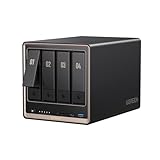
UGREEN NASync DXP4800 GT 4-Bay NAS Storage,2 * 10GbE LAN, 4K HDMI, 8GB RAM | ECC - Support, SD Card Slot, U.2 & M.2 Slots, 4K HDMI, Surveillance Center, Docker, Cloud Backup (Diskless)
10GbE NAS | UGREEN NASync DXP4800 GT | 4 bays | Dual 10GbE | AMD Ryzen Embedded R2514 | 8 GB RAM | 2 M.2 slots | Diskless listing | UGOS Pro | New | In stock
Previously verified price; check the current offer.
Last checked: Oct 28, 2026 11:41 pm GMT+0000

UGREEN NASync DXP4800 Plus 4-Bay Desktop NAS, 2 * NVMe Slots, Nas Server | 8GB DDR5 RAM,1 * 10GbE, 2 * M.2 NVMe Slots, 4K HDMI, Multi-Device Connectivity, Versatile Expansion Ports (Diskless)
AI NAS | UGREEN NAS | 4 bays | 10GbE | 8 GB RAM | Diskless listing | New | In stock
Previously verified price; check the current offer.
Last checked: Oct 28, 2026 11:36 pm GMT+0000

UGREEN NAS DXP4800 Pro 4-Bay NAS Storage with HDMI Cable, Cloud Backup | Intel® Core™ i3-1315U 6-Core CPU, 8GB DDR5 RAM, 128G SSD, 1x 10GbE, 1x 2.5GbE, 2 * NVMe Slots NAS Support Docker (Diskless)
AI NAS | UGREEN NASync DXP4800 Pro | 4 bays | 10GbE + 2.5GbE | Intel Core i3-1315U | 8 GB RAM | 2 M.2 slots | Diskless listing | UGOS Pro | New | In stock
Previously verified price; check the current offer.
Last checked: Oct 28, 2026 11:36 pm GMT+0000

UGREEN NASync DXP4800 GT 4-Bay NAS Storage + UPS, Dual 10GbE LAN, AMD Ryzen Embedded R2514 CPU, 8GB RAM, ECC - Support, SD Card Slot (Diskless)
Previously verified price; check the current offer.
Last checked: Oct 28, 2026 11:43 pm GMT+0000
Useful additions for your setup
A complete storage setup may also need drives, SSDs or faster networking. Check compatibility, interfaces and your backup plan before ordering.
NVMe storage for cache and fast projects

Lexar Thor Pro 1TB SSD, M.2 2280 PCIe Gen4 NVMe SSD | Up to 6,000MB/s, High-Performance Storage SSD, Compatible with PS5, Laptop & Desktop, for Gamers and Creators
Internal SSD | 1 TB | PCIe 4.0 | New | In stock
Last checked: Nov 2, 2026 8:16 pm GMT+0000

Lexar EQ790 SSD, M.2 2280 PCIe Gen4 NVMe SSD, EQ790 1TB | Up to 7,000MB/s Read, High-Performance Storage Internal Solid State Drive for AI Rendering, 4K Video Editing, PC & PS5 Gaming
Internal SSD | 1 TB | PCIe 4.0 | New | In stock
Last checked: Nov 2, 2026 8:21 pm GMT+0000

Samsung SSD 990, Internal M.2 NVMe SSD Hard Drive, 1TB, PCIe 4.0 x4 | Data Storage, NVMe 2.0, Up to 7,150/6,450 MB/s Read/Write Speed, For Work, Gaming & Creative, MZ-V9V1T0BW
Internal SSD | 1 TB | PCIe 4.0 | New | In stock
3% below Amazon reference price £169.90
Last checked: Nov 2, 2026 8:17 pm GMT+0000

Lexar ARES 1TB SSD, M.2 2280 PCIe Gen4 NVMe SSD | Up to 7,400MB/s Read & 6,500MB/s Write, Internal Solid State Drive for PS5, PC, Laptop, Gamers, Creators, Professionals
Internal SSD | 1 TB | PCIe 4.0 | New | In stock
Last checked: Nov 2, 2026 11:15 am GMT+0000
Estimate the complete storage-system cost
Include the enclosure, drives and the infrastructure you still need. The cheapest enclosure is not always the cheapest finished system.
Which option fits your situation?
| Buyer situation | What matters most | Check before purchase |
|---|---|---|
| Large media library | Eight-bay capacity and parity | Calculate usable RAID capacity |
| Small studio | Dual 10GbE shared access | Check switch and client NICs |
| Long growth horizon | Unused bays and upgrade path | Avoid overbuying drives on day one |
Detailed buying guide
Why buy eight bays instead of larger drives in four bays?
More bays give you additional choices for parity, performance and staged growth. Larger individual drives can still be simpler, quieter and lower power, so there is no universal winner.
Compare the total cost of drives, rebuild times, usable capacity and the number of failure domains you are comfortable managing.
Does eight bays automatically make it faster?
More drives can increase aggregate throughput in the right RAID layout, but controller behaviour, file size and network limits still matter.
For small random files, metadata and application workloads, SSDs, caching and CPU performance may matter more than spindle count.
How should I plan a 10GbE studio around it?
Treat the NAS, switch, client adapters and cabling as one system. A fast NAS attached to a 1GbE or 2.5GbE client will still transfer at the slower link's practical ceiling.
For several editors, consider aggregate traffic across clients rather than only one workstation's peak speed.
Where does Thunderbolt 4 fit?
Thunderbolt can be valuable for a nearby workstation and specialised workflows, while Ethernet remains the usual shared-storage path for multiple systems.
Confirm the NAS operating mode and your host support before buying with the assumption that it behaves exactly like a conventional Thunderbolt DAS.
Should I fill all eight bays immediately?
Not necessarily. Leaving bays free can preserve an upgrade path, depending on the RAID type and expansion rules you choose.
Buying fewer larger drives can sometimes reduce power and noise, while more drives can improve parallel throughput. Plan for your workload rather than maximising bay utilisation.
What backup does an eight-bay NAS still need?
RAID is not a backup. Keep another copy of important data on a separate device, location or cloud service according to the value and recovery-time requirement of the files.
Large arrays also take longer to restore, so recovery planning matters more as capacity grows.
How to read this comparison
Products are grouped by the exact storage model, drive-bay count, networking and interface information shown in the listing. If an important specification is unclear, it is marked as not confirmed rather than guessed. Drive trays, cables, adapters, docks and unrelated bare drives are left out of the main results.
Prices and availability can change quickly. Use the last-checked time as a freshness guide, then confirm the current price, seller, delivery date and exact configuration on Amazon before ordering.
This page covers Amazon offers rather than every UK retailer. Compare the complete configuration and total delivered cost, not just the headline price.
Frequently asked questions
Does this page compare every UK retailer?
No. Live prices on this page come from Amazon. Other UK retailers may have different stock, bundles or delivery terms, so compare the exact model and what is included before ordering.
Why can the Amazon price change after I click?
Prices and availability can change between checks. Use the last-checked time on each card as a freshness guide, then confirm the current price, seller, condition and delivery date on Amazon.
Are hard drives included with every NAS or DAS listing?
No. Many enclosures are sold diskless, while some listings include drives. Check the title and included-items section carefully because the chassis model alone does not confirm installed storage.
Does a 10GbE port guarantee 10Gbps file transfers?
No. Real throughput depends on the drives, RAID layout, SSD cache, client network adapter, switch, cabling, protocol and workload. A 10GbE port removes one bottleneck but does not eliminate the others.
Can an accessory appear instead of the complete storage system?
The main results are intended for complete NAS, DAS or external-storage products. Still confirm that the listing is the enclosure or complete unit you expect rather than a drive tray, cable, adapter or replacement part.
What happens when an important specification is unclear?
The page leaves unclear details as not confirmed rather than copying a specification from a similar model. Check the exact Amazon listing when drive bays, networking, memory or included storage matters to your purchase.