


United Kingdom · GBP · Deal Watch
Networking Black Friday Deals UK 2026: What to Buy
This Black Friday, make your network upgrade a connected plan—from the switch and adapters to the devices that will use them.
Find the missing speed, port or power capability, then compare suitable hardware. Include transceivers, cables and adapters required to make the new connection work. Set a recent-price baseline for the whole build before Black Friday. Buy when the combined offers reduce that useful setup’s cost, rather than shifting the budget into unnecessary extras.
Choose TP-Link TL-SG108-M2 to connect a small set of 2.5GbE computers and storage devices on one straightforward wired network. Choose UniFi Lite 8 PoE when you need a managed switch to power a small group of cameras or access points. These solve different problems, so start with the missing connection or power supply.
Which Networking option should you choose?
Start here
TP-Link TL-SG108-M2
Choose it for a small unmanaged 2.5GbE network.
Find this configurationChoose this alternative
Ubiquiti UniFi Lite 8 PoE
Choose it for a small managed installation needing powered ports.
Buy on AmazonCurrent Networking Listings on Amazon
Black Friday sale dates and offer timing
Dates for 2026: Black Friday — November 27; Amazon.co.uk — November 19–30. Individual offer periods and eligibility vary.

Ubiquiti UniFi Switch Lite 16 PoE L2 Gigabit Ethernet (10/100/1000) Power over Ethernet (PoE) White
Last verified 2026-11-13 03:01:57 UTC

Ubiquiti UniFi Lite 16 PoE Switch di rete gestito Gigabit a 16 Door Con 8 Door POE+
Last verified 2026-11-13 03:01:57 UTC

Asustor AS5404T Nimbustor 4 Gen2 4 Bay NAS + ASW205T 5 Port 2.5Gb Network Switch
Last verified 2026-11-13 14:23:28 UTC

29% below the Amazon reference price
TP-Link Archer BE3600 Dual Band WiFi 7 Router 3600Mbps, 2x2.5G Ports | WiFi Router wtih 4×External Antennas, USB 3.0 Port, VPN Router, Replace ISP Router, MU-MIMO, HomeShield, Easy Setup, EasyMesh
Last verified 2026-11-13 08:41:00 UTC

GL.iNet GL-MT6000 Flint 2 Wi-Fi 6 Dual 2.5G VPN Router | Wi-Fi 6 6 Gbps, 8-stream, 2.5G WAN and LAN, WireGuard 900Mbps, OpenVPN 880Mbps, AdGuard Home
Last verified 2026-11-13 08:40:54 UTC
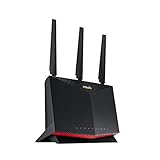
ASUS RT-AX86U Pro (AX5700) Dual Band WiFi 6 Extendable Gaming Router, 2.5G Port, Mobile Game Mode, Port Forwarding, Subscription-Free Network Security, VPN, AiMesh Compatible
Last verified 2026-11-13 08:40:54 UTC

ASUS RT-AX88U Pro WLAN Gaming Router (AX6000 WiFi 6 Standard, MU-MIMO, OFDMA, AiProtection, Gaming Engine, Adaptive QoS, 8x Gigabit, USB 3.1)
Last verified 2026-11-13 08:40:54 UTC

20% below the Amazon reference price
TP-Link EAP650-Outdoor WiFi 6 Access Point, AX3000 Dual Band Gigabit Wireless Access Points, Omada Mesh, PoE+ Powered, Indoor Outdoor Weatherproof, Seamless Roaming Extended Range, Cloud Management
Last verified 2026-11-13 08:40:21 UTC
As an Amazon Associate, Cloudzat earns from qualifying purchases. Prices and availability can change; Amazon shows the final price for your chosen item.
Networking buying guide
| Choice | Best for |
|---|---|
| TP-Link TL-SG108-M2 | a small unmanaged 2.5GbE network |
| Ubiquiti UniFi Lite 8 PoE | a small managed installation needing powered ports |
Which Networking option should you choose?
For a small unmanaged 2.5GbE network, choose TP-Link TL-SG108-M2.
For a small managed installation needing powered ports, choose Ubiquiti UniFi Lite 8 PoE.
Map the traffic before shopping the sale
Write down which devices actually exchange large amounts of data. A workstation backing up to a NAS, a Proxmox host moving VM images, a camera recorder receiving many streams and a Wi-Fi access point serving ordinary internet traffic create very different patterns. Black Friday does not change those traffic paths. It only changes the purchase price, so the architecture still comes first.
Count simultaneous transfers rather than adding every advertised port speed together. A switch with many multi-gig ports can be perfectly adequate when only one or two clients are active at once. The reverse is also true: a small office with several fast workstations may need stronger uplinks even if no single client exceeds 2.5GbE.
Choose 2.5GbE or 10GbE from the bottleneck
2.5GbE is attractive because it often works over existing copper cabling and gives a meaningful step above gigabit without the power, media and adapter questions that accompany 10GbE. It is a strong fit for modern NAS appliances, mini PCs and Wi-Fi access points that already include multi-gig Ethernet.
10GbE makes more sense for fast storage, server aggregation, editing workstations and backup windows where multi-gig traffic is sustained. Do not pay for 10GbE only because the switch is discounted. Verify that the client NICs, NAS, cabling and storage can move enough data to use the additional link capacity.
Treat port type as part of the product, not an accessory decision
RJ45 10GBASE-T and SFP+ can both deliver 10GbE, but they lead to different cabling, power and deployment choices. Copper is convenient when existing structured cabling is important. SFP+ is common for short DAC links between servers, NAS systems and switches and can also support fiber for longer runs.
A discount on the switch can be offset by the cost of modules, DACs or NIC changes. Check whether combo ports share capacity, whether an SFP+ cage is genuinely 10GbE, and whether the media you plan to use is supported by both endpoints.
Managed features matter when the network carries more than one trust zone
VLANs, tagged trunks, link aggregation, spanning-tree behavior and monitoring are not headline shopping features, but they often determine whether a switch fits a home lab, camera network or small office. An unmanaged switch may be ideal for a simple edge segment and completely unsuitable for a design that needs several VLANs.
If OPNsense, Proxmox or another router is expected to route between VLANs, make sure the access switch can create the tagged and untagged port behavior the design requires. Buying the cheapest multi-gig switch and replacing it later is usually worse than paying slightly more for the required control plane once.
PoE savings are real only when the power budget is sufficient
PoE switch listings often emphasize the number of powered ports while the total watt budget is less prominent. Eight PoE-capable ports do not guarantee that eight high-draw access points or cameras can run simultaneously. Add the maximum expected consumption of the powered devices and keep reserve for startup peaks, future additions and model changes.
Also verify whether the ports provide the PoE generation your devices expect. A discount should not persuade you to run injectors beside a switch that was supposed to simplify the deployment. The cleanest Black Friday purchase is usually the switch that meets both data and power requirements without workaround hardware.
Wi-Fi 7 is a system purchase, not only a radio purchase
Wi-Fi 7 routers and access points can advertise enormous aggregate wireless rates, but the wired uplink, client capabilities, channel plan and placement determine whether those numbers matter. A fast access point on a 1GbE uplink may become limited by Ethernet before the radio is busy.
Coverage also matters because 6GHz propagation differs from lower bands. A mesh kit may solve coverage but use valuable wireless capacity for backhaul unless Ethernet is available. Compare node count, multi-gig ports and placement before using the sale price as the deciding factor.
Avoid false economy in NIC and adapter deals
Network interface cards are unusually sensitive to host compatibility. The connector, PCIe slot width, available lanes, operating-system drivers, low-profile bracket and cooling all matter. A discounted server NIC can be a good buy for a home lab only when the host platform can actually use it.
USB Ethernet adapters and media converters can be useful products, but they are not substitutes for every PCIe NIC use case. Keep USB adapters and media converters separate from PCIe NICs because they solve different host and cabling problems.
Use price history instead of the crossed-out number
Networking hardware often moves through coupons, weekly promotions and model transitions before Black Friday. A large percentage off a list price may simply return a switch to the same street price it reached several times during the year. Compare the event price with the recent median and tracked low so a seasonal badge does not disguise an ordinary street price.
The useful question is whether the exact SKU, port configuration and condition are cheaper than the same product before the sale. A different revision or a bundle with extra media should not be treated as a direct price drop without checking what is included.
Build a complete network cost before checkout
A switch is often only one line in the bill. Add NICs, DACs or transceivers, Ethernet cabling, PoE requirements, rack hardware and any UPS capacity needed for the new gear. A supposedly cheap 10GbE upgrade can become a larger project when every endpoint requires a new adapter.
Model the whole path before buying. Black Friday is most valuable when it lowers the cost of a network you already understand, not when a discount creates an unnecessary redesign.
Keep the whole connection path in the budget
Write down the speed of the computer, storage server and any uplink between them. A fast network card cannot speed up a path that still crosses a slower switch port. Copper Ethernet and SFP+ need the right adapters and media at both ends. Include the cable, transceiver or adapter in the complete cost where one is required.
For a shared network, count simultaneous transfers as well as the maximum speed of one connection. A small switch with a useful fast uplink can be better than a larger switch with an uplink that several clients will saturate. For a simple home network, unnecessary management features can add setup work without improving the jobs you actually do.
Plan power and placement before buying
A PoE installation has both a per-port power limit and a total switch budget. Add the connected devices’ maximum demand, then leave an allowance for startup and later additions. A port count by itself does not establish how many of your devices the switch can power together. Match the PoE standard required by the device to the switch output.
Put the equipment where cooling, access and noise are acceptable. A fan-cooled rack switch can be inconvenient beside a desk even when its ports are excellent value. Access-point placement matters as much as the radio generation. A wired route to a useful location can be a better upgrade than a more expensive wireless device in a poor location.
Choose the simplest suitable management approach
An unmanaged switch is often enough to connect a small set of devices on one network. Choose managed features when you have a specific need for VLANs, monitoring or other controls. Check whether the intended management approach depends on another controller or subscription. Include the time needed to configure and document the network, especially when somebody else may need to maintain it later.
For a replacement, preserve the working settings and test the important devices before removing the old switch or router permanently. Check local file transfers as well as internet access. A device can provide an internet connection while a VLAN, shared folder or access point remains incorrectly configured. The useful upgrade is the one that improves the actual traffic without creating an avoidable recovery problem.
Buying Networking in the UK
For Networking in the UK, begin with TP-Link TL-SG108-M2 for a small unmanaged 2.5GbE network. Compare Ubiquiti UniFi Lite 8 PoE when a small managed installation needing powered ports is the more useful choice. The Amazon links and prices on this page use Amazon UK and pounds. Add delivery and any required components to the amount you are comfortable paying. For a model family with several configurations, use the model name and the installed components together when comparing these two choices. Keep the seller’s order details so you can check that the hardware you receive is the version you chose.
Electricity cost calculator
Replace the example values with your own measurements, capacity or prices.
Questions buyers ask
Which Networking option should I choose?
Choose TP-Link TL-SG108-M2 for a small unmanaged 2.5GbE network. Choose Ubiquiti UniFi Lite 8 PoE for a small managed installation needing powered ports.
What networking hardware usually has useful Black Friday discounts?
Switches, NICs, Wi-Fi routers, mesh kits, access points and PoE hardware frequently receive promotions, but the value depends on the exact model and its pre-event price.
Is 2.5GbE enough for a home lab?
Often yes. It is a strong upgrade from gigabit for NAS and multi-gig internet, while 10GbE is more useful for sustained server, storage and workstation traffic.
Should I buy an unmanaged switch because it is cheaper?
Only when the segment is simple. VLANs and more advanced network designs usually require managed switching.
Is SFP+ better than RJ45 for 10GbE?
Neither is universally better. SFP+ is attractive for DAC and fiber; RJ45 can reuse copper cabling. Choose the media path before choosing the sale switch.
Related buying guides
- 2.5GbE Switch buying guide
- 10GbE Switch buying guide
- 10GbE Network Card buying guide
- PoE Switch buying guide
- UniFi buying guide
- QNAP Switch buying guide
- Ethernet Switch
- Mesh Wi-Fi
- Network Adapter
- eero Mesh Wi-Fi
- GL.iNet Router
- Travel Router
- VPN Router
- Tenda Networking
- D-Link Switch
- WAVLINK Networking
- Outdoor PoE Access Point
- 2.5GbE Adapter
- USB4 10GbE Adapter
- USB Wi-Fi Adapter
- Managed Switch
- 2.5GbE Switch with 10GbE Uplinks
- 2.5GbE PoE Switch
- TP-Link Deco
- TP-Link Omada
- ASUS Router