


CLOUDZAT · BLACK FRIDAY 2026
Updated · 26 Nov 2026 21:10 UTC
Black Friday offers and current Amazon listings

Black Friday Deal
Canon imageCLASS MF465dw II - Monochrome Wireless Duplex Laser Printer with Print, Copy, Scan, Fax, Expandable Paper Capacity, 42 PPM
−44% · Amazon reference price: $540.99
Verified 2026-11-26 21:36:08 UTC

Black Friday Deal
Canon Color imageCLASS LBP646Cdw Wireless Laser Printer, Duplex, 26 PPM, Print Only, White
−40% · Amazon reference price: $378.99
Verified 2026-11-26 21:36:08 UTC

Black Friday Deal
Canon Color imageCLASS MF753Cdw II - All-in-One Color Duplex Laser Printer | Wireless with Scanner, Copier, Fax, Auto Document Feeder, 3 Year Limited Warranty, Mobile Ready, 35 PPM for Home and Office
−38% · Amazon reference price: $702.99
Verified 2026-11-26 21:36:08 UTC

Black Friday Deal
Canon Color imageCLASS MF663Cdw - Wireless, Multifunction Duplex Laser Printer
−31% · Amazon reference price: $479.99
Verified 2026-11-26 21:36:08 UTC

Canon imageCLASS LBP122dw - Wireless Monochrome Duplex Laser Printer | Print Only, Mobile Ready, 30 PPM for Home
−44% · Amazon reference price: $194.99
Verified 2026-11-26 21:36:08 UTC
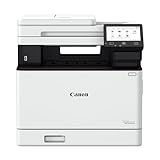
Canon Color imageCLASS MF751Cdw II - Wireless Duplex Laser Printer, Multifunction with Copier, Scanner, Automatic Document Feeder, 3 Year Limited Warranty, 35 PPM
−39% · Amazon reference price: $648.99
Verified 2026-11-26 21:36:08 UTC
Prices and stock reflect the last successful check shown on each card. Discounts and Black Friday badges appear only when reported by Amazon. The checkout price applies. As an Amazon Associate, Cloudzat earns from qualifying purchases.
Our buying recommendation
For most US buyers, the safest Black Friday laser-printer choice is a mono Brother or Xerox model for everyday documents, and a Canon or HP color model only when color pages truly matter. The Brother HL-L2460DW is the best simple print-only pick for text, while the DCP-L2640DW adds scanning and copying for a small office without pretending to be a premium office hub. For color documents, the Canon imageCLASS MF665Cdw is the most balanced option, and the HP Color LaserJet Pro 3301fdw is the better fit when you want a color all-in-one with a duplex automatic document feeder. Skip laser if your main goal is photo printing.
Laser printers are still the right answer for many households and small offices that mainly push out text, forms, invoices, labels, and homework sheets. The best purchase is not automatically the most feature-packed one; it is the printer that matches the way you actually work. If your output is mostly black text, a mono laser is usually the most sensible path. If your documents regularly need charts, branded handouts, or color-coded pages, then a color laser can earn its place. The right choice is about page type, not shopping drama.
Ownership cost and daily hassle matter more than the seasonal excitement around a deal card. A printer can look cheap to buy and still be a poor fit if it uses more toner than your workload justifies, adds features you never use, or takes up more room than your desk can support. It also matters whether the machine is print-only or an all-in-one, because scanning and copying convenience can save time every week. The smartest Black Friday purchase is the simplest model that still handles your real tasks without forcing compromises.
Compatibility is another place where buyers get tripped up. Most current laser printers can handle common home and office setups, but not every family includes the same features. Some models print only, some scan only one side at a time, and some include a duplex automatic document feeder while others do not. You should not assume automatic duplex scanning just because the printer supports automatic duplex printing. This guide focuses on direct buying advice so you can choose the right machine for your space, your document volume, and your workflow without having to decode spec sheets on your own.
Choose the right printer for your work
| Buyer scenario | Named pick | Why it fits |
|---|---|---|
| Best simple home document printer | Brother HL-L2460DW | Mono laser, automatic duplex printing, and a straightforward layout make it a strong fit for text-heavy pages. |
| Best budget all-in-one for scanning and copying | Brother DCP-L2640DW | Adds scanning and copying for home office work, but duplex printing should not be mistaken for duplex scanning. |
| Best color laser for mixed business documents | Canon imageCLASS MF665Cdw | Good choice for reports, charts, and handouts when color documents matter more than photo output. |
| Best color laser with stronger office workflow | HP Color LaserJet Pro 3301fdw | A better fit when you want a color all-in-one with a duplex ADF and regular multi-page handling. |
| Best to skip if you mostly print photos | Epson ET8550 | This is a photo-oriented inkjet, not a laser printer, so it belongs in a different buying category. |
Start with the page type, not the brand name
The most useful question is not which printer is newest or most heavily promoted, but what your pages actually look like. If you mainly print resumes, school forms, invoices, shipping slips, web pages, or receipts, a mono laser is usually the right category. It is built to make black text look crisp and to handle routine document output with very little drama. That is why the Brother HL-L2460DW stands out for many buyers: it is a focused document printer, not a machine trying to be everything to everyone. The less your pages depend on color, the more value you get from a simple mono model.
Color lasers only make sense when color changes the usefulness of the page. That can mean sales decks, classroom handouts, marked-up drafts, or business material where color coding helps people read faster. In that case, the Canon imageCLASS MF665Cdw is the more balanced choice because it keeps the focus on office documents rather than photo output. Do not pay for color just because it sounds nicer on the box. If black-and-white dominates your printing, a mono model will usually be easier to live with, easier to place, and easier to justify over time. The right choice starts with honesty about what you print most often.
Choose print-only or all-in-one on purpose
A lot of shoppers say they want a printer, but their real need includes scanning, copying, or occasional document archiving. That is why the print-only versus all-in-one decision matters so much. The Brother HL-L2460DW is the cleaner buy when you only need printing and want the fewest moving parts. It is a practical fit for a desk, a dorm, or a small family setup where a phone app or separate scanner can handle the rare document capture job. Print-only models are often simpler to place and simpler to use, which is a real advantage if you want the printer to stay out of the way.
The Brother DCP-L2640DW makes more sense for users who do scan and copy on a regular basis. It is important to be precise here: this model supports automatic duplex printing, but that does not mean it automatically scans both sides of a page in one pass. Duplex printing and duplex scanning are different capabilities, and buyers should not conflate them. If your job includes scanning bills, IDs, or multi-page paperwork often, an all-in-one can save real time. If you never scan, do not pay for the extra mechanism just because it exists. Buy the function you will actually use, not the one that sounds future-proof.
Understand why mono laser still wins for most homes
Mono laser remains the default recommendation because most home printing is boring in the best way. It is about forms, labels, return paperwork, contracts, class pages, and family documents that need to look clean and be easy to read. Those jobs reward dependable black text far more than they reward fancy color. The Xerox B230 is a solid alternative in this lane for buyers who want a compact mono printer with a straightforward office feel. It belongs in the same general conversation as the Brother HL-L2460DW, but it appeals to a slightly different shopper who likes a simple, businesslike design.
The reason to choose mono is not just convenience; it is also restraint. A color printer can tempt people into using color when it adds nothing to the page, and that can make the printer feel more complicated than it needs to be. If your output is mostly black text, keeping the machine monochrome removes a layer of decision-making. Xerox also gives you all-in-one options like the B225 and B235 if you need scanning and copying alongside printing. The point is not that Xerox is automatically better than Brother, but that both brands offer sensible mono paths. For document-heavy households, that is often the most rational purchase.
When color is worth paying for and when it is not
Color laser is worthwhile when the color is part of the message. That includes charts, training handouts, classroom packets, sales documents, and family paperwork where color improves clarity or organization. In that use case, the Canon imageCLASS MF665Cdw is an easy recommendation because it is aimed at document work first. It is a better fit than a mono printer if you know you will regularly benefit from color on the page. The Canon imageCLASS MF662Cdw is a named alternative in the same family for buyers who want a comparable color document printer but may prefer a different configuration or local offer.
What color laser is not for is photo-lab output or rich image reproduction. If your main goal is glossy family photos, wall-worthy prints, or art-focused image work, laser is the wrong category. That is where inkjet and photo-oriented models belong. Epson ET2900, ET4950, ET8550, and Canon MegaTank G3290 are different product types entirely, and they should not be treated as laser substitutes. The Black Friday mistake is to buy a laser because it sounds office-grade, then expect it to behave like a photo printer. Buy color laser when you need document color that stays sharp and practical, not when you want a substitute for photo printing.
Know when HP is the better office workflow choice
HP’s Color LaserJet Pro line belongs on the shortlist when your main need is a more office-like all-in-one experience. The HP Color LaserJet Pro 3301fdw is especially relevant if you scan and copy multi-page documents often, because it includes a duplex automatic document feeder. That matters for people who deal with two-sided paperwork and want a smoother workflow. The detail to keep straight is that not every HP model in this broader family has the same feeder setup, so you should not assume duplex ADF just because the model name looks similar. The 3301fdw is the one to consider when document handling is a frequent part of your day.
This makes HP a strong alternative to Canon rather than an automatic replacement. Canon can be the better straightforward color document buy when your needs are moderate and you want an uncomplicated setup. HP is more compelling when scan-and-copy behavior is central to the purchase. If you only print the occasional flyer or report, you may not need the extra workflow muscle. But if your household or office processes stacks of paperwork, a duplex ADF becomes useful quickly. The best HP choice here is not about brand loyalty; it is about matching the machine to repeated office tasks and avoiding the frustration of a weaker feeder later on.
Use Brother as the easy baseline, then branch out only if needed
Brother is often the safest starting point because its laser lineup is easy to understand. The HL-L2460DW covers print-only users who want a simple mono document machine. The DCP-L2640DW steps up to scanning and copying for households that need an all-in-one. That separation is helpful during Black Friday because it reduces the risk of overbuying. You can look at the two models and immediately know whether you need the extra functions. Brother is especially good for shoppers who want the least amount of fuss from a document printer and do not want to spend time learning a complicated interface.
That said, Brother should not be treated as the universal answer. If you need color document output, Canon and HP are stronger fits because Brother’s recommended models here are mono. If you want a more businesslike mono alternative, Xerox is worth considering through the B230, B225, and B235. If you want a photo printer, you should leave laser behind entirely and move into inkjet territory. So the right way to use Brother in this guide is as the baseline recommendation, not as a one-size-fits-all slogan. It is the place to start when your priorities are clarity, practicality, and low-friction document printing.
Choose Xerox when you want no-nonsense mono documents
Xerox models deserve attention from buyers who want a plain, businesslike approach to printing. The B230 is the clean print-only option for people who care about compact mono output and do not need scan or copy functions. It is a strong pick for a small office, a desk corner, or a focused home setup where reliability and document clarity matter more than flashy extras. Xerox tends to appeal to shoppers who like their hardware to feel straightforward and professional rather than consumer-fancy. That can be a meaningful difference if you are tired of printers that spend too much time trying to be clever.
The B225 and B235 extend that same philosophy into all-in-one territory. They are useful if you need occasional scanning and copying but still want the printer to stay disciplined about document work. Choose Xerox over Brother when you want that more office-like tone and the specific feature mix fits your day. Choose Brother when you want the easiest, most familiar home-office path. Xerox is not a better answer for photos, and it is not a substitute for a color printer. It is simply a very sensible alternative for buyers who want a mono printer that focuses on the job rather than on marketing language.
Do not confuse laser, LED, inkjet, and thermal categories
A good buying guide should keep the technology labels straight because the wrong label leads to the wrong expectation. Laser printers are the focus here, and they are the right choice for document-heavy printing. By contrast, tank printers such as the Epson ET2900, ET4950, ET8550, and Canon MegaTank G3290 are inkjet models, not laser printers. They can be excellent in the right setting, but they solve different problems and should be judged differently. Likewise, SELPHY photo printers use dye-sublimation technology, and shipping printers use direct thermal printing. Those are separate categories and should not be mixed into a laser purchase decision.
This distinction matters because buyers often try to force one printer family to cover every task. A laser printer is not a photo lab, a tank printer is not a laser substitute, and a shipping label printer is not a general-purpose home office device. If you know those boundaries, the recommendations become much easier to trust. The best laser pick for text documents is a laser, not an inkjet with a similar-looking price tag. If you need color documents, buy a color laser on purpose. If you need photos, buy a photo-oriented inkjet or MegaTank model on purpose. The category choice is the foundation of a good Black Friday purchase.
Questions answered
Should I buy a mono laser or a color laser for home use?
Choose mono if your pages are mostly text, forms, shipping labels, or school work. Choose color only if charts, handouts, or other documents genuinely need color. For most homes, mono is the simpler and more practical choice.
Is the Brother HL-L2460DW better than the DCP-L2640DW?
Neither is automatically better. The HL-L2460DW is the better choice if you only want printing. The DCP-L2640DW is better if you also need scanning and copying. Buy the one that matches your real workflow.
Does the Brother DCP-L2640DW do duplex scanning?
No. It supports automatic duplex printing, but that is different from automatic duplex scanning. If two-sided scanning matters, make sure the model explicitly includes that feature rather than assuming it from the print function.
When should I pick the Canon imageCLASS MF665Cdw?
Pick it when you want color document printing for reports, charts, and handouts, and you do not need a more office-heavy feeder setup. It is a strong all-around color laser for practical document work, not for photo printing.
Is the HP Color LaserJet Pro 3301fdw overkill for most households?
For many households, yes. It becomes valuable when you regularly scan and copy multi-page documents and want a duplex ADF. If you only print occasionally or mostly black text, a simpler mono model is usually the better buy.
Are Epson EcoTank models replacements for laser printers?
Not really. Models like the Epson ET2900, ET4950, ET8550, and Canon MegaTank G3290 are inkjet tank printers, and they fit different needs. The ET8550 is especially aimed at photo-oriented output, so it is not a straight laser substitute.
Related printer buying guides
Sources and offer checks
Research checked November 26, 2026. Amazon cards show their own last successful check. Manufacturer promotions and Amazon offers have separate terms. Published regional product and campaign information.