


CLOUDZAT · BLACK FRIDAY 2026
Updated · 26 Nov 2026 21:05 UTC
Black Friday offers and current Amazon listings

Black Friday Deal
Canon imageCLASS MF465dw II - Monochrome Wireless Duplex Laser Printer with Print, Copy, Scan, Fax, Expandable Paper Capacity, 42 PPM
−44% · Amazon reference price: $540.99
Verified 2026-11-26 21:36:08 UTC

Black Friday Deal
Canon Color imageCLASS LBP646Cdw Wireless Laser Printer, Duplex, 26 PPM, Print Only, White
−40% · Amazon reference price: $378.99
Verified 2026-11-26 21:36:08 UTC

Black Friday Deal
Canon Color imageCLASS MF753Cdw II - All-in-One Color Duplex Laser Printer | Wireless with Scanner, Copier, Fax, Auto Document Feeder, 3 Year Limited Warranty, Mobile Ready, 35 PPM for Home and Office
−38% · Amazon reference price: $702.99
Verified 2026-11-26 21:36:08 UTC

Black Friday Deal
Canon Color imageCLASS MF663Cdw - Wireless, Multifunction Duplex Laser Printer
−31% · Amazon reference price: $479.99
Verified 2026-11-26 21:36:08 UTC

Canon imageCLASS LBP122dw - Wireless Monochrome Duplex Laser Printer | Print Only, Mobile Ready, 30 PPM for Home
−44% · Amazon reference price: $194.99
Verified 2026-11-26 21:36:08 UTC
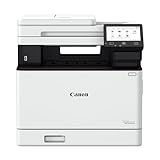
Canon Color imageCLASS MF751Cdw II - Wireless Duplex Laser Printer, Multifunction with Copier, Scanner, Automatic Document Feeder, 3 Year Limited Warranty, 35 PPM
−39% · Amazon reference price: $648.99
Verified 2026-11-26 21:36:08 UTC
Prices and stock reflect the last successful check shown on each card. Discounts and Black Friday badges appear only when reported by Amazon. The checkout price applies. As an Amazon Associate, Cloudzat earns from qualifying purchases.
Our buying recommendation
For most US buyers, the best printer is the one matched to the work: mono laser or LED for text, color laser or ink tank for family documents, an MFP with a duplex ADF for scanning-heavy homes or offices, a photo tank for creative prints, and thermal for shipping labels. The Brother HL-L2460DW is the cleanest pick for simple black-and-white printing, the Canon imageCLASS MF665Cdw is the strongest all-around color family choice, the HP Color LaserJet Pro 3301fdw is the better scanning pick, and Epson’s tank line is where photo and high-color households should look first. Choose the category before the deal card.
Black Friday is a good moment to buy a printer only when the machine fits the job you actually do. If you mostly print invoices, school worksheets, forms, or recipes, a document-first mono laser or LED model is often the calmest ownership choice. If your household leans toward color handouts, family projects, or photos, a tank inkjet or color laser may be the better fit. The right match prevents the common regret of buying a “good deal” that is wrong for daily use.
Ownership cost should guide the decision more than the sticker on the box. Cartridges, toner, and ink bottles behave very differently over time, and the cheapest printer upfront is not always the cheapest to keep running. Tank printers are inkjet models that use refill bottles rather than cartridges, while laser and LED printers use toner and are usually best for text-heavy work. Photo-oriented and shipping-label printers are separate categories, so the best value comes from choosing the right category first, then the right model.
Compatibility is the other part many shoppers overlook. Think about whether you need simple printing from phones and laptops, scanning stacks of pages, duplex printing, or a machine that can sit in a shared family area without constant attention. Also separate print needs from scan needs: automatic duplex printing is not the same as automatic duplex scanning, and a printer with both is not automatically the right answer. The best seasonal buy is the one that fits your home, your office rhythm, and your kind of documents without forcing compromises.
Choose the right printer for your work
| Buyer scenario | Best named pick | Why this is the right kind of buy |
|---|---|---|
| Occasional black-and-white documents | Brother HL-L2460DW | Mono laser with automatic duplex printing for sharp text and low-fuss document use. |
| Family color documents and homework | Canon imageCLASS MF665Cdw | Color MFP that fits mixed household printing, copying, scanning, and duplex document handling. |
| Small office scanning and shared paperwork | HP Color LaserJet Pro 3301fdw | Better fit when a duplex automatic document feeder matters more than a basic printer-only setup. |
| Photo-heavy home printing | Epson EcoTank ET-8550 | Photo-oriented ink tank for buyers who care more about image output and creative color than plain office pages. |
| Shipping labels and marketplace orders | Thermal label printer | The right category for adhesive labels because it is purpose-built for shipping workflows and not paper documents. |
Start with the job, not the sticker price.
The easiest way to buy the wrong printer is to begin with a sale tag instead of your workload. If your printing is mostly black text, a mono laser or LED printer is usually the safest choice because it is built around crisp documents and straightforward upkeep. The Brother HL-L2460DW belongs at the top of that list for buyers who want a simple home or dorm printer with automatic duplex printing. If you also need scanning and copying, the Brother DCP-L2640DW is the better fit because it adds MFP convenience, but it remains a mono document machine rather than a color all-rounder.
If your house prints color schoolwork, calendars, or shared handouts, move to a color MFP instead of forcing a mono model to cover that need. The Canon imageCLASS MF665Cdw and MF662Cdw are sensible options for families who need one machine to print, copy, and scan without turning the printer area into a hobby project. Skip broader office hardware if you only print a few pages at a time. The right conclusion is simple: pay for the workflow you use, not the workflow that sounds impressive in a product listing.
Choose laser or LED when text reliability matters most.
Laser and LED printers are the strongest fit for buyers who want stable text output, a predictable document workflow, and less worry about dried ink between uses. The Xerox B230, B225, and B235 family is a good example of a mono document line that makes sense for small offices or home offices that value consistency over creative features. Brother’s HL-L2460DW plays in the same lane but with a more home-friendly emphasis. These models are best when documents are the whole story and photo quality is not a buying factor.
It also helps to understand what LED means here. Brother’s color LED models use LED print technology, not laser technology, even though they sit in the same document-printing conversation as lasers. That matters because buyers should compare them as document printers, not assume every dark-gray box is the same thing. The practical advice is to choose laser or LED if your pages are mostly text, forms, invoices, and reports. If you want richer photos or heavy color graphics, switch categories instead of expecting toner-based machines to behave like photo printers.
Use ink tanks when color is frequent and cartridges would be frustrating.
Ink tank printers are still inkjet printers, just with refillable ink bottles instead of replaceable cartridges. That difference matters because tanks make more sense for households that print color often enough to feel irritated by constant cartridge replacement. The Epson ET-2900 is the simpler entry point for basic home use, while the Canon MegaTank G3290 is a good family-oriented alternative when you want an approachable color all-in-one. These are not the right buy for someone who prints almost nothing. They are strongest when color is a routine part of home life.
If you want more capable home-office performance, the Epson ET-4950 is the better tank choice than a bare-bones starter model because it is aimed at a fuller office-style workflow. For buyers whose main reason for shopping is photo output, the Epson ET-8550 is the better recommendation because it is built for richer color and creative work, not just school packets. The main point is to separate general family color printing from photo printing. A tank printer can be excellent, but the right tank depends on whether you need documents, photos, or both.
Don’t confuse duplex printing with duplex scanning.
Many shoppers see “duplex” and assume it covers every paper-handling task. It does not. Automatic duplex printing means the printer can print on both sides of a sheet without you flipping it manually. Automatic duplex scanning is a different capability, and it requires an ADF that can scan both sides of a page, not just print them. That distinction is important when comparing models like the Brother DCP-L2640DW and DCP-L2620DW, which do not gain duplex scanning simply because they can duplex print.
If scanning stacks of paper is part of your routine, the HP Color LaserJet Pro 3301fdw is the clearer fit among the models named here because it includes a duplex ADF for scanning workflows. That is why it belongs in the office or paperwork-heavy home conversation, not just the color printer conversation. If you only scan an occasional document, you may not need that extra hardware. But if you regularly digitize contracts, class handouts, or multi-page forms, buy the scanner workflow first and treat printing as the second priority.
Pick color laser when you need family documents, not gallery prints.
Color laser is often the sweet spot for families that want consistent text and simple color pages without moving into photo-printer territory. The Canon imageCLASS MF665Cdw is the best named recommendation in this guide for a family that prints homework, forms, flyers, and occasional charts. It gives you the useful features that matter in a busy home: print, copy, scan, and duplex handling. The MF662Cdw is a valid alternative if your actual needs are a bit lighter and you do not need the fuller feature set of the higher model.
What color laser is not is a substitute for a photo printer. If you care most about family pictures, scrapbook projects, or image-heavy creative work, a tank photo printer will usually make more sense than a color laser. On the other hand, if your color printing is mostly documents, a laser MFP is often easier to live with than a photo-oriented inkjet. The buying conclusion is to separate document color from photo color. They are both “color,” but they are not the same product category.
Buy photo-oriented printers only when image quality is the point.
The Epson EcoTank ET-8550 is the clearest recommendation here for photo-minded buyers who want better creative output from a home printer. It belongs to a different use case from ordinary family document printing. If your projects include photographs, craft prints, color-rich layouts, or larger creative sheets, this is the kind of machine that deserves attention. A standard office printer can handle charts and school reports, but it is not the same as buying a model designed for image-heavy work. That difference is the whole reason photo-oriented printers exist.
Do not overbuy this category if your real need is tax forms or school packets. A photo printer is a specialized tool, and paying for image performance does not make sense when almost every page is text. If you want a balanced home machine and rarely print photos, a more ordinary tank or color laser is the better alternative. The practical rule is straightforward: buy the photo printer when pictures are the reason you are excited to print at home, not when photos are a side note to ordinary paperwork.
Use thermal only for labels and shipping, not for paper documents.
Thermal label printers occupy a very specific lane: shipping labels, address labels, marketplace orders, and other adhesive output. They are excellent at that task because they are designed for labels instead of paper documents. If you sell online, ship parcels often, or print return labels weekly, a thermal printer can be the cleanest possible second device. It is especially useful when you want a clutter-free workflow for package prep and do not want to waste ink or toner on labels.
Skip thermal if you need reports, schoolwork, photos, or standard office paperwork. It is not a substitute for a regular document printer, and it should not be treated as one. If you only need the occasional label, you can still use a document printer, but that is usually a less elegant solution. The better conclusion is to think of thermal as a specialist tool. It is perfect for shipping and almost useless for everything else, so buy it only when labels are truly a routine part of your life.
Make the final decision by matching the machine to your household rhythm.
A single student, a family that prints from the kitchen table, and a side-hustle seller all need different hardware. For the student or solo user whose needs are mostly black-and-white, the Brother HL-L2460DW or a Xerox B230-class mono printer is usually the right answer. For a family that wants one dependable color hub, the Canon imageCLASS MF665Cdw is the strongest overall recommendation, with the Canon MegaTank G3290 as the better ink-based alternative if color volume is higher and you prefer tanks. Those are different products, and the difference matters.
For a busy household or small office that scans a lot, the HP Color LaserJet Pro 3301fdw earns its place because the duplex ADF solves a real workflow problem. For creative families and photo-focused buyers, the Epson ET-8550 is the clear specialty pick. For shipping and sales, add a thermal label printer rather than forcing a paper printer to do label duty. That is the main Black Friday lesson: the best printer is not the one with the most features in theory, but the one that removes the most friction in your actual week.
Questions answered
Which printer type should most people buy for basic home documents?
A mono laser or LED printer is usually the safest choice for basic black-and-white documents. It is best for sharp text, simple upkeep, and printing that happens in bursts. The Brother HL-L2460DW is the strongest straightforward pick, with Xerox’s mono B230 family as a clear alternative.
Is a color laser better than an ink tank for a family printer?
Not always. Color laser is often better for predictable text and mixed documents, while an ink tank is usually better if your household prints enough color pages to make cartridges annoying. The Canon imageCLASS MF665Cdw is the family-color laser pick; the Canon MegaTank G3290 is the tank alternative.
Do I need an ADF if I already have duplex printing?
No. Duplex printing means the printer can print on both sides automatically. An ADF is for feeding multiple pages into the scanner, and a duplex ADF can scan both sides of a page. If scanning stacks matters, the HP Color LaserJet Pro 3301fdw is the more useful kind of machine.
Should I buy a photo printer if I only print pictures a few times a year?
Usually not. Photo-oriented models like the Epson EcoTank ET-8550 make the most sense when image quality is a real priority, not an occasional novelty. If photos are rare, a general tank or color laser is often the more practical everyday printer.
What is the best printer choice for shipping labels?
A thermal label printer is the correct category for shipping labels. It is built for adhesive output and is much better suited to labels than a normal paper printer. If labels are your main job, thermal is the smartest second device to buy.
Does automatic duplex printing mean the printer can scan both sides too?
No. This is a common mix-up. Automatic duplex printing only means printing on both sides of paper. Duplex scanning requires different hardware, usually an ADF that supports two-sided scanning. Brother’s DCP-L2640DW and DCP-L2620DW should not be treated as automatic duplex scan models just because they duplex print.
Related printer buying guides
Sources and offer checks
Research checked November 26, 2026. Amazon cards show their own last successful check. Manufacturer promotions and Amazon offers have separate terms. Published regional product and campaign information.