


CLOUDZAT · BLACK FRIDAY 2026
Updated · 26 Nov 2026 21:53 UTC
Black Friday offers and current Amazon listings

HP Color LaserJet Pro MFP 3301sdw | Color Printer | Wireless | All-in-One | Duplex
−19% · Amazon reference price: $539.00
Verified 2026-11-26 21:14:46 UTC
Prices and stock reflect the last successful check shown on each card. Discounts and Black Friday badges appear only when reported by Amazon. The checkout price applies. As an Amazon Associate, Cloudzat earns from qualifying purchases.
Our buying recommendation
For most US buyers, the HP Color LaserJet Pro 3301sdw is the best starting point because it gives you color laser printing and basic scanning without paying for fax hardware you may never need. Buy the 3301fdw if your daily work includes two-sided scanning, stacks of forms, or fax use in a business or medical setting. Skip this family if your priority is photo quality, very high-volume color printing, or a refillable-ink ownership style. In those cases, a Brother mono laser, a Canon color laser MFP, or an Epson or Canon MegaTank inkjet is usually the more sensible buy.
The HP Color LaserJet Pro 3300 family is a strong fit for buyers who want a compact color laser printer for everyday documents, homework packets, invoices, and business graphics without moving into a bulky office machine. The best choice depends less on color alone and more on how you handle paper. If you mainly print and scan single sheets, the HP Color LaserJet Pro 3301sdw is the clean, balanced pick. If your real work involves multi-page paperwork, duplex scanning, and fax, the HP Color LaserJet Pro 3301fdw is the better match because it is built for document flow, not just output.
Ownership cost matters as much as feature count, especially during a shopping season when attractive deal cards can make any printer seem like a bargain. The 3300 family uses toner, so buyers should think about cartridge replacement as part of the long-term experience rather than assuming every laser printer is automatically economical for every household. That said, ownership cost is not only about supplies; it is also about buying the right model once. Paying for fax or advanced document handling you will never use is wasteful, while buying too little printer for your paperwork can become frustrating quickly.
Compatibility should be judged by your workflow, not by a generic checklist. The 3301sdw and 3301fdw are the US and Canada versions of this family, while the 3302sdw and 3302fdw are the Europe-region versions, and they are not interchangeable. Also, the special strengths of the family are in color document printing and practical scanning, not photo printing. If you need richer photo output, cartridge-free ink refilling, or mostly monochrome text, there are better alternatives. The right Black Friday decision is the one that matches your actual paperwork, devices, and daily habits, not the one with the longest feature name.
Choose the right printer for your work
| Buyer scenario | Named pick | Why it fits |
|---|---|---|
| Home office with mixed devices and occasional scanning | HP Color LaserJet Pro 3301sdw | Best when you want a practical color laser all-in-one for documents, phone printing, and simple scans without paying for document features you will rarely use. |
| Paper-heavy business use with two-sided scan jobs | HP Color LaserJet Pro 3301fdw | The right choice when duplex scanning and fax are part of the job, because it reduces manual handling and keeps paperwork moving. |
| Mostly black-and-white printing with occasional color | Brother HL-L2460DW | A smarter buy if color is a bonus rather than a need; this mono duplex printer stays focused on text-first printing. |
| Need a color MFP but want a competing brand | Canon imageCLASS MF665Cdw | A strong alternative for buyers comparing color laser all-in-ones and wanting a different interface and ecosystem from HP. |
| Want refillable ink for frequent color pages | Epson ET4950 or Canon MegaTank G3290 | Tank inkjets are better when you print color often and want a cartridge-free refillable-ink approach instead of toner ownership. |
Why the 3301sdw is the default choice for most households
The HP Color LaserJet Pro 3301sdw is the model most readers should start with because it covers the basics that matter: color printing, wireless convenience, and everyday scanning. It is the sensible buy for a shared family desk, a small home office, or a side business that prints reports, school forms, and simple handouts. The appeal is not that it does everything; it is that it does the right things without pushing you into features that add cost or complexity. If your scanner use is occasional and your printer job is mostly ordinary documents, this model is enough. That is important because many shoppers overbuy multifunction features and then never use them.
Compared with the fdw, the 3301sdw is easier to justify because it fits more people’s real-world habits. It is not the model to buy if your workload is defined by duplex scanning, faxing, or long paper processing sessions. But it is the best buy when you want a color laser MFP that is likely to feel natural in the first week and still make sense months later. That makes it a better recommendation than jumping straight to a heavier office device. If you are comparing it with Canon imageCLASS MF662Cdw or Xerox C235, the HP wins when you want a mainstream, straightforward desk printer rather than a more office-centric experience.
When the 3301fdw is the right upgrade
The HP Color LaserJet Pro 3301fdw earns its place when paper handling matters more than simplicity. This is the model for users who regularly scan double-sided documents, manage forms, send and receive fax, or move through stacks of paperwork that would otherwise force repeated manual flipping. The key point is that the fdw is not just a fancier version of the sdw; it is the better tool for document-heavy routines. If your office life includes contracts, healthcare paperwork, school administration, or client packets, duplex scanning can save time every week. That is the genuine reason to choose it, not the model name itself.
Buy the fdw if you know document handling will be part of your normal routine. Skip it if you think fax might someday be useful but you rarely scan anything beyond a page or two. In that case, the added features are not paying for themselves in convenience. This is also where it helps to separate print features from scan features. Duplex printing does not mean duplex scanning, and the value of the fdw comes from the automatic document feeder behavior, not from a vague assumption that one kind of duplex automatically implies the other. For buyers who are sure they need a more capable paperwork machine, the fdw is the correct HP pick.
What to know about duplex printing versus duplex scanning
A common buying mistake is assuming that if a printer can print on both sides automatically, it must also scan on both sides automatically. That is not true. In this family, duplex printing and duplex scanning are separate capabilities, and readers should not let the wording blur them together. The HP Color LaserJet Pro 3301fdw is the model to choose when automatic duplex scanning is important; the 3301sdw is the more basic option for printing and standard scanning. The difference matters because duplex scanning is what changes the scanner from a convenience feature into a real document workflow tool.
This distinction is useful beyond HP. Buyers also make the same mistake with other brands, such as Brother models where automatic duplex print does not necessarily mean duplex scan. For example, the Brother DCP-L2640DW is a mono multifunction printer with automatic duplex printing, but it does not gain duplex scanning just because it duplex prints. That is why naming the exact job matters. If you only need duplex print, your options are broader. If you need duplex scan, your shortlist gets smaller, and the 3301fdw becomes a clearer recommendation. Matching the machine to the paper task is the fastest way to avoid disappointment after purchase.
Why this family is not the right answer for photo-first buyers
The HP Color LaserJet Pro 3300 family is built for documents, not photo-quality output. It can produce clean color charts, handouts, presentations, and forms, but that is different from printing family photos, art projects, or images that need nuanced tonal gradation. Buyers should not confuse colorful business graphics with photo performance. Those are separate jobs, and color laser is not the best tool for the second one. If your main goal is vivid photos, the right alternatives are ink tank or photo-oriented inkjet models, not a business-focused color laser MFP.
For photo-first buyers, the better alternatives in the supplied lineup are the Epson ET8550 for larger-format creative output and the Epson ET4950 or Canon MegaTank G3290 for more general refillable-ink use. Those are inkjet printers, not lasers, and that matters because their ownership style and output character are different. The HP family still makes sense when your pages are mostly office documents with occasional color, but once photos become the priority, the balance changes. This is why the best recommendation is not universal. It depends on whether you need document color or image color, and those are not the same thing.
Regional model names and supplies must match your market
The HP Color LaserJet Pro 3300 family uses different regional model names, and that is not a trivial detail. In the US and Canada, shoppers should focus on the 3301sdw and 3301fdw. In Europe, the corresponding models are the 3302sdw and 3302fdw. Those regional versions are not interchangeable product listings, and buyers should not treat them as though they are the same device with a different label. This matters because supplies, retailer listings, and support documentation are tied to the market-specific model name.
The practical advice is simple: buy the version sold for your region and do not assume a bargain listing for the other region is a safe substitute. A printer can look very similar online and still be the wrong regional SKU. That warning applies to toner as well. Starter supplies included with a printer are not the same thing as standalone consumables, and buyers should not confuse the box contents with the long-term supply ecosystem. Regional fit is part of the ownership decision, not an afterthought. For US readers, the 3301 models are the correct recommendations.
Best alternatives if you do not want HP
If you want a color laser MFP but prefer another brand, the Canon imageCLASS MF665Cdw and MF662Cdw are the most relevant alternatives. They make sense for buyers who want a similar office-oriented experience but do not want to commit to HP. Xerox B230, B225, B235, and C235 are also useful comparison points, especially for buyers who lean toward a business-first product family. These are not direct photo substitutes or tank replacements; they are competing office printers that solve the same broad problem from a different brand perspective.
The best alternative depends on your use case. Choose Canon when you want a close color-laser rival with a different user experience. Choose Xerox when your buying style favors office utility and a more business-focused lineup. Skip both if your real goal is low-refill hassle from an ink tank, because then an Epson or Canon MegaTank model is more appropriate. The important part is not which brand looks strongest in isolation. It is which model family fits your workflow, your documents, and your expectation for day-to-day use.
When a mono Brother printer is the better buy
Many households buy color because it sounds safer, but if nearly everything you print is black text, a mono laser is usually the wiser choice. The Brother HL-L2460DW is the clearest alternative when you want dependable text printing, simple operation, and no temptation to pay for color capability you rarely use. If you also want scanning in a mono multifunction device, the Brother DCP-L2640DW is a sensible option. It is important to note that the DCP-L2640DW does not gain duplex scanning simply because it has duplex printing. Buyers need to evaluate those features separately.
This is where the buying advice becomes practical: choose Brother mono when your use is receipts, drafts, shipping documents, school text, and general black-and-white work. Choose the HP 3300 family when color helps the output make sense, such as charts, worksheets, client-facing handouts, and mixed business documents. The Brother models are not better in every way; they are better for a narrower job. That narrow focus is exactly what makes them smart alternatives. During a seasonal shopping rush, the temptation to “upgrade” to color can be strong, but if color is not central, the simpler mono printer is usually the better decision.
How tank printers compare with toner-based ownership
Tank inkjets such as the Epson ET2900, ET4950, ET8550, and Canon MegaTank G3290 belong to a different category from the HP Color LaserJet Pro 3300 family. They are inkjet printers with refillable ink tanks, so the ownership experience is not about toner cartridges. This difference matters for buyers who print a lot of color pages or who want to reduce how often they deal with replacement supplies. It also matters for output preferences. Tank inkjets are often better at photo-style printing and broad color use, while laser printers are often stronger at crisp document handling and page-to-page consistency.
Choose a tank inkjet if your print volume includes many color pages, school projects, family records, or creative pages, and you prefer refillable ink over toner. Choose the HP if your output is mostly office documents and you value the clean, document-first behavior of a color laser. Do not assume one technology is cheaper or better in every situation, because the correct answer depends on what you print and how often. The best seasonal buying advice is to match the printer type to the paper you produce most often. That way, you avoid buying a laser for photo work or a tank printer for a workflow that really wants laser behavior.
Suitable alternatives — different models
These are different products. Our guide explains which one to choose for your setup.

Black Friday Deal
Canon Color imageCLASS LBP646Cdw Wireless Laser Printer, Duplex, 26 PPM, Print Only, White
−40% · Amazon reference price: $378.99
Verified 2026-11-26 21:36:08 UTC

Black Friday Deal
Canon Color imageCLASS MF753Cdw II - All-in-One Color Duplex Laser Printer | Wireless with Scanner, Copier, Fax, Auto Document Feeder, 3 Year Limited Warranty, Mobile Ready, 35 PPM for Home and Office
−38% · Amazon reference price: $702.99
Verified 2026-11-26 21:36:08 UTC

Black Friday Deal
Canon Color imageCLASS MF663Cdw - Wireless, Multifunction Duplex Laser Printer
−31% · Amazon reference price: $479.99
Verified 2026-11-26 21:36:08 UTC
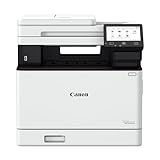
Canon Color imageCLASS MF751Cdw II - Wireless Duplex Laser Printer, Multifunction with Copier, Scanner, Automatic Document Feeder, 3 Year Limited Warranty, 35 PPM
−39% · Amazon reference price: $648.99
Verified 2026-11-26 21:36:08 UTC

Canon Color imageCLASS MF665Cdw - Wireless, All-in-One Duplex Laser Printer | Copier, Scanner, Fax, Auto Document Feeder, 3 Year Limited Warranty, Mobile Ready, 22 PPM for Home and Office
−29% · Amazon reference price: $549.99
Verified 2026-11-26 21:36:08 UTC

Canon Color imageCLASS MF662Cdw - Wireless Duplex Laser Printer with Copier, Scanner, 3 Year Limited Warranty, 26 PPM
−28% · Amazon reference price: $429.99
Verified 2026-11-26 21:36:08 UTC
Questions answered
Should I buy the 3301sdw or the 3301fdw?
Buy the 3301sdw if you want a color laser all-in-one for printing and basic scanning. Choose the 3301fdw if you regularly scan two-sided pages or still need fax. The fdw is a workflow tool; the sdw is the simpler, better-value pick for most homes and small desks.
Is the HP Color LaserJet Pro 3300 family a good photo printer?
No. It is a document-oriented color laser family, so it is better for text, forms, charts, and handouts than for photo-quality output. If photos matter most, look instead at an Epson ET8550 or another inkjet designed for richer image reproduction.
What should I buy instead if I mostly print black and white?
The Brother HL-L2460DW is the strongest simple alternative for monochrome printing. If you also want scanning, the Brother DCP-L2640DW is a more complete mono MFP. Both are better targeted than a color laser when color is only an occasional extra.
Are the US 3301 models the same as the European 3302 models?
No. The US and Canada use the 3301sdw and 3301fdw, while Europe uses the 3302sdw and 3302fdw. They are regional variants, so buyers should choose the version sold for their market rather than treating them as interchangeable listings.
Which Canon models are the closest alternatives?
Canon imageCLASS MF665Cdw and MF662Cdw are the most relevant Canon alternatives if you want a competing color laser multifunction printer. They are good comparison points for buyers who want a similar office-style printer from a different brand.
When should I skip this family and buy an ink tank printer instead?
Skip the 3300 family if you print lots of color pages, want refillable ink, or care more about photo output than laser document handling. Epson ET2900, ET4950, ET8550, and Canon MegaTank G3290 are better fits for those priorities, especially in family or creative-use settings.
Related printer buying guides
Sources and offer checks
Research checked November 26, 2026. Amazon cards show their own last successful check. Manufacturer promotions and Amazon offers have separate terms. Published regional product and campaign information.