


CLOUDZAT · BLACK FRIDAY 2026
Updated · 26 Nov 2026 21:54 UTC
Black Friday offers and current Amazon listings

Black Friday Deal
Canon imageCLASS MF465dw II - Monochrome Wireless Duplex Laser Printer with Print, Copy, Scan, Fax, Expandable Paper Capacity, 42 PPM
−44% · Amazon reference price: $540.99
Verified 2026-11-27 20:58:35 UTC

Black Friday Deal
Canon Color imageCLASS LBP646Cdw Wireless Laser Printer, Duplex, 26 PPM, Print Only, White
−40% · Amazon reference price: $378.99
Verified 2026-11-27 20:58:35 UTC

Black Friday Deal
Canon Color imageCLASS MF753Cdw II - All-in-One Color Duplex Laser Printer | Wireless with Scanner, Copier, Fax, Auto Document Feeder, 3 Year Limited Warranty, Mobile Ready, 35 PPM for Home and Office
−38% · Amazon reference price: $702.99
Verified 2026-11-27 20:58:35 UTC

Black Friday Deal
Canon Color imageCLASS MF663Cdw - Wireless, Multifunction Duplex Laser Printer
−31% · Amazon reference price: $479.99
Verified 2026-11-27 21:03:56 UTC

Canon imageCLASS LBP122dw - Wireless Monochrome Duplex Laser Printer | Print Only, Mobile Ready, 30 PPM for Home
−44% · Amazon reference price: $194.99
Verified 2026-11-27 20:58:35 UTC
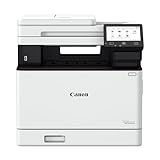
Canon Color imageCLASS MF751Cdw II - Wireless Duplex Laser Printer, Multifunction with Copier, Scanner, Automatic Document Feeder, 3 Year Limited Warranty, 35 PPM
−39% · Amazon reference price: $648.99
Verified 2026-11-27 21:03:56 UTC
Prices and stock reflect the last successful check shown on each card. Discounts and Black Friday badges appear only when reported by Amazon. The checkout price applies. As an Amazon Associate, Cloudzat earns from qualifying purchases.
Our buying recommendation
The safest Canon Black Friday choice depends on your workload, not the biggest feature list. For a balanced color multifunction, the Canon imageCLASS MF665Cdw is the best headline recommendation in the U.S. For black-and-white printing, the Brother HL-L2460DW is the cleanest print-only alternative, and the Brother DCP-L2640DW is better if you also need scanning and copying. If your scanning workflow is heavier and feeder use matters more than Canon branding, the HP Color LaserJet Pro 3301fdw is a stronger fit. Skip color laser if you mostly print text, and skip print-only models if you already know you will scan stacks of paper.
Canon’s laser lineup is strongest when your printing is document-first and your buying decision is based on workflow, not brand habit. A solo worker printing invoices has different needs from a family scanning school forms, and both are different from someone who wants color handouts for a small office. In the U.S., imageCLASS is the relevant Canon family, while i-SENSYS is the European branding for related but not identical models. That regional distinction matters because the right purchase is the one built for your market and your actual tasks, not a near-match from another region.
Ownership cost should guide the decision as much as the printer’s shelf appeal. Canon laser models are generally appealing because they are built for text-heavy output, predictable day-to-day use, and retail supply chains for toner, but the value only lands if you pick the right class of device. A simple mono printer is often the smartest buy for black-and-white pages, while a color multifunction makes sense only if color documents, scanning, and copying genuinely show up in your routine. Buying a more elaborate machine than you need can make the printer more annoying, not more useful.
Compatibility also matters in a more practical sense than many shoppers expect. Some people need automatic two-sided printing, some need a feeder for multi-page scans, and some just want a reliable printer that works with laptops and phones in a normal home or small office setup. Canon’s lineup includes print-only and multifunction models, mono and color models, and region-specific naming that should not be treated as interchangeable. This guide separates those choices so you can buy the right Canon laser the first time and avoid paying for features you do not plan to use.
Choose the right printer for your work
| Buyer scenario | Named pick | Why this is the right call |
|---|---|---|
| Mostly black-and-white pages and no scanning needs | Brother HL-L2460DW | This is the best straightforward choice for people who want duplex black-and-white printing without paying for copier hardware they will not use. |
| Black-and-white printing plus routine scanning and copying | Brother DCP-L2640DW | Choose this if you want a mono multifunction printer that can handle everyday documents, but you do not need color output. |
| One Canon machine for color documents, scanning, and copying | Canon imageCLASS MF665Cdw | This is the strongest Canon-led option for a home office or shared desk that needs a practical color multifunction laser. |
| Color office workflow centered on feeder-based scanning | HP Color LaserJet Pro 3301fdw | Pick this when multi-page scanning is a top priority and you want a color office printer built around an ADF-heavy workflow. |
| Home printing is more about photos or creative pages than office documents | Canon MegaTank G3290 or Epson ET-8550 | Choose an ink tank printer instead of laser when photo quality, richer media options, or mixed creative output matters more than document speed. |
Start with the job, not the technology label
Canon imageCLASS and i-SENSYS printers are best understood as document tools. If your pages are contracts, school forms, invoices, shipping documents, worksheets, or office handouts, a Canon laser can be an excellent fit. That is because laser printers are designed around steady text output and clean document handling, not photo-style color tuning. When Black Friday makes every model look tempting, the real question is simple: do you need a printer that handles office paperwork reliably, or do you need something built for photos and creative pages? For document-first buyers, Canon lasers deserve serious attention.
The wrong purchase usually happens when a shopper buys for hypothetical use instead of real use. A mono model is the better buy if most of your printing is black text. A color multifunction is only worth the extra attention if you truly need color documents, scanning, and copying in one place. If you are tempted by a feature-rich machine but rarely scan, copy, or print color, that extra capability becomes clutter. The best Canon purchase is the one that reduces friction in your weekly routine, not the one that simply sounds the most complete.
Decide between print-only and multifunction before anything else
The most important fork in Canon’s lineup is whether you want print-only or multifunction. A print-only model such as a Canon LBP unit makes sense if your whole job is outputting pages. That can be ideal for a dedicated desk, a student corner, or a small business that scans elsewhere. It is also the cleaner choice if you dislike extra hardware and want the simplest possible setup. For that buyer, the fewer features the printer has, the easier it usually is to live with.
A multifunction model is the better decision when copying and scanning are regular, not occasional, tasks. The Canon imageCLASS MF665Cdw fits that pattern well because it handles print, scan, and copy in a single color device aimed at home-office use. If you know you will digitize receipts, scan forms, or copy ID cards, multifunction is not a luxury; it is the practical category. By contrast, buying a print-only model and then adding a separate scanner later is usually a false economy unless you truly need a dedicated printing device only.
Choose color only when color changes the document
Color laser is most useful when color carries meaning rather than decoration. Examples include spreadsheets with color-coded columns, lesson plans, charts, client-facing handouts, and family documents that are easier to read with colored highlights. In those cases, a Canon color imageCLASS can be a smart compromise between everyday office usefulness and a compact footprint. It gives you business-style document color without moving you into a photo-printer mindset. For people who print some color but still focus on text, that balance often makes sense.
If your pages are almost always black and white, a mono printer is usually the better buy. You avoid paying for a capability that sits idle most of the year. And if your priority is photos, art prints, or colorful creative projects, skip laser entirely. Canon MegaTank models such as the G3290, and photo-oriented ink tank options like the Epson ET-8550, are more appropriate because they are inkjet printers designed for broader media and richer image use. Color laser is for structured documents, not for chasing photo realism.
Use the Brother mono path when simplicity matters more than brand choice
Canon is not automatically the best answer for every buyer, even within laser printers. If you want a straightforward black-and-white printer with as little complication as possible, the Brother HL-L2460DW is the better fit for many homes. It is a print-only duplex mono printer that suits people who just want dependable document output. That makes it the cleanest alternative to Canon when your needs are limited to everyday text pages and you do not want to pay for extra scanner hardware.
If you need mono printing plus scan and copy functions, the Brother DCP-L2640DW is the stronger alternative. One important note for buyers: duplex printing does not mean duplex scanning. The DCP-L2640DW supports automatic two-sided printing, but that is different from automatically scanning both sides of a page through a feeder. That distinction matters because shoppers often assume one duplex feature implies the other. If your priority is simple black-and-white productivity, Brother can be the smarter buy. If you want Canon color multifunction capability, stay with imageCLASS instead.
Choose HP when scanning throughput is the real priority
The HP Color LaserJet Pro 3301fdw belongs in this guide because some buyers are not just shopping for color; they are shopping for an office-style scan workflow. This model is the stronger option when your day involves multi-page packets, repeated feeder use, and a focus on document handling efficiency. It is especially relevant if the automatic document feeder is central to how you work. For that kind of buyer, scanning convenience can matter more than brand preference or even the exact color output experience.
This also helps clarify a common mistake: not every similar-looking office printer has the same feeder or scanning behavior. The HP 3301fdw is relevant because it is a duplex ADF model, while some related siblings in other product lines may not share the same duplex-feeder setup. For Canon buyers, that means you should judge MF models by the scanning workflow you actually need, not by assuming every multifunction printer is equally suited to feeder-heavy work. If feeder scanning is central, HP may beat Canon. If your needs are simpler, Canon remains a stronger all-around document choice.
Treat regional names as regional products, not exact twins
Canon imageCLASS is the U.S. and Canada branding, while i-SENSYS is the European branding for Canon laser printers. Those families are related, but they are not automatically one-to-one equivalents. Model names can differ, feature bundles can differ, and local toner or warranty expectations can differ as well. That is why a U.S. buyer should focus on U.S. imageCLASS models, and a European buyer should focus on i-SENSYS models built for that market. Buying the correct regional version avoids confusion later and makes ownership simpler.
This matters because a printer is not just a box you use once. It is a device you live with for years, and the regional configuration affects how you replace supplies and how the printer is supported. Do not assume that a similar number from another region gives you the same paper handling or the same included package. Also do not assume a local model can be swapped for a near-match from abroad without consequences. Regional matching is part of smart printer buying, not a minor technicality.
Think about the whole ownership package, not just the machine
A printer can look like a bargain and still be the wrong buy if the configuration does not fit your needs. Starter supplies and standalone consumables are not the same thing, and printer-plus-included-supplies should be judged differently from a bare unit. That distinction matters when comparing offers, because a model with starter toner included may be easier to get running on day one, while another unit may require separate supplies sooner. For that reason, the safest advice is to compare the actual printer package you are buying, not just the model name.
You also should not assume every retail Canon laser requires a subscription or cloud account to be useful. Ordinary retail ownership is generally about the printer, the app or driver you choose, and the supplies you buy later. The better buying question is simpler: does this model fit your printing habits, your scanning needs, and your space? If yes, it is a candidate. If not, a cheaper or more limited model may still be the better long-term value even during a busy seasonal sale period.
Best Canon pick by need, and when to skip it
For most U.S. shoppers who want a Canon laser with color, the Canon imageCLASS MF665Cdw is the best all-around recommendation. It is the right answer for a home office, a small shared workspace, or a family that needs one dependable color multifunction printer for documents, copying, and scanning. It is also the best Canon model to watch first if you want a practical seasonal purchase rather than a niche office machine. The appeal is balance: useful features without drifting into enterprise complexity.
Skip it if your needs are narrower. If you print mostly black text, the Brother HL-L2460DW or DCP-L2640DW will usually be the cleaner decision. Skip Canon color laser altogether if your main goal is photo printing, because ink tank models like the Canon MegaTank G3290 or Epson ET-8550 are a better category. And if your scanning workload is heavy enough that feeder performance is the real priority, the HP Color LaserJet Pro 3301fdw deserves a look. In other words, Canon MF665Cdw is the best Canon answer for many buyers, but not the best answer for every buyer.
Suitable alternatives — different models
These are different products. Our guide explains which one to choose for your setup.

Black Friday Deal
Xerox C255a Wireless Color Laser All-in-One Printer - Print Scan Copy Fax | Compact Color Print, Scan, Copy, Fax, 26 ppm, wireless setup, ideal for hybrid & small businesses, replaces the C235 model
−15% · Amazon reference price: $489.00
Verified 2026-11-27 21:15:03 UTC
Black Friday Deal
Xerox C245 Wireless Color All-in-One Printer - Amazon Exclusive - 3 in 1 | Compact Color Print, Scan & Copy, 26 ppm, wireless setup, best for hybrid offices & small businesses, replaces the C235 model
−15% · Amazon reference price: $459.00
Verified 2026-11-27 21:09:08 UTC
Black Friday Deal
Xerox C303a Wireless Color Laser All-in-One Printer - Print Scan Copy Fax | Color print, scan, copy, fax, 32 ppm, high-yield toner, wireless setup, touchscreen, ideal for hybrid & small businesses
−15% · Amazon reference price: $499.00
Verified 2026-11-27 21:09:08 UTC

Black Friday Deal
Xerox C300 Wireless Color Laser Printer - Print Only | 32 ppm color printing, high-yield toner, wireless setup, touchscreen, ideal for hybrid work and small to midsize businesses
−15% · Amazon reference price: $449.00
Verified 2026-11-27 21:09:08 UTC

HP Color LaserJet Pro MFP 4301fdw | Color Printer | Wireless | All-in-One | Printer Home Office | Color Documents | Mobile Compatibility | Print, Scan, Copy & Fax | Ideal Home Office Use
−23% · Amazon reference price: $859.00
Verified 2026-11-27 20:58:34 UTC

HP Color LaserJet Pro MFP 3301sdw | Color Printer | Wireless | All-in-One | Duplex
−19% · Amazon reference price: $539.00
Verified 2026-11-27 20:58:34 UTC
Questions answered
Should I buy a Canon imageCLASS color laser or a mono laser?
Choose color only if it improves the documents you actually print, such as charts, handouts, or mixed office pages. If you mostly print plain text, a mono laser is usually the better ownership choice because it is simpler and more appropriate for that workload.
Is the Canon MF665Cdw the best Canon model for a home office?
For many U.S. home offices, yes. It is the strongest Canon recommendation here because it combines color printing, scanning, and copying in one practical device. It is less compelling if you never print color or if you need a photo-focused printer instead.
What is the difference between imageCLASS and i-SENSYS?
They are regional Canon laser families. imageCLASS is the U.S. and Canada branding, while i-SENSYS is used in Europe. Do not assume the same model number is an exact match across regions, because the configuration and feature mix can differ.
Do duplex printing and duplex scanning mean the same thing?
No. Duplex printing means the printer can print on both sides of paper automatically. Duplex scanning means the feeder can scan both sides of a page automatically. A printer can have one feature without having the other, so do not treat them as interchangeable.
When is Brother a better buy than Canon?
Brother is often better when your needs are straightforward black-and-white printing, or mono printing plus basic scanning and copying. The HL-L2460DW and DCP-L2640DW are especially strong alternatives if you do not need Canon’s color multifunction approach.
Should I choose an ink tank printer instead of a Canon laser?
Yes, if your priority is photos, creative pages, or broader media flexibility. Canon MegaTank and Epson ink tank models are more appropriate for those jobs. Canon imageCLASS and i-SENSYS are better for document-heavy printing, not photo-first output.
Related printer buying guides
Sources and offer checks
Research checked November 26, 2026. Amazon cards show their own last successful check. Manufacturer promotions and Amazon offers have separate terms. Published regional product and campaign information.