


United Kingdom · GBP
Best Ryzen AI 9 HX 370 Mini PCs UK: Models and Prices
Choose the GMKtec EVO-X1 for a complete HX 370 desktop with fast soldered memory. Choose the MINISFORUM AI X1 Pro-370 if replaceable RAM, several SSDs or future expansion matter more. Start at 32GB for everyday work; move to 64GB for heavier development and virtual machines.
Which model to choose
GMKtec EVO-X1, 32GB or 64GB
Best ready-to-use choice for a compact desktop. Decide on RAM now because its onboard memory cannot be upgraded.
Alternative with the same processor: MINISFORUM AI X1 Pro-370 Mini PC 32GB DDR5 1TB PCIe 4.0 SSD | AMD Ryzen AI 9 HX370 Up to … · 32 GB RAM
 £1,099.00Price checked 13.11.2026 00:03 UTCView alternative on Amazon ↗Specifications and model details ↗
MINISFORUM AI X1 Pro-370, 64GB
Best for a growing home lab or development workstation: replaceable SO-DIMM memory and three SSD positions provide more room to adapt.
£1,499.00Price checked 13.11.2026 00:03 UTCBuy on Amazon ↗Specifications and model details ↗Amazon prices and configurations
Ryzen AI 9 HX 370
MINISFORUM AI X1 Pro-370 Mini PC 32GB DDR5 1TB PCIe 4.0 SSD | AMD Ryzen AI 9 HX370 Up to 5.1GHz 12C/24T, Mini Desktop Comput…
32 GB RAM · 1000 GB SSD
£1,099.00Price checked 13 Nov 2026 00:03 UTCBuy on Amazon ↗Ryzen AI 9 HX 370
MINISFORUM AI X1 Pro-370 Mini PC 64GB DDR5 1TB PCIe 4.0 SSD | AMD Ryzen AI 9 HX370 Up to 5.1GHz 12C/24T, Mini Desktop Comput…
64 GB RAM · 1000 GB SSD
£1,499.00Price checked 13 Nov 2026 00:03 UTCBuy on Amazon ↗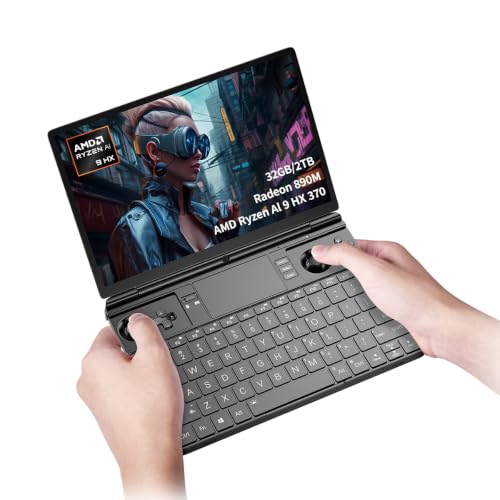
Ryzen AI 9 HX 370
Cutesliving GPD Win Max 2 2025 Handheld Gaming Mini PC with AMD Ryzen AI 9 HX 370, Radeon 890M Graphics, 10.1-inch 2.5K Disp…
32 GB RAM · 2000 GB SSD
£1,500.99Price checked 12 Nov 2026 23:32 UTCBuy on Amazon ↗
Ryzen AI 9 HX 370
MINISFORUM Mini PC AI X1 Pro AMD Ryzen AI 9 HX370(12 Cores/24 Threads, up to 5.1GHz)&AMD Radeon 890M Mini Gaming Computer,32…
32 GB RAM · 1000 GB SSD
£1,089.00Price checked 12 Nov 2026 02:59 UTCBuy on Amazon ↗Ryzen AI 9 HX 370
MINISFORUM AI X1 Pro-370 Mini PC 64GB DDR5 2TB PCIe 4.0 SSD | AMD Ryzen AI 9 HX370 Up to 5.1GHz 12C/24T, Mini Desktop Comput…
64 GB RAM · 2000 GB SSD
£1,509.00Price checked 02 Nov 2026 12:28 UTCBuy on Amazon ↗Buying guide
The two HX 370 models to shortlist
The GMKtec EVO-X1 is our first choice for someone who wants a complete, compact computer and does not plan to change its memory later. Pick 32GB for normal office applications, programming and lighter creative work. Pick 64GB if your projects already approach the smaller capacity or if several virtual machines must stay open together. Its soldered memory makes that decision part of the original purchase.
The MINISFORUM AI X1 Pro-370 is our recommendation when the machine will evolve. Its replaceable memory and multiple SSD positions suit a developer who wants to add capacity over time. Pay attention to the full model suffix: an AI X1 family listing can offer other processors. The 370 version is the one discussed here. Compare complete systems against complete systems when deciding which gives the better overall purchase.
What HX 370 and Radeon 890M are good at
AMD’s Ryzen AI 9 HX 370 has 12 cores and 24 threads with Radeon 890M integrated graphics. It suits a capable everyday desktop that also handles programming, several applications at once and occasional games. It is a different tier from a Ryzen AI Max+ 395 machine with Radeon 8060S. Paying for the larger platform makes sense when you need its memory and graphics capabilities, rather than simply wanting an AI label on a small computer.
Integrated graphics use system memory, so memory configuration matters alongside the GPU name. Game performance also depends on resolution, quality settings, cooling and drivers. Start demanding games at a modest resolution and adjust settings around the frame rate you find comfortable. A list of supported display resolutions describes the output connection, not a promise that modern games will run at that resolution.
32GB, 64GB and upgradeable memory
For a new general-purpose purchase, 32GB gives more breathing room than an entry-level configuration when browser tabs, office software and background services are all running. Choose 64GB for virtual machines, large development builds, substantial photo projects or smaller local AI models that share memory with other applications. There is no benefit in buying a memory tier that your workload will never approach if the extra cost displaces a needed SSD or monitor.
The EVO-X1’s onboard memory and the AI X1 Pro-370’s SO-DIMMs are meaningfully different designs. With the former, buy the capacity you expect to keep. With the latter, check the manufacturer’s supported modules and firmware before planning a later upgrade. A processor’s theoretical memory limit does not establish the limit of every finished computer using it. For graphics workloads, retaining a supported dual-channel arrangement is preferable to choosing modules by capacity alone.
Which ports are worth paying for?
Both shortlisted model designs are interesting for users who want more than a basic office box. An OCuLink connection can support an external graphics setup, but you must budget for the dock, graphics card, power supply, cable and desk space. Shut the system down before connecting or disconnecting OCuLink hardware. If you want an ordinary plug-and-play desktop, choose the Mini PC for its built-in capabilities first rather than assuming you will later build a low-cost gaming tower around it.
Two Ethernet ports can be useful for a lab or a workstation connected to fast storage. They do not make the computer a ready-configured secure router. USB4 can be useful for a fast external SSD or a display dock; confirm the bandwidth and functions of the particular port you plan to use. Make a short list of your monitor, storage and network connections before choosing the enclosure.
A useful development and home-lab configuration
Start with 64GB and a 1TB or 2TB SSD if you run containers and virtual machines alongside a desktop operating system. Give each virtual machine a realistic allocation, leave capacity for the host and allow space for snapshots. A large number of CPU threads cannot compensate for an SSD that is nearly full or a host operating system forced to swap continuously. Keep backups outside the Mini PC so a single hardware failure does not take both your working environment and its recovery copy.
For a machine that mostly edits code and connects to remote servers, 32GB can be enough. Spend the saving on a display and reliable storage rather than unused compute capacity. If you need several local drives, the AI X1 Pro-370’s SSD expansion is the more relevant feature. Check the lane width of each position: a secondary slot may have less bandwidth than the main system drive even when both accept the same physical SSD size.
Local AI and sensible alternatives
Use an HX 370 machine for local AI when you have a specific supported application and models that fit its memory budget. Test a small model first and inspect whether the application is using the intended acceleration backend. The NPU can accelerate supported tasks, but its TOPS figure cannot be translated directly into language-model speed. A useful buying question is whether your actual application supports the hardware today, with the operating system you plan to install.
If one shortlisted HX 370 model is unavailable, the other is the closest named alternative when fitted with similar RAM and SSD capacity. A 395 machine is a step up for high-memory AI and stronger integrated graphics; it is not necessary for ordinary office work. An Intel Core Ultra 9 285H Mini PC is worth considering when your applications or existing workflow favour Intel. Choose around the program and capacity you need rather than collecting processor badges.
Plan the complete working setup
Include the screen, keyboard, storage backup and any required dock in the budget. A powerful small computer cannot fix an unsuitable monitor connection or recover files that were never backed up. If you are replacing a working system, keep the old machine available while installing the applications that matter. Move one representative project first, check its output and confirm that sleep, networking and external devices behave as expected before moving the rest of your work.
For a purchase intended to last several years, consider how you will obtain firmware, drivers and replacement parts. A clear support route and a return window that allows a realistic trial can be more valuable than a small difference in headline specifications. Test the workload that motivated the purchase during that period: a long build, your actual game, a video export or the local model you plan to use. Keep the result, configuration and settings together so future upgrades address a measured limitation.
Buying in United Kingdom
Amazon UK prices are shown in pounds. Prefer a UK plug, a clear VAT-inclusive total and a seller offering a practical UK return route. An overseas import can change the cost and the way a warranty claim is handled.
Questions buyers ask
Which HX 370 Mini PC should I choose?
Choose the GMKtec EVO-X1 for a complete desktop whose memory capacity is decided at purchase. Choose the MINISFORUM AI X1 Pro-370 for replaceable RAM and more SSD expansion.
Can I upgrade the RAM later?
The EVO-X1 uses onboard memory. The AI X1 Pro-370 uses replaceable DDR5 SO-DIMMs, subject to its supported modules and firmware.
Is HX 370 suitable for gaming?
Radeon 890M is useful for lighter games and adjusted settings in more demanding titles. Choose a Radeon 8060S machine or a dedicated GPU system when graphics performance is the main reason for the purchase.
Manufacturer specifications
AMD Ryzen AI 9 HX 370 ↗GMKtec EVO-X1 ↗MINISFORUM AI X1 Pro-370 ↗Related Mini PC guides
Best Ryzen AI Max+ 395 Mini PCs UK: Models, RAM and PricesBest Core Ultra 9 285H Mini PCs UK: Models and PricesBest Radeon 8060S Mini PCs UK: Gaming, Models and PricesBest AI Mini Workstations UK: Local Models and Buying GuideAs an Amazon Associate, Cloudzat earns from qualifying purchases. Prices and availability can change.