


Mini PC decisions · United Kingdom · GBP
Best Mini PCs in the UK: Choose by Workload and Price
Pick a Mini PC for the work you actually do. Below are named UK choices for office use, media, a home server, virtual machines and gaming, with RAM, SSD and prices beside each one.
For a simple office PC, pick the Beelink Mini S13 N150 with 16 GB RAM. For a home server with more headroom, pick the Beelink EQR7 with 24 GB. For several virtual machines, start with the Beelink SER8 with 32 GB. The category choices below include alternatives and the exact UK listings.
Best UK Mini PCs: our picks by use
Choose the model that fits your job. Each card shows its RAM, SSD and the date we checked its price. Confirm those options and the total on Amazon.
Best for everyday office and study
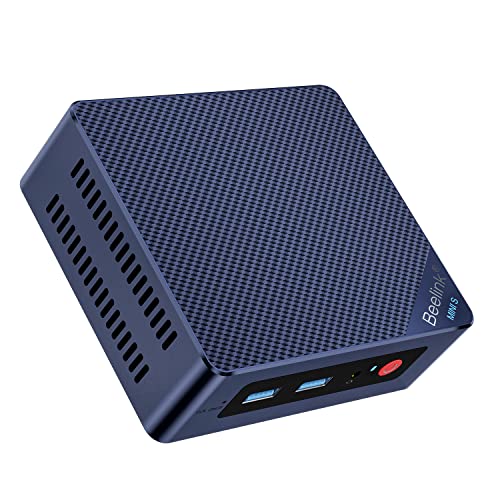
Beelink Mini S13, N150, 16 GB/500 GB
A complete Windows 11 Home configuration for documents, browser work and two displays, with dual 2.5G LAN.
Check: Confirm the selected 16 GB variant and display outputs.
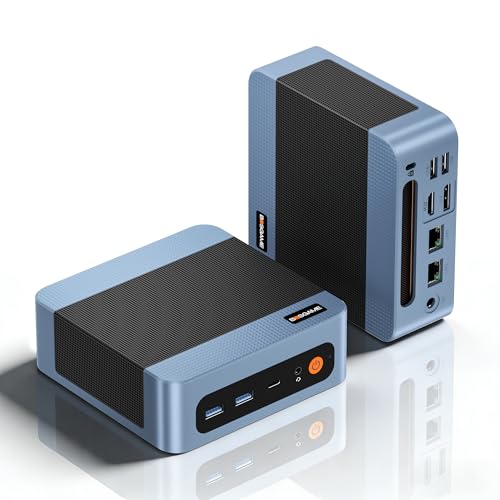
BOSGAME E5, Ryzen 5300U, 16 GB/512 GB
A similarly priced Windows 11 Pro option with more CPU threads and dual 2.5G LAN.
Check: Check the seller and the exact operating-system variation.
Best for home server or NAS companion

Beelink EQR7, Ryzen 7 7735U, 24 GB/1 TB
Eight CPU cores, more installed memory and a 1 TB SSD give several services more room to grow.
Check: Keep independent backups and confirm the network controller for your OS.

Beelink EQ14, N150, 16 GB/500 GB
A smaller starting system for modest always-on services with dual 2.5G LAN.
Check: Measure the whole system at the wall for your power estimate.
Best for media playback and a modest Plex server
Beelink EQ14, N150, 16 GB/500 GB
An N150 system with dual display outputs and enough installed memory for a media client or modest server.
Check: Verify the exact codecs, software settings and remote-stream needs.

Beelink S12 Pro, N100, 16 GB/500 GB
A lower-priced N100 configuration for straightforward playback and light services.
Check: Do not infer a guaranteed transcoding stream count from the CPU name.
Best for proxmox and several virtual machines

Beelink SER8, Ryzen 7 8745HS, 32 GB/1 TB
Eight cores and 32 GB installed RAM make a practical starting host for multiple small guests.
Check: Confirm memory expansion, storage layout and your guest RAM budget.

MINISFORUM MS-01, Core i9-13900H, 32 GB/1 TB
A higher-cost option when 10Gb networking, more storage interfaces and PCIe expansion are requirements.
Check: Check Proxmox driver support and the exact supplied configuration.
Best for OPNsense or a multi-port firewall

HSIPC N150 firewall PC, 16 GB/256 GB
Four advertised Intel i226-V Ethernet ports give clear physical interfaces for WAN and LAN planning.
Check: Verify the NIC chipset and firmware on the delivered unit.

Ttfzzztech i3-N305 firewall PC, 16 GB/256 GB
Consider this when the listed dual 10G SFP and dual 2.5GbE ports match your network plan.
Check: Confirm NICs, SFP compatibility and seller support before ordering.
Best for creative work and light gaming

MINISFORUM UM880 Plus, Ryzen 7 8845HS, 32 GB/1 TB
The listed Radeon 780M graphics, 32 GB RAM and OCuLink make this a stronger compact option than an N-series office box.
Check: Check your applications, display needs and sustained cooling.

Beelink SER8, Ryzen 7 8745HS, 32 GB/1 TB
Another 32 GB Radeon 780M listing for lighter graphics work and 1080p gaming with adjusted settings.
Check: Compare actual game tests for the exact model and memory setup.
Best for gaming with a dedicated GPU

MINISFORUM G1 Pro, RTX 5060, 32 GB/1 TB
A named GeForce RTX 5060 configuration when integrated graphics will not meet your game requirements.
Check: Review independent performance and noise tests at your target resolution.

ASUS ROG NUC 15, RTX 5080, 32 GB/2 TB
A much higher-priced RTX 5080 option for demanding games and GPU-heavy work.
Check: Compare the full desktop alternative at this price before buying.
Amazon UK prices · GBP
More complete Mini PCs to compare
Each card shows when its price was checked. Confirm the selected RAM, SSD and total on Amazon.
Beelink
Beelink Mini PC MINI S12 Pro, Intel 12th Processor N100 (4C/4T, up to 3.4Ghz), 12G LPDDR5 500G SSD Mini Computer Windows 11 H…
12 GB RAM · 500 GB SSD
£279.00Last verified 30 Oct 2026 14:51 GMTBuy on Amazon ↗
Beelink
Beelink MINI S12 Pro Mini PC, Intel Alder Lake N100(4C/4T, up to 3.4GHz) 25W TDP, Mini Computer Windows11 Home, 12GB LPDDR5 5…
12 GB RAM · 500 GB SSD
£289.00Last verified 30 Oct 2026 14:51 GMTBuy on Amazon ↗
Beelink
Beelink Mini PC N100(4C/4T,up to 3.4GHz),12th Alder Lake,Mini Desktop 12G LPDDR5 RAM 512G M.2 SATA SSD,Mini Computer 4K Dual…
12 GB RAM · 512 GB SSD
£289.00Last verified 30 Oct 2026 14:51 GMTBuy on Amazon ↗
Beelink
Beelink Mini PC 13th Gen Intel Alder Lake-N150 (up to 3.6GHz) MINI S13 Mini PC Windows 11 Home, 12GB LPDDR5 500GB SSD Busines…
12 GB RAM · 500 GB SSD
£299.00Last verified 30 Oct 2026 07:04 GMTBuy on Amazon ↗BOSGAME
BOSGAME E5 Mini PC Windows 11 Pro, Ryzen 5300U (Beats 4300U, Up to 3.8GHz), 16GB DDR4 RAM 512GB SSD Mini Desktop PC, Triple 4…
16 GB RAM · 512 GB SSD
£299.00Last verified 30 Oct 2026 07:04 GMTBuy on Amazon ↗Beelink
Beelink Mini PC S12 Pro, Intel Twin Lake-N100 (up to 3.4GHz), 25W TDP | 16GB DDR4 500GB SSD Windows 11 Home, 2.5G LAN, 4K Dua…
16 GB RAM · 500 GB SSD
£299.00Last verified 30 Oct 2026 14:51 GMTBuy on Amazon ↗Beelink
Beelink MINI S12 Pro Mini PC, Intel Alder Lake-N100(up to 3.60GHz) Mini Computer, 16GB DDR4 500GB SSD Office Mini Desktop PC…
16 GB RAM · 500 GB SSD
£299.00Last verified 30 Oct 2026 14:51 GMTBuy on Amazon ↗Beelink
Beelink MINI S12 Pro Mini PC, Intel Alder Lake N100(4C/4T, up to 3.4GHz) 25W TDP, Mini Computer Windows11 Home, 16GB DDR4 500…
16 GB RAM · 500 GB SSD
£299.00Last verified 30 Oct 2026 14:51 GMTBuy on Amazon ↗Buying guide
Best for everyday office and study
The most useful office Mini PC is responsive with your real browser tabs, documents and video meetings, and has the outputs for your monitors. A complete Intel N-series system can be a sensible starting point for light work, but do not buy a processor label alone. Check the actual RAM and SSD in the selected UK listing, whether Windows is included, and the supported display resolution and refresh rate of each physical connector. A lower price with only 8 GB may become poor value if the memory cannot be upgraded.
For a buyer keeping a machine several years, 16 GB of installed memory provides more room for normal multitasking than an 8 GB entry configuration. A 500 or 512 GB SSD is a practical comparison point, not a universal requirement. A student who stores files in a managed cloud account has different needs from a photographer working locally. Include a keyboard, display and backup plan in the budget when the Mini PC is replacing a complete desktop.
Best for a home server or NAS companion
An always-on home server should be selected around the services and connected storage, not just a low advertised wattage. N100 and N150 machines can suit modest services, media management and small backup tasks, subject to memory and I/O needs. Check installed RAM, network port count, controller compatibility and SSD expansion. External drives and a UPS add their own power draw; the processor TDP is not the whole setup's electricity use.
If you plan to host several applications or virtual machines, write a memory budget for the operating system and each service. Leave room for updates and growth. A single Ethernet port may be enough for a simple server, while a router or segmented lab may need two or more verified physical ports. The linked workload guides address Proxmox, Plex, Jellyfin, Docker and OPNsense individually, because their requirements are not interchangeable.
Best for media playback and streaming services
A media client connected to a television needs the right video output, supported codecs, quiet operation and reliable network access. A server that transcodes video for remote clients has a different workload. Intel Quick Sync support can be useful, but verify the exact generation, codecs and software configuration. Do not infer a guaranteed number of streams from a CPU name or from a retailer's marketing image. Read the Plex or Jellyfin guide for the software-specific decisions.
Check the television's HDMI requirements, audio path, remote-control setup and available space before buying. A compact box behind a display still needs airflow. If the media library lives on a NAS, confirm the network path and permissions. If you attach USB disks, include their power supplies, noise and recovery plan. For many buyers, a balanced complete configuration beats a more expensive processor with the wrong output or storage arrangement.
Best for Proxmox and virtual machines
Virtualisation benefits from installed memory, SSD space, storage reliability and management access. A processor with more cores may help simultaneous workloads, yet a low-memory variation will restrict useful VM counts. Check whether RAM is socketed or soldered, the maximum supported capacity, and the actual amount shipped. Confirm virtualisation support and any required passthrough features with the exact hardware and current software documentation.
Use a separate plan for host overhead, guests, snapshots and backups. A second internal SSD slot may help separate workloads, but it is not a backup by itself. Small enclosures can throttle under prolonged load, so evaluate cooling and independent testing when sustained performance matters. The UK Proxmox guide includes a planning tool; use it to estimate resources, then verify the selected model rather than treating a general ranking as certification.
Best for networking and firewall use
A firewall Mini PC must have the physical ports and supported controllers for its network design. A listing that says dual LAN in a family description may still have a different selected variation. Inspect port photographs, manufacturer specifications and controller details. For OPNsense, confirm driver support for the release you will install, and plan a safe management or recovery path before replacing a working router.
More CPU power is useful only if it solves a measured throughput, VPN or inspection requirement. Port speeds are meaningful with matching switch and cabling. An inexpensive one-port office model cannot satisfy a two-port hard requirement because it appears in a best-seller list. If the listing does not identify a network controller or port, confirm it with the manufacturer before choosing a firewall PC.
Best for creative work and light gaming
Graphics performance varies widely between Mini PCs. Integrated graphics can suit media and some casual games, but settings, memory bandwidth, cooling and resolution affect results. A product title containing Ryzen or Core does not establish gaming performance. Seek tests of the exact processor and enclosure with the games or editing workloads you use. Confirm the display output and whether the system runs quietly under sustained load.
If an external GPU is planned, verify the actual USB4 or OCuLink port and its supported path. A USB-C connector alone does not prove USB4, video output or an eGPU connection. Include the dock, enclosure, GPU and power costs when comparing a compact system to a desktop. A full desktop can be the better choice when discrete graphics, multiple internal drives or straightforward replacement are essential.
Compare complete offers in pounds
The cards show complete Mini PCs priced in pounds on Amazon UK, with the date each price was checked. Confirm the RAM, SSD, seller, delivery, UK power plug and final total for the model you choose. Prices and availability can change.
Do not compare a barebones unit to a complete ready-to-use system without adding memory, storage, operating-system setup and any adapters. A small nominal saving can disappear at checkout. Conversely, a model with extra ports and memory may be worth more if those features satisfy a real requirement. Use the price page for a wider view, then document two or three candidates rather than chasing a single headline price.
Use the selector and verify a finalist
Use the selector to narrow UK models by budget, installed RAM, SSD and confirmed ports. Then check the manufacturer’s specifications and the option in your Amazon cart. If no PC has a port or memory capacity you need, keep that requirement and look at another model.
Once a machine arrives, verify the CPU, installed RAM and SSD against the order. Test displays, USB and Ethernet with your intended equipment during the return period. Measure wall power for the real workload if operating cost matters, then use the UK calculator with your own pence-per-kWh rate. Keep a separate backup and recovery plan before putting important files or services onto the system.
Questions before you buy
Which Mini PC is best for office work in the UK?
Compare complete 16 GB systems with the monitor outputs, storage, operating system and delivered GBP price you need. The best choice depends on your applications.
Is an N100 Mini PC enough for a home server?
It can suit modest services, but check installed RAM, storage, network ports and the software workload. Several VMs or heavy transcoding may need more headroom.
Do Mini PC prices include RAM and SSD?
Some listings are barebones or vary by configuration. Confirm the selected variation and total cost before comparing it with a ready-to-use machine.
Are the offers a benchmark ranking?
No. Each card shows when its price was checked. Confirm today’s price on Amazon and check the model’s hardware and software support.
What should I check before buying a firewall Mini PC?
Verify physical Ethernet ports, controller models and current OPNsense support for the exact system; unknown listing details are not confirmed compatibility.
Continue your comparison
Buying hubBest Mini PCsUK pricesSelectorPower costAs an Amazon Associate, Cloudzat earns from qualifying purchases. Prices can change. Confirm the chosen RAM, SSD, seller, availability and delivered total on Amazon.