


SkyHawk vs SkyHawk AI buying guide
SkyHawk AI is not simply a larger SkyHawk. The two families target different recorder scale, annual workload, analytics concurrency, capacity and warranty requirements.
Quick answer
Choose standard SkyHawk for ordinary continuous surveillance recording up to 8TB per drive and within the 180TB/year workload tier. Choose SkyHawk AI when you need 10TB–32TB capacities, concurrent analytics, a 550TB/year workload tier, or a larger multi-bay recorder.
Live Amazon prices
Live SkyHawk and SkyHawk AI prices
Compare the exact model, capacity, recording technology, seller and current Amazon price before you buy.
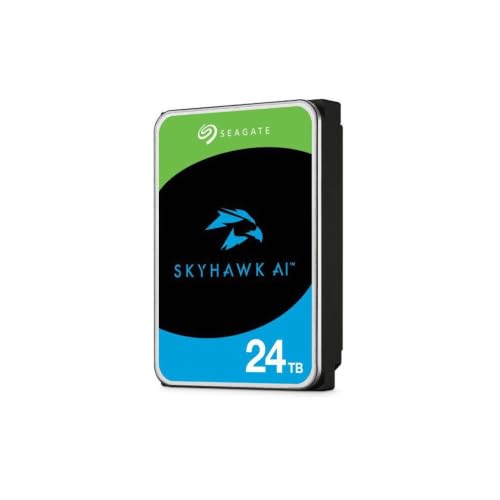
SkyHawk AI 24TB (ST24000VE002)
Seagate Skyhawk AI 24TB Video Internal Hard Drive HDD – 3.5 Inch SATA 6Gb/s 512MB Cache for DVR NVR Security Camera System with in-House Rescue Services (ST24000VE002)
Checked 15 days ago

SkyHawk AI 32TB (ST32000VE000)
Seagate Skyhawk AI 32TB Video Internal Hard Drive HDD – 3.5 Inch SATA 6Gb/s 512MB Cache for DVR NVR Security Camera System with in-House Rescue Services (ST32000VE000)
Checked 15 days ago

SkyHawk AI 8TB (ST8000VE001)
Seagate Skyhawk AI 8TB Video Internal Hard Drive HDD – 3.5 Inch SATA 6Gb/s 256MB Cache for DVR NVR Security Camera System with in-house Rescue Services (ST8000VEZ01)
Checked 15 days ago

SkyHawk +Rescue 6TB (ST6000VX009)
SCOSCHE Seagate HDD Skyhawk 3,5
Checked 3 days ago

SkyHawk AI 10TB (ST10000VE001)
HDD Skyhawk AI 10TB 7.2K 3.5" SATA
Checked 3 days ago

SkyHawk AI 16TB (ST16000VE002)
Seagate Skyhawk AI ST16000VE002 - Hard Drive - 16 TB - Internal - 3.5" - SATA 6Gb/s - Buffer: 256 MB - with 3 Years Rescue Data Recovery
Checked 3 days ago

SkyHawk AI 12TB (ST12000VE001)
PNTQOKGQX Seagt Skyhawk AI ST12000VE001 12 TB Hard Drive 3.5" Internal SATA (SATA/600) Network Video Recorder
Checked 3 days ago

SkyHawk +Rescue 8TB (ST8000VX010)
Seagate Skyhawk 8TB Video Internal Hard Drive HDD – 3.5 Inch SATA 6Gb/s 256MB Cache for DVR NVR Security Camera System with Data Rescue Services (ST8000VX010)
Checked 3 days ago

SkyHawk +Rescue 3TB (ST3000VX015)
Seagate Skyhawk Surveillance HDD ST3000VX015 - Hard Drive - 3 TB - SATA 6Gb
Checked 3 days ago

SkyHawk +Rescue 4TB (ST4000VX016)
Seag 4TB ST4000VX016 5900 SA3 Skyhawk
Checked 15 days ago

SkyHawk AI 16TB (ST16000VE004)
Seagate Skyhawk AI 16TB Video Internal Hard Drive HDD – 3.5 Inch SATA 6Gb/s 512MB Cache for DVR NVR Security Camera System with Drive Health Management and in-House Rescue Services (ST16000VE004)
Checked 3 days ago

SkyHawk +Rescue 2TB (ST2000VX017)
Seagate ST2000VX017 2TB Skyhawk 5400 Hard Drive
Checked 3 days ago
Amazon prices and availability can change. Verify the final seller, condition and checkout total before ordering.
Decision tool
Standard SkyHawk or SkyHawk AI selector
Enter system scale and workload to see which family boundary the plan crosses.
Exact model data
Representative SkyHawk and SkyHawk AI differences
| Capacity | Model | Family | Recording | RPM | Cache | Max sustained | Workload | Warranty |
|---|---|---|---|---|---|---|---|---|
| 4TB | ST4000VX016 | SkyHawk +Rescue | CMR | 5,400 | 256MB | 180MB/s | 180TB/year | 3 years |
| 8TB | ST8000VX010 | SkyHawk +Rescue | CMR | 5,400 | 256MB | 180MB/s | 180TB/year | 3 years |
| 8TB | ST8000VE001 | SkyHawk AI | CMR | 7,200 | 256MB | 255MB/s | 550TB/year | 5 years |
| 12TB | ST12000VE003 | SkyHawk AI | CMR | 7,200 | 512MB | 285MB/s | 550TB/year | 5 years |
| 20TB | ST20000VE004 | SkyHawk AI | CMR | 7,200 | 512MB | 240MB/s | 550TB/year | 5 years |
| 32TB | ST32000VE000 | SkyHawk AI | CMR | 7,200 | 512MB | 285MB/s | 550TB/year | 5 years |
Model revisions within SkyHawk AI can have different cache and sustained-transfer specifications. Compare exact models, not only capacity.
Buying guide
What to know before you buy
The AI label refers to workload, not marketing alone
SkyHawk AI is designed for recorders that perform continuous video capture while also reading footage for analytics. That creates a mixed read-and-write pattern beyond a simple single-purpose DVR workload.
A camera with person detection does not by itself determine the drive. The storage system must actually run concurrent analytics and generate enough workload to justify the higher tier.
Capacity is the clearest product boundary
Standard SkyHawk currently tops out at 8TB in the current range. SkyHawk AI continues through 10TB, 12TB, 16TB, 20TB, 24TB and 32TB. Any recorder requiring more than 8TB in a single bay therefore moves into the AI family or another high-capacity drive class.
Before selecting a large drive, confirm the recorder firmware supports that capacity. A physically compatible SATA connection does not guarantee the recorder can format or address the full disk.
Workload rating changes from 180TB to 550TB per year
The annual workload tier is one of the most important differences. Standard SkyHawk is listed at 180TB per year, while SkyHawk AI is listed at 550TB per year. This matters in dense camera systems, analytics deployments and recorders that regularly read archived footage while new streams continue to write.
Estimate actual writes from bitrates rather than choosing a family from camera count alone.
Stream support separates recording from analytics
Both families are positioned for up to 64 HD video streams. SkyHawk AI adds support for up to 32 AI streams in the current family materials. An AI stream is an analytics workload, not merely another camera channel.
Recorder software and hardware must also support the analytics feature. A drive cannot add AI capability to a recorder that lacks it.
Warranty and service reflect the higher tier
Current standard SkyHawk carries a three-year limited warranty. Current SkyHawk AI carries a five-year limited warranty, with three years of Rescue Data Recovery Services listed for the family where available.
Service terms remain regional. Confirm the serial number, seller and warranty route, especially for OEM, imported or marketplace stock.
Performance varies by exact AI revision
SkyHawk AI uses 7,200 RPM CMR models, but cache size and listed sustained transfer rate can vary between exact revisions at the same capacity. Multiple 16TB and 20TB model numbers exist.
Compare the exact VE model number rather than assuming every drive at the same capacity has identical performance specifications.
Standard SkyHawk is still the efficient choice for many NVRs
A small business or home recorder with conventional continuous recording, no concurrent AI workload and no requirement above 8TB per bay may gain little from paying for the AI tier. Standard SkyHawk already provides surveillance firmware and the mainstream workload rating.
Spend the saved budget on adequate retention, a UPS, a second backup destination or a spare drive when those improve system resilience more than a higher family tier.
SkyHawk AI is appropriate when the system must grow
Choose the AI tier earlier when the recorder will add cameras, analytics, bays or longer retention. Replacing an undersized recorder and all of its drives can cost much more than selecting a scalable capacity plan at the beginning.
The tool on this page provides a family boundary, but the final choice still depends on the recorder compatibility list and exact model availability.
Before you buy a SkyHawk drive
- Match the exact model number and capacity to your recorder's supported-drive list.
- Confirm whether the model is standard SkyHawk, SkyHawk AI or an older revision.
- Check the seller, condition and regional warranty route before checkout.
- Size the drive for the retention period you actually need, with room for future camera growth.
Frequently asked questions
SkyHawk versus SkyHawk AI questions
Does an AI camera require SkyHawk AI?
Can SkyHawk AI work in a normal NVR?
Is SkyHawk AI faster?
Why does SkyHawk AI have a longer warranty?
Can I use standard SkyHawk in an AI NVR?
Is 8TB standard SkyHawk or SkyHawk AI better?
Sources
- Seagate SkyHawk product page and current specifications
- Seagate SkyHawk AI product page
- Seagate SkyHawk AI current data sheet
Cloudzat may earn a commission from qualifying purchases. Product availability, pricing and specifications can change. Confirm the exact model, recorder compatibility, seller, condition and regional warranty route before buying.