


BarraCuda price-per-TB buying guide
The cheapest dollars-per-terabyte number is only useful after the drive fits the workload. This page combines live prices with exact model, capacity and CMR/SMR information so you can compare value without buying the wrong drive.
Live Amazon prices
Live BarraCuda prices by capacity and value
Compare exact model, capacity, condition and seller before checkout. The lowest price is useful only when the drive fits the workload.

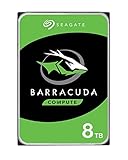


BarraCuda ST24000DM001 24TB

BarraCuda ST24000DM001 24TB

BarraCuda ST20000DM001 20TB

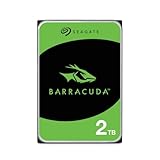

BarraCuda ST1000DM014 1TB
BarraCuda ST1000DM014 1TB
BarraCuda ST2000DM008 2TB
BarraCuda ST20000DM001 20TB
BarraCuda ST2000DM008 2TB

BarraCuda ST2000DM008 2TB

BarraCuda ST2000DM008 2TB
BarraCuda ST4000DM004 4TB
BarraCuda ST4000DM004 4TB
Compare the exact model and seller on Amazon before ordering.
Choose the right drive
Calculate BarraCuda price per TB and total storage cost
Choose a model, enter the current price and quantity, and reserve the free space you want to keep. You’ll see the cost per TB and the specifications that matter before buying.
A practical value framework
Often competitive on raw price per TB for read-heavy desktop storage.
Compare these when sustained write behavior matters but you still want BarraCuda pricing.
Do not treat a lower BarraCuda price per TB as automatically better for NAS or RAID duty.
Specs that affect the buying decision
Current BarraCuda capacity, recording and workload ladder
| Capacity | Model | Family | Recording | RPM | Cache | Max sustained | Workload | Warranty |
|---|---|---|---|---|---|---|---|---|
| 1TB | ST1000DM014 | BarraCuda | SMR | 7,200 | 256MB | 220MB/s | 55TB/yr | 2 years |
| 2TB | ST2000DM005 | BarraCuda | SMR | 5,400 | 256MB | 190MB/s | 55TB/yr | 2 years |
| 2TB | ST2000DM008 | BarraCuda | SMR | 7,200 | 256MB | 220MB/s | 55TB/yr | 2 years |
| 3TB | ST3000DM007 | BarraCuda | SMR | 5,400 | 256MB | 185MB/s | 55TB/yr | 2 years |
| 4TB | ST4000DM004 | BarraCuda | SMR | 5,400 | 256MB | 190MB/s | 55TB/yr | 2 years |
| 6TB | ST6000DM003 | BarraCuda | SMR | 5,400 | 256MB | 185MB/s | 55TB/yr | 2 years |
| 8TB | ST8000DM004 | BarraCuda | SMR | 5,400 | 256MB | 190MB/s | 55TB/yr | 2 years |
| 12TB | ST12000DM003 | BarraCuda | CMR | 7,200 | 512MB | 190MB/s | 120TB/yr | 2 years |
| 16TB | ST16000DM001 | BarraCuda | CMR | 7,200 | 512MB | 190MB/s | 120TB/yr | 2 years |
| 20TB | ST20000DM001 | BarraCuda | CMR | 7,200 | 512MB | 190MB/s | 120TB/yr | 2 years |
| 24TB | ST24000DM001 | BarraCuda | CMR | 7,200 | 512MB | 190MB/s | 120TB/yr | 2 years |
Live Amazon listings prices can change. The specification table remains fixed to exact current models, while the offer section is limited to fresh new-condition matches.
Buying guide
What matters before you buy
The correct price-per-terabyte formula
For a single drive, divide the purchase price by the decimal terabytes printed by the manufacturer. A $160 8TB drive costs $20 per raw TB. For several drives, multiply price and capacity by the same quantity; the raw price per terabyte remains unchanged.
This is a comparison metric, not operating-system usable space. Binary reporting, formatting and reserved working space reduce what appears available. RAID or mirroring can reduce it further, though BarraCuda is not the default recommendation for a new multi-bay array.
Price must be filtered by exact model and condition
A low offer can be renewed, recertified, used, external, bundled or a different family. Open the Amazon listing and confirm the exact model, condition, seller, warranty route and current checkout price. Compare one new bare internal drive with another.
A capacity-only listing can conceal a different model. This matters especially at 2TB, where ST2000DM005 and ST2000DM008 have different RPM and power. Value calculations are meaningful only after product identity is established.
SMR can look cheaper without being better value
The 4TB and 8TB BarraCuda models may rank well on raw price per terabyte. That value is real for mostly-read storage and moderate backups. It is less persuasive for frequent sustained rewriting, where an SMR performance penalty can consume time and complicate operations.
Compare the cheapest drive that fits the workload, not the cheapest drive that reaches the capacity. A CMR requirement should be applied before sorting price.
The high-capacity CMR tier changes the comparison
Current 12TB, 16TB, 20TB and 24TB BarraCuda models use CMR, 7,200 RPM, 512MB cache and a 120TB-per-year workload rating. They can provide both greater bay efficiency and a more predictable recording design.
When the 12TB drive costs less than 1.5 times the 8TB price, it has a lower raw price per terabyte. The same percentage test can compare any capacities. Larger drives can also avoid purchasing another bay or enclosure.
Warranty and workload are part of storage cost
All current BarraCuda models in the data sheet carry a two-year limited warranty, but the workload tier differs. Smaller models are 55TB per year, while the 12TB-to-24TB models are 120TB per year.
A price-per-terabyte table should show these specifications next to price. A cheaper drive outside the expected workload can create earlier replacement, longer jobs or a forced migration. Those costs do not appear on the product page.
Calculate the full storage project
Add drive price, mounting hardware, SATA cables if required, backup capacity, enclosure or case cost, electricity and future replacement. A single 24TB drive may simplify installation but also concentrates more data in one failure domain. A second copy is still required.
For a desktop, bay count can have real value. Replacing several smaller disks with one larger drive can free SATA ports and reduce cabling. Balance that convenience against restore time and the amount of data affected by one failure.
How to read the live Amazon prices
Use the live Amazon section as the final market check after choosing the right capacity, recording method and workload fit. Compare the exact model, condition, seller, warranty route and total price before checkout.
When more than one listing is available, prefer the listing that clearly identifies the exact drive model and condition rather than choosing by capacity alone.
A practical value decision rule
First define the workload and required recording technology. Second choose the capacity that leaves growth headroom. Third compare fresh exact-model prices per terabyte. Fourth add backup, bay and power costs.
The best value is the lowest complete cost among drives that meet the requirement. It is not automatically the lowest number in the price-per-terabyte column.
Questions buyers ask
Seagate BarraCuda questions
How is BarraCuda price per TB calculated?
Divide the current new single-drive price by the manufacturer's decimal capacity in terabytes.
Why does usable capacity look lower?
Operating systems may report binary units, and formatting or reserved space reduces available capacity.
Should I compare renewed drives with new drives?
No. Separate conditions because warranty, wear and risk differ.
Which current BarraCuda capacities are CMR?
12TB, 16TB, 20TB and 24TB in the March 2026 data sheet.
Does buying two drives change raw price per TB?
No, if both have the same unit price. It changes total cost and the way you can protect or distribute data.
Why can a larger drive be better value even at a higher price per TB?
It may preserve a drive bay, reduce system complexity or meet a CMR requirement that the smaller model does not.
Sources
- Seagate BarraCuda 3.5-inch HDD data sheet, March 2026
- Seagate BarraCuda SATA product manual for 12TB through 24TB, February 2026
- Seagate warranty and replacement support
Cloudzat may earn a commission from qualifying purchases. Amazon prices and availability can change; confirm the exact model, condition and final checkout price before ordering.