


BarraCuda 8TB buying guide
The 8TB ST8000DM004 can deliver a lot of desktop capacity for the money, but it remains an SMR drive. This guide helps decide whether that trade-off works for your archive, media, backup or server workload before you buy.
Live Amazon prices
Live BarraCuda 8TB prices and alternatives
Compare exact model, capacity, condition and seller before checkout. The lowest price is useful only when the drive fits the workload.

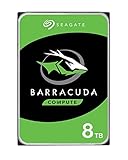

BarraCuda ST8000DM004 8TB
BarraCuda ST8000DM004 8TB
Compare the exact model and seller on Amazon before ordering.
Choose the right drive
Check whether BarraCuda 8TB fits the workload
Estimate your largest writes, how full the drive will be and whether it will be used in RAID. This helps you decide whether ST8000DM004 fits or a CMR drive is a safer choice.
Your 8TB decision
5,400 RPM, SMR. Best when capacity and read-heavy use matter more than sustained write behavior.
Better fit for NAS, RAID and heavier duty when the price premium is justified by the workload.
The current BarraCuda range switches to CMR at 12TB and above.
Specs that affect the buying decision
BarraCuda 8TB and CMR alternatives
| Capacity | Model | Family | Recording | RPM | Cache | Max sustained | Workload | Warranty |
|---|---|---|---|---|---|---|---|---|
| 8TB | ST8000DM004 | BarraCuda | SMR | 5,400 | 256MB | 190MB/s | 55TB/yr | 2 years |
| 12TB | ST12000DM003 | BarraCuda | CMR | 7,200 | 512MB | 190MB/s | 120TB/yr | 2 years |
| 8TB | ST8000VN002 | IronWolf | CMR | 5,400 | 256MB | 202MB/s | 180TB/yr | 3 years |
| 8TB | WD80EAAZ | WD Blue | CMR | 5,640 | 256MB | 215MB/s | Not listed | 2 years |
The 12TB BarraCuda row shows the current family's transition to CMR. Compare total price and bay value rather than assuming 8TB is automatically the cheapest usable option.
Buying guide
What matters before you buy
ST8000DM004 specification and intended duty
ST8000DM004 is listed as an 8TB 5,400 RPM SMR drive with 256MB cache and up to 190MB/s maximum sustained outer-diameter read speed. It has a 55TB-per-year workload rate, 2,400 power-on hours per year and a two-year limited warranty.
These are desktop-family specifications. They do not prohibit every home-server use, but they should be compared with the expected annual writes, powered-on time and recovery behavior.
Why 8TB can look like the value sweet spot
Eight terabytes often has a competitive sticker price and can hold a large media library or backup set. It can reduce the number of drives compared with 4TB models and may fit in desktop cases with limited bays.
Price per terabyte can change quickly. Compare the current 12TB CMR BarraCuda and 8TB CMR WD Blue. A larger drive can be cheaper per terabyte or preserve a bay, making the nominally cheaper 8TB option less attractive.
Large SMR capacity magnifies long-write decisions
An 8TB drive can receive multi-terabyte transfers, parity calculations or rebuild-like workloads. Those jobs are exactly where device-managed SMR may show long slow periods after its staging areas fill. Near-full operation can reduce the room available for internal data movement.
For an archive written once and read often, this can be acceptable. For a drive repeatedly rewritten at scale, CMR is easier to plan around. Session size, write frequency, drive fullness and RAID use are the key factors in that decision.
Plex and media-server use
A Plex library is primarily read during playback, so ST8000DM004 can serve a single-drive media server. The server's CPU, GPU and network usually determine transcoding and playback limits. Keep the Plex database, metadata and transcode directory on SSD when possible.
Library imports, downloads and replacement of large media sets create writes. A modest home server can tolerate them, but a multi-user NAS or array should move toward IronWolf or another CMR product.
Backup strategy for an 8TB drive
A large backup disk can tempt users to place all copies on one device. Do not confuse capacity with protection. Keep another independent copy and verify restoration. Initial backups and full re-seeding may take many hours, especially when source and destination are HDDs.
Incremental backups that change a small portion of the disk can fit the workload better than constant full rewrites. Monitor job duration and SMART health over time.
Unraid, parity and multi-drive arrays
Unraid and parity arrays can involve long writes during parity build, checks and recovery. An SMR data disk may function, but rebuild and sustained-write behavior can be less predictable. A parity disk that is slower under rewriting can affect the whole operation.
Use documented CMR drives for a new array when budget allows. IronWolf is the Seagate family designed for NAS duty. A current WD Blue 8TB CMR model may be considered for desktop-like systems, but compatibility and workload still matter.
BarraCuda 8TB versus 12TB CMR
ST12000DM003 is CMR, 7,200 RPM, 512MB cache and rated for 120TB per year. It costs more in absolute terms, but the additional 50% capacity and different recording method can make it a better long-term buy.
Compare price per terabyte and the value of avoiding an extra drive bay. If the 12TB premium is less than 50%, it already has the lower raw price per terabyte. The CMR advantage can justify more even when raw price is close.
The 8TB buying checklist
Confirm ST8000DM004, new condition and a valid warranty route. Reject external-drive listings, enclosures, renewed disks and family-mixed product pages. Compare WD80EAAZ, ST8000VN002 or ST8000VN004 and ST12000DM003 according to workload.
Buy ST8000DM004 when low-cost, mostly-read capacity is the objective. Do not buy it by accident for a workload that explicitly requires CMR.
Questions buyers ask
Seagate BarraCuda questions
Is ST8000DM004 SMR?
Yes. It is listed as SMR.
Is BarraCuda 8TB good for Plex?
It can be suitable for a mostly-read single-drive library. Use a NAS drive for multi-bay arrays or heavier shared duty.
Can ST8000DM004 be used in Unraid?
It may function, but CMR is the safer choice for parity, rebuilds and sustained array writes.
What is the current WD Blue 8TB alternative?
WD80EAAZ is listed as an 8TB CMR model.
Is BarraCuda 12TB CMR?
Yes, making it an important step-up alternative when price per terabyte is competitive.
How much power does ST8000DM004 use?
Seagate lists 3.4W idle and 5.3W typical operating power.
Sources
- Seagate BarraCuda 3.5-inch HDD data sheet, March 2026
- Seagate BarraCuda SATA product manual for 12TB through 24TB, February 2026
- Seagate warranty and replacement support
Cloudzat may earn a commission from qualifying purchases. Amazon prices and availability can change; confirm the exact model, condition and final checkout price before ordering.