


Mini PC decisions · United States
Mini PC Buying Guide: Choose the Right Small Computer
Start here if you are comparing small computers for a desk, a home server, media playback or specialist work. This guide maps the decisions, tools and live US listings without treating every Mini PC as interchangeable.
Choose the workload first, then check the exact CPU, installed RAM and SSD, network ports, operating system and total delivered price. A cheap barebones listing is not comparable to a complete ready-to-use system.
US Amazon observations
Compare complete Mini PC listings
Latest successful observations are retained with their original time. Availability, variations and checkout totals may change.
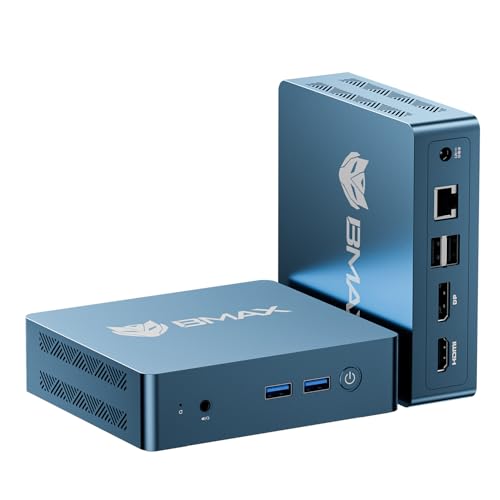
BMAX
Bmax Mini PC 2026 Intel 5205U 12GB RAM 256GB SSD Support Expansion (64GB&2TB) Small Desktop Computer Windows 11 Pro,HDMI/DP 4…
12 GB RAM · 256 GB SSD
$209.99Verified 2 days ago · Last verified priceBuy on Amazon ↗
BMAX
Bmax Mini PC B9 Power Intel Core i9-12900H(up to 5.0GHz,14C/20T) 32GB DDR4/1TB NVMe SSD Mini Desktop Computer WiFi6 BT5.2 Gam…
32 GB RAM · 1024 GB SSD
$599.99Verified 2 days ago · Last verified priceBuy on Amazon ↗
BMAX
BMAX Mini PC, Intel Core i3 8109U Up to 3.6GHz (Beats N95/N100/N5030/N5095), Compact PCs 12GB RAM 256GB/4TB SSD Small Desktop…
12 GB RAM · 256 GB SSD
$239.99Verified 2 days ago · Last verified priceBuy on Amazon ↗
BMAX
Bmax Mini PC, Intel N4500 Processor Up to 2.8GHz, 8GB RAM 256GB M.2 SSD, Windows 11 Pro Mini Desktop Computer, Dual 4K Displa…
8 GB RAM · 256 GB SSD
$199.99Verified 2 days ago · Last verified priceBuy on Amazon ↗
BMAX
Bmax 2026 Mini PC 12GB DDR4 RAM 512GB NVMe SSD,Intel i3 1000NG4 Up to 3.2GHz(Beat N150/N95),4TB Expansion,Mini Micro Desktop…
12 GB RAM · 512 GB SSD
$249.99Verified 2 days ago · Last verified priceBuy on Amazon ↗
BMAX
Bmax 2026 Mini PC Micro Desktop Computer, Intel Core i5-8257U (Beats N100/N97/N150/4300U/10110U) 16GB DDR4 RAM 512GB SATA SSD…
16 GB RAM · 512 GB SSD
$299.99Verified 2 days ago · Last verified priceBuy on Amazon ↗
BMAX
Bmax AI Gaming Mini PC, Intel Core Ultra 5 115U (8C/10T, Up to 4.2GHz), 16GB LPDDR5X 512GB SSD, Triple 8K Display, Mini Compu…
16 GB RAM · 512 GB SSD
$436.99Verified 2 days ago · Last verified priceBuy on Amazon ↗
ACEMAGIC
ACEMAGIC FOCUX Series AI Mini PC Intel Core Ultra X7 358H (16C/16T up to 4.8GHz), 32GB LPDDR5X 7467MT/s, 1TB PCIe 4.0 SSD, 18…
32 GB RAM · 1024 GB SSD
$1,299.99Verified 2 days ago · Last verified priceBuy on Amazon ↗Choose a path
Buying guide
Start with the job, not a brand
Write down what the computer will run before looking at a brand or a sale price. An office machine needs reliable everyday responsiveness, the right monitor connections and enough memory for browser tabs. A home server needs storage, recovery and network planning. Gaming depends heavily on graphics, memory bandwidth and cooling. A firewall is a network appliance with specific port requirements. Calling all of these products Mini PCs describes their size, not their suitability for your particular workload.
List hard requirements separately from preferences. If your router replacement needs three physical Ethernet ports, a single port system does not become suitable because its CPU is faster. If you plan to run several virtual machines, an inexpensive eight gigabyte configuration may force an immediate memory purchase. Use the selector for a shortlist, then verify the exact variant and software requirements before ordering.
Compare complete configurations
A product family can contain different processors, memory capacities, storage sizes and operating-system packages. The card title may describe the family while the selected Amazon variation determines what arrives. Compare the CPU model, installed RAM, installed SSD and included operating system on the same variation. Do not read a supported maximum as installed capacity. If an offer is barebones, add memory, SSD, any needed licence and your setup time to its total.
Keep a short comparison sheet for two or three candidates. Record the exact model and configuration, retailer, seller, price verification time, shipping and return conditions. Check whether the local power adapter is included. Two prices are comparable only after these differences are visible. A system with a larger factory SSD is not automatically better value if a spare internal slot lets you expand later for less.
Choose a processor tier with room for the actual tasks
Intel N-series systems can be sensible for light office use, media clients and modest home services. More demanding multitasking, several virtual machines, heavier development or graphics work may need a different class. Core and Ryzen labels span many generations and power envelopes, so the family name alone is not a reliable ranking. Check the specific CPU, memory configuration and cooling in the system you can buy.
A quoted processor base power or maximum turbo frequency is a component specification. It is not the electricity consumption of the whole computer and does not prove sustained performance inside a tiny enclosure. Compare independent testing of the exact machine when performance or acoustics matter, and leave headroom for the applications you expect to add during its useful life.
Size memory and storage for present and future use
For an everyday computer, sixteen gigabytes of installed memory is a practical starting point for many buyers; more may help development, virtual machines and heavy multitasking. Some Mini PCs use soldered memory while others accept replaceable modules. Confirm the number of slots, supported type and actual installed amount before paying for a higher-capacity variation. A maximum advertised capacity does not mean that memory is included.
Check both SSD capacity and expansion. A media server might store its library elsewhere, but its database, cache and operating system still need local room. Development and virtualisation produce images, snapshots and logs that grow. Identify the interface and occupied slots of the exact configuration. Plan a backup separately; a second internal drive is useful for capacity or recovery workflows but is not automatically a backup.
Match networking to the plan
A single Ethernet connection can be enough for a desk PC or a simple home service. Dual 2.5GbE may matter for a router, a small lab or faster transfers to a compatible switch and NAS. Count physical ports and confirm the NIC model when an operating system or firewall depends on driver support. Terms such as multi-gig, Wi-Fi 6 and dual LAN should be checked against the selected product and a detailed port photograph or specification.
Do not infer a second LAN port from an accessory, a USB Ethernet adapter shown beside the system or a comparison phrase in a seller title. For OPNsense, network segmentation and failover may require more than a nominal port count. Check throughput against VPN, IDS/IPS and packet inspection needs using the project guidance. For ordinary office work, paying for ports you will never connect is unlikely to improve the experience.
Check displays, USB and expansion
Count the monitors you own, their resolution and refresh rate, and the exact outputs on the computer. HDMI and DisplayPort versions can matter; the existence of a USB-C socket does not confirm video output, USB4 or power delivery. If an external GPU or fast expansion dock is part of the plan, verify the supported interface and lane or bandwidth details on the exact model rather than relying on the shape of the connector.
An OCuLink port can be valuable to a specific external GPU setup but adds complexity and may require an external power supply. USB4 can serve useful docks and storage, but host and peripheral support vary. A small PC with the right ordinary ports can be a better purchase than a more expensive machine with impressive expansion features you will not use.
Budget for the whole ownership period
The purchase price is only one part of cost. Add missing barebones parts, delivery, tax, warranty terms and any software or adapters the setup needs. An always-on system also uses electricity. Enter measured whole-system watts and your local tariff in the power cost calculator; do not use the processor TDP as the wall measurement. Compare the annual difference between two plausible systems instead of assuming a higher upfront price will always pay back.
A newer or more expensive system may be easier to expand or may provide features that solve a real problem. Equally, a modest machine can be the better value for a single known task. Check the price observation timestamp on every offer. A retained last-verified price is historical buying context, not a promise that checkout still matches it.
Use the tools in the right order
Use the selector to turn your workload, budget and hard requirements into a shortlist. Use the price comparison page to compare the RAM, SSD, ports and price of each model. Read a workload guide for Proxmox, Plex, Home Assistant, OPNsense or Docker when the software is central to the purchase. Then use the power calculator for a transparent running-cost estimate based on your own measurements and rate.
This hub does not claim that one machine is universally best. Its role is to connect questions to the narrowest useful guide and to make the current buying options easy to inspect. If the local listing does not prove a required specification, treat it as unverified and inspect the manufacturer documentation or ask the seller before purchase.
Verify the order and test the delivered machine
Before checkout, reselect the exact RAM and SSD variant and confirm the seller, condition, operating system, return window and total. Keep a copy of the listing details and your order configuration. On arrival, confirm CPU, installed memory and storage in the system settings, then test the ports your workload actually depends on. Update firmware only through the manufacturer’s documented process.
Set up recovery before moving important data. Keep a separate backup of service configurations and files, and test restoration. Try representative media, virtual machines, monitors or network paths while the return period still applies. A good buying decision includes a way to discover a wrong configuration early and return or correct it without disrupting the rest of your setup.
Questions before you buy
What should I check first when buying a Mini PC?
Start with the workload and non-negotiable ports or software requirements, then compare the exact CPU, installed RAM, SSD, operating system and delivered price.
Is a barebones Mini PC cheaper?
Its starting price can be lower, but add RAM, SSD and any operating-system or setup costs before comparing it with a complete system.
How much RAM does a Mini PC need?
It depends on the workload. Sixteen gigabytes is a practical starting point for many everyday setups, while virtual machines and heavier applications can require more.
Are Mini PC Amazon prices live?
Each card shows when its price was checked. Confirm the RAM, SSD, seller, availability and total on Amazon.
Where can I estimate Mini PC electricity cost?
Use measured whole-system watts, daily hours and your electricity tariff in the linked power calculator. Processor TDP is not a wall-power measurement.
Continue your comparison
Best Mini PCMini PC pricesMini PC selectorPower cost calculatorAs an Amazon Associate, Cloudzat earns from qualifying purchases. Each price was checked on the date shown. Confirm the selected RAM, SSD and total on Amazon.