


Canada · CAD
Mini PCs with Linux Preinstalled Canada
Choose a System76 Meerkat configured with Ubuntu or Pop!_OS for a ready-made Linux Mini PC. Choose a TUXEDO Nano Pro Gen14 when you prefer TUXEDO’s Linux setup and support. Compare the installed memory, delivery and return route for your country. A Windows Mini PC is a different, self-installation option.
Which model to choose
System76 Meerkat, Ubuntu or Pop!_OS
Ready-to-use choice with a Linux operating-system option from the computer supplier. Select the actual configuration and confirm the delivery destination.
See model and buying options ↗TUXEDO Nano Pro Gen14, Linux configuration
Linux-focused alternative with vendor configuration and support. Choose the supplied operating system in the order rather than assuming it from the model name.
See model and buying options ↗Prefer to install Linux yourself?
Choose this route if you want local Amazon hardware and are comfortable installing and testing Linux. Select a vendor-preinstalled model above when you want the operating system supplied with the machine.

Intel N150
Beelink Mini S13 Mini PC, Intel Twin Lake-N150 (4C/4T, up to 3.6GHz), 16GB DDR4 RAM 500GB M.2 SSD, Mini Computer Support 4K@60Hz Dual Screen Display/…
16 GB RAM · 500 GB SSD
CA$418.93Price checked 01.11.2026 09:55 UTCBuy on Amazon ↗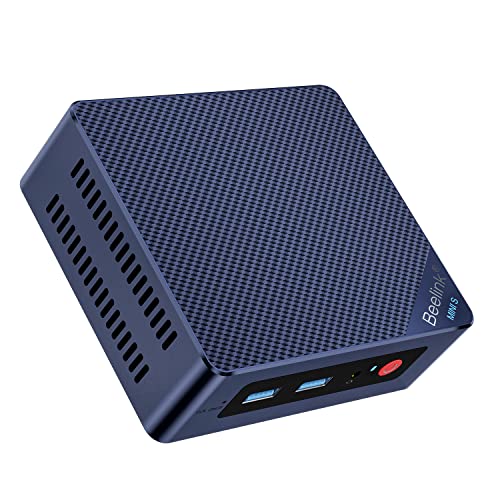
Intel N100
Beelink Mini S12 Pro Mini PC - 12th Gen Intel N100 (Up to 3.4GHz), 16GB DDR4, 500GB SSD, 4K Dual Display, WiFi 6, BT 5.2, 1000Mbps LAN - Low Power Mi…
16 GB RAM · 500 GB SSD
CA$421.04Price checked 01.11.2026 09:55 UTCBuy on Amazon ↗
AMD Ryzen
GMKtec G10 Mini PC, AMD Ryzen 5 3500U, 16GB DDR4 512GB SSD W11 Pro Silver | (Beats 3200U) 2.5GbE LAN Desktop Computer, Triple 4K Display, USB-C PD, D…
16 GB RAM · 512 GB SSD
CA$439.00Price checked 01.11.2026 06:27 UTCBuy on Amazon ↗
Ryzen 7 7735
GMKtec K16 Gaming Mini PC, AMD Ryzen 7 7735HS 32GB LPDDR5 512GB NVMe SSD | OCuLink eGPU Port, Dual 2.5GbE LAN, USB4 40Gbps, WiFi 6E, Triple Display, …
32 GB RAM · 512 GB SSD
CA$829.00Price checked 01.11.2026 10:59 UTCBuy on Amazon ↗
Ryzen 7 8745HS
Beelink SER8 Mini PC, AMD Ryzen 7 8745HS (8C/16T up to 4.9GHz), 16GB DDR5 512GB SSD, AMD Radeon 780M Graphics/Triple 4K Display (HDMI 2.1+DP+USB4)/2.…
16 GB RAM · 512 GB SSD
CA$896.04Price checked 01.11.2026 06:33 UTCBuy on Amazon ↗
Ryzen 7 8845HS
Beelink SER8 Mini PC AMD Ryzen 7 8845HS(Max 5.1GHz), 32GB DDR5 1TB PCIE4.0 SSD Mini Computer, AMD Radeon 780M Graphics 12 core 2700MHz Gaming PC,Trip…
32 GB RAM · 1000 GB SSD
CA$954.30Price checked 01.11.2026 06:33 UTCBuy on Amazon ↗
Intel Core
MINISFORUM NAB9S Mini PC, Intel Core i9-13900HK (14C/20T, Up to 5.4GHz), 16GB DDR4, 500GB PCIe 4.0 SSD, Quad 4K Display, Dual 2.5GbE LAN, Wi-Fi 6, BT…
16 GB RAM · 500 GB SSD
CA$1,019.99Price checked 01.11.2026 06:27 UTCBuy on Amazon ↗
Core Ultra
ASUS NUC 14 Pro AI Mini PC | Agent Computer, up to 97 AI Tops, 3Y Warranty | Ultra 5 226V (16GB RAM | 512GB SSD | Win 11 Home) AI Agent Ready, WiFi 7…
16 GB RAM · 512 GB SSD
CA$1,656.71Price checked 01.11.2026 06:27 UTCBuy on Amazon ↗Buying guide
Which preinstalled Linux Mini PC should you choose?
The Meerkat is the first option to compare for a compact computer supplied with Ubuntu or Pop!_OS by System76. The Nano Pro is the alternative when TUXEDO’s Linux installation and support fit the purchase better. Both let you choose a supplier that takes Linux seriously as part of the product rather than leaving all setup to you.
The better buy depends on the delivered configuration and support route. A low advertised starting price can describe less memory or storage than you need. Compare the actual operating system, installed RAM, SSD and destination. For a work computer, ask how a hardware fault is handled from your country before choosing the cheaper import.
Understand what preinstalled should mean
The order should identify the Linux distribution supplied with the computer. That is different from a seller saying the hardware is Linux-compatible while shipping Windows or no system. Keep the chosen configuration in the order record. If you need a particular desktop environment, encryption setup or support period, confirm the vendor’s current options rather than assuming every Linux package includes them.
Also check where operating-system support ends. A supplier may help with its own installation without supporting every third-party application, distribution change or custom kernel. Choose a package close to the environment you want to keep, especially if the reason for buying preinstalled is to reduce maintenance work.
Choose memory and connections for the job
16GB is a practical starting comparison for a general Linux desk, while 32GB is more comfortable for development, containers and heavier multitasking. Larger virtual-machine or local-model workloads need their own memory budget. Do not buy extra capacity merely because the configurator allows it; buy enough for the applications and a useful reserve.
Plan display inputs, USB devices, Ethernet and any wireless requirements before ordering. A ready-made Linux system still needs the right physical connections for your desk. Check the memory upgrade path and SSD layout separately. A configurable machine is not necessarily equally easy to expand in every component.
Compare an import with a self-installed alternative
Include delivery, possible import charges and the practical cost of returning the machine. A local Windows Mini PC may be cheaper and easier to obtain, but installing Linux yourself changes who handles the software setup. Treat that as a deliberate alternative route rather than an equal ready-made package.
If one vendor model is temporarily unavailable, compare the other with matching memory, necessary display support and acceptable service terms. Do not replace a 32GB development purchase with a minimal entry configuration just to preserve a low headline price. Keep backups and recovery instructions for the supplied system so a later experiment does not erase the advantage of a well-configured start.
Compatibility belongs to the exact configuration
Linux compatibility is more specific than a processor brand or the word Ubuntu in a listing. The wireless card, Ethernet controller, audio device, graphics generation and firmware can differ between revisions of the same product family. Start with the manufacturer’s operating-system statement and the distribution’s hardware or certification information. A certification for one SKU is not a blanket promise for every machine sold under a similar name.
For recent hardware, choose a supported distribution release with a suitable kernel and graphics stack. Do not assume that an old installer contains drivers for a new wireless card or GPU. Keep a wired network path available during setup if possible. A current live USB is useful for testing before installation, but a successful desktop boot is only the beginning. Test the features that make the computer useful for your own work.
Run a practical hardware acceptance check
Connect every display at the resolution and refresh rate you intend to use. Check audio output and microphone input, Ethernet, Wi-Fi, Bluetooth and the USB devices you need. Try suspend and resume several times, then reboot with the peripherals connected. If you plan to use hardware video decoding, virtual machines or GPU compute, test those functions directly. Desktop graphics working correctly does not prove that every application can use the GPU for computation.
Record the model, BIOS version, distribution and kernel alongside any setup notes. This makes a support request more useful and helps you reproduce a working installation. Use firmware and drivers intended for the exact product. Avoid copying a BIOS image or a kernel workaround from a different Mini PC merely because the processors look similar. When a machine needs extensive unsupported workarounds for an essential feature, a vendor-supported Linux system can be the better purchase.
Choose the support arrangement you want to own
A Linux-preinstalled computer can put operating-system support and hardware support with the same supplier. A Windows Mini PC on which you install Linux yourself may offer better local buying options, but you take responsibility for the software installation and some compatibility diagnosis. Neither route is automatically right for everyone. Choose the first when predictable setup and support matter most, and the second when you are comfortable testing and maintaining the installation.
Back up personal files before changing partitions or operating systems. Keep recovery media and encryption recovery information where you can retrieve them without booting the computer. For an alternative purchase, preserve the required ports and tested hardware support, not just the CPU speed. A faster new wireless chipset with no suitable driver can be less useful than a modest system that works reliably with your supported distribution.
Buying and support in Canada
Use Canadian-dollar prices when comparing these systems. Include delivery and the applicable provincial or territorial taxes in your total, and check whether the seller ships from Canada or imports the machine. A cross-border offer can have a different return process, delivery schedule or additional charges. Do not compare an American promotional price with a Canadian delivered price as though the currency and purchase conditions were identical.
Confirm the included adapter, power lead and operating-system edition, then keep the invoice and serial number. For work or study, choose a support route you can use if the computer fails during a busy week. An alternative should preserve the required memory, graphics and connections, even when the brand changes. Add any missing display, keyboard, webcam or backup drive to the budget before deciding whether the compact system is good value.
Questions buyers ask
Which two preinstalled Linux models should I compare?
The System76 Meerkat with Ubuntu or Pop!_OS, and the TUXEDO Nano Pro with the vendor’s chosen Linux configuration. Compare the delivered specification and support.
Is Linux-compatible the same as Linux-preinstalled?
No. The order must explicitly include the Linux system if you want it supplied ready to use. Compatibility alone does not establish what arrives.
Should I buy local hardware and install Linux myself?
Choose that route when you are comfortable testing the distribution and handling setup. Choose a vendor-preinstalled model when you want the system supplied and supported as a package.
Specifications and software guidance
System76 Meerkat ↗TUXEDO Nano Pro Gen14 ↗Ubuntu certified desktops ↗Related Mini PC guides
Best Mini PCs for Linux CanadaDual Boot Windows and Linux on a Mini PC CanadaCompare Mini PC pricesAs an Amazon Associate, Cloudzat earns from qualifying purchases. Prices and availability can change.