


Server thermal screening
The AI Server Cooling Calculator converts electrical load into a heat-removal screen and, for air-cooled systems, an approximate airflow requirement. Nearly all server power becomes heat within the facility boundary, but actual cooling design depends on inlet conditions, recirculation, chassis pressure, altitude, liquid loops and the OEM thermal specification.
Quick answer
How much cooling does this AI server need?
Use sustained server watts as the heat-load starting point. For air cooling, estimate required airflow across the allowed temperature rise, then validate inlet temperature and throttling under a long workload.
Live Amazon options
Rack airflow and temperature-monitoring options
Compare rack airflow hardware and environmental sensors that can help validate temperatures around an air-cooled AI server. Use the calculator first, then verify the actual chassis and room requirements.
Rack airflow options
5 options
SX440
PROCOOL SX440 1U Silent Rack Mount Fan/Airflow = Intake/Home Theater AV Cabinet Cooling Broadcast Network Server Recording Studio Rack Mount Fan Panel 19"
SX440

SX2240
PROCOOL SX2240 / 1U Silent Rack Mount Fan/Airflow = Intake/Home Theater AV Cabinet Cooling Broadcast Network Server Recording Studio Rack Mount Fan Panel 19"
SX2240
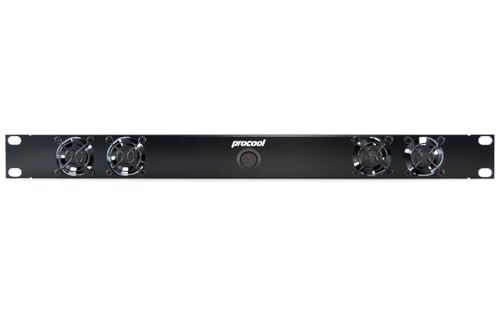
SX2240E
PROCOOL SX2240E / 1U Silent Rack Mount Fan/Airflow = Exhaust/Home Theater AV Cabinet Cooling Broadcast Network Server Recording Studio Rack Mount Fan Panel 19"
SX2240E

SX640
PROCOOL SX640 1U Silent Rack Mount Fan/Airflow = Intake/Home Theater AV Cabinet Cooling Broadcast Network Server Recording Studio Rack Mount Fan Panel 19"
SX640

SP640X
PROCOOL SP640X / 1U Temperature Controlled Silent Rack Fan/Airflow= INTAKE/Home Theater AV Cabinet Cooling Broadcast Server Recording Studio Rack Fan
SP640X
Rack temperature and environmental sensors
1 option
SR1UPNLTEMP
TRIPP LITE Blanking Panel with Digital Temperature Sensor, 1U Rack Panel, Front Panel LCD for Network Racks (SR1UPNLTEMP)
SR1UPNLTEMP
Interactive planning tool
AI Server Cooling Calculator
Use this as a screening calculation. It does not certify a server, predict benchmark performance, design high-voltage electrical work, or replace the current OEM and facility documentation.
Before you buy
Four checks that keep planning estimates in context
Start with current documentation
Use the exact platform or OEM system guide as the source of truth for supported configurations and limits.
Keep assumptions visible
Every calculator input is an assumption until it is replaced by a measurement, vendor limit or facility design value.
Separate nameplate from application performance
Port speed, SSD peak rate, GPU memory and power ratings do not guarantee end-to-end workload results.
Escalate facility decisions
High-voltage distribution, rack electrical work, cooling design and liquid loops require qualified professionals and current codes.
Buying decision
Buying decision: what changes the answer
If the required airflow or inlet conditions exceed what the chassis and room can maintain, reduce density or move to a cooling architecture designed for the load rather than adding ad-hoc fans.
Detailed buying guide
What to check before you commit to the hardware
Use sustained electrical load as heat
A server drawing several kilowatts releases roughly that scale of heat into the environment. Short idle measurements understate the cooling problem.
measure power during the longest representative high-utilization workload. Recheck the result after material changes.
Convert watts to a common thermal unit
BTU/h can help facilities teams compare IT load with legacy cooling equipment ratings.
use 1 watt as approximately 3.412 BTU/h for the heat-load conversion. Recheck the result after material changes.
Set an allowable air temperature rise
Airflow requirement depends on how much warmer exhaust air may be than inlet air. A smaller delta requires more airflow.
use the server and room thermal design rather than choosing a convenient temperature rise. Recheck the result after material changes.
Check chassis airflow direction
Server fans are designed for a specific front-to-back or other flow path. Recirculation can raise inlet temperature even when room cooling capacity appears sufficient.
confirm blanking, containment and rack layout keep hot exhaust away from intakes. Recheck the result after material changes.
Treat fan rating as part of a system
Free-air CFM numbers fall when filters, heatsinks and chassis resistance create static pressure.
validate the complete server under load instead of summing fan marketing specifications. Recheck the result after material changes.
Monitor component temperatures and clocks
A server may remain online while silently throttling because GPU, memory, VRM or CPU temperatures are too high.
log temperatures, fan speed, power and clocks together during commissioning. Recheck the result after material changes.
Include room and rack interactions
One dense server can raise the inlet temperature of nearby equipment if containment or return airflow is weak.
test with the intended rack population, not a single server on an open bench. Recheck the result after material changes.
Account for environmental conditions
Altitude, room temperature and humidity can change cooling margin and allowable operating envelopes.
check OEM environmental specifications for the installation site. Recheck the result after material changes.
Consider liquid cooling when air becomes impractical
Direct liquid cooling can move high heat flux efficiently, but adds pumps, coolant, manifolds and leak management.
evaluate it as an engineered system rather than a component upgrade. Recheck the result after material changes.
Plan failure behavior
A fan, pump or room-cooling failure can produce rapid temperature rise in dense AI systems.
define alarms, workload shedding and shutdown thresholds before production. Recheck the result after material changes.
Keep sensors at useful locations
Room-average temperature can hide hot inlet zones at the top or rear of a rack.
place environmental sensors where they reveal actual equipment inlet conditions. Recheck the result after material changes.
Validate after every density change
Adding GPUs or servers changes airflow and heat distribution.
repeat thermal checks when rack population or power limits change materially. Recheck the result after material changes.
Frequently asked questions
What should I know about “Use sustained electrical load as heat”?
A server drawing several kilowatts releases roughly that scale of heat into the environment. Short idle measurements understate the cooling problem. measure power during the longest representative high-utilization workload.
How should I validate “Convert watts to a common thermal unit”?
BTU/h can help facilities teams compare IT load with legacy cooling equipment ratings. use 1 watt as approximately 3.412 BTU/h for the heat-load conversion.
Why does “Set an allowable air temperature rise” affect the final design?
Airflow requirement depends on how much warmer exhaust air may be than inlet air. A smaller delta requires more airflow. use the server and room thermal design rather than choosing a convenient temperature rise.
Which measurement matters most for “Check chassis airflow direction”?
Server fans are designed for a specific front-to-back or other flow path. Recirculation can raise inlet temperature even when room cooling capacity appears sufficient. confirm blanking, containment and rack layout keep hot exhaust away from intakes.
When can “Treat fan rating as part of a system” become a bottleneck?
Free-air CFM numbers fall when filters, heatsinks and chassis resistance create static pressure. validate the complete server under load instead of summing fan marketing specifications.
How much reserve is appropriate for “Monitor component temperatures and clocks”?
A server may remain online while silently throttling because GPU, memory, VRM or CPU temperatures are too high. log temperatures, fan speed, power and clocks together during commissioning.
Can extra hardware solve “Include room and rack interactions” by itself?
One dense server can raise the inlet temperature of nearby equipment if containment or return airflow is weak. test with the intended rack population, not a single server on an open bench.
What should be documented for “Account for environmental conditions”?
Altitude, room temperature and humidity can change cooling margin and allowable operating envelopes. check OEM environmental specifications for the installation site.
How should “Consider liquid cooling when air becomes impractical” be tested before production?
Direct liquid cooling can move high heat flux efficiently, but adds pumps, coolant, manifolds and leak management. evaluate it as an engineered system rather than a component upgrade.
How does growth change the plan for “Plan failure behavior”?
A fan, pump or room-cooling failure can produce rapid temperature rise in dense AI systems. define alarms, workload shedding and shutdown thresholds before production.
Methodology and official references
The tool uses the physical conversion from watts to BTU/h and a simplified air heat-capacity calculation as a screening estimate. It is not CFD, a room design or a liquid-cooling specification. OEM limits and qualified mechanical engineering control production decisions.
- NVIDIA GB300 NVL72
- NVIDIA Vera Rubin NVL72
- NVIDIA NVL72 AI Factory reference architecture
- NVIDIA Dynamic Power Management
- NVIDIA Mission Control power resiliency FAQ
- ASHRAE Datacom Series
As an Amazon Associate, Cloudzat may earn from qualifying purchases. Check the exact model, electrical specification, condition, warranty and installation requirements before purchase.