


Coin scanning guide
Top picks
The scanners I would shortlist first
Revopoint MINI 2
Close-range specialist for fine small-object detail.
See Amazon options3DMakerpro Seal
Fine-detail small-object alternative for tabletop work.
See Amazon options3DMakerpro Seal Lite
Budget route for small objects when slower setup is acceptable.
See Amazon optionsBefore you buy
Match the scanner to the object
Object size
very small objects where surface relief can be measured in fractions of a millimeter.
Surface
bright metal, tarnished metal, dark patina, glossy plating and low-contrast relief.
Detail goal
Prioritize engraving, lettering, rim shape, relief height, edge features and tiny surface transitions.
Output
Plan for enlarged replicas, archival meshes, relief studies, display models and 3D-printable reproductions.
Object checker
Which scanner should I start with?
Choose the closest description of your object and workflow. The result is a practical starting point, not a substitute for checking the exact model specifications.
Shopping options
Current 3D scanners for this use case
Compare the exact model and included items before checkout. Prices and availability can change on Amazon.
Revopoint MINI 2
Miniatures, jewelry and small parts
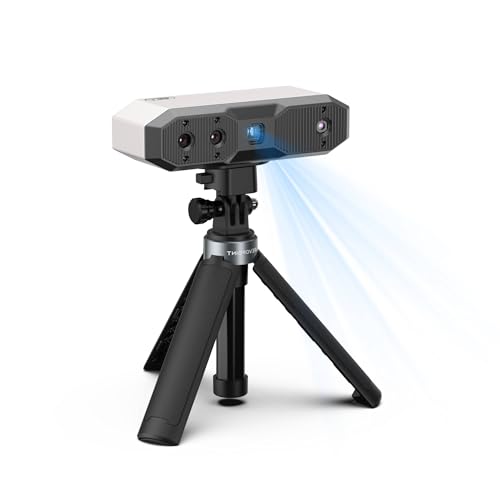
Revopoint MINI 2 3D Scanner, Full Color Scan, for 3D Printing, Standard | 0.02mm, Industrial Blue Light, Model Scanning for Small Objects, Wi-Fi 6, Portable Lightweight, for Win/Android/iOS/macOS
Miniatures, jewelry and small parts
Seller: Revopoint Official Store
Revopoint MINI 2 3D Scanner, Full Color Scan, for 3D Printing, Advanced | 0.02mm, Industrial Blue Light, Model Scanning for Small Objects, Wi-Fi 6, Portable Lightweight, for Win/Android/iOS/macOS
Miniatures, jewelry and small parts
Seller: Revopoint Official Store3DMakerpro Seal
Miniatures, jewelry and small parts

3DMakerpro Seal 3D Scanner for 3D Printing - 3D Printer Accessories Vivid Textures Handheld Scan 0.01mm Accuracy 0.05mm Resolution 10FPS, Blue Light & Anti-Shake Lenses, Free 3D Scanning Software
Miniatures, jewelry and small parts
Seller: BUDDYFU 3DMakerpro Authorized Store
3DMakerpro Seal 3D Scanner, Handheld 3D Scanners for Printing | Standard Version, Small-Format, Up to 0.01mm Accuracy, 24-Bit Full-Color Scanning, Blue Structured Light, Powered by JMStudio
Miniatures, jewelry and small parts
Seller: 3DMakerpro Authorized Store3DMakerpro Seal Lite
Entry-level miniature and small-part capture

3DMakerpro Seal Lite 3D Scanner for 3D Printing - 3D Printer Accessories Handheld Scan 0.02mm Accuracy 0.07mm Resolution 10FPS, NIR Light & Anti-Shake Optical Lenses, Free 3D Scanning Software
Entry-level miniature and small-part capture
Seller: BUDDYFU 3DMakerpro Authorized Store
3DMakerpro Handheld 3D Scanner for 3D Printer, 0.02mm High Detailed Precision, 10FPS Scanning Lightning with Anti-Shake Lenses, Portable 3D Scanner for Win10/MacOS -Seal Lite Standard Version
Entry-level miniature and small-part capture
Seller: 3DMakerpro Official StoreBuying decision
Which scanner fits this job?
Start with the object, not the scanner. For coins and medals, decide whether the difficult part of the job is fine detail, surface reflectivity, object size or mobility. The top pick on this page is the strongest general fit, the second recommendation covers a different workflow strength, and the third offers a useful alternative when budget or setup changes. If your project combines multiple object classes, use the chooser below and compare the scanning mode rather than buying from price alone.
At a glance
Compare the recommended scanners
Detailed guide
How to get a better scan for this use case
Why coins and medals are difficult to scan well
Coin scanning is a resolution problem first and an object-size problem second; a large-object scanner can be accurate yet still be the wrong tool. Typical targets include coins, tokens, medals, small reliefs, embossed emblems and miniature flat objects. Those objects do not present one uniform scanning problem: the scanner may move from very small objects where surface relief can be measured in fractions of a millimeter while also dealing with bright metal, tarnished metal, dark patina, glossy plating and low-contrast relief. A useful buying decision therefore starts with the job you need to complete rather than the largest accuracy number printed on a specification sheet.
For this use case, preserve engraving, lettering, rim shape, relief height, edge features and tiny surface transitions. If those features are lost, a visually smooth mesh can still be useless for enlarged replicas, archival meshes, relief studies, display models and 3D-printable reproductions. The best scanner is the one that can repeatedly hold tracking over the important geometry in a controlled tabletop setup with stable lighting, a turntable and repeatable object positioning, not simply the model with the most aggressive marketing claim.
The specifications that matter most
Accuracy, resolution and capture volume describe different things. For coins and medals, accuracy helps with the relationship between features, resolution affects the smallest surface changes that reach the mesh, and object range determines whether the scanner can cover very small objects where surface relief can be measured in fractions of a millimeter without forcing an awkward working distance. Treat all three as a system rather than choosing from one headline number.
Light source is equally important because this page deals with bright metal, tarnished metal, dark patina, glossy plating and low-contrast relief. Blue-laser and hybrid systems can behave differently from infrared structured-light scanners, especially when the target is dark or reflective. Software, tracking recovery, export options and the computer or standalone hardware required to process the scan can affect the result as much as the optical specification.
How to choose among the recommended scanners
The three recommendations on this page cover different priorities. Choose the first pick when the central goal is engraving, lettering, rim shape, relief height, edge features and tiny surface transitions. Move toward the more portable option when your real limitation is a controlled tabletop setup with stable lighting, a turntable and repeatable object positioning. Choose the value option when the object can be controlled, repositioned and prepared carefully enough that you can trade some workflow convenience for a lower purchase price.
Do not assume the same scanner must handle every part of a project. A broad scanner can capture the overall form of coins and medals, while a smaller-detail scanner or direct caliper measurement may still be better for one mating feature. Combining tools is often more reliable than forcing a single mesh to carry every design decision.
Preparing coins and medals before the first scan
Handle the object carefully, remove only loose contamination, mount it securely and choose a background that separates the rim from the scene without introducing reflective clutter. Good preparation shortens scanning time because the software spends less effort trying to recover from avoidable movement, glare or missing geometry.
Before capture, decide which regions will define the final model. Mark them mentally or in a photo, then plan orientations that expose those areas. Keep the setup consistent between passes. For coins and medals, a few minutes spent controlling the object and background usually saves far more time than trying to repair a badly aligned mesh later.
Markers, spray and difficult surfaces
Markers normally belong on the turntable or surrounding fixture rather than on the coin itself because they can obscure the very detail you want to capture. Markers are tracking aids, not a substitute for useful geometry. Keep them away from the precise edges or surface details you need to reconstruct.
Reflective coins may need a removable matte treatment for geometry capture, but do not apply any coating to valuable or collectible objects without conservation-safe guidance. Surface treatment should solve a specific capture problem. If the scanner already holds tracking and returns clean geometry, adding coating or extra markers only increases preparation and cleanup.
A capture workflow that produces cleaner geometry
Use a small capture volume, slow deliberate passes or turntable rotation, and scan both faces plus the edge separately if the final model must be complete. Watch the live tracking view rather than only the growing mesh; loss of correspondence is easier to correct immediately than after a long pass has been recorded.
Use enough overlap that each new region connects to geometry the software already understands. For coins and medals, deliberately capture edges, holes or landmarks from more than one angle. When the object has a hidden face, plan a separate orientation and align it through shared geometry instead of stretching one pass into an impossible viewing angle.
Cleaning the scan without destroying useful detail
After capture, remove floating fragments and obvious background geometry first. Then inspect the regions that matter for engraving, lettering, rim shape, relief height, edge features and tiny surface transitions. Heavy smoothing can make a mesh look professional while rounding exactly the edges or relief needed for enlarged replicas, archival meshes, relief studies, display models and 3D-printable reproductions. Keep an untouched copy of the raw or minimally processed scan before aggressive cleanup.
If alignment is weak, return to the source passes before sculpting over the error. A clean-looking mesh built on bad registration is difficult to trust. For repeatable projects, save the scanner settings, working distance and preparation method that produced the best result so later scans of similar coins and medals do not start from zero.
From scan to CAD or a 3D-printable model
A scan mesh is not automatically an editable engineering model. For enlarged replicas, archival meshes, relief studies, display models and 3D-printable reproductions, decide whether you need a watertight mesh, a surface reference or rebuilt parametric CAD. Functional geometry such as holes, threads, planar faces and symmetry is often better recreated from the scan than accepted directly from millions of mesh triangles.
When the destination is 3D printing, repair non-manifold areas, check wall thickness and verify scale before slicing. When the destination is CAD, use the mesh as a reference and rebuild critical features around measured dimensions. This hybrid approach is especially important when engraving, lettering, rim shape, relief height, edge features and tiny surface transitions determine fit.
Common mistakes and how to avoid them
Failures usually come from glare, insufficient sampling of shallow relief, poor edge registration, motion during turntable capture and aggressive smoothing that erases lettering. The fix is usually to improve capture conditions or divide the job into smaller controlled passes, not to increase smoothing after the fact.
Another mistake is treating every numeric specification as directly comparable across brands and modes. A scanner may quote excellent local accuracy in one mode while your actual coins and medals workflow depends on tracking stability, scan volume, surface response and software. Use the recommendations as starting points, then validate the exact object class you expect to scan most often.
When a phone or photogrammetry may be enough
Macro photogrammetry can be useful for visual texture, but a dedicated small-object scanner is easier when you need repeatable geometry rather than only a convincing image-based model.
Choose the simpler method when you mainly need visual documentation, approximate scale or a one-off reference. Move to a dedicated scanner when repeated projects, engraving, lettering, rim shape, relief height, edge features and tiny surface transitions, difficult bright metal, tarnished metal, dark patina, glossy plating and low-contrast relief or the need for enlarged replicas, archival meshes, relief studies, display models and 3D-printable reproductions makes failed captures expensive. The practical threshold is not whether a phone can make a 3D model; it is whether that model is dependable enough for your next step.
Buyer questions
Frequently asked questions
What is the best 3D scanner for coins and medals?
For coins and similarly small objects, Revopoint MINI 2 is the strongest first choice because this job rewards close-range detail more than large capture volume. 3DMakerpro Seal is a strong alternative for fine small-object work, while Seal Lite is the budget route when you can spend more time on setup and cleanup.
How accurate should a scanner be for coins and medals?
It depends on the output. If the scan is mainly for visualization, overall shape and stable tracking can matter more than the smallest stated accuracy figure. If engraving, lettering, rim shape, relief height, edge features and tiny surface transitions control fit or CAD reconstruction, choose a scanner and workflow that preserve those features and confirm important dimensions with direct measurement.
Do I need scanning spray for coins and medals?
Reflective coins may need a removable matte treatment for geometry capture, but do not apply any coating to valuable or collectible objects without conservation-safe guidance. Start without spray when the surface already scans cleanly, then introduce treatment only where reflections or low signal repeatedly break the capture.
Do I need markers when scanning coins and medals?
Markers normally belong on the turntable or surrounding fixture rather than on the coin itself because they can obscure the very detail you want to capture. A scanner that tracks reliably from natural geometry does not need markers everywhere.
Can I turn the scan directly into a 3D print?
Often, but inspect the mesh first. Remove unwanted geometry, close holes, confirm scale and check wall thickness. For functional coins and medals, rebuild or verify critical interfaces rather than assuming the raw mesh is print-ready.
Can I use the scan for CAD and reverse engineering?
Yes, but the mesh normally serves as a geometric reference rather than a finished parametric model. Rebuild planes, cylinders, holes, symmetry and other design features around the scan, especially where engraving, lettering, rim shape, relief height, edge features and tiny surface transitions matter.
Is a phone good enough instead of a dedicated 3D scanner?
What should I check before buying a scanner?
Check the object-size range, surface behavior, required computer or standalone workflow, export formats, included accessories and the exact Amazon listing. Make sure you are buying the scanner itself rather than a case, turntable, marker kit, spray or other accessory.
Manufacturer references
Specifications can vary by scanning mode, software version and bundle. Confirm the exact model and included items before buying.