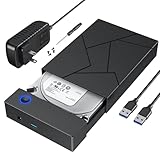
Best 3.5-Inch Hard Drive Enclosures: Compare Prices
Compare powered enclosures for full-size desktop SATA hard drives. Cloudzat highlights maximum claimed capacity, host interface, ventilation, power requirements and whether 2.5-inch drives are also supported.
18fresh offers
$14.30lowest price
10Gbpsfastest listed link
Prices checked: October 24, 2026 7:35 pm. Amazon prices and availability can change after this time. Price details
Reset a filter or choose another interface, protocol, brand or feature.
Choosing a 3.5-inch hard drive enclosure
Plan for external power
A 3.5-inch desktop hard drive needs more power than a USB port normally supplies, so these enclosures use an AC adapter.
Check the capacity claim
Controller and firmware support can place a stated limit on drive capacity. Choose an enclosure that explicitly supports the drive size you plan to install.
Give the drive airflow
Large hard drives can run for hours during backups. Ventilation, an aluminum body or a fan may improve sustained operation in warm rooms.
How Cloudzat compares enclosure prices
Compare current Amazon listings relevant to this guide. Product availability and prices can change.
Cloudzat rejects preinstalled-drive bundles, carrying cases, replacement cables and unrelated accessories. Technical fields are extracted from the Amazon title and product information and can be incomplete, so confirm the selected Amazon variant and manufacturer specification before ordering.
Frequently asked questions
Can a 3.5-inch enclosure run without its power adapter?
Normally no. The USB connection carries data, while the supplied adapter powers the desktop hard drive.
Can I install a 2.5-inch drive in a 3.5-inch enclosure?
Some models support both sizes, but the listing must state this and the drive should be held securely.
Does an enclosure make an internal drive portable?
It makes the drive externally accessible, but a powered 3.5-inch setup is better described as desktop storage than pocket-portable storage.
Should I use an enclosure or a docking station?
An enclosure protects a drive for regular use. A dock is more convenient when drives are swapped frequently.