


UK BUYING GUIDE
SanDisk’s Extreme PRO badge covers two physically different card families, so the first buying decision is the slot in your device, not the branding on the label. The UK product pages separate full-size SD from microSD, and the cards are only compatible with host devices that accept that exact format.
For most buyers, the useful comparison is not “which Extreme PRO is best?” but “which exact format, capacity and interface does my device support?”. SanDisk’s current UK microSD Extreme PRO UHS-I family runs from 32GB to 1TB, while the SD UHS-I family runs from 32GB to 2TB; SanDisk also sells separate SD UHS-II branches for users whose cameras can exploit them.
If you are buying for a camera, drone, smartphone, handheld console or dash cam, the slot and the device’s speed support matter more than the logo on the packet. A microSD card can sometimes be used in an SD reader with an adapter, but that does not make it the same product as a full-size SD card, and it does not change what the host device can properly support.
Our recommendation
Buy the format your device was built for; do not treat Extreme PRO as a single interchangeable product line. If your device takes microSD, the clean default is the SanDisk Extreme PRO microSDXC UHS-I 256GB, because the current UK family combines A2 app support, UHS-I compatibility and write performance up to 170MB/s on the higher capacities, while still fitting the small-slot devices most people actually use. The in-box item is just the card itself, so you are not paying for unnecessary extras.
If your device takes full-size SD, the best mainstream choice is the SanDisk Extreme PRO SD UHS-I 256GB, model SDSDXXJ-256G-GSCIN. SanDisk lists SDHC/SDXC compatibility, up to 250MB/s read speed, up to 170MB/s write speed on 256GB and above, and a lifetime limited warranty. That makes it the straightforward default for stills cameras and many video-capable cameras that do not need UHS-II.
If you own a camera that can use UHS-II, the specialist pick is not a faster UHS-I card but a separate UHS-II card. For higher-end stills and video work, SanDisk’s SDXC UHS-II V60 and V90 lines exist as distinct products with higher interface headroom, but they only make sense when the host device actually supports UHS-II.
SanDisk memory cards
Choose the exact model and configuration recommended below. These listings are from Amazon UK; bundles and capacities are identified on each card.

SanDisk Extreme Pro 1 TB microSDXC Memory Card + SD Adapter with A2 App Performance + Rescue Pro Deluxe 170 MB/s Class 10, UHS-I, U3, V30
£225.70
9% off · Amazon reference price £249.00
Last verified 2026-11-28 10:08:58 UTC

SANDISK Extreme PRO microSD + Adapter 128GB, Up to 250MB/s Read Speeds | UHS-I, V30, 5K, 4K UHD, U3, C10, A2, Ideal for Action Cams, Drones, Android Devices, Laptops, Up to 170MB/s Write speeds
£28.39
46% off · Amazon reference price £52.99
Last verified 2026-11-28 09:57:50 UTC
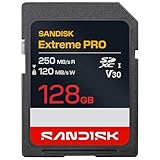
SANDISK Extreme PRO SD Memory Card 128GB, Up to 250MB/s Read Speeds *New | UHS-I, V30, U3, C10, 4K UHD, Full HD, Up to 120MB/s Write Speeds, SANDISK App
£36.99
16% off · Amazon reference price £43.90
Last verified 2026-11-28 09:49:47 UTC

SANDISK Extreme PRO microSD Card + Adapter 128GB, Up to 200MB/s Read Speeds | UHS-I, V30, 4K UHD, U3, C10, A2 App Performance, Ideal for Android Smartphones, Action Cams, Drones, Up to 90MB/s Write Speed
£27.15
22% off · Amazon reference price £34.99
Last verified 2026-11-28 09:33:09 UTC
As an Amazon Associate, Cloudzat earns from qualifying purchases. Price and availability may change; Amazon checkout controls the purchase price.
What to buy for your needs
Start with the slot, not the brand
The shared Extreme PRO name is the main source of confusion. On SanDisk’s UK site, the SD family and the microSD family are separate product pages with separate model numbers, capacities and compatibility lists. A full-size SD card is meant for SDHC/SDXC host devices; a microSD card is meant for microSDHC/microSDXC host devices.
That means the right purchase is determined by the socket in the device, not by whether you already own an adapter. If your camera, drone or handheld device specifies microSD, buy microSD. If it specifies SD, buy SD. Do not buy one format hoping the adapter will make it function like the other, because the physical size and host compatibility are still different.
Use the right speed class for the device you own
For SanDisk’s current UK microSD Extreme PRO UHS-I family, the headline figures are up to 200MB/s read and, on the higher capacities, up to 140MB/s write. The product data sheet also shows that the 32GB card is slower on writes than the larger models, and that QuickFlow is only available on 64GB and above.
For the SD UHS-I family, SanDisk lists up to 250MB/s read, with 170MB/s write on the main high-capacity models and 150MB/s on the 2TB card. Those are strong paper figures, but they only matter if your device can actually use SD UHS-I and if your workflow benefits from the extra speed. If your camera supports UHS-II, the better specialist route is to move to SanDisk’s UHS-II cards rather than overbuying a UHS-I card.
Choose capacity by workload, not by bragging rights
For most buyers, 256GB is the best default because it gives a sensible balance of space, cost and convenience without pushing you into capacities you may never fill. That is true for both formats, provided your device supports the card class and capacity you choose.
If you record short clips, store casual photos or use the card as portable phone or game storage, 128GB can be enough. If you shoot regular 4K, carry a lot of media, or want fewer offloads, 512GB is the more relaxed option. If you need a single high-capacity card, SanDisk currently lists 1TB in the microSD family and 2TB in the SD UHS-I family, but those sizes are only useful when the host device and workflow can justify them.
Check what is in the box and what is not
The card is the product; the reader is not. SanDisk’s microSD page shows the in-box item as the card itself, and the higher-speed marketing on the page depends on using a suitable reader such as the SanDisk Professional PRO-READER SD and microSD, which is sold separately. If your laptop or desktop already has a decent card slot, you may not need anything else.
Do not assume that a bundle listing or marketplace pack-in changes the fundamentals. A reader can make transfers easier, and an adapter can help a microSD card fit some SD readers, but neither changes the card family you are buying. The safest habit is to match the card to the device first, then add any reader only if your existing hardware is the bottleneck.
Know when to step up to UHS-II
UHS-II is the specialist branch for cameras that can use it. SanDisk’s current UK SD UHS-II V60 and V90 pages position those cards for higher-bitrate video, burst shooting and faster offloads, with the V60 family marketed for 6K and 4K capture and the V90 family marketed for more demanding cinema and high-speed workflows.
The important limitation is compatibility. If your camera does not support UHS-II, buying a UHS-II card brings no practical advantage over a good UHS-I card. For most owners, the right decision is still: format first, then capacity, then speed class.
Use the model number to avoid marketplace confusion
SanDisk’s model numbers are the most reliable way to distinguish close-looking variants. On the current UK SD UHS-I page, the 256GB model is SDSDXXJ-256G-GSCIN; on the current UK microSD UHS-I page, the 256GB model is SDSQXCJ-256G-GS6MA. If a marketplace title is vague, the SKU should settle the question immediately.
This matters because SanDisk’s naming can be inconsistent across regions, capacity revisions and page layouts. The physical format and exact model code are more trustworthy than a generic product title that simply says “Extreme PRO”.
Capacity, compatibility and ownership
Format differences that matter in everyday use
Full-size SD cards are the standard fit for many stills cameras and some video cameras, while microSD cards are common in phones, action cameras, drones and compact handheld devices. SanDisk’s own product pages reflect that split in both naming and compatibility, which is why the shared branding should never be taken as proof of interchangeability.
In practical terms, the right card is the one your device accepts natively. If the device says SD, buy SD. If it says microSD, buy microSD. A convenient adapter may help in some readers, but it does not alter the device’s actual slot or the card family you should have bought.
What the current UK SanDisk line-up actually includes
SanDisk’s current UK microSD Extreme PRO UHS-I line lists 32GB, 64GB, 128GB, 256GB, 512GB and 1TB capacities, with the higher capacities carrying the strongest read and write figures. The page also shows that QuickFlow is only available from 64GB upwards.
The SD UHS-I line lists 32GB, 64GB, 128GB, 256GB, 512GB, 1TB and 2TB. The 32GB card is SDHC, while the higher capacities are SDXC, and the product page states compatibility with SDHC and SDXC host devices.
For specialist users, SanDisk’s UK UHS-II SD line is separate again. The V60 product page highlights up to 1TB capacity, RescuePRO Deluxe for two years, and performance aimed at 6K and 4K recording. The V90 product page positions the card for even more demanding cinema and burst workflows, with sustained video performance at the V90 level.
Warranty, bundle contents and support rules
SanDisk’s current UK SD UHS-I product page states a lifetime limited warranty. The microSD product page also states a lifetime limited warranty on the current family. That is useful, but it is still a warranty, not an assurance of damage cover, misuse cover or compatibility beyond the host-device requirements already stated on the page.
Where SanDisk offers extra software or recovery benefits, those are product-specific. The UHS-II V60 page includes a two-year RescuePRO Deluxe offer, while the everyday UHS-I cards are sold as memory cards rather than full software bundles. Buyers should treat any add-on as a bonus, not the core reason to choose one card over another.
How to choose between the main options
If you need one card for a phone, action camera, drone or other micro-slot device, buy the microSD Extreme PRO. It is the most natural fit for compact gear, and the 256GB size is the easiest all-round choice for ordinary use.
If you need one card for a camera with an SD slot, buy the SD Extreme PRO UHS-I 256GB unless your shooting demands a higher tier. It is the simplest default because it combines strong advertised speed, broad compatibility and a capacity that suits most stills-and-video users.
If your camera truly supports UHS-II and you need faster sustained writing or faster offloads, skip the UHS-I comparison and go straight to the UHS-II range. That is the only branch where you will get a real technical benefit from the extra interface speed.
Which option should you choose?
Best default: SanDisk Extreme PRO microSDXC UHS-I 256GB
Choose this if your device takes microSD and you want the most versatile everyday card in the current UK family. The 256GB model sits in the faster part of the line, supports A2, and is listed at up to 200MB/s read and 170MB/s write on the higher-capacity versions. It is the safest all-round pick for phones, action cameras, drones and compact gadgets.
Budget choice: SanDisk Extreme PRO SD UHS-I 128GB
Choose this only if your device takes full-size SD and you know 128GB is enough for your workload. SanDisk lists the 128GB SD card as SDXC with up to 250MB/s read and 120MB/s write, lifetime limited warranty and SDHC/SDXC compatibility, so it remains a sensible lower-capacity option when you do not need the headroom of 256GB or more.
Specialist choice: SanDisk Extreme PRO SD UHS-II V90 or V60
Choose this if your camera supports UHS-II and your work is limited by card speed rather than by the camera body itself. The V60 line is aimed at 6K and 4K video capture with sustained video performance, while the V90 line is the more demanding branch for cinema-style workflows and high-speed burst shooting. These are specialist cards for specialist hosts, not upgrades for microSD-only devices.
NAS options on Amazon
Compare the NAS model, drive bays, included disks and supported applications before buying. Keep using your existing NAS if it already meets the guide’s requirements.
Checking current Amazon listings…
As an Amazon Associate, we earn from qualifying purchases. Prices and availability can change; Amazon’s checkout price applies.
Questions answered
Is SanDisk Extreme PRO SD the same as microSD?
No. They share a brand name, but they are different physical formats with different host compatibility. Buy the format your device accepts, not the one that sounds closest in a listing title.
Which is faster in SanDisk’s current UK range?
On paper, the SD UHS-I family is faster than the microSD UHS-I family in SanDisk’s current UK listings, with up to 250MB/s read versus up to 200MB/s read. But the faster card only matters if your device uses SD, not microSD.
Do I need UHS-II?
Only if your camera supports it and your workflow can benefit from it. For most buyers, a good UHS-I card is enough; UHS-II is a specialist upgrade for demanding cameras and video work.
What capacity should most UK buyers choose?
256GB is the most sensible default for many buyers because it balances space and convenience without becoming excessive. If you shoot lightly, 128GB can do the job; if you shoot a lot of video, 512GB or higher is the safer choice.
Can I use a microSD card in an SD slot?
Sometimes, with the correct adapter, but it remains a microSD card. An adapter can help with physical fit in some readers, but it does not turn the card into a full-size SD card or change the device’s format requirement.
Sources and further detail
- SanDisk Extreme PRO microSD UHS-I Card – UK product page — Current UK microSD family, capacities, model numbers, A2/QuickFlow notes, lifetime limited warranty, in-box contents and compatibility.
- SanDisk Extreme PRO SD UHS-I Card – UK product page — Current UK full-size SD family, capacities, model numbers, SDHC/SDXC compatibility, performance figures and lifetime limited warranty.
- SanDisk Extreme PRO SDXC UHS-II Card (V60) – UK product page — Specialist UHS-II V60 branch, capacity range, RescuePRO Deluxe offer and performance positioning for video and burst workflows.
- SanDisk Extreme PRO SD UHS-II Card (V90) – UK product page — Specialist UHS-II V90 branch and performance positioning for demanding camera workflows.
- SanDisk QuickFlow Technology tech brief — QuickFlow availability by capacity and reader dependency.