


CLOUDZAT · BLACK FRIDAY 2026
Updated · 26 Nov 2026 21:26 UTC
Black Friday offers and current Amazon listings

Black Friday Big Deal
Canon PIXMA G3570 Wireless Inkjet Printer with Refillable MegaTank | All-in-one scan and copy; refillable ink tanks, WiFi Direct and Mopria, borderless A4 photos, high-yield bottles
−45% · Amazon reference price: £227.18
Verified 2026-11-27 21:25:19 UTC

Black Friday Big Deal
HP LaserJet M110w Wireless Black & White Printer | 1 Year Limited Warranty | Print from phone or tablet | Smallest laser in its class | 150 sheet input tray |Print speed up to 20ppm
−42% · Amazon reference price: £119.99
Verified 2026-11-27 21:20:16 UTC

Black Friday Big Deal
Brother HL-L2400DWE Mono Laser Printer with EcoPro Subscription | Single function, Automatic 2-sided print, A4, 4-month free trial, Automatic toner delivery, UK Plug
−41% · Amazon reference price: £129.99
Verified 2026-11-27 21:15:07 UTC

Black Friday Big Deal
HP Smart Tank 210 Wireless Printer | Perfect for Everyday Home Use | Print only | Self-healing Wi-Fi | A4 | Smart buttons | Low on ink sensors | Refillable | Includes up to 3 Years of Ink
−38% · Amazon reference price: £159.99
Verified 2026-11-27 21:25:23 UTC

Black Friday Big Deal
Epson EcoTank ET-2911 | Busy Home Use | Wi-Fi | A4 | Print, Copy, Scan | AirPrint Compatible | Compact | Includes Up To 3 Years of Ink
−38% · Amazon reference price: £239.99
Verified 2026-11-27 21:20:20 UTC
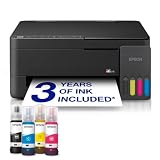
Black Friday Big Deal
Epson EcoTank ET-2910 | Busy Home Use | Wi-Fi | A4 | Print, Copy, Scan | AirPrint Compatible | Compact | Includes Up To 3 Years of Ink
−34% · Amazon reference price: £239.99
Verified 2026-11-27 21:25:19 UTC
Prices and stock reflect the last successful check shown on each card. Discounts and Black Friday badges appear only when reported by Amazon. The checkout price applies. As an Amazon Associate, Cloudzat earns from qualifying purchases.
Our buying recommendation
For most UK buyers, the right low-running-cost printer is the one that matches your page mix, not the one that looks cheapest on a seasonal card. If you mainly print black text, choose Brother HL-L2445DW or a compact HP mono model. If your household prints colour every week, Epson EcoTank ET-3956 or Canon G3590 is the more sensible route. For office-style colour and scanning, Canon i-SENSYS MF664Cdw or HP Color LaserJet Pro 3302fdw are stronger fits. For photos, Canon SELPHY CP1500 is the specialist choice. Buy by workload, and you avoid paying for features that do not lower ownership cost.
Low-running-cost printers only save money when they match the pages you really print. A mono laser can be the calmest choice for letters, homework and invoices, while a refillable ink tank suits families who print colour often enough to justify the extra ink capacity. Photo buyers need a separate category again, because image quality is shaped by ink system, paper handling and finish rather than by headline features alone.
Ownership cost is broader than the ticket price of the machine. It includes replacement ink or toner, drums where relevant, paper, starter supplies that run out sooner than a full set of retail consumables, and the time you lose when a printer clogs, sleeps for too long or insists on repeat prints. The best buy is the one that keeps your real workloads moving with the least waste, not the one with the most impressive spec sheet.
Compatibility matters just as much in a UK home or small office as the running cost itself. Some buyers need straightforward wireless printing from phones, some need scanning and copying, and some need duplex printing for longer documents. Do not assume duplex printing also means duplex scanning: Brother DCP-L2640DW and DCP-L2620DW can automatically print on both sides, but that does not give them automatic two-sided scanning. Likewise, colour Brother LED models use LED print engines, not laser technology, so it is worth choosing by function rather than by shorthand labels.
Choose the right printer for your work
| Buyer scenario | Named pick | Why this is the right buy |
|---|---|---|
| Mostly black text, homework, letters and returns labels | Brother HL-L2445DW | Best when you want crisp mono pages, automatic duplex printing and a simple device that avoids colour-related maintenance you will not use. |
| Compact mono all-rounder with print, scan and copy | Brother DCP-L2620DW | A sensible choice if you need a small multifunction, but remember that duplex printing does not mean automatic duplex scanning. |
| Family colour documents and regular scanning | Epson EcoTank ET-3956 | A refillable ink tank suits regular colour use, scanning and copying without making you rely on cartridges for everyday family printing. |
| Colour office documents with duplex ADF | HP Color LaserJet Pro 3302fdw | A better fit for shared workspaces needing colour laser output, automatic duplex printing and a duplex automatic document feeder for scanning. |
| Large-format home office work and A3 pages | Epson WorkForce Pro WF-7830DTWF | The right buy if layout, scanning and A3 paper handling matter more than a compact footprint or simple home use. |
Choose a mono laser when text is your real workload
If most of your printing is black text, forms, homework sheets and occasional returns paperwork, a mono laser is usually the least troublesome low-running-cost option. The Brother HL-L2445DW is the cleanest recommendation because it focuses on the basics that matter: reliable mono output, automatic duplex printing and a compact shape that fits a study or shared household desk. It avoids the dried-nozzle risk that can make inkjets expensive in practice when they sit idle. For people who print steadily but not constantly, that predictability is often the real saving. You are spending on toner rather than colour ink you will rarely touch, and that keeps ownership simple.
The main alternative is HP M110w if you only need basic mono printing and want a smaller, print-only device. That can suit a student room or a minimal home setup, but it is not as versatile as the Brother because it lacks the multifunction convenience many homes eventually need. Skip mono laser if you regularly print charts, school projects or photos, because buying a black-only machine and then compensating with a second device usually raises friction rather than lowering cost. In that case, choose a refillable colour ink tank instead, or move to colour laser if the documents are office-led rather than image-led.
Pick a compact multifunction if scanning matters more than colour
A multifunction printer is worthwhile when scanning and copying are part of the weekly routine, not an occasional afterthought. The Brother DCP-L2620DW is a strong low-running-cost choice for that role because it keeps the device compact while adding the everyday convenience of print, scan and copy in one box. It is especially useful for households that handle school paperwork, warranties, receipts or administrative forms and want to avoid switching between devices. But the buying lesson is important: automatic duplex printing does not mean duplex scanning. The DCP-L2620DW and DCP-L2640DW can print double-sided automatically, yet they do not magically gain automatic two-sided scanning from that feature.
The clear alternative is HP M234sdw if you want a small mono multifunction with a different interface and a more HP-flavoured setup. It is worth considering when you want straightforward home-office basics, but it should still be judged on what you actually scan and print, not on the promise of extra convenience. Skip this whole category if you only print and never scan, because the extra hardware does not improve running cost on its own. Likewise, do not pay extra for features you will not use, such as fax functions or a more elaborate document feeder, when a simpler machine would do the same job with less clutter and fewer consumables to maintain.
Buy refillable ink tank for regular family colour
If your home prints colour every week, a refillable tank printer is usually the best low-running-cost route. Epson EcoTank ET-3956 is the most balanced recommendation here because it suits mixed family use: homework, school handouts, forms, charts and the odd presentation page, plus scanning and copying. The point of a tank printer is not mystical economy; it is that the owner buys bottled ink or starter supplies in a format designed for repeated top-ups rather than a constant cycle of cartridges. That works well when there are bursts of printing followed by quieter spells, because you are not throwing away partly used cartridges just to keep the printer ready.
Canon G3590 is the alternative to look at if you want a simple MegaTank-style home printer from Canon rather than Epson. It is a practical option for colour documents and everyday family work, and it can make sense if you prefer Canon’s layout or print behaviour. Choose between them by workflow, not by brand loyalty. Skip tank printers if you only print a few pages a month, because they are best when the ink system gets regular use. Infrequent printing makes any printer harder to justify, but a tank machine is especially sensible only when the household is printing often enough that the refillable design actually earns its place.
Choose colour laser for office documents, not for photos
Colour laser is the better answer when the pages are business-like: reports, presentations, charts, invoices and shared office documents. Canon i-SENSYS MF664Cdw is a strong recommendation for that role because it combines colour output with scanning and copying in a format that feels suited to a small office or serious home setup. It is about consistency and presentation rather than photo realism. If your pages need to look crisp under fluorescent lights, survive filing and arrive in a stack, colour laser can be the calmer choice. It also suits shared use because toner-based machines are usually less fussy about stop-start patterns than photo-focused inkjets.
Canon i-SENSYS MF667Cdw is the closest alternative if you want a similar Canon business model with comparable intent. HP Color LaserJet Pro 3302fdw is also worth considering, especially if you need a duplex automatic document feeder for two-sided scanning. That distinction matters because not every model in a family has the same feeder setup, and buyers should not assume all ‘sdw’ or ‘fdw’ labels mean the same thing. Skip colour laser if your main priority is photo printing, because office colour is not the same as photographic output. For photos, a dedicated photo printer gives better texture, finish and paper handling than a workhorse office laser ever will.
Use a large-format machine only when A3 is genuinely needed
The Epson WorkForce Pro WF-7830DTWF makes sense when A3 paper handling is not a novelty but a real part of the job. That includes teachers, designers, home-office users with wide spreadsheets, and small businesses that occasionally need larger layouts without outsourcing them. The attraction here is practical: one machine can print, scan and copy at larger sizes, which removes the need to divide pages or send awkward jobs elsewhere. It is not a compact everyday home printer, though, so the value depends on whether the bigger format genuinely appears in your week. If not, the extra space, paper cost and footprint can outweigh the convenience quickly.
For most families, Epson EcoTank ET-3956 is the better alternative because it keeps the low-running-cost logic without the bulk and complexity of an A3 device. Choose the WF-7830DTWF only when the larger format is clearly useful. Skip it if your printing is mainly letters, school worksheets and standard forms, because oversized capability is one of the easiest ways to overbuy. The right printer is the one that fits your pages and your room. A printer that can do more is not automatically cheaper to own if that extra ability sits unused while you keep buying ordinary A4 paper and never touch the wider tray.
Buy a photo printer when pictures are the point
If the main aim is to print family memories, holiday photos or small gifts, a dedicated photo printer is the correct category. Canon SELPHY CP1500 is the best fit here because dye-sublimation printing is designed for compact, polished, ready-to-hold photo output. That is very different from general-purpose inkjet or laser printing. SELPHY prints are about presentation and finish: postcard-style images, albums and keepsakes that look intentional rather than improvised. If photos are a regular hobby or part of family life, this kind of specialist machine can be the most satisfying low-running-cost choice because it avoids wasting office equipment on a job it was not built to do.
If you want larger, more creative photo and craft work, Epson ET-8550 is the more ambitious alternative. It is an inkjet, not a photo lab replacement, but it is designed for larger creative output than a tiny portable photo printer. Still, do not buy either of these if your needs are mostly documents. A photo printer is a specialist tool, and the running-cost logic only works when you actually use its strengths. If you want an occasional snapshot, print elsewhere in the home office. If you want polished photo keepsakes at home, the SELPHY is the better value than trying to force a document printer into a photo-first role.
Understand starter supplies, consumables and what they really mean
A printer plus included starter supplies is not the same as the standalone consumables you will buy later. That matters because starter ink or toner is often intentionally limited, and the first cartridge, bottle or set of tanks should be treated as part of the purchase, not as proof of long-term ownership cost. The real calculation is hardware plus future ink or toner, plus drums where the model needs them, plus paper and the time spent maintaining the machine. This is why cheap-looking printers can become awkward purchases if the replacement supplies do not match your print volume. The right question is whether the machine will still feel manageable after the starter kit is finished.
HP M140w and HP M110w are fine examples of simple mono printers where buyers should focus on the total ownership pattern rather than the first box contents. Brother and Canon multifunctions deserve the same treatment. Do not assume that a larger starter bundle makes one model automatically better, or that a smaller bundle makes a printer expensive forever. Instead, ask whether the printer’s technology suits your usage rhythm. Regular colour printing suits tanks, text-heavy work suits mono laser, and photos suit dedicated photo machines. That reasoning is more useful than chasing a package that only looks generous on day one and becomes ordinary once the initial supplies are used up.
Do not mix up colour document printing with photo quality
Colour documents and photo prints are not the same requirement, even though buyers often group them together. Office colour needs clear text, charts and diagrams that hold up in reports and handouts. Photo quality needs richer tonal transitions, better paper handling and a printing method designed for images rather than spreadsheets. That is why Canon i-SENSYS MF664Cdw or HP Color LaserJet Pro 3302fdw can be excellent for work documents while still being the wrong choice for holiday pictures. Likewise, a Canon SELPHY CP1500 may be perfect for memories and completely unsuitable for day-to-day office paperwork. Matching the technology to the output type is the quickest way to avoid disappointment.
For mixed users, the safer decision is to separate the jobs. Use a tank printer such as Epson ET-3956 or Canon G3590 for family colour documents, and use SELPHY CP1500 for special photo prints. If you only want one printer, decide which output matters most. Skip the idea that a single machine can excel at everything, because that usually leads to paying for capabilities you do not use well. The best low-running-cost printer is not the one that can technically print in colour; it is the one that produces the exact pages you need with the least waste, the least faff and the least temptation to reprint.
Questions answered
What is the best low-running-cost printer for most UK homes?
For most homes, Epson EcoTank ET-3956 is the best balanced choice if you print colour often. If your pages are mainly black text, Brother HL-L2445DW is usually the safer buy because it is simpler and less demanding to own.
Should I buy a tank printer if I only print a few pages each month?
Usually not. Tank printers come into their own when you print often enough for the refillable design to matter. If your printing is light and mostly text, a mono laser is often easier to live with and less likely to sit idle.
Is colour laser better than inkjet for family use?
Only for some families. Colour laser is great for office-style documents and shared use, but refillable ink tanks are usually better for regular mixed colour at home. Photos are a separate case and need a different kind of printer altogether.
Do Brother DCP-L2620DW and DCP-L2640DW have automatic duplex scanning?
No. They can print on both sides automatically, but duplex printing does not mean duplex scanning. If you need two-sided scanning, look for a model with a duplex automatic document feeder rather than assuming the feature is included.
Which printer should I choose if I mainly print photos?
Canon SELPHY CP1500 is the clearest specialist pick for small-format photo prints and keepsakes. If you want larger creative work as well, Epson ET-8550 is the more ambitious alternative, but it is a different type of machine.
Can I treat starter ink or toner as the real running cost?
No. Starter supplies are only the beginning. The proper ownership picture is the printer itself plus future consumables, any drums or maintenance parts, paper and the time you spend keeping the machine working as intended.
Related printer buying guides
Sources and offer checks
Research checked November 26, 2026. Amazon cards show their own last successful check. Manufacturer promotions and Amazon offers have separate terms. Published regional product and campaign information.