


CLOUDZAT · BLACK FRIDAY 2026
Updated · 26 Nov 2026 21:38 UTC
Black Friday offers and current Amazon listings

Black Friday Big Deal
Canon PIXMA G3570 Wireless Inkjet Printer with Refillable MegaTank | All-in-one scan and copy; refillable ink tanks, WiFi Direct and Mopria, borderless A4 photos, high-yield bottles
−45% · Amazon reference price: £227.18
Verified 2026-11-27 21:25:19 UTC

Black Friday Big Deal
HP Smart Tank 210 Wireless Printer | Perfect for Everyday Home Use | Print only | Self-healing Wi-Fi | A4 | Smart buttons | Low on ink sensors | Refillable | Includes up to 3 Years of Ink
−38% · Amazon reference price: £159.99
Verified 2026-11-27 21:25:23 UTC

Black Friday Big Deal
Epson EcoTank ET-2911 | Busy Home Use | Wi-Fi | A4 | Print, Copy, Scan | AirPrint Compatible | Compact | Includes Up To 3 Years of Ink
−38% · Amazon reference price: £239.99
Verified 2026-11-27 21:20:20 UTC
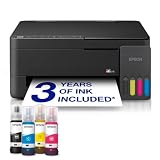
Black Friday Big Deal
Epson EcoTank ET-2910 | Busy Home Use | Wi-Fi | A4 | Print, Copy, Scan | AirPrint Compatible | Compact | Includes Up To 3 Years of Ink
−34% · Amazon reference price: £239.99
Verified 2026-11-27 21:25:19 UTC
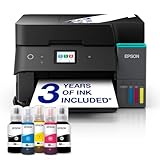
Black Friday Big Deal
Epson EcoTank ET-4950 Ink Tank Printer | Home Office Use | Wireless & Ethernet | A4 | Duplex Print, Copy, Scan, Fax | 6.1cm Touchscreen | ADF | Includes up to 3 Years of Ink
−28% · Amazon reference price: £459.99
Verified 2026-11-27 21:25:19 UTC
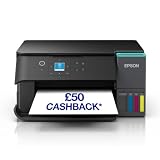
Black Friday Big Deal
Epson EcoTank ET-2950 Ink Tank Printer | Busy Home Use | Wireless | A4 | Print, Copy, Scan | 3.7cm LCD Screen | Double-Sided Printing | Includes up to 3 Years of Ink
−25% · Amazon reference price: £279.99
Verified 2026-11-27 21:20:20 UTC
Prices and stock reflect the last successful check shown on each card. Discounts and Black Friday badges appear only when reported by Amazon. The checkout price applies. As an Amazon Associate, Cloudzat earns from qualifying purchases.
Our buying recommendation
For most UK buyers who print colour regularly, a refillable ink-tank printer is a sensible purchase, but only if the workload is steady enough to justify it. Buy an Epson EcoTank ET-2921 for straightforward family use, a Canon MegaTank G3590 for a more document-led household, and an Epson EcoTank ET-8550 when photo quality and creative printing matter most. For busier home offices, the Canon MAXIFY GX4050 and Epson WorkForce WF-7830DTWF are the more serious choices. Skip tank printers if you mainly print occasionally in black and white; a mono laser such as the Brother HL-L2445DW or HP M110w will usually be the better fit.
Refillable ink-tank printers make sense when you print often enough to use colour regularly and want a calmer, less wasteful ownership pattern than cartridges usually deliver. They are a strong fit for families, homework-heavy homes, side businesses and hybrid workspaces that produce letters, forms, handouts or occasional images every week. They are not automatically the right answer for everyone, because the advantages depend on use frequency, document mix and how much scanning or copying you need alongside printing.
The best way to judge them is by ownership behaviour rather than headline convenience. Tank printers are not laser printers, not a shortcut to free printing and not all aimed at the same user. Epson EcoTank, Canon MegaTank and HP Smart Tank each lean slightly differently, while some models are built for straightforward domestic printing and others for more demanding office work or better photo output. The right choice is the one that fits your workload now, not a machine that looks impressive but sits underused.
Compatibility matters in practical, everyday ways. A printer can be excellent on paper and still be awkward if it does not match the devices, paper handling or scanning habits in the room where it will live. UK buyers should think about Windows and Mac support, mobile printing from phones and tablets, document scanning, and whether a small office needs a simple all-rounder or a model that copes better with long runs. That is why the recommendations below are grouped by job to be done, not by brand loyalty.
Choose the right printer for your work
| Buyer scenario | Named pick | Why this is the sensible choice |
|---|---|---|
| Simple family printing and scanning | Epson EcoTank ET-2921 | A straightforward ink-tank all-rounder for homework, letters and occasional colour pages, without pushing you into office features you may never use. |
| Document-heavy home office | Canon MAXIFY GX4050 | A stronger fit when the printer will handle invoices, forms, admin and frequent everyday documents rather than just light domestic use. |
| Heavier scanning and larger office jobs | Epson WorkForce WF-7830DTWF | A better choice when paper handling and more demanding multitasking matter more than keeping the machine small and basic. |
| Photo-led household | Epson EcoTank ET-8550 | This is the clear pick if photo quality and creative printing matter more than routine office pages or basic family documents. |
| Rare printing, mostly black and white | Brother HL-L2445DW | Skip ink tanks and buy a mono laser instead; it is the more sensible option when colour printing is not part of the routine. |
Start with print frequency, not with the tank idea
The first question is not whether an ink-tank printer looks modern, but whether the household or office prints often enough to benefit from it. Refillable tanks are most convincing when colour output is a normal part of life: school sheets, sports club notices, project work, return forms, invoices and occasional presentations. In that situation, bottled ink can be a much better ownership model than constant cartridge replacement. If the printer is likely to sit unused for long stretches, the balance shifts and a mono laser becomes a more rational buy.
That is why the Epson EcoTank ET-2921 is the best starting point for many UK homes. It is simple, family-friendly and avoids loading you with business features that would go unused. If you know your household prints a bit more, the Canon MegaTank G3590 is the more document-led alternative. It makes more sense when the main jobs are text pages, school admin and everyday colour documents rather than creative work. Skip the basic tank route only if you already know you need bigger paper handling or frequent scanning, because then a more office-focused model will be less frustrating.
Ownership value comes from routine use, not from hype
The attraction of an ink-tank printer is not that it is magically cheap in every situation. It is that it changes the economics of printing for people who actually use it. That distinction matters because a lot of buyers assume a tank printer is always the smarter buy. It is not. If your annual print volume is modest, the convenience of a laser printer may matter more than the refill system. If you print steadily, though, a tank printer can feel much less wasteful and far more predictable than juggling small cartridges.
The Canon MAXIFY GX4050 is the best model in this group for buyers who want a more serious workhorse. It suits home offices that regularly print letters, forms and multi-page admin, and it is easier to justify when the printer has a proper job to do. The Canon G3590 is the more modest alternative for lighter domestic use. Buy the GX4050 when you need a sturdier office machine; skip it if your real needs are mainly homework and the occasional letter, because the extra capability then becomes unnecessary complexity rather than value.
Choose by the kind of pages you print, not just by brand
Epson, Canon and HP all make sensible tank printers, but they do not all aim at the same buyer. For regular documents, the EcoTank and MegaTank ranges are the natural comparison because they are designed around ongoing ink use rather than short bursts. HP Smart Tank sits in the same general category, but that does not mean every model in the family suits the same task. A good buying decision starts with whether you mainly print text pages, mixed household documents or creative colour work.
If your priority is tidy everyday paperwork and you want a mainstream family machine, the Epson EcoTank ET-2921 remains the easy recommendation. If you want a more document-first option with a slightly more office-like feel, the Canon MegaTank G3590 is the stronger alternative. Do not overbuy photo features if all you need is schoolwork and letters; and do not buy a plain document model if photo reproduction is genuinely important. The wrong strength can be more expensive than the right compromise, because you end up paying for capabilities you will never use.
Scanning and copying should drive the decision when admin is regular
For many homes and small offices, printing is only half the job. The machine may also need to scan receipts, copy forms or handle small document batches at short notice. That is where all-in-one behaviour becomes important. Do not assume every tank printer will be equally pleasant at this. Some are simple print-first models, while others are better suited to a workflow built around admin and multi-page handling. The right machine should fit the rhythm of the room in which it lives.
The Epson WorkForce WF-7830DTWF is the most convincing choice here when scanning, copying and larger-format office use matter. It is the better pick if you need a printer that behaves like a compact office hub rather than a basic family box. The Canon MAXIFY GX4050 is the clearer alternative when you want a slightly more compact, document-focused office model. Skip smaller domestic tank printers if you already know you will regularly process multi-page documents, because they can print adequately yet still feel slow or cramped in actual use.
Photo quality needs its own recommendation
A common mistake is assuming all ink-tank printers are equally strong for photos. They are not. Some are aimed squarely at office documents, where crisp text and decent colour are the priority. Others are tuned more carefully for image richness, paper handling and creative work. That distinction matters because photo printing is a different use case from ordinary colour document printing. It is perfectly possible to buy a tank printer that is excellent for reports but only average for photographs.
The Epson EcoTank ET-8550 is the clear pick if photos, craft work, greeting cards or other image-led output are central. It belongs in a different conversation from the typical office tank printer because it is designed for higher-quality creative printing. If photo output is only an occasional birthday snapshot or a handful of holiday prints, skip the specialist model and buy a more ordinary document tank instead. In that case the ET-2921 or G3590 will make far more practical sense, because they cover the real job without loading you with a photo-first price and footprint you do not need.
When a mono laser is the better answer
Refillable ink tanks are not the universal solution, and it is important to say that plainly. If the printer will mostly handle black-and-white pages, or if you print very infrequently, a mono laser is often the calmer choice. It avoids the mismatch between a colour ink system and a mostly text-only routine. It is also a better fit for buyers who value predictability and simplicity above all else. In those cases, the right conclusion is to skip ink tanks entirely.
The Brother HL-L2445DW is the clearest buy for low-volume document-only users who want straightforward monochrome printing. If you want scan and copy functions as well, the Brother DCP-L2620DW is the more useful alternative, but do not confuse its duplex printing with automatic duplex scanning; duplex print does not mean it acquires duplex scan capability. For very basic wireless monochrome use, the HP M110w is another sensible option, while the HP M140w or HP M234sdw suit buyers who want more features. Choose laser when colour is not genuinely part of the routine.
Do not mix up printer technologies or expect one model to do everything
It helps to separate categories cleanly. Epson EcoTank and Canon MegaTank are inkjet printers with refillable tanks, not lasers. Brother's colour LED printers are LED-based electrophotographic machines, not laser technology, and that distinction matters if you are comparing brand families. Canon SELPHY photo printers are dye-sublimation models, which are a different type of photo device from tank printers. Shipping-label printers are usually direct thermal machines, which again serve a different purpose. If you keep those categories straight, the buying decision becomes much easier.
That is also why the short list here stays focused on refillable ink-tank printers for general use, while mentioning laser and photo alternatives only when they are the better answer for a specific need. A family wanting documents and schoolwork should not be pushed towards a photo specialist. A business needing frequent labels should not be told to buy a tank printer for a thermal job. The sensible rule is simple: buy the technology built for your main task, then refine by model. If you do that, the choice becomes much clearer and much less likely to disappoint.
Regional model names and bundled supplies matter
UK buyers should stick to UK-appropriate model names and not import assumptions from another market. A model sold in one region may look similar to another, but the specifications, support and warranty arrangements can differ. The same care applies to bundled starter supplies. A printer-plus-ink package is not the same thing as buying the printer with separate bottles later. Starter supplies can make setup convenient, but they are not a reason to assume long-term running behaviour will be identical across every version of a product.
That is why the recommendations here focus on the UK-market names you are most likely to see: Epson EcoTank ET-2921 and ET-8550, Canon MegaTank G3590 and MAXIFY GX4050, Epson WorkForce WF-7830DTWF, Brother HL-L2445DW and DCP-L2620DW, and HP M110w, M140w and M234sdw where a laser makes more sense. Do not assume features such as duplex scanning, fax, AirPrint or a particular warranty period across a whole family unless the specific model confirms it. The best buy is the one that matches your actual need, not the one with the broadest assumed spec sheet.
Questions answered
Are refillable ink-tank printers good for occasional printing?
Usually not. If you only print occasionally, especially in black and white, a mono laser is often the better fit because it is simpler and better aligned with light use. Ink tanks make the most sense when colour printing is regular enough to justify the system.
Which brand should I choose: Epson, Canon or HP?
Choose the model that fits the workload first. Epson EcoTank is a strong all-round option, Canon MegaTank often suits document-led buyers, and HP Smart Tank can work well for mixed home use. Brand matters less than whether the specific model suits your printing pattern.
Do refillable ink-tank printers automatically give great photo quality?
No. Some are designed for business documents, while others are closer to photo-led devices. If photos matter, the Epson EcoTank ET-8550 is the clear named pick here. For ordinary letters, schoolwork and office pages, a simpler tank model is usually the better choice.
Are tank printers cheaper to own than cartridge printers?
They can be better value for regular users, but only when the printer is used often enough to make the refill system worthwhile. A low-volume household may not see the same benefit. Ownership pattern matters more than the technology label alone.
Which model is best for a small office?
The Canon MAXIFY GX4050 is the strongest office-leaning recommendation here, with the Epson WorkForce WF-7830DTWF as the alternative when scanning, copying and larger paper handling matter more. Buy one of those only if your day-to-day use is genuinely office-like.
When should I skip an ink-tank printer altogether?
Skip one if you print rarely, mostly in black and white, or want the simplest document machine possible. In that case, a mono laser such as the Brother HL-L2445DW, Brother DCP-L2620DW or HP M110w is usually the more sensible buy.
Related printer buying guides
Sources and offer checks
Research checked November 26, 2026. Amazon cards show their own last successful check. Manufacturer promotions and Amazon offers have separate terms. Published regional product and campaign information.