


CLOUDZAT · BLACK FRIDAY 2026
Updated · 26 Nov 2026 22:26 UTC
Black Friday offers and current Amazon listings

Black Friday Big Deal
Canon PIXMA G3570 Wireless Inkjet Printer with Refillable MegaTank | All-in-one scan and copy; refillable ink tanks, WiFi Direct and Mopria, borderless A4 photos, high-yield bottles
−45% · Amazon reference price: £227.18
Verified 2026-11-28 05:31:06 UTC

Black Friday Big Deal
HP LaserJet M110w Wireless Black & White Printer | 1 Year Limited Warranty | Print from phone or tablet | Smallest laser in its class | 150 sheet input tray |Print speed up to 20ppm
−42% · Amazon reference price: £119.99
Verified 2026-11-28 05:25:52 UTC

Black Friday Big Deal
Brother HL-L2400DWE Mono Laser Printer with EcoPro subscription, | Single function, Automatic 2-sided print, A4, 4 mths free trial, Automatic toner delivery, A4, UK Plug
−41% · Amazon reference price: £129.99
Verified 2026-11-28 08:06:50 UTC

Black Friday Big Deal
HP Smart Tank 210 Wireless Printer | Perfect for Everyday Home Use | Print only | Self-healing Wi-Fi | A4 | Smart buttons | Low on ink sensors | Refillable | Includes up to 3 Years of Ink
−38% · Amazon reference price: £159.99
Verified 2026-11-28 05:31:09 UTC

Black Friday Big Deal
Epson EcoTank ET-2911 | Busy Home Use | Wi-Fi | A4 | Print, Copy, Scan | AirPrint Compatible | Compact | Includes Up To 3 Years of Ink
−38% · Amazon reference price: £239.99
Verified 2026-11-28 05:25:55 UTC
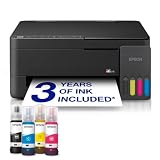
Black Friday Big Deal
Epson EcoTank ET-2910 | Busy Home Use | Wi-Fi | A4 | Print, Copy, Scan | AirPrint Compatible | Compact | Includes Up To 3 Years of Ink
−34% · Amazon reference price: £239.99
Verified 2026-11-28 05:31:06 UTC
Prices and stock reflect the last successful check shown on each card. Discounts and Black Friday badges appear only when reported by Amazon. The checkout price applies. As an Amazon Associate, Cloudzat earns from qualifying purchases.
Our buying recommendation
The short answer is: buy a mono laser for mostly text, buy an EcoTank for regular colour and photo use, and buy a colour laser for office graphics and shared document work. Brother HL-L2445DW is the best simple text-only pick, Brother DCP-L2620DW is the safer choice when scanning and copying matter, Epson ET-2921 and ET-3956 are the strongest everyday EcoTank options, and Epson ET-8550 is the better creative printer when photos are important. For office colour, Canon i-SENSYS MF664Cdw or MF667Cdw are the clear alternatives. If scanning is central, check the exact MFP features rather than assuming they are universal. The best Black Friday deal is the one that matches your actual workflow, not the biggest-looking badge.
If you mainly print black text, occasional forms and the odd return label, a mono laser is still the most sensible technology to buy. It is the neatest fit for people who want pages to look crisp and for the printer to sit idle without becoming a project in maintenance. For that use, Brother HL-L2445DW is the straightforward print-only recommendation, while Brother DCP-L2620DW is the better choice if you also need scanning and copying. The key point is that the right deal depends on how often you print and what kind of output you actually want, not on which box looks busiest in a sale carousel.
EcoTank changes the calculation when colour printing becomes part of ordinary life. These are inkjet printers with refillable tanks, so they are aimed at households and small teams that print school work, colour documents and sometimes photographs often enough to justify an ink tank workflow. Epson ET-2921 is the simple family option, ET-3956 is the more capable mixed-use pick, and ET-8550 is the specialist creative model for photo-led home printing. That makes EcoTank the better ownership match for frequent colour use, but not automatically the best answer for every home or desk.
Compatibility matters just as much as print technology. Some buyers need only output on paper; others need scanning, copying and, in some cases, automatic document feeding. It is also important not to confuse features that look similar on a product page: duplex printing is not the same as automatic duplex scanning, and a model with duplex print does not automatically gain duplex scan. Brother DCP-L2640DW and DCP-L2620DW do not get duplex scanning simply because they can duplex print, and HP 3302fdw are the HP models to look for if duplex ADF matters. This guide gives direct buying conclusions so you can choose the best model for the job without chasing claims that do not actually change day-to-day use.
Choose the right printer for your work
| Buyer scenario | Best fit | Why this is the better buy |
|---|---|---|
| Mostly black text, letters and forms | Brother HL-L2445DW | Mono laser is the most practical choice for crisp text, low attention and straightforward home printing without paying for colour you rarely need. |
| Text plus scanning and copying at home | Brother DCP-L2620DW | It adds the everyday MFP functions many homes want while staying in the simple black-and-white laser category. |
| Regular colour documents and homework | Epson ET-2921 or ET-3956 | EcoTank is an inkjet system built for frequent colour printing and suits families that actually use colour often. |
| Office graphics, charts and shared paperwork | Canon i-SENSYS MF664Cdw or MF667Cdw | Colour laser is the more natural fit for business documents and office workflows than a photo-oriented ink tank. |
| Photos and creative home printing | Epson ET-8550 | This is the stronger creative EcoTank choice when photo output and premium home projects matter more than office neatness. |
Choose mono laser when text is the priority, not colour
If your printing is mostly black text, invoices, school letters, shipping labels and the occasional document, mono laser is the most sensible buy. It suits people who want the printer to be ready without much drama, and it is the easiest way to get sharp plain-paper output. Brother HL-L2445DW is the clean recommendation for that role because it keeps the machine simple and focused. If you need a little more than printing, Brother DCP-L2620DW is the obvious step up because it adds scanning and copying while staying in the same black-and-white lane. That is the right conclusion for a home study, a student room or a small home office that values reliability over feature count.
What you should not do is buy colour capability as a precaution if you hardly ever use it. A colour laser can be a fine product, but it is not the best fit if all you print is black text. Nor should you assume that a duplex printing feature solves scanning needs. Brother DCP-L2620DW and DCP-L2640DW do duplex print, but that does not mean they offer automatic duplex scanning; the scan path and the print path are separate features. The practical buying rule is simple: if you print text and only text most of the time, mono laser is the most rational Black Friday choice, and Brother remains the easiest brand to recommend in that space.
Choose EcoTank when colour is part of ordinary life
EcoTank makes sense when colour printing is not an occasional luxury but part of the household routine. These printers are inkjet models with refillable tanks, so they are aimed at people who print worksheets, projects, family documents, event plans and the occasional picture often enough to want a tank system rather than small cartridges. Epson ET-2921 is the neat entry point for a household that wants basic colour printing and copying. Epson ET-3956 is the stronger all-round pick if you want a more capable family machine that copes better with regular mixed use. The reason to buy EcoTank is not hype; it is that the printing pattern genuinely suits refillable ink.
This is also where buyers should separate document colour from photo output. A regular EcoTank is usually the right answer for colour documents, school work and home admin, but if your priority is photos you should move up to a model designed for that role. Epson ET-8550 is the better creative choice because it is aimed at higher-end home printing rather than basic paperwork. That does not make ET-2921 or ET-3956 poor printers; it means they are different tools for different tasks. If your family prints in colour every week and wants a more natural-looking page than a black-only device can provide, EcoTank is the stronger Black Friday purchase than trying to force a mono laser into a colour job.
Buy colour laser for office graphics and document workflow
For office-style printing, colour laser is often the better fit than an ink tank printer. The reason is not photo beauty; it is consistency on charts, slides, forms, branded documents and shared paperwork. Canon i-SENSYS MF664Cdw and MF667Cdw are the strongest names to look at in this space because they are built around office document work rather than creative output. If your printer will be used by more than one person, or if your day is mostly spreadsheets, reports and client packs, a colour laser has the right kind of output and handling. It is the more businesslike choice for a busy desk or a small office.
This is also the point where buyers should avoid assuming that a family ink tank printer can replace a document-focused colour laser. It can be useful for colour pages, but if you print a lot of office material, the workflow and the page handling matter as much as the image on the paper. Colour Brother LED models should not be described as laser technology; they are LED printers, which is a different imaging system even if the market placement can look similar. For office graphics, Canon’s colour laser models remain the clearer recommendation. Buy them if your work is presentation-heavy, and skip them only if your real priority is photo printing rather than business documents.
Choose a photo-focused model when images matter more than office convenience
If the printer is meant for family albums, craft projects, posters or premium photo output, the answer should not be a standard office laser. Epson ET-8550 is the more suitable creative inkjet because it is designed for home printing that goes beyond plain documents. It is the right buy when you want photos and creative pieces to look intentional rather than merely acceptable. That makes it the best EcoTank option for image-led households. For smaller dedicated photo prints, Canon SELPHY CP1500 is the specialist alternative. It is a dye-sublimation printer, not an inkjet or laser machine, and it serves a different purpose again.
The buying conclusion here is to avoid forcing office technology into a photo job. A colour laser can do colour pages neatly, but it is not the same as photo reproduction. Likewise, a monochrome laser is obviously the wrong choice if pictures matter. SELPHY CP1500 is the best alternative when you want compact, finished photo prints rather than a general-purpose desk printer. If you need both ordinary documents and photos, ET-8550 is the more versatile single-machine answer. If you mainly want office use and only an occasional picture, do not overspend on a photo specialist; if you want real photo output, do not settle for a document printer and hope it will somehow become a photo machine.
Check scanning and automatic document feeding separately from printing
Scanning needs are where many buyers get misled by model names and feature shorthand. A printer that can print double-sided on its own is not automatically a printer that can scan both sides automatically. Brother DCP-L2620DW and DCP-L2640DW illustrate this distinction clearly: duplex printing does not create duplex scanning. That is why it matters to read the feature set as a whole, not as a single label. If you need to scan stacks of paper often, you should buy a model with the right ADF and duplex scan features rather than hoping the print feature covers it. In the HP range, HP 3302fdw and HP 3302fdw are the models to look at if duplex ADF is specifically important.
This distinction matters for both homes and small offices because a scanner can save as much frustration as the printer itself. If your job involves school admin, receipts, contracts or archived paperwork, the convenience of the correct scanner hardware is real. If you only print, then scanning features are wasted money and desk space. Canon i-SENSYS MF664Cdw and MF667Cdw are useful because they sit in a more office-oriented MFP category, while Epson ET-3956 is the more sensible EcoTank-style choice when colour printing and scanning both matter at home. The practical conclusion is: buy scanning only if you will actually use it, and never assume duplex printing implies duplex scanning.
Choose the right compact model for a small desk or spare room
If space is tight, the best printer is often the one that does not try to do everything. Brother HL-L2445DW is a good compact choice when you only need text printing, because it is straightforward and does not bring unnecessary complexity into a small room. Brother DCP-L2620DW is the better compact multi-function step if you also need scanning and copying, but it is still aimed at simple black-and-white use rather than a full colour workflow. Compactness matters because a printer that is easy to place is more likely to be used properly, and less likely to become a permanent obstacle on a desk or shelf.
By contrast, larger EcoTank and office colour models should be bought only when their extra capability is genuinely needed. Epson ET-8550 is a more ambitious creative machine and deserves its footprint only if photo and premium output really matter. Canon i-SENSYS MF664Cdw and MF667Cdw are similarly more office-led than a basic home text printer. For a smaller household, the right conclusion is not to chase the most feature-rich model in the sale. Choose the smallest printer that truly covers your needs. That usually means mono laser for text-only homes, or a modest EcoTank if colour printing is genuinely part of weekly life.
Consider regional model names and not generic family assumptions
Regional naming matters in the UK because not every model family behaves the same way across markets. Use the UK names listed here rather than assuming a US or international equivalent will be identical in features or support. Brother HL-L2445DW, DCP-L2620DW and DCP-L2640DW are UK-appropriate names for the laser models discussed. HP M110w, M140w and M234sdw are the simple office and home-office references in this guide, while HP 3302fdw are the more relevant duplex-ADF models to compare if you need that function. Canon i-SENSYS MF664Cdw and MF667Cdw are the colour laser office options, and Epson ET-2921, ET-3956, ET-8550 and WF-7830DTWF are the UK-market EcoTank and work-style inkjet models to keep in view.
The point is not to memorise families for their own sake, but to avoid buying a product because a sibling model sounded similar. HP’s sdw naming should not be treated as a blanket promise of duplex ADF, and Brother’s duplex print models should not be assumed to scan on both sides automatically. Also remember that tank printers are inkjet printers, not laser printers, while Canon SELPHY CP1500 is a dye-sublimation photo printer and shipping label printers are a separate thermal category entirely. Keeping the technology straight leads to better purchases and fewer surprises. For Black Friday, that means buying the exact model that matches your use, not a vague family name.
Make the final choice by use case, not by the loudest sale banner
The most useful buying conclusion is a direct one. Buy Brother HL-L2445DW if you only need a reliable black-and-white printer for documents, and buy Brother DCP-L2620DW if you also want the convenience of scanning and copying. Buy Epson ET-2921 or ET-3956 if colour documents are part of normal family life, and move up to ET-8550 only when photos and creative printing are genuinely important. Buy Canon i-SENSYS MF664Cdw or MF667Cdw if your world is charts, forms and office paperwork, because colour laser is the better document workflow tool. That is the clearest split between the technologies.
The alternatives also have clear places. HP M110w and M140w are stripped-back mono options for very simple printing; HP M234sdw suits a small office that wants a compact MFP; Canon G3590 is a practical ink tank alternative for home document use; WF-7830DTWF is the better pick when you need a wider-format work-style inkjet. But none of those change the basic rule: mono laser for occasional black text, EcoTank for frequent colour and photos, colour laser for office graphics. That is the right Black Friday framework for a UK buyer, and it is more useful than any generic “best printer” label because it tells you exactly what to buy and what to skip.
Questions answered
Is mono laser or EcoTank the better Black Friday buy for a typical home?
For a home that mainly prints black text, mono laser is usually the better fit. For a home that prints colour regularly, EcoTank is the smarter choice. The best answer depends on the output you actually need, not on which printer looks cheapest on the day.
Should I buy Brother HL-L2445DW or Brother DCP-L2620DW?
Choose HL-L2445DW if you only need printing. Choose DCP-L2620DW if you also need scanning and copying. Duplex printing does not mean duplex scanning, so do not assume extra scan features unless the model explicitly includes them.
Are Canon i-SENSYS MF664Cdw and MF667Cdw good for photos?
They are better suited to office graphics, charts and document work than to serious photo printing. If photos matter, Epson ET-8550 or Canon SELPHY CP1500 is the more appropriate direction. Office colour and photo printing are related, but they are not the same job.
Is Epson ET-8550 just a bigger EcoTank?
No. ET-8550 is a more creative, photo-led inkjet model and should be bought for that role specifically. A simpler EcoTank such as ET-2921 or ET-3956 is better if you mainly want everyday documents and occasional colour pages rather than premium creative output.
Do all Brother or HP multifunction printers have the same scan features?
No. Feature sets vary by model. Some are print-only, some add scanning and copying, and some include duplex ADF or other office functions. HP 3302fdw are the HP models to watch if duplex ADF matters, rather than assuming every similar-looking model has it.
What if I only need a compact printer for a small desk?
Pick the smallest model that really matches your use. Brother HL-L2445DW is a tidy text-only choice, and Brother DCP-L2620DW is the compact step up if you need scanning too. Avoid buying a bigger colour machine unless you genuinely print colour often enough to justify it.
Related printer buying guides
Sources and offer checks
Research checked November 26, 2026. Amazon cards show their own last successful check. Manufacturer promotions and Amazon offers have separate terms. Published regional product and campaign information.