


UK BUYING GUIDE
Choose Reolink by installation first, not by the biggest spec number on the box. For a front door, a doorbell camera is usually the right tool because its field of view, alerts and visitor framing are built for entrances rather than open ground. For drives, side passages and gardens, the better choice is usually a separate outdoor camera with either a wide panoramic view or pan-and-tilt tracking, depending on what you need to monitor.
The next decision is power and recording. Reolink’s wired PoE and plug-in cameras can usually do continuous recording, while most battery-powered models are event-based and therefore better for alerts than for uninterrupted footage. Reolink also states that local use does not require a subscription for its core camera features, so the real buying question is whether you want a simple local system, a doorbell tied into your existing wiring, or a camera that can keep recording all day.
For a UK home, the safest purchase is the model that matches your wiring and recording needs without relying on assumptions about the product name. Battery cameras are not interchangeable with wired models, and some battery products only support continuous recording in specific wired-power modes. If you want the reader-proof answer: buy the wired doorbell if you can, buy the Wi‑Fi doorbell if you want easier installation, and buy a PoE wide-angle or tracking camera when you need broader coverage than a doorway.
Our recommendation
Default recommendation: Reolink Video Doorbell PoE. It is the strongest all-round choice for UK homes that can support a wired install because it can run on PoE, or from compatible doorbell wiring, and it supports 24/7 recording to local storage or an NVR. Reolink also bundles a chime, wedge, wiring accessories and a 1m network cable in the box, so it is a proper install kit rather than a bare camera.
Budget or easier-install choice: Reolink Video Doorbell WiFi. This is the better fit when you want a hardwired doorbell camera but do not want to run Ethernet for data. It supports 2.4/5GHz Wi‑Fi, can be powered by the included adapter or compatible existing doorbell wiring, and has the same 2-year limited warranty as the PoE model. Choose it for simplicity, not because it is a battery device.
Specialist choice: Reolink Duo 3 PoE. It is the better buy when one camera needs to cover a lot of horizontal space, such as a broad driveway, frontage or side return. It uses PoE, supports local microSD recording up to 256GB, includes a network cable and mounting plate in the box, and is positioned as a 180° panoramic dual-lens camera rather than a doorbell or tracker.
Reolink security camera
Amazon UK listings for this buying decision. Match the model, capacity and bundle to our recommendations below.

Reolink TrackFlex Floodlight WiFi, 4K Outdoor Security Camera PTZ Dual Lens | Auto-Tracking Zoom, 270° PIR Detection, 3000 Lumens, Wi-Fi 6, Local AI Video Search with No Monthly Fee, 24/7 Recording
£169.99
29% off · Amazon reference price £239.99
Last verified 2026-11-28 10:41:58 UTC

Reolink Doorbell Camera Wireless 2K 4MP, Battey Viedo Doorbell (2nd Gen) | 1:1 Head-to-Toe View, 2.4/5GHz WiFi, AI Detection, No Monthly Fee For Local Storage, Video Call, Tamper Protection
£94.99
32% off · Amazon reference price £139.99
Last verified 2026-11-28 10:41:58 UTC

Reolink Doorbell Camera Wireless with Home Hub Mini, 4MP Video Doorbell | 2K 4MP with 1:1 Head-to-Toe View, Smart Detection with No Monthly Fee, Encrypted Local Storage, Live Video Call
£143.99
20% off · Amazon reference price £179.99
Last verified 2026-11-28 10:41:58 UTC
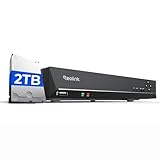
Reolink 4K PoE NVR 8 Channel CCTV Camera System with 2TB HDD, RLN8-410 | Network Video Recorder with 2TB Hard Drive, Supports 16MP/12MP/8MP/5MP/4MP/1080P HD IP Cameras, 24/7 Surveillance Recording
£245.99
15% off · Amazon reference price £289.99
Last verified 2026-11-28 10:26:56 UTC
As an Amazon Associate, Cloudzat earns from qualifying purchases. Price and availability may change; Amazon checkout controls the purchase price.
What to buy for your needs
Start with the scene you need to cover
A doorbell should cover faces, parcels and the threshold. That is why the Reolink Video Doorbell range is a better front-door answer than a general outdoor camera: both the PoE and Wi‑Fi versions use a portrait-style field of view suited to visitors, while the Duo and TrackMix families are built for wider outdoor scenes. If your only goal is to see who is at the door, buy a doorbell. If you want to watch the driveway or side path as well, choose a camera built for wider coverage.
TrackMix and Duo are not substitutes for each other. TrackMix PoE and TrackMix WiFi are dual-lens, auto-tracking cameras intended to follow activity and preserve detail as subjects move, whereas Duo 3 PoE is aimed at broad panoramic coverage. That distinction matters in practice because a tracking camera is better when one subject moves through the scene, while a panoramic camera is better when you want a single wide shot of the whole area.
Decide whether you need continuous recording
This is the most important technical filter in the Reolink range. Reolink says continuous recording is supported on most PoE and plug-in Wi‑Fi cameras, while most battery-powered cameras do not support it. Reolink’s own battery-camera guidance also says that only specific battery lines support continuous recording, and that other battery models remain event-based even if they are kept powered.
For battery models, the current exception list matters. Reolink says continuous recording is supported by Altas series, TrackMix LTE Plus series, TrackMix LTE Plus 2, and Battery Video Doorbell (2nd Gen); a separate support article also notes that wired power mode unlocks 24/7 recording and pre-recording on the Battery Video Doorbell (2nd Gen). That means you should not assume a battery camera is incapable of 24/7 recording, but you should assume it is impossible unless the exact model is listed as supported.
If you want dependable all-day capture, PoE or plug-in Wi‑Fi remains the safer purchase because it avoids battery-mode limits. Reolink says continuous recordings can be stored to microSD, NVR/Home Hub, local PC through Reolink Client, FTP, or compatible third-party software, but the camera still needs to support that mode in hardware.
Match power to the install you actually have
The camera itself does not take household mains directly. Reolink’s doorbell and camera pages specify low-voltage or PoE inputs instead: the PoE doorbell can use PoE at IEEE 802.3af 48V active, or 12–24V AC / 24V DC hardwired power; Duo 3 PoE can use PoE or a separate 12V DC adapter; TrackMix PoE also uses PoE or a 12V DC adapter; and the Wi‑Fi doorbell is hardwired via the included adapter or compatible doorbell wiring.
For UK buyers, that means you should choose the model that fits the existing infrastructure rather than planning to feed it from a wall socket after the fact. If you already have Ethernet, PoE is the neatest option because one cable carries data and power. If you only have doorbell wiring, the wired doorbell models are the sensible choice. If neither is available, a battery model is the least disruptive option, but you should accept its recording limits and charging needs.
Decide where the footage should live
Reolink’s core value proposition is local recording without a mandatory subscription. The doorbell and camera pages say no subscription is required for core use, and the support pages show that footage can be stored locally on microSD cards or on a compatible NVR/Home Hub depending on the model. That makes Reolink attractive for buyers who want to avoid monthly fees and keep footage on site.
There is a meaningful difference between storing footage on the camera and storing it centrally. A microSD card is enough for one or two cameras; a Reolink NVR or Home Hub is the cleaner route if you expect to add more cameras or want central playback. Reolink’s support pages also show that only cameras which support continuous recording can use that feature on NVR/Home Hub, so recorder choice does not remove the camera’s own hardware limits.
Capacity, compatibility and ownership
Battery cameras: flexible, but only some are true 24/7 recorders
Battery cameras are useful where wiring is awkward, such as sheds, temporary mounts, rental properties or side entrances where you do not want to run a cable. Reolink’s Argus line remains the main battery family in the UK-facing range, and the company positions models such as Argus 4 Pro around local storage, Wi‑Fi, solar support and dual-lens coverage. These are practical cameras when flexibility matters more than uninterrupted capture.
The catch is recording behaviour. Reolink says most battery cameras do not support continuous recording, and its battery-camera guidance says battery models generally use motion-triggered recording unless they are specifically listed as continuous-recording exceptions. If the exact model is not on Reolink’s support list, do not buy it expecting 24/7 capture.
The current battery exception worth knowing is the Battery Video Doorbell (2nd Gen). Reolink says it can operate in battery power mode or wired power mode, and wired mode unlocks 24/7 recording and pre-recording. Its official support page lists a 4MP 2048×2048 sensor, up to 300 days of battery life based on five minutes of recordings per day, 2.4/5GHz Wi‑Fi, and up to 512GB microSD support. That makes it the battery option for buyers who want doorbell flexibility but also want a path to always-on recording.
Wired and plug-in cameras: the safer default for dependable security
If your priority is stability, wired cameras are easier to recommend. The PoE doorbell supports 24/7 recording to microSD or an NVR, the Duo 3 PoE supports up to 256GB microSD recording, and TrackMix PoE supports 24/7 recording with PoE or a 12V adapter. These models are better suited to long recording windows, dependable power and future expansion.
Reolink’s Wi‑Fi doorbell is still a wired camera, not a battery one. It exists for buyers who want the convenience of wireless networking without giving up hardwired power. Reolink says it supports 2.4/5GHz Wi‑Fi, uses hardwired power, and works with Reolink NVRs that are on sale now, with some older NVRs requiring firmware updates. That makes it a sensible retrofit option when Ethernet is impractical.
Doorbells, panoramic cameras and tracking cameras do different jobs
The PoE and Wi‑Fi doorbells are the right answer for people, parcels and doorstep events. The Duo 3 PoE is the broad-view answer for front drives, long porches and wide side elevations. TrackMix PoE and TrackMix WiFi are the better choice when you want a camera that can follow motion and simultaneously preserve a wider context view. Reolink’s own product pages show that these models use different optics, different mounting assumptions and different storage maxima.
This is why the wrong model can be disappointing even if the specification sheet looks strong. A doorbell placed too high or used as a general area camera can miss detail at the threshold, while a PTZ-style tracker mounted to watch a fixed doorway can be more complicated than necessary. The best result comes from matching the camera family to the scene rather than buying the highest pixel count available.
Compatibility: NVRs, Home Hub and third-party software
Reolink says the Doorbell PoE works with specific Reolink NVR hardware families, and the Wi‑Fi doorbell works with current NVRs plus older models after firmware updates. Reolink also says the Doorbell PoE can be added to some third-party software for live view, though support for protocols should be checked with Reolink directly. That means NVR compatibility is model-specific, not universal.
For buyers using Synology Surveillance Station, the general rule is to check protocol support and model compatibility before purchase. Synology’s own knowledge base says Surveillance Station can add third-party cameras through ONVIF and RTSP, and its transport settings support multiple protocol options. Reolink’s support also indicates that the cameras can be used with third-party software for live view, but you should verify the exact camera and protocol combination rather than assuming every model behaves the same way.
Warranty, contents and what you actually get in the box
Both the Reolink Video Doorbell PoE and the Reolink Video Doorbell WiFi carry a 2-year limited warranty on their UK pages. The PoE doorbell box includes the chime, extension cables, jumper cables, a mounting plate, a wedge and a 1m network cable. Duo 3 PoE includes a 1m network cable and a mounting plate, while TrackMix PoE includes a 1m network cable, mounting template, surveillance sticker and screws. Buyers who want a complete install kit should pay attention to these contents, not just the camera itself.
That matters because Reolink does not sell all installs in the same way. Some cameras are closer to a full kit, while others assume you already have the correct cabling, mount or storage plan. In practical terms, the doorbell models are the easiest starting point for a first-time buyer, while the PoE outdoor cameras assume a more deliberate installation.
Which option should you choose?
Default choice: Reolink Video Doorbell PoE
Buy this if you can support wired installation at the front door. It is the best overall Reolink option for UK homes because it combines stable PoE networking, hardwired power options, 24/7 local recording, a 180° diagonal view and a proper accessory bundle. It is the most future-proof choice if your priority is dependable front-door surveillance rather than the easiest possible install.
Choose it over the Wi‑Fi model when reliability, cable-based power and simpler long-term recording matter more than reducing network cabling. The PoE version also fits naturally into a wider Reolink system with an NVR later on.
Budget or easier-install choice: Reolink Video Doorbell WiFi
Buy this if you want a wired doorbell camera without needing Ethernet for data. It uses 2.4/5GHz Wi‑Fi, remains hardwired for power, supports local recording and carries the same 2-year limited warranty. It is the right answer when your existing wiring is usable but running a network cable would be disproportionate.
Do not choose it if your front-of-house Wi‑Fi is weak or you want the neatest path to continuous recording on a central recorder. In those cases, the PoE model is still the better purchase.
Specialist choice: Reolink Duo 3 PoE
Buy this when a wide scene matters more than a doorway. Duo 3 PoE is the better specialist option for front drives, wide gardens and side elevations because it is a dual-lens panoramic camera with PoE power, 24/7 recording support and a 180° view. It is a strong replacement for buying two separate narrow cameras when the main task is broad coverage.
Pick it over TrackMix if you need the widest possible single-camera coverage. Pick TrackMix PoE or WiFi instead if the job is to follow movement and preserve a zoomed-in view of the subject as it moves.
NAS options on Amazon
Compare the NAS model, drive bays, included disks and supported applications before buying. Keep using your existing NAS if it already meets the guide’s requirements.
Checking current Amazon listings…
As an Amazon Associate, we earn from qualifying purchases. Prices and availability can change; Amazon’s checkout price applies.
Questions answered
Do Reolink cameras need a subscription in the UK?
No for core use. Reolink’s UK pages state that the doorbell cameras do not require a subscription, and its support pages show that local recording can be done to microSD, NVR/Home Hub, PC or FTP depending on the model. Cloud may exist in some regions, but the core camera functions do not depend on it.
Which Reolink models support continuous recording?
Reolink says most PoE and plug-in Wi‑Fi cameras support continuous recording. For battery cameras, only certain models do: Altas series, TrackMix LTE Plus series, TrackMix LTE Plus 2, and Battery Video Doorbell (2nd Gen). If a battery model is not on that list, assume it does not do continuous recording.
What power do UK Reolink doorbells and cameras use?
They use low-voltage or PoE inputs, not direct household mains. The PoE doorbell supports IEEE 802.3af 48V active PoE and 12–24V AC / 24V DC hardwired power; the Wi‑Fi doorbell is hardwired and can use its adapter or compatible existing doorbell wiring; Duo 3 PoE and TrackMix PoE also use PoE or a 12V DC adapter.
Is the Reolink Battery Video Doorbell (2nd Gen) worth considering?
Yes, if you want a battery doorbell but also want a route to 24/7 recording. Reolink says it can run in battery mode or wired power mode, and wired mode unlocks continuous recording and pre-recording. It also supports up to 512GB microSD, 2.4/5GHz Wi‑Fi and 2-year limited warranty coverage.
Can I use Reolink with Synology Surveillance Station?
Often yes, but the exact compatibility depends on the camera and protocol support. Synology says Surveillance Station supports third-party cameras through ONVIF and RTSP, while Reolink says some of its cameras can be added to third-party software for live view. Check the model’s protocol support before buying if Synology is central to your setup.
Sources and further detail
- Reolink Video Doorbell PoE product page — Power inputs, 24/7 recording, warranty, box contents, NVR compatibility and no-subscription FAQ.
- Reolink Video Doorbell WiFi product page — Wi‑Fi bands, hardwired power, warranty, local storage, NVR compatibility and box contents.
- Reolink Duo 3 PoE product page — Panoramic dual-lens coverage, PoE/DC power, 24/7 recording, microSD max and box contents.
- Reolink support: continuous recording and storage options — Continuous-recording definitions and storage destinations; battery-camera limitations.
- Reolink support: battery camera continuous recording eligibility — Current battery-camera exceptions including Battery Video Doorbell (2nd Gen).
- Synology Knowledge Center: drive compatibility policies for DSM 7.3 and above — Current DSM 7.3 storage-policy wording for compatibility list and third-party HDD flexibility.