


United Kingdom · GBP
Best Mini PCs for OpenClaw Local Models UK
Choose an EVO-X2 with 128GB for a compact OpenClaw host built around larger local models. Choose the MS-S1 MAX with 128GB for a shared lab with fast networking. For smaller models and light agent work, an AI X1 Pro-370 with 64GB is the more flexible starting point. Use an NVIDIA desktop when your model stack requires CUDA.
Which model to choose
GMKtec EVO-X2, 128GB
Best compact choice when the local model and context need a large shared-memory pool. Leave capacity for the model server and agent tools.

128 GB RAM · 2000 GB SSD
£3,483.32Price checked 02.11.2026 14:06 UTCBuy on Amazon ↗Specifications and model details ↗MINISFORUM MS-S1 MAX, 128GB
Best for a dedicated agent host connected to fast shared storage or several clients. Its networking and expansion justify the larger workstation role.

128 GB RAM · 2000 GB SSD
£3,639.00Price checked 02.11.2026 11:58 UTCBuy on Amazon ↗Specifications and model details ↗MINISFORUM AI X1 Pro-370, 64GB
Best smaller-model development host with replaceable memory. Size the model server, browser and tool processes together.

64 GB RAM · 1000 GB SSD
£1,407.00Price checked 02.11.2026 12:28 UTCBuy on Amazon ↗Specifications and model details ↗Amazon prices and configurations
Ryzen AI Max+ 395
GMKtec EVO-X2 AI Mini PC AMD Ryzen Al Max+ 395 (up to 5.1GHz) Mini Gaming Computers, 128GB LPDDR5X 8000MHz (8GB*8) 2TB PCIe 4.0 SSD, Quad Screen 8K D…
128 GB RAM · 2000 GB SSD
£3,483.32Price checked 02.11.2026 14:06 UTCBuy on Amazon ↗Ryzen AI Max+ 395
MINISFORUM MS-S1 MAX Mini AI Workstation PC 128GB LPDDR5x RAM 2TB SSD | MINI PC AMD Ryzen AI Max+395 (16C/32T),RDNA3.5 GPU,Dual M.2 PCIe 4.0,PCIex16 …
128 GB RAM · 2000 GB SSD
£3,639.00Price checked 02.11.2026 11:58 UTCBuy on Amazon ↗Ryzen AI 9 HX 370
MINISFORUM AI X1 Pro-370 Mini PC 64GB DDR5 1TB PCIe 4.0 SSD | AMD Ryzen AI 9 HX370 Up to 5.1GHz 12C/24T, Mini Desktop Computer ,Quad Display, Dual 2.…
64 GB RAM · 1000 GB SSD
£1,407.00Price checked 02.11.2026 12:28 UTCBuy on Amazon ↗
Core Ultra
ROG NUC 2025 Mini Gaming PC, Intel Core Ultra 7, GeForce RTX 5060, 96GB DDR5 Support, Thunderbolt 4, Triple Fan Cooling & ARGB Lighting (32GB DDR5+2T…
96 GB RAM · 2000 GB SSD
£1,879.20Price checked 02.11.2026 12:43 UTCBuy on Amazon ↗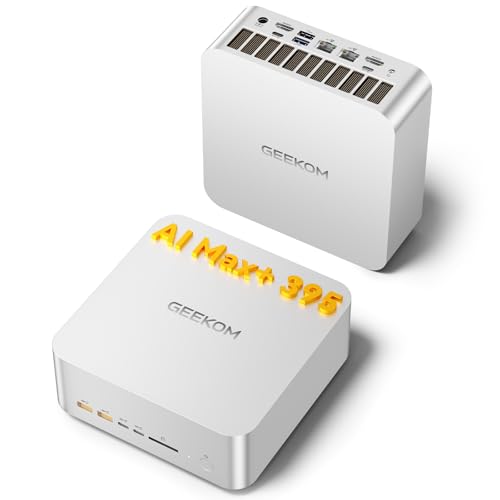
Ryzen AI Max+ 395
GEEKOM A9 Mega Mini PC, AMD Ryzen AI MAX 395,128GB LPDDR5X RAM+2TB SSD | Local AI Super PC, Radeon 8060S Graphics, 4K@120Hz Quad Display,Dual USB4, 8…
128 GB RAM · 2000 GB SSD
£3,399.00Price checked 02.11.2026 11:58 UTCBuy on Amazon ↗
Ryzen AI Max+ 395
MINISFORUM MS-S1 MAX Mini AI Workstation PC 128GB LPDDR5x RAM 4TB SSD | MINI PC AMD Ryzen AI Max+395 (16C/32T),RDNA3.5 GPU,Dual M.2 PCIe 4.0,PCIex16 …
128 GB RAM · 4000 GB SSD
£3,879.00Price checked 02.11.2026 11:58 UTCBuy on Amazon ↗Ryzen AI 9 HX 370
MINISFORUM AI X1 Pro-370 Mini PC 64GB DDR5 2TB PCIe 4.0 SSD | AMD Ryzen AI 9 HX370 Up to 5.1GHz 12C/24T, Mini Desktop Computer ,8K Quad Display, Dual…
64 GB RAM · 2000 GB SSD
£1,509.00Price checked 02.11.2026 12:28 UTCBuy on Amazon ↗Buying guide
Choose the host around the local model service
OpenClaw is more than a chat window. A local-model installation can involve the gateway, a model server, browser sessions, tools and application data at the same time. The EVO-X2 with 128GB is the first compact comparison when model capacity is central. The MS-S1 MAX fits a shared host with useful network and expansion requirements. An AI X1 Pro-370 with 64GB suits smaller models and a development environment that may evolve.
A conventional NVIDIA desktop remains a useful choice for a CUDA-focused backend or a replaceable GPU. Compact shared memory and discrete VRAM solve different problems. Choose the platform that runs the intended model reliably, then leave room for the processes surrounding it.
Test tool use as well as text generation
A model that answers an isolated prompt can behave differently during a full agent turn with tools and a longer context. Test the exact model format, quantization and backend with tasks you actually want to delegate. Check whether the responses are usable, the requested tool calls are handled correctly and the host stays responsive while the agent works.
For several simultaneous sessions, allow memory for separate contexts and measure the resulting wait time. A larger model is not automatically the best agent model for your tasks. A smaller, responsive model with suitable tool behavior can be more useful than a large model that barely fits and leaves the rest of the machine under pressure.
Keep the agent environment contained
Give the agent only the files, credentials and tools needed for its job. Keep unrelated personal or business material separate. Start with a limited test environment and deliberate approval boundaries for actions that can change important systems. Network access to the model service and remote access to the host are separate decisions; neither should be exposed merely to make a local experiment easier.
Keep backups of configuration and application data, and record the versions used in a working setup. Test updates before relying on them for unattended work. Storage capacity helps with models and logs, but it does not remove the need to manage retained data or protect credentials.
When the compact host is the wrong purchase
Choose a tower when your software requires a discrete NVIDIA GPU, when the intended model exceeds the useful shared-memory budget, or when you need a clear graphics upgrade path. Choose a separate dedicated host when daily desktop work interferes with long agent sessions. A faster network can connect clients to that host without buying the same accelerator for every desk.
If one 128GB recommendation sells out, keep that capacity in the replacement. A 64GB computer is a deliberate smaller-model choice, not an equal substitute for a workload that needs more. Check the complete installed configuration and required backend rather than buying from an AI appliance label alone.
Budget memory for the whole application
Choose a model size and a useful context window before choosing a computer. A model file is only one part of memory use: the runtime, attention cache, operating system, browser and other applications need room too. Four-bit quantization reduces weight storage, but it does not make every part of inference four-bit. A machine that loads a model with almost no free memory may become frustrating during a long conversation. For a first local AI desktop, 32GB suits smaller experiments, 64GB provides more working room, and 128GB is worth comparing when model capacity drives the purchase.
Shared memory and dedicated video memory behave differently. An integrated GPU uses part of the same physical RAM as the CPU. A discrete GPU has its own VRAM, and moving work between that memory and host RAM can reduce throughput. Do not add the two capacities together and treat the result as one equally fast pool. Choose a supported backend first, then enough memory for the workload and a reasonable reserve.
Build a useful local AI workspace
A 1TB SSD is a workable starting point for a few smaller models. Choose 2TB when you expect several large downloads, separate environments and your own documents. Keep projects and irreplaceable data backed up separately. An additional internal drive helps organize work but does not protect against the failure or loss of the whole computer. A fast network is useful when datasets live on a NAS; it does not automatically combine several PCs into one larger accelerator.
Plan for long sessions rather than a brief demonstration. Leave the intake and exhaust clear, use a stable power supply, and try a balanced power profile if the machine shares your desk with a microphone. Measure whole-system power if electricity cost matters. The adapter rating and processor power limit are not constant wall consumption. Buy an expandable system when you expect to change RAM or storage, and a fixed-memory system only after choosing the memory tier you intend to keep.
Test the workflow while returns are straightforward
Install the current supported application and graphics driver, then begin with a small model. Confirm which processing backend is active instead of assuming that an AI badge means your software uses the NPU. Load your intended model, run a realistic prompt, and watch memory use and response time through a longer exchange. For a shared service, test simultaneous requests as well as a single user. A successful download or a screenshot of a loaded model is not enough to judge a working setup.
Keep the application version, model format, quantization and power mode with any performance notes. Those details explain why two reports about the same processor can differ. For an alternative purchase, preserve the requirements that matter: usable memory, supported accelerator and necessary ports. A lower-memory replacement is not equivalent when capacity is the reason for buying. If your essential tools require CUDA or a replaceable graphics card, allow space and budget for an NVIDIA desktop instead.
Buying and support in the UK
Compare the complete UK purchase cost in pounds, including delivery and the parts needed to finish a barebone. Check whether a marketplace seller supplies the machine from UK stock or ships it internationally. That affects delivery, possible additional charges and the practical return route. Look for the correct UK mains lead and a clear description of the included operating-system licence. A compact case does not make an overseas support arrangement more convenient.
Keep the invoice, serial number and exact RAM and SSD configuration. For a business desk, ask who handles a hardware fault and how a replacement is arranged before buying several units. When the first model is unavailable, keep the required memory, graphics and ports in the alternative. Include a monitor, keyboard and independent backup in the budget where needed. Compare the finished, usable computer rather than a low barebone headline price.
Questions buyers ask
Is 64GB enough for an OpenClaw Mini PC?
It can be useful for smaller local models and light agent work. Budget for the model server, context, browser and tools together; choose 128GB for an identified larger-memory workload.
Does the agent need a separate GPU?
That depends on the model backend and desired responsiveness. Integrated shared-memory systems are one option; CUDA-focused stacks point toward compatible NVIDIA graphics.
Which model is the first compact large-memory choice?
Compare an EVO-X2 with 128GB first. Choose an MS-S1 MAX with the same memory when networking or expansion makes it a better host.
Specifications and software guidance
Ollama GPU support ↗LM Studio system requirements ↗GMKtec EVO-X2 ↗MINISFORUM MS-S1 MAX ↗MINISFORUM AI X1 Pro-370 ↗Related Mini PC guides
Mini PCs for Ollama UKMini PCs for LM Studio UKMini PCs for Stable Diffusion and ComfyUI UKCompare Mini PC pricesAs an Amazon Associate, Cloudzat earns from qualifying purchases. Prices and availability can change.